
1. Entwodiksyon
Thank you for choosing the Donerton Bluetooth 5.4 Wireless Headphones, Model W90. These headphones are designed to provide a high-quality audio experience with advanced features such as Bluetooth 5.4 connectivity, HiFi stereo sound, Environmental Noise Cancelling (ENC) for calls, and IP7 waterproofing. This manual will guide you through the setup, operation, and maintenance of your new headphones to ensure optimal performance and longevity.
2. Enfòmasyon sou Sekirite
- Do not disassemble or modify the headphones or charging case. This may cause malfunction or damage and will void the warranty.
- Keep the device away from extreme temperatures (hot or cold), humidity, and water, except for the specified IP7 water resistance.
- Avoid prolonged exposure to loud volumes to prevent hearing damage.
- Netwaye kas ekoutè yo ak yon twal mou epi sèk. Pa sèvi ak pwodui chimik ki agresif oswa materyèl abrazif.
- Kenbe lwen timoun ak bèt kay.
- Jete aparèy la ak konpozan li yo yon fason responsab dapre règleman lokal yo.
3. Pake kontni
Tanpri verifye sa ki nan pake a lè w ap ouvri l pou asire w tout bagay yo la:
- Donerton W90 Wireless Headphones (Left and Right earbuds)
- Ka chaje
- USB Chaje Kab
- Manyèl itilizatè (dokiman sa a)
4. Pwodwi souview
Familiarize yourself with the components of your Donerton W90 Wireless Headphones.
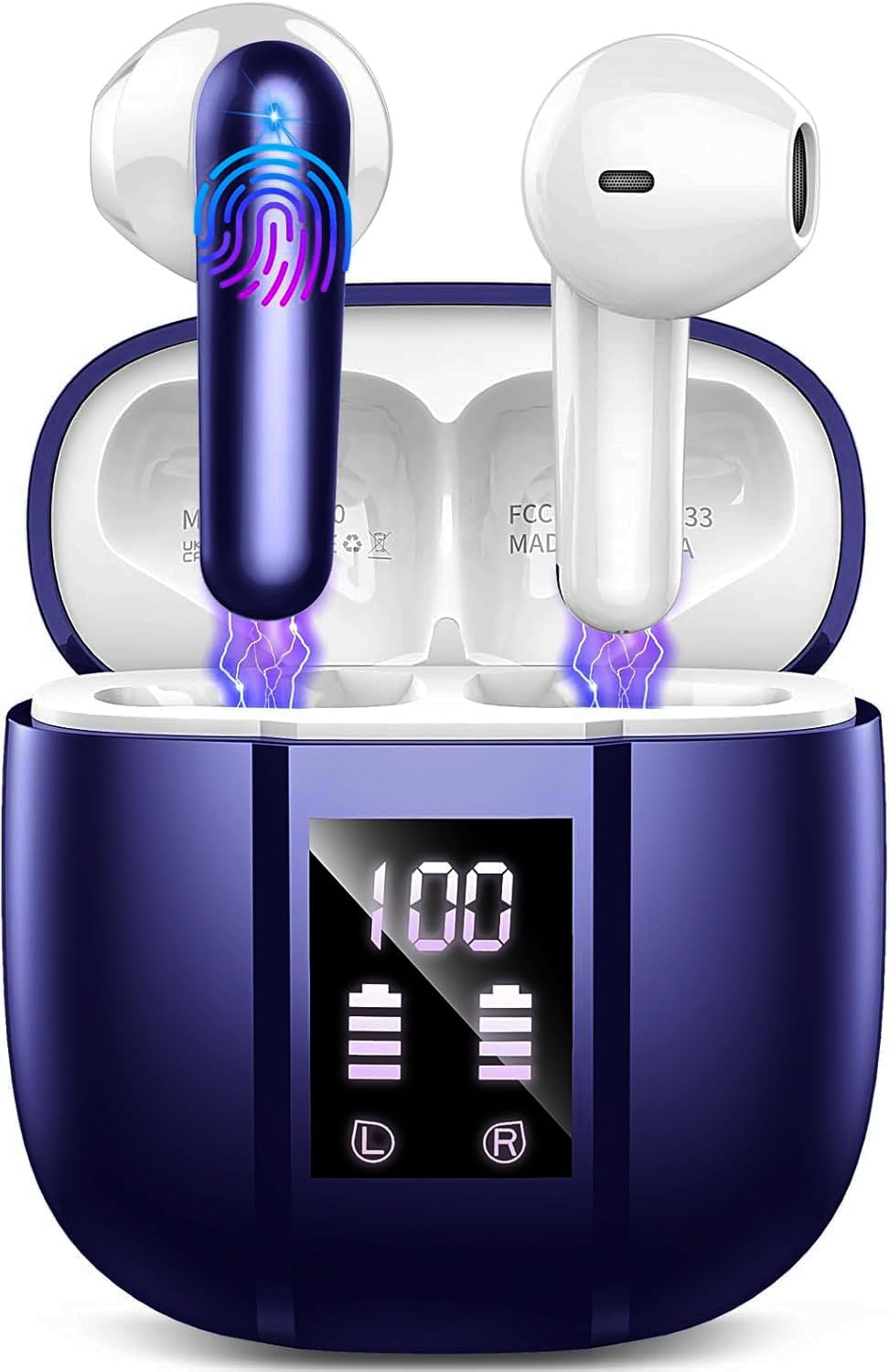
Image: Donerton W90 Wireless Headphones and Charging Case. This image displays the overall design of the earbuds and their charging case.
- Ekouteur: Left and Right earbuds with touch control areas and charging contacts.
- Ka chaje: Houses and charges the earbuds, features an LED display for battery status.
- USB-C chaje pò: Located on the charging case for power input.
- Mikwofòn: Integrated into each earbud for calls and ENC functionality.
5. Enstalasyon
5.1 Chaje kas ekoutè yo
Anvan premye itilizasyon an, chaje kas ekoutè yo ak bwat chaje a nèt.
- Place both earbuds into the charging case. Ensure they are correctly seated, and the charging indicators on the case light up.
- Konekte kab chaje USB a nan pò chaje ki sou bwat la epi nan yon sous kouran USB (pa egzanp, òdinatè, adaptè miray).
- The LED display on the charging case will show the battery level. A full charge typically takes about 1.5 hours for the case.
- Yon fwa konplètman chaje, dekonekte kab la chaje.
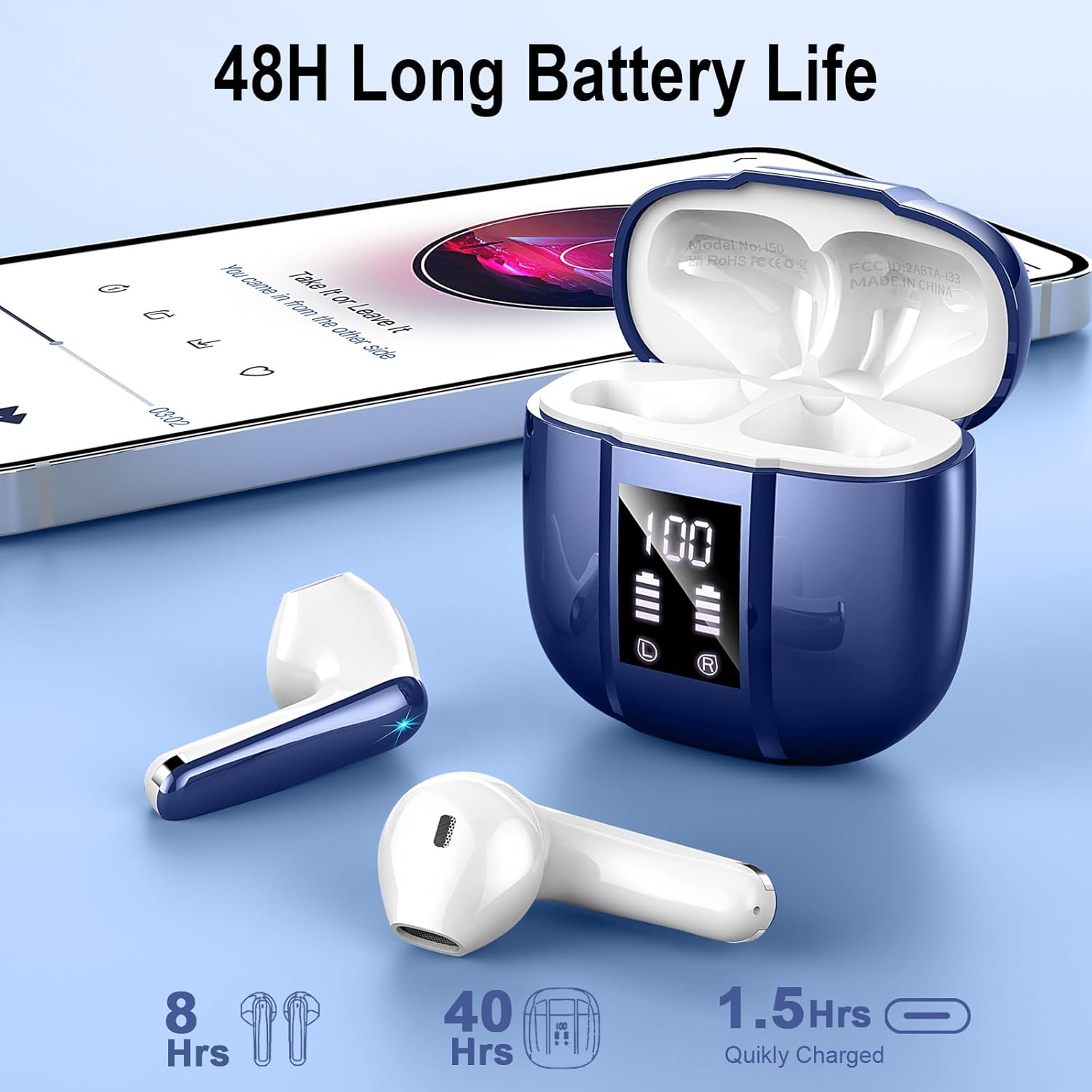
Image: Donerton W90 Charging Case with LED Display. This image illustrates the charging case displaying battery levels for both earbuds and the case itself, indicating a quick charge time of 1.5 hours for the case and up to 8 hours of playback per earbud charge, with an additional 40 hours from the case.
5.2 Premye koneksyon
Follow these steps to pair your headphones with a Bluetooth-enabled device for the first time:
- Asire w ke kas ekoutè yo chaje.
- Open the charging case. The earbuds will automatically power on and enter pairing mode. The indicator lights on the earbuds will flash.
- Sou aparèy ou an (telefòn entelijan, tablèt, elatriye), aktive Bluetooth.
- Chèche pou available Bluetooth devices. Select "Donerton W90" from the list.
- Once connected, the earbud indicator lights will turn off or flash slowly, and you will hear a confirmation tone.

Image: Donerton W90 One-Step Pairing and Touch Control. This image demonstrates the simple pairing process by opening the charging case and selecting the device on a smartphone's Bluetooth settings. It also highlights the touch control functions on the earbuds.
5.3 Automatic Re-pairing
After the initial pairing, the headphones will automatically connect to the last paired device when you open the charging case and take them out, provided Bluetooth is enabled on your device and it is within range.
6. Operasyon Enstriksyon
6.1 Mete kas ekoutè yo
Pou yon bon jan kalite son ak yon konfò optimal, asire w ke ekoutè yo byen chita nan zòrèy ou.
- Idantifye ekoutè gòch (G) ak ekoutè dwat (D).
- Mete chak ekoutè dousman nan kanal zòrèy ki koresponn lan.
- Vire ekoutè a yon ti kras jiskaske li santi l byen fèm epi konfòtab.

Image: Donerton W90 Ergonomic Design and Fit. This image highlights the ergonomic design of the earbuds, showing how they fit comfortably and securely in the ear, emphasizing their lightweight nature and portability.
6.2 Kontwòl manyen
The Donerton W90 headphones feature intuitive touch controls on each earbud. The specific functions may vary slightly depending on your device and application.
| Aksyon | Ekoutè gòch (L) | Ekoutè dwat (R) |
|---|---|---|
| Jwe/Poz Mizik | Tape sèl | Tape sèl |
| Next Track | Tape doub | Tape doub |
| Previous Track | Triple tiyo | Triple tiyo |
| Volim leve | Peze epi kenbe | N/A |
| Volim desann | N/A | Peze epi kenbe |
| Reponn/Fen Apèl | Tape sèl | Tape sèl |
| Rejte apèl | Peze epi kenbe pou 2 segonn | Peze epi kenbe pou 2 segonn |
| Aktive Asistan Vwa | Katrip tiyo | Katrip tiyo |
The headphones feature Environmental Noise Cancelling (ENC) for clear calls. This technology automatically reduces background noise during phone conversations.

Image: Donerton W90 Crystal Clear Call with ENC. This image visually represents the Environmental Noise Cancelling (ENC) feature, showing how background noise is reduced to ensure clear voice transmission during calls.
7. Antretyen
7.1 Netwayaj
- Regularly clean the earbuds and charging case to prevent dirt and earwax buildup.
- Sèvi ak yon twal mou, sèk, epi ki pa gen pousyè pou siye sifas yo.
- Pou pousyè tè ki difisil pou retire, yon ti kras dampen the cloth with water. Do not use alcohol, solvents, or abrasive cleaners.
- Asire w ke kontak chaje yo sou tou de ekoutè yo ak sou bwat la pwòp epi san debri pou kenbe chaj la byen.
7.2 Depo
- Lè w pa ap itilize kas ekoutè yo, sere yo nan bwat chaje yo pou pwoteje yo epi kenbe yo chaje.
- Sere aparèy la nan yon kote ki fre epi sèk, lwen limyè solèy dirèk ak tanperati ekstrèm.
7.3 Rezistans dlo (IP7)
The Donerton W90 headphones are rated IP7 waterproof. This means they are protected against immersion in water up to 1 meter for up to 30 minutes. They are resistant to splashes, sweat, and rainwater.
- Do not intentionally submerge the charging case in water, as it is not waterproof.
- Ensure the earbuds are completely dry before placing them back into the charging case to prevent damage to the charging contacts.
- Water resistance is not a permanent condition and may decrease as a result of normal wear.
NAN. Depanaj
If you encounter issues with your Donerton W90 headphones, refer to the following common problems and solutions:
Kas ekoutè 8.1 yo pa konekte
- Asire w ke Bluetooth la aktive: Check that Bluetooth is turned on on your device.
- Re-enter pairing mode: Place the earbuds back into the charging case, close the lid, then open it again to re-initiate pairing mode.
- Bliye aparèy la: On your device, go to Bluetooth settings, find "Donerton W90", and select "Forget" or "Unpair". Then, try the pairing process again from step 5.2.
- Chaje kas ekoutè: Ensure both earbuds and the charging case have sufficient battery.
- Distans: Make sure the headphones are within the Bluetooth range (up to 15 meters) of your device.
8.2 Pa gen son oswa volim ki ba
- Tcheke nivo volim yo: Adjust the volume on both your connected device and using the headphone touch controls.
- Re-connect: Disconnect and re-connect the headphones to your device.
- Clean earbuds: Ensure there is no earwax or debris blocking the earbud speakers.
- Eseye yon lòt sous odyo: Test with a different song or application.
8.3 Pwoblèm chaj
- Check cable and adapter: Ensure the USB charging cable and power adapter are working correctly. Try a different cable or adapter.
- Clean charging contacts: Wipe the charging contacts on both the earbuds and inside the case with a dry cloth.
- Proper seating: Asire w ke ekoutè yo byen plase nan bwat chaje a.
8.4 Yon ekoutè pa fonksyone
- Re-pè: Try forgetting the device and re-pairing as described in 8.1.
- Reyajiste: Some issues can be resolved by resetting the headphones. Refer to the manufacturer's website or contact support for specific reset instructions if needed.
- Chaje: Asire ke tou de ekoutè yo chaje.
9. Espesifikasyon
| Karakteristik | Detay |
|---|---|
| Modèl | W90 |
| Bluetooth vèsyon | 5.4 |
| Pwotokòl Bluetooth | HFP, HSP, A2DP, AVRCP |
| Wireless Range | Jiska 15 mèt (49 pye) |
| Chofè Oratè | 13mm Oratè dinamik |
| Kontwòl bri | Environmental Noise Cancellation (ENC) with 4 microphones |
| Tan lekti ekoutè | 6-8 èdtan (yon sèl chaj) |
| Tan total pou lèktur (ak bwat) | Jiska 45-50 èdtan |
| Tan chaje (Ka) | Apeprè 1.5 èdtan |
| Evalyasyon ki enpèmeyab | IP7 (koutè sèlman) |
| Earbud Pwa | Approximately 3 grams each |
| Materyèl | Plastik |
| Kalite batri | Lityòm Polymère |
| Konpatibilite | iOS 9.0+, Android 10.0+, Bluetooth 5.4+ devices |
10. Garanti ak sipò
Donerton products are designed and manufactured to the highest quality standards. For detailed warranty information, please refer to the warranty card included with your purchase or visit the official Donerton websit.
If you experience any issues or have questions regarding your Donerton W90 Wireless Headphones, please contact Donerton customer support through the retailer where you purchased the product or via the contact information provided on the official Donerton websit.