
1. Entwodiksyon
Welcome to the user manual for your new DOOGEE Blade 10 Ultra Rugged Smartphone. This device is engineered for durability and high performance, featuring an Octa-core processor, a 50MP camera, and robust IP68/IP69K and MIL-STD-810H certifications for water, dust, and shock resistance. This manual provides essential information on setting up, operating, maintaining, and troubleshooting your smartphone to ensure optimal performance and longevity.
2. Pwodwi souview
The DOOGEE Blade 10 Ultra combines a sleek, ultra-thin design with rugged capabilities. Familiarize yourself with the device's physical features and components.

Figi 2.1: Devan ak dèyè view of the DOOGEE Blade 10 Ultra smartphone.

Figi 2.2: Detaye view of the transparent back cover, showcasing konpozan entèn yo.

Figi 2.3: Pwofesyonèl bò kotefile highlighting the 10.7mm ultra-thin design.
3. Enstalasyon
3.1 Enstalasyon Kat SIM ak Kat MicroSD
The DOOGEE Blade 10 Ultra supports Dual SIM 4G and expandable storage up to 2TB via a microSD card. Ensure the phone is powered off before inserting or removing cards.
- Jwenn plato kat SIM lan sou bò aparèy la.
- Sèvi ak zouti ejèksyon SIM ki vini ak li a pou ouvri plato a.
- Carefully place your Nano-SIM cards and/or microSD card into the designated slots. Ensure correct orientation.
- Dousman pouse plato a tounen nan aparèy la jiskaske li vin plat.
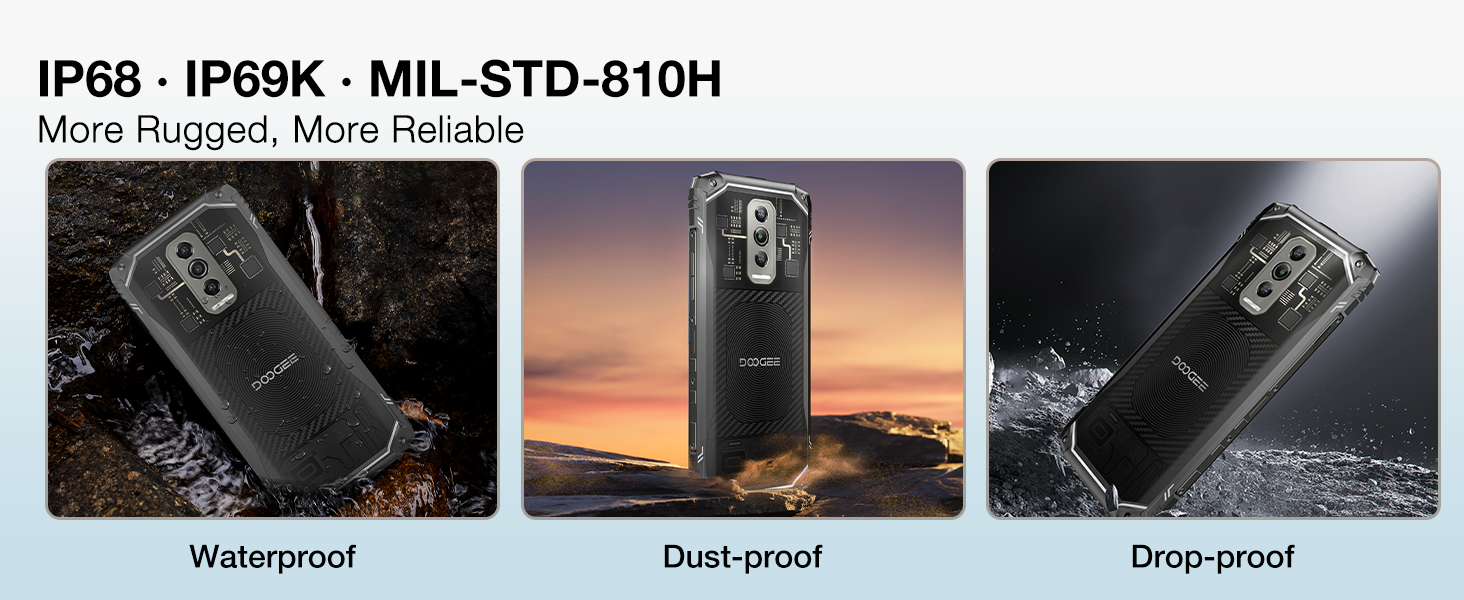
Figure 3.1: Illustration of inserting SIM and microSD cards into the tray.
3.2 Premye Limen ak Paramèt Debaz yo
Press and hold the power button until the DOOGEE logo appears. Follow the on-screen prompts to complete the initial setup, including language selection, Wi-Fi connection, and Google account setup.
4. Operasyon Enstriksyon
4.1 Ekspozisyon ak Entèfas Itilizatè
The Blade 10 Ultra features a 6.56-inch 90Hz display, providing a smooth visual experience. Navigate the Android 14 operating system using touch gestures. Swipe down from the top for notifications and quick settings, swipe up for the app drawer, and use the navigation bar or gestures for home, back, and recent apps.

Figure 4.1: The 6.56-inch HD+ 90Hz Waterdrop Display.
4.2 Fonksyon Kamera
Capture high-quality images with the 50MP AI main camera. The Morpho Imaging Algorithm enhances your photography with features like Super Night Mode for brighter low-light shots, EIS Anti-Shake for stable photos and videos, and EIS UltraZoom for detailed distant objects.
Video 4.1: Demonstrating the Morpho Imaging Algorithm for enhanced photography.

Figi 4.2: Plis paseview of Morpho Imaging Algorithm features for diverse photography.
4.3 Pèfòmans ak Depo
Powered by a robust Octa-core processor, the Blade 10 Ultra ensures smooth multitasking and efficient performance. It comes with 20GB RAM (8GB physical + 12GB virtual) and 256GB internal storage, expandable up to 2TB with a microSD card.
Video 4.2: Highlighting the powerful Octa-core processor for fast and power-saving performance.

Figure 4.3: Visual representation of the Octa-core processor.

Figure 4.4: Details on RAM, ROM, and expandable storage.
4.4 Lavi batri
The device is equipped with a 5150mAh large battery, providing extended usage times for standby, music playback, calls, video watching, and web Navigasyon.
Videyo 4.3: Montreasing the 5150mAh large battery capacity.

Figi 4.5: Kapasite batri a ak tan itilizasyon estime.
4.5 Karakteristik Sekirite Sosyal
Unlock your device securely using Face Recognition or the side-mounted Fingerprint Sensor. The fingerprint sensor offers a 0.19s response speed and 360° identification angle.

Figure 4.6: Dual unlocking modes for enhanced security.
4.6 Konektivite ak Navigasyon
The Blade 10 Ultra supports NFC for convenient mobile payments and data transfer, GPS for accurate navigation, and OTG for connecting external USB devices. It also features dual-band Wi-Fi for reliable internet access.

Figure 4.7: NFC functionality for seamless transactions.

Figure 4.8: GPS for precise location tracking and navigation.
4.7 Sistèm operasyon
The smartphone runs on the latest Android 14 system, offering advanced privacy and security features, along with a customizable user experience.
5. Antretyen
5.1 Karakteristik solid
The DOOGEE Blade 10 Ultra is designed to withstand harsh environments, certified with IP68/IP69K for water and dust resistance, and MIL-STD-810H for shock resistance. This means it can endure submersion in water, exposure to dust, and drops from certain heights.
Video 5.1: Demonstrating the ruggedness and reliability of the DOOGEE Blade 10 Ultra.

Figure 5.1: Visual representation of the phone's waterproof, dustproof, and drop-proof capabilities.
5.2 Enstriksyon netwayaj
To clean your device, power it off and wipe it gently with a soft, damp twal. Evite itilize pwodui chimik ki fò oswa materyèl abrazif ki ka domaje ekran an oswa casing. Ensure all ports are dry before charging or connecting accessories after exposure to water.
NAN. Depanaj
If you encounter issues with your DOOGEE Blade 10 Ultra, refer to the following common solutions:
- Aparèy pa limen: Asire w batri a chaje. Konekte telefòn nan nan plato li epi tann kèk minit anvan ou eseye limen l ankò.
- Pwoblèm koneksyon rezo: Check if your SIM card is correctly inserted. Verify that mobile data is enabled in settings. If issues persist, contact your network provider.
- Pèfòmans Ralanti: Close unnecessary background applications. Clear cache from apps or perform a factory reset (back up data first).
- Ekran an pa reponn: Restart the device by holding the power button. If unresponsive, force restart by holding power and volume down buttons simultaneously for about 10 seconds.
- Kamera a pa fonksyone: Ensure the camera app has necessary permissions. Restart the device.
For more complex issues, please refer to the support section or contact customer service.
7. Espesifikasyon
| Karakteristik | Spesifikasyon |
|---|---|
| Mak | DOOGEE |
| Modèl | Lam 10 Ultra |
| Kapasite Depo memwa | 256 GB (Ou ka elaji li jiska 2TB ak yon kat microSD) |
| RAM | 20GB (8GB fizik + 12GB vityèl) |
| Gwosè ekran | 6.56 pous |
| Rafrechisman pousantaj | 90Hz |
| Wireless Carrier | Unlocked for All Carriers (Note: Not support T-mobile and AT&T networks) |
| Koulè | NWA |
| Processeur | Octa-nwayo |
| Kamera prensipal | 50MP AI Kamera |
| Kapasite batri | 5150mAh |
| Durability | IP68/IP69K Waterproof, Dustproof, Shockproof; MIL-STD-810H Certified |
| Sistèm operasyon | Android 14 |
| Dimansyon (L x W x H) | 6.45 x 2.98 x 0.33 pous (163.8 x 75.7 x 8.4 mm) |
| Epesè | 10.7mm (Pati ki pi mens) |
8. Garanti ak sipò
Your DOOGEE Blade 10 Ultra comes with a sèvis garanti dezan. For any product-related inquiries, technical assistance, or warranty claims, please contact DOOGEE customer support. You can find contact information on the official DOOGEE websit la oubyen atravè platfòm acha ou a.
Tanpri konsève prèv acha ou a pou validasyon garanti a.