
1. Entwodiksyon
The AJAZZ AKP03 Macro Keypad Stream Controller is a versatile device designed to enhance productivity and streamline workflows for gamers, streamers, and professionals. Featuring six programmable keys with LCD displays, three physical knobs, and three toggle switches, it offers extensive customization options for various tasks.
This manual provides detailed instructions for setting up, operating, and maintaining your AKP03 device, ensuring optimal performance and user experience.
2. Pwodwi Features
- Six Programmable Macro Keys: Customizable LCD displays for single or continuous actions.
- Three Physical Knobs: For precise control over various functions.
- Three Toggle Switches: Additional control options.
- Operasyon an yon sèl klike: Instant execution of macro commands, text input, application launches, and media control.
- Intuitive Driver Software: Drag-and-drop functionality for easy key assignment and property configuration.
- Lajè konpatibilite: Seamless integration with platforms like Streamlabs, Twitch, YouTube, and various software applications on Windows and Mac.
- Removable 40° Stand: Provides an ergonomic viewing angle and stable placement.

Figi 2.1: Plis paseview of the AJAZZ AKP03 Macro Keypad, highlighting its programmable buttons, toggle switches, and scroll wheels.
3. Pake kontni
Verifye ke tout atik yo prezan nan pakè ou a:
- AJAZZ AKP03 Macro Keypad Stream Controller
- USB-C pou USB-A kab
- Removable 40° Stand
- Manyèl Itilizatè (dokiman sa a)
4. Enstalasyon
4.1 Koneksyon Fizik
- Attach the removable 40° stand to the bottom of the AKP03 for an ergonomic angle, if desired.
- Connect the provided USB-C cable to the USB-C port on the AKP03.
- Connect the USB-A end of the cable to an available USB port on your computer (PC or Mac).
- Aparèy la pral limen otomatikman.

Figure 4.1: Attaching the removable 40° stand to the AKP03.
4.2 Enstalasyon lojisyèl
To unlock the full customization capabilities of your AKP03, you must install the dedicated driver software.
- Louvri ou web browser and navigate to the official AJAZZ websit: www.a-jazz.com.
- Locate the 'Driver Download' section.
- Chèche pou 'AKP03' or browse for the corresponding driver for your model.
- Download the driver software compatible with your operating system (Windows or macOS).
- Kouri enstale a epi swiv enstriksyon ki sou ekran pou konplete enstalasyon an.
- Rekòmanse òdinatè w lan si yo mande w.
Video 4.1: Demonstrates the software installation process and initial setup for the AJAZZ Macro Keypad.
5. Operasyon Enstriksyon
5.1 Customizing Keys and Knobs
The AKP03's driver software provides a user-friendly interface for customization:
- Launch the 'Stream Dock AJAZZ' software from your desktop or applications folder.
- The software will display a visual representation of your AKP03.
- To assign an action, drag and drop a desired function (e.g., launch application, media control, macro command) from the software's library onto one of the six programmable keys.
- For knobs, select the knob in the software and assign functions such as volume control, scrolling, or zooming.
- You can configure properties for each assigned action, including specific file chemen, web URLs, or macro sequences.
- The LCD displays on the keys will update to show the assigned icon or text.
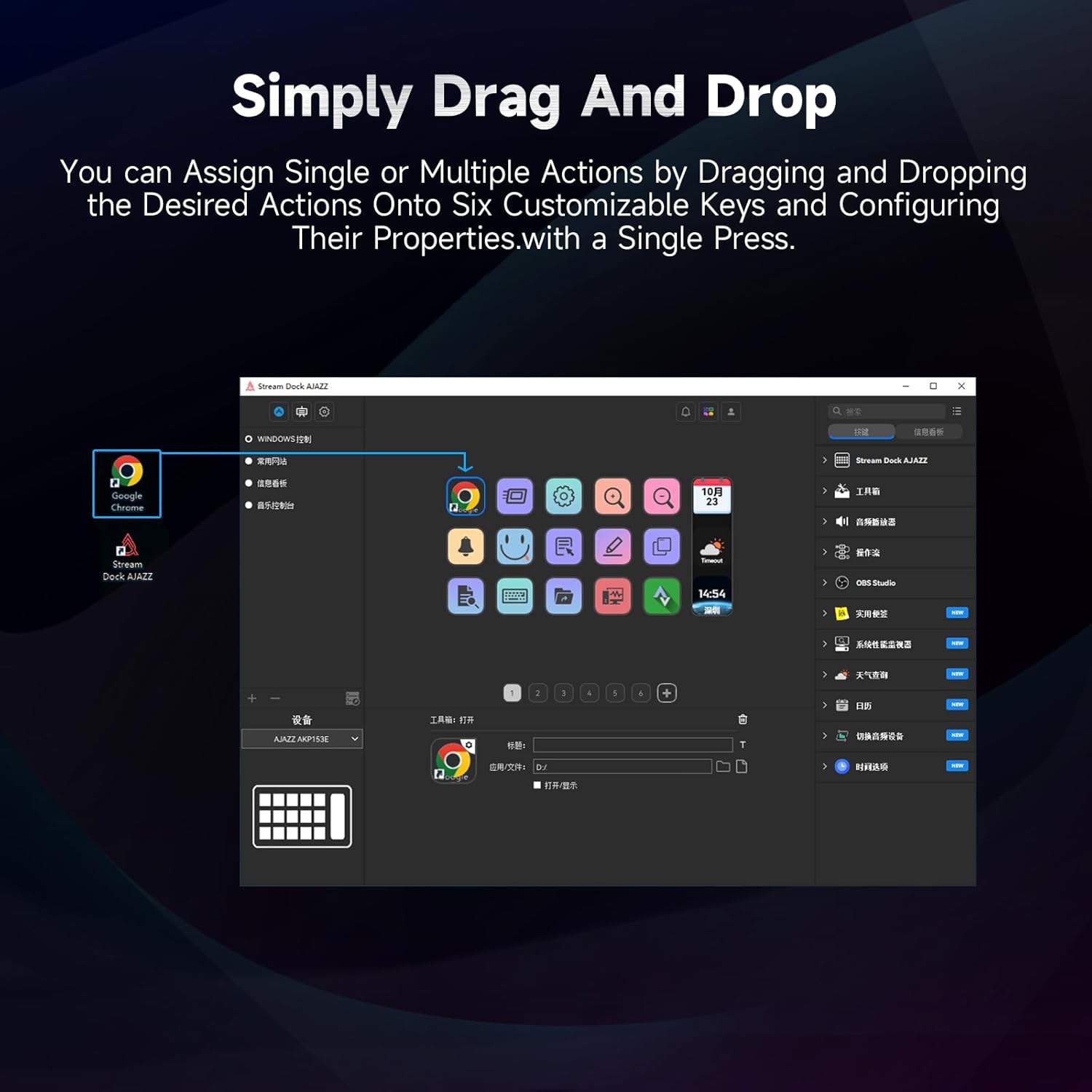
Figure 5.1: Customizing keys using the drag-and-drop interface in the AJAZZ software.
Video 5.1: Demonstration of assigning actions to keys for launching web pages and software with a single click.
5.2 Using Profiles and Pages
The software supports multiple profiles and pages, allowing you to switch between different sets of key assignments for various applications or tasks.
- Kreye nouvo profiles for specific games, editing software, or streaming setups.
- Nan chak profile, you can create multiple pages of key assignments, accessible by navigating through the device's buttons or software interface.
- The AKP03 automatically switches to the relevant profile when a linked application is in focus.
Video 5.2: Illustrates the multi-functional capabilities and profile switching of the AKP03 for various tasks.
6. Antretyen
To ensure the longevity and optimal performance of your AJAZZ AKP03, follow these maintenance guidelines:
- Netwayaj: Use a soft, dry cloth to wipe the surface of the device. Avoid abrasive cleaners or solvents.
- Depo: Sere aparèy la nan yon kote ki fre epi sèk, lwen limyè solèy dirèk ak tanperati ekstrèm.
- Swen kab: Evite pliye oswa tòde kab USB a twòp pou anpeche li domaje.
- Mizajou lojisyèl: Regularly check the AJAZZ website for software and firmware updates to ensure compatibility and access to new features.
NAN. Depanaj
If you encounter issues with your AKP03, refer to the following common troubleshooting steps:
- Aparèy pa rekonèt:
- Ensure the USB cable is securely connected to both the AKP03 and your computer.
- Eseye konekte nan yon pò USB diferan.
- Rekòmanse òdinatè w lan.
- Verify that the driver software is correctly installed and up to date.
- Kle yo pa reponn:
- Check the software to ensure keys are properly assigned and the correct profile se aktif.
- Ensure the driver software is running in the background.
- Pwoblèm lojisyèl:
- Reinstall the driver software.
- Check for software updates on the AJAZZ websit.
8. Espesifikasyon
| Karakteristik | Detay |
|---|---|
| Mak | AJAZZ |
| Non modèl | AKP03 |
| Aparèy konpatib | PC, Laptop |
| Kalite kontwolè | Klavye |
| Koneksyon Teknoloji | USB-C |
| Kantite bouton | 6 Programmable Keys (with LCD displays), 3 Physical Knobs, 3 Toggle Switches |
| Pwa atik | 0.32 Kilogram |
| Dimansyon atik (L x W x H) | 5 x 3 x 2 pous |
| Sous pouvwa | Fil elektrik |
9. Garanti ak sipò
9.1 Enfòmasyon sou Garanti
The AJAZZ AKP03 Macro Keypad Stream Controller comes with a 1-ane garanti limite from the date of purchase. This warranty covers manufacturing defects and malfunctions under normal use. It does not cover damage caused by misuse, accidents, unauthorized modifications, or improper installation.
Tanpri kenbe prèv ou achte pou reklamasyon garanti.
9.2 Sipò pou Kliyan
For technical assistance, troubleshooting, or warranty inquiries, please contact AJAZZ customer support:
- Websit: www.a-jazz.com (Refer to the 'Support' or 'Contact Us' section)
- Imèl: [Insert Customer Support Email, if available]
- Telefòn: [Insert Customer Support Phone Number, if available]
Our support team is available to assist you with any questions or concerns regarding your product.