
Entwodiksyon
This manual provides instructions for the VINABTY RT22R3KECA Replacement Voice Remote Control. This remote is designed to function as a replacement for specific Hyundai and Continental Edison television models, offering voice search capabilities and standard remote control functions.
Key features include an ergonomic design, sensitive buttons for quick response, and a durable ABS construction. It operates with a transmission distance of up to 10 meters.
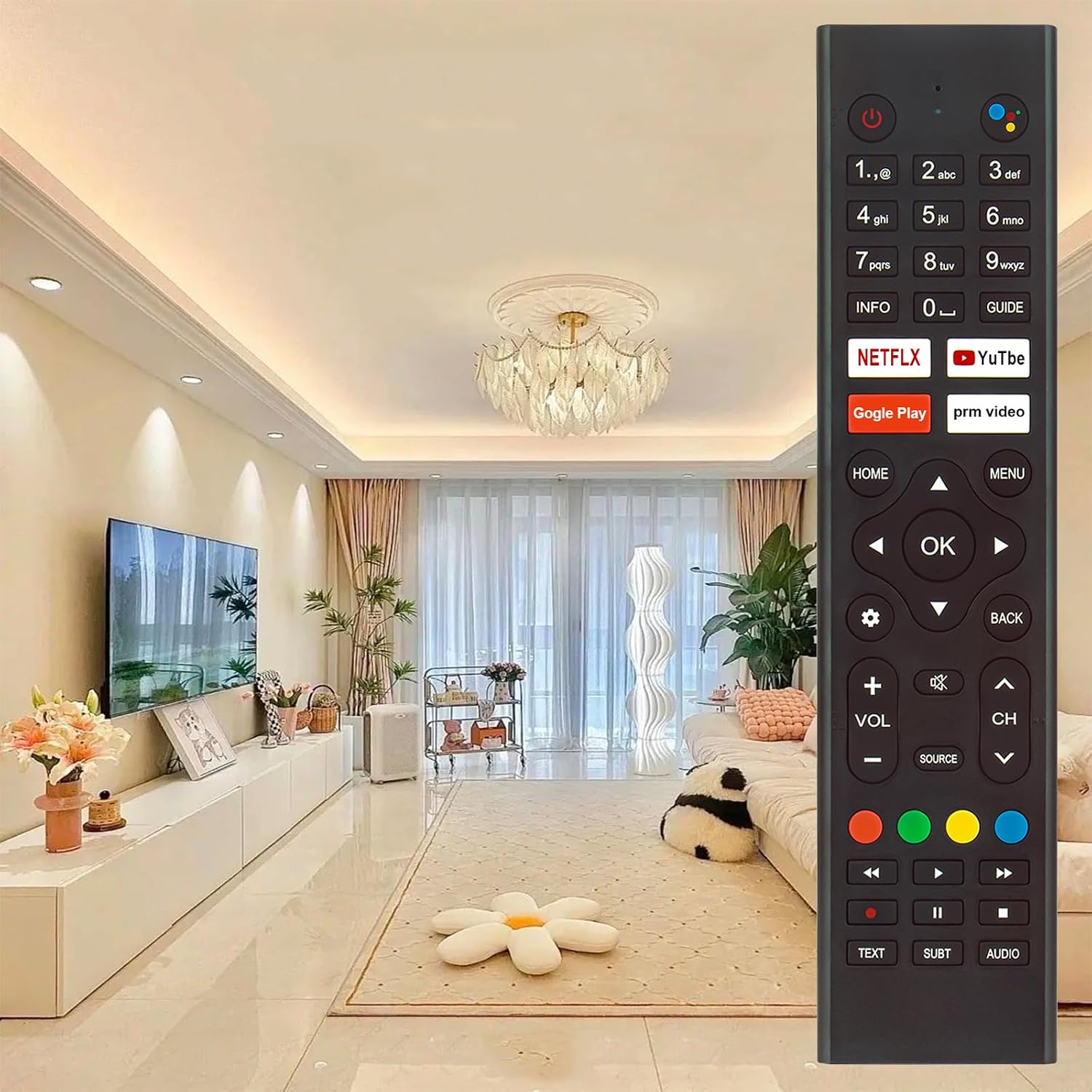
Image: The VINABTY RT22R3KECA remote control, showcasing its design and button layout in a typical home environment.
Enstalasyon
1. Enstalasyon batri
Kontwòl remote la bezwen de pil AAA (pa enkli) pou fonksyone.
- Jwenn lòj batri a sou do a nan kontwòl remote la.
- Glise kouvèti batri a anba pou ouvri li.
- Mete de pil AAA ladan l, asire w ke tèminal pozitif (+) ak negatif (-) yo byen aliyen ak mak ki anndan konpatiman an.
- Remèt kouvèti batri a lè w glise l tounen nan plas li jiskaske li fè yon klik byen fèm.

Imaj: View of the remote control's back with the battery cover removed, showing the battery compartment for two AAA batteries.
2. Konekte ak televizyon ou an
This remote control is a voice search remote and requires pairing with your television before full functionality, especially voice control, can be utilized. Refer to your TV's user manual for specific pairing instructions, as the process can vary by TV model. Generally, pairing involves:
- Ensuring your TV is powered on.
- Accessing the TV's settings menu (often under "Remotes & Accessories" or "Bluetooth Settings").
- Following the on-screen prompts to add a new remote control or Bluetooth device.
- Pressing and holding specific buttons on the VINABTY remote (e.g., "OK" and "Home" simultaneously, or a dedicated pairing button if present) until the TV detects it.
Once successfully paired, the remote control will function correctly.
Enstriksyon Operasyon
The VINABTY RT22R3KECA remote control offers intuitive operation with clearly labeled buttons.
Fonksyon estanda
- Bouton pouvwa: Located at the top right, used to turn the TV on or off.
- Nimewo Pad: Pou antre dirèk sou chanèl la.
- Navigation Pad (OK, Up, Down, Left, Right): Pou navigasyon ak seleksyon meni.
- Kontwòl Volim (VOL +/-): Ajiste volim televizyon an.
- Kontwòl Chanèl (CH +/-): Chanje chanèl televizyon.
- Bouton Kay: Retounen nan ekran prensipal televizyon an.
- Bouton meni: Accesses the TV's settings or options menu.
- Bouton tounen: Retounen nan ekran oswa meni anvan an.
- Sous bouton: Chwazi sous antre yo (HDMI, AV, elatriye).
- Bouton Aplikasyon Dedye: Quick access to popular streaming services like Netflix and YouTube.
Voice Control Functionality
After successful pairing, the voice control feature allows you to issue commands to your TV using your voice.
- Jwenn la Voice Search Button (often represented by a microphone icon or colored dots) near the top of the remote.
- Press and hold the Voice Search Button.
- Speak your command clearly into the remote control. Examples include "Open Netflix," "Chèche pou action movies," or "Change to Channel 5."
- Release the button once you have finished speaking.

Image: The VINABTY RT22R3KECA remote control with an overlay highlighting the voice search button and its microphone icon.
The remote control operates effectively up to a distance of 10 meters from the television.
Antretyen
To ensure the longevity and optimal performance of your VINABTY RT22R3KECA remote control, follow these maintenance guidelines:
- Netwayaj: Wipe the remote control regularly with a soft, dry cloth. For stubborn dirt, slightly dampRense twal la avèk dlo oswa yon pwodui netwayaj dou ki pa abrazif. Evite itilize pwodui chimik oswa solvan ki agresif.
- Swen batri: Replace batteries when the remote's response becomes sluggish or it stops functioning. If the remote will not be used for an extended period, remove the batteries to prevent leakage and potential damage.
- Depo: Sere telekòmand lan nan yon kote ki fre epi sèk, lwen limyè solèy dirèk ak tanperati ekstrèm.
- Dirab: The remote is constructed from durable ABS material with soft rubber buttons, designed for long-term use. Avoid dropping the remote or exposing it to excessive force.

Image: Diagram illustrating the features of the remote control, including sensitive buttons for fast response, durable ABS materials, and a comfortable grip.
Depanaj
If you encounter issues with your VINABTY RT22R3KECA remote control, consider the following troubleshooting steps:
- Remote pa reponn:
- Check the batteries. Ensure they are inserted correctly with the correct polarity and are not depleted. Replace with fresh batteries if necessary.
- Asire w pa gen okenn obstak ant kontwòl remote la ak reseptè enfrawouj televizyon an.
- Verify that the remote is pointed directly at the TV.
- Kontwòl Vwa a pa fonksyone:
- Confirm that the remote control is properly paired with your TV. If unsure, attempt to re-pair it according to the "Pairing with Your TV" section and your TV's manual.
- Ensure your TV supports voice control and that the feature is enabled in its settings.
- Speak clearly and hold the voice button while speaking.
- Bouton ki pa fonksyone byen:
- Clean the remote control, especially around the buttons, to remove any dirt or debris that might be causing stickiness or preventing proper contact.
- If only specific buttons are not working, and battery replacement doesn't help, there might be an internal issue.
If these steps do not resolve the issue, please refer to the "Support and Contact" section for further assistance.
Espesifikasyon
| Mak | VINABTY |
| Non modèl | RT22R3KECA |
| Nimewo Modèl | RT22R3KECA (Mfr Part Number: BYDE-RT22R3KECA) |
| Karakteristik espesyal | Ergonomic, Voice Search |
| Koneksyon Teknoloji | Enfrawouj |
| Kalite kontwolè | Kontwòl vwa |
| Maksimòm Range | 10 mèt |
| Kantite bouton | 25 |
| Pwa atik | 60 gram |
| Dimansyon atik (L x W x H) | 18L x 4W x 1H centimeters (approximately 8.11 x 1.85 x 0.98 inches) |
| Sous pouvwa | 2 x AAA pil (pa enkli) |

Image: Diagram showing the length, width, and thickness dimensions of the VINABTY RT22R3KECA remote control.

Image: The VINABTY RT22R3KECA remote control overlaid with text indicating an upgraded smart chip for stable performance, set against a futuristic circuit board background.
Modèl televizyon konpatib
This VINABTY RT22R3KECA remote control is compatible with the following television models:
- Hyundai: HY-TVSAND43-004, HY-TVSAND55-55-001, HY-TVSAND55-00551 US
- Continental Edison: CELED55SAUDV23B7, CELED65UHDSA23B7, CELED32SAHDV23B7, ED55C05UHD-MM, ED65C05UHD-MM
Please verify your TV model number against this list to ensure compatibility.
Sipò ak Kontakte
For any questions regarding the compatibility or operation of your VINABTY RT22R3KECA remote control, or if you encounter any issues not resolved by the troubleshooting steps, please contact our customer support.
It is recommended to contact us before purchase if you are unsure about the remote's suitability for your device. If the remote you received does not work as expected, please reach out for assistance.
Contact information is typically available through your purchase platform or the VINABTY official websit.