
1. Entwodiksyon
The CHNADKS RM-66 Radon Detector is a portable device designed for continuous monitoring of radon gas levels in indoor environments. It features a high-precision semiconductor sensor, a 2.0-inch TFT color display, and provides both audible and visual alarms when radon levels exceed user-defined thresholds. This manual provides essential information for the safe and effective operation, maintenance, and troubleshooting of your RM-66 Radon Detector.
2. Enfòmasyon sou Sekirite
- Li tout enstriksyon yo ak anpil atansyon anvan ou sèvi ak aparèy la.
- Pa eseye ouvri oswa modifye aparèy la. Sa ka anile garanti a epi poze risk pou sekirite.
- Kenbe aparèy la lwen dlo ak imidite twòp.
- Evite ekspoze aparèy la nan tanperati ekstrèm oswa limyè solèy la dirèk pou peryòd pwolonje.
- Sèvi sèlman ak kab chaje Kalite-C ki vini ak li a oswa yon ekivalan sètifye.
- Kenbe soti nan atenn timoun yo.
- Asire w ke aparèy la byen vantile pandan w ap chaje pou evite li chofe twòp.
3. Pake kontni
Verifye ke tout atik yo prezan nan pakè a:
- 1 × CHNADKS RM-66 Radon Detector
- 1 × Kalite-C Chaje Kab
- 1 × Manyèl Itilizatè (dokiman sa a)

4. Pwodwi souview
The RM-66 Radon Detector is equipped with advanced features for accurate and convenient radon monitoring.
4.1 Karakteristik kle
- High-Precision Semiconductor Sensor: Ensures accurate radon detection with a measurement range of 0.09–1000 pCi/L (3.3 Bq/m³ – 37 kBq/m³).
- Ekspozisyon koulè TFT: A 2.0-inch screen with a graphical interface for clear and easy reading of radon levels.
- Audible & Visual Alarms: Provides instant alerts when radon levels exceed user-defined safe thresholds.
- Konsepsyon pòtab: Compact and includes an adjustable rear kickstand for flexible placement.
- Long-Term Monitoring: Stores up to 504 days of historical radon data, recording every 6 hours.
- Batri rechargeable: Max 45 days of battery life in screen-off mode, with fast Type-C charging.
- Anviwònman Customizable: Adjustable measurement units (pCi/L/Bq/m³), alarm thresholds, and screen sleep time.
4.2 Konpozan Aparèy

The device features scientifically designed air vents to enable efficient radon diffusion into the detector, ensuring fast and reliable readings.

The color TFT screen provides a clear graphical interface, including current radon levels, accumulated average, and a color progress bar for quick interpretation. Dual alerts (red indicator light and beep) activate when levels exceed thresholds.
5. Enstalasyon
5.1 Premye chaj
Before first use, fully charge the RM-66 Radon Detector. Connect the provided Type-C charging cable to the device's charging port and plug the other end into a standard USB power adapter (DC 5V 1A, not included). A full charge takes approximately 3.5 hours when the device is off.
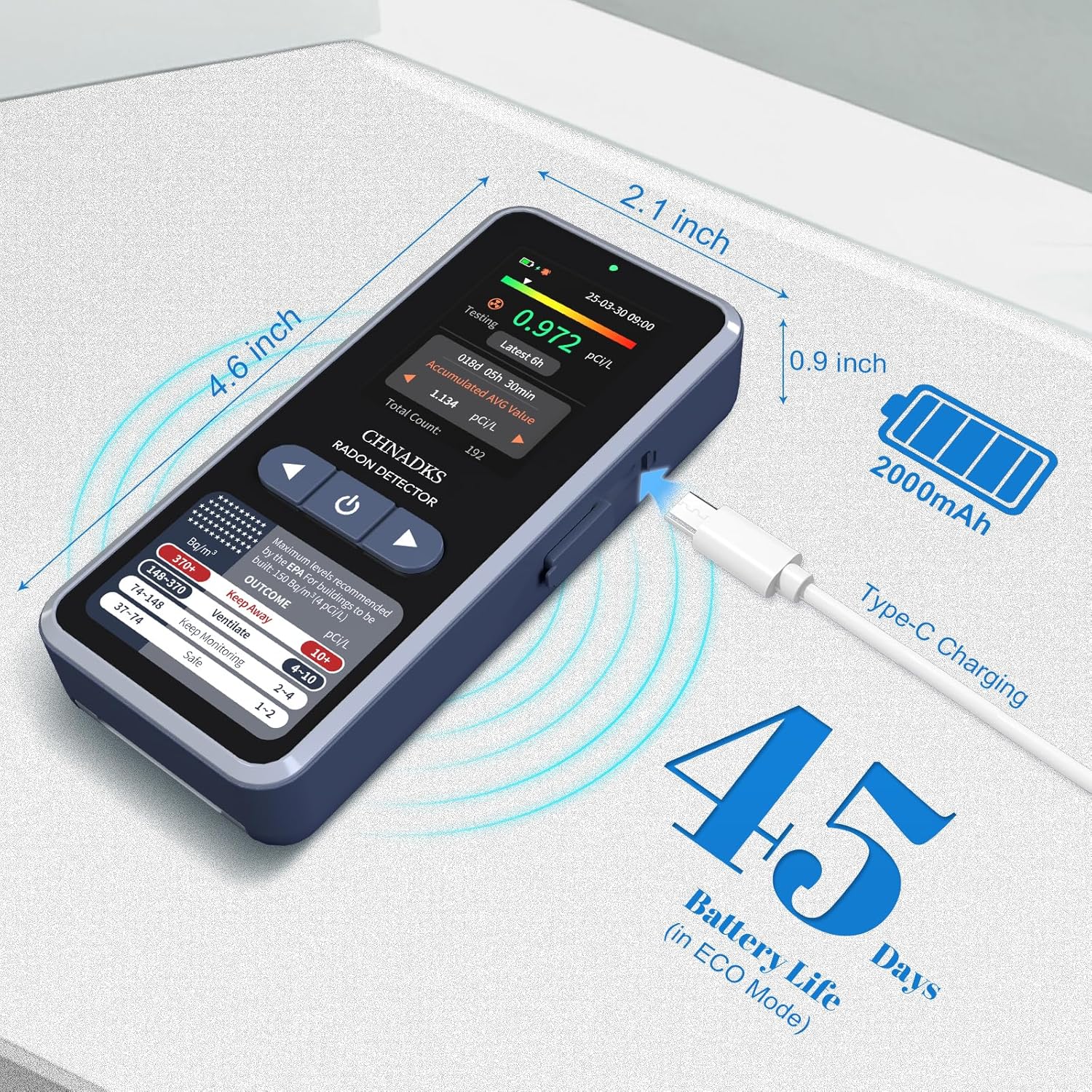
5.2 Limen/Etenyen
- Pou limen: Press and hold the power button (usually located on the front panel below the screen) for a few seconds until the display illuminates.
- Pou etenn: Press and hold the power button until the device prompts you to confirm shutdown, then select 'Yes'.
5.3 Placement for Monitoring
For accurate readings, place the detector in the lowest lived-in area of your home, such as a basement or ground floor. Ensure it is:
- At least 20 inches (50 cm) from the floor and ceiling.
- At least 8 inches (20 cm) from other objects.
- Away from direct drafts, vents, windows, and doors.
- Not in areas of high humidity (e.g., bathrooms) or extreme temperatures.

6. Operasyon Enstriksyon
6.1 Initial Measurement
Once powered on, the device will automatically begin monitoring. The first data display will appear after 6 hours, and readings will update every 60 minutes thereafter. For reliable results, continuous monitoring for at least 48 hours is recommended, with longer periods (e.g., 30 days) providing more accurate long-term averages.
6.2 Navige nan Ekran an
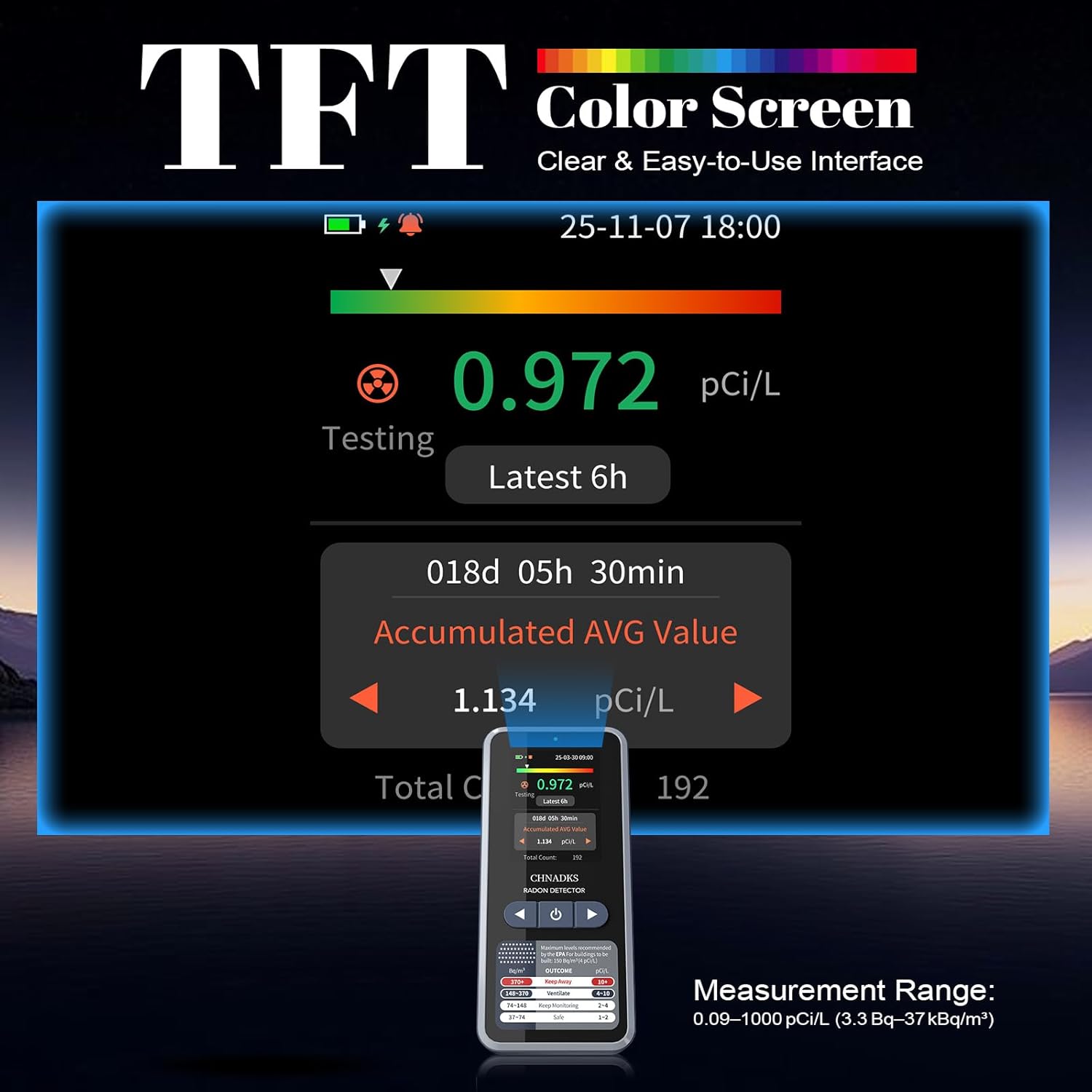
The 2.0-inch TFT color screen displays various information:
- Current Radon Level: Real-time measurement.
- Latest 6h Average: Average radon level over the last 6 hours.
- Accumulated Average Value: Long-term average since the device was last reset or powered on.
- Endikatè batri: Shows current battery status.
- Endikatè alam: Appears when radon levels exceed the set threshold.
6.3 Pèsonalizasyon Paramèt yo
Access the device's menu to adjust settings:
- Inite Mezi: Switch between pCi/L and Bq/m³.
- Limit alam: Set the desired radon level at which the audible and visual alarms will activate.
- Screen Sleep Time: Adjust the duration before the screen automatically turns off to conserve battery.
- Particle Sound: The particle sound can be turned off if desired.
Refer to the on-screen prompts and navigation buttons for specific steps to change these settings.
7. Understanding Radon Readings and Alarms
Radon levels are typically measured in picocuries per liter (pCi/L) in the United States and becquerels per cubic meter (Bq/m³) internationally. The RM-66 allows you to select your preferred unit.
- 1 pCi/L ≈ 37 Bq/m³
The EPA (Environmental Protection Agency) recommends taking action to reduce radon levels if they are 4 pCi/L (148 Bq/m³) or higher. The device's display provides a color-coded guide for interpreting radon levels:
- Dual Alerts: When radon levels exceed the set threshold, the device will emit an audible beep and activate a red indicator light. You can adjust the alarm threshold in the settings.
8. Long-Term Monitoring
The RM-66 Radon Detector is designed for long-term monitoring, storing up to 504 days of historical radon data. Data is recorded every 6 hours, allowing you to track trends and identify potential issues over time. This feature is crucial for understanding seasonal variations and the effectiveness of mitigation efforts.
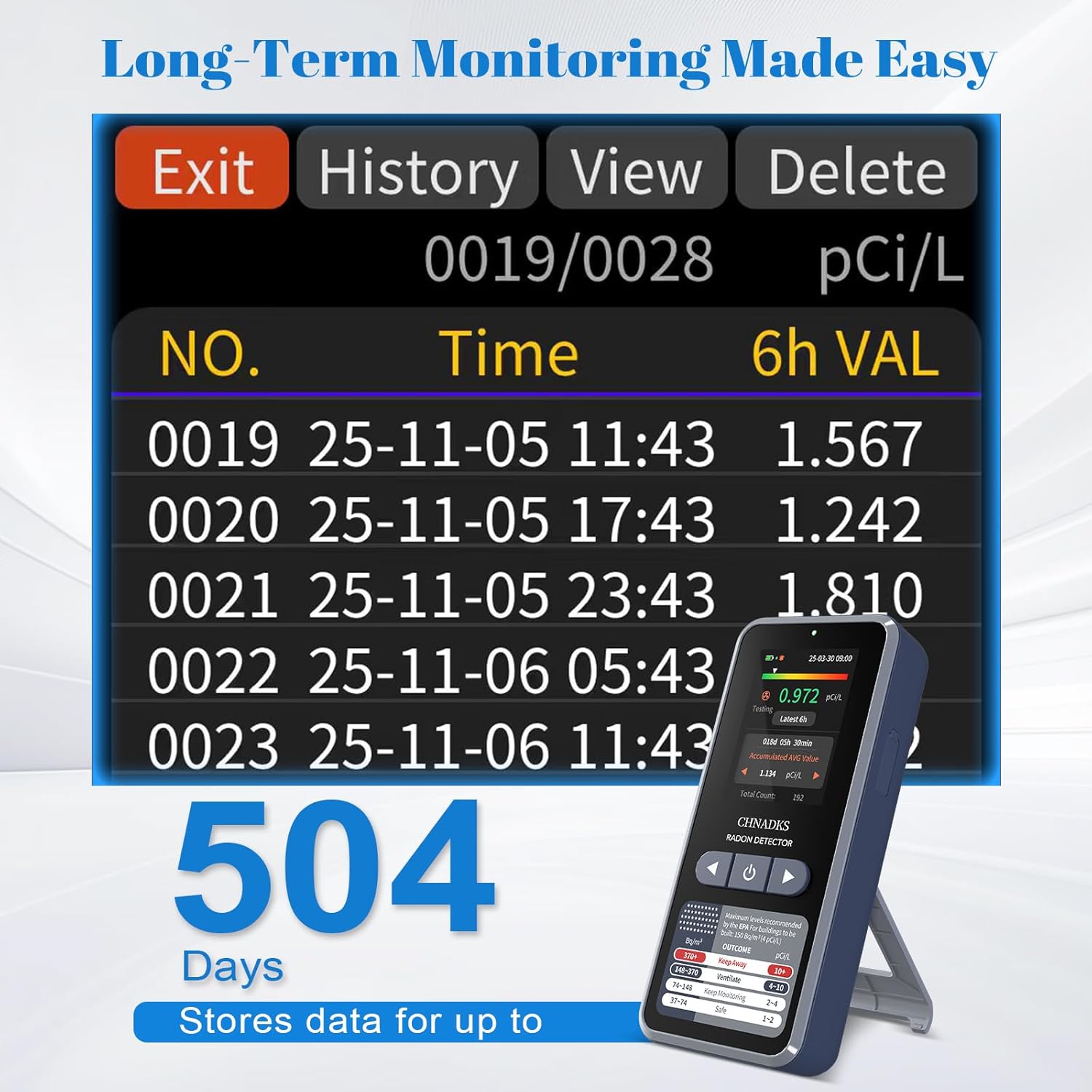
Pou view historical data, navigate to the "History" section in the device menu. You can scroll through past readings to analyze trends.
9. Antretyen
- Netwayaj: Wipe the device with a soft, dry cloth. Do not use abrasive cleaners or solvents. Ensure no liquid enters the air vents or charging port.
- Swen batri: For optimal battery life, avoid fully discharging the device frequently. Charge it regularly, especially if storing for extended periods.
- Depo: Sere aparèy la nan yon kote ki fre epi sèk, lwen limyè solèy dirèk ak tanperati ekstrèm lè w pa ap itilize li.
NAN. Depanaj
| Pwoblèm | Kòz posib | Solisyon |
|---|---|---|
| Aparèy pa limen. | Batri fèb oswa aparèy la pa fonksyone byen. | Chaje aparèy la pou omwen 30 minit. Si li toujou pa limen, kontakte sipò teknik. |
| Lekti ki pa egzak oswa ki varye. | Improper placement, environmental factors, or initial measurement period. | Ensure proper placement (refer to Section 5.3). Allow at least 48 hours for stable readings. Avoid placing near drafts or vents. |
| Alam son souvan. | High radon levels or alarm threshold set too low. | Check current radon levels. Consider adjusting the alarm threshold in settings if appropriate, or take action to mitigate radon. |
| Ekran an vid oswa li pa reponn. | Screen sleep mode, low battery, or software issue. | Press any button to wake the screen. Charge the device. If unresponsive, try a soft reset (power off and on). |
11. Espesifikasyon
| Modèl | RM-66 |
| Mak | CHNADKS |
| Ranje Mezi | 0.09–1000 pCi/L (3.3 Bq/m³ – 37 kBq/m³) |
| Kalite Capteur | High-precision semiconductor sensor |
| Ekspozisyon | 2.0-pous TFT koulè ekran |
| Entèval Mizajou Done | First data in 6 hours, then every 60 minutes |
| Depo Done Istorik | Up to 504 days (recorded every 6 hours) |
| Sous pouvwa | Batri rechargeable (Kalite-C) |
| Lavi batri | Max 45 days (screen-off mode) |
| Tan pou chaje | Approx. 3.5 hours (shutdown mode) |
| Dimansyon pwodwi | 2.3P x 5.3W x 11.7H santimèt |
| Pwa atik | 0.11 Kilogram (110 g) |
| Materyèl | ABS |
| Peyi orijin | Lachin |
12. Garanti ak sipò
The CHNADKS RM-66 Radon Detector comes with a standard manufacturer's warranty. Please refer to the warranty card included in your package or contact CHNADKS customer support for detailed warranty terms and conditions.
For technical assistance, troubleshooting, or any questions regarding your device, please contact CHNADKS customer support through their official websit oswa enfòmasyon kontak yo bay ak acha w la.
13. Enfòmasyon sou jete
Do not dispose of this device with general household waste. Electronic products contain materials that can be harmful to the environment if not disposed of properly. Please recycle the device at an authorized collection point for electronic waste or return it to your retailer for proper disposal. The internal battery should also be disposed of according to local regulations.