
1. Entwodiksyon
This manual provides detailed instructions for the installation, operation, and management of your MokerLink 8-Port 10G Managed Ethernet Switch. This device is designed to enhance network performance and efficiency with its high-speed connectivity and advanced management features. Please read this manual thoroughly before using the product to ensure proper setup and functionality.
2. Pwodwi souview
The MokerLink 8-Port 10G Managed Ethernet Switch features a robust design for high-bandwidth network environments. It includes 4x10Gbps Ethernet RJ45 ports and 4x10Gbps SFP+ slots, offering versatile connectivity options for various network devices. The switch supports a 160Gbps switching capacity and a packet forwarding rate of 119.04Mpps, ensuring non-blocking 10G line speed forwarding across all ports.
Karakteristik kle yo enkli:
- Pò gwo vitès: 4x10Gbps RJ45 ports (auto-adaptive 10G/5G/2.5G/1000M/100M) and 4x10Gbps SFP+ slots (compatible with 1G/10G optical modules).
- Gwo Bandwidth: 160Gbps switching capacity and 119.04Mpps packet forwarding rate.
- L3 Management: Sipò Web and Command Line Interface (CLI) for comprehensive device and port configuration, including IPv4/IPv6 management and routing.
- Advanced Layer 2 Features: VLAN, ACL, QoS, Jumbo frame, DHCP, security, multicast, MAC address table, diagnosis, Statistics, MSTP/RSTP/STP.
- Security & Diagnosis: AAA/802.1X/MAC-Based authentication, DoS anti-attack, dynamic ARP inspection, DHCP Snooping, IP Source Guard, Port Security, Protected Ports, storm control, Console/RAM/Flash Logs, Port Mirroring, Ping, Traceroute, Port Tests, UDLD Protocol.
- Konsepsyon dirab: Metal case with industrial-grade fan for efficient heat dissipation, suitable for desktop or wall-mounting.
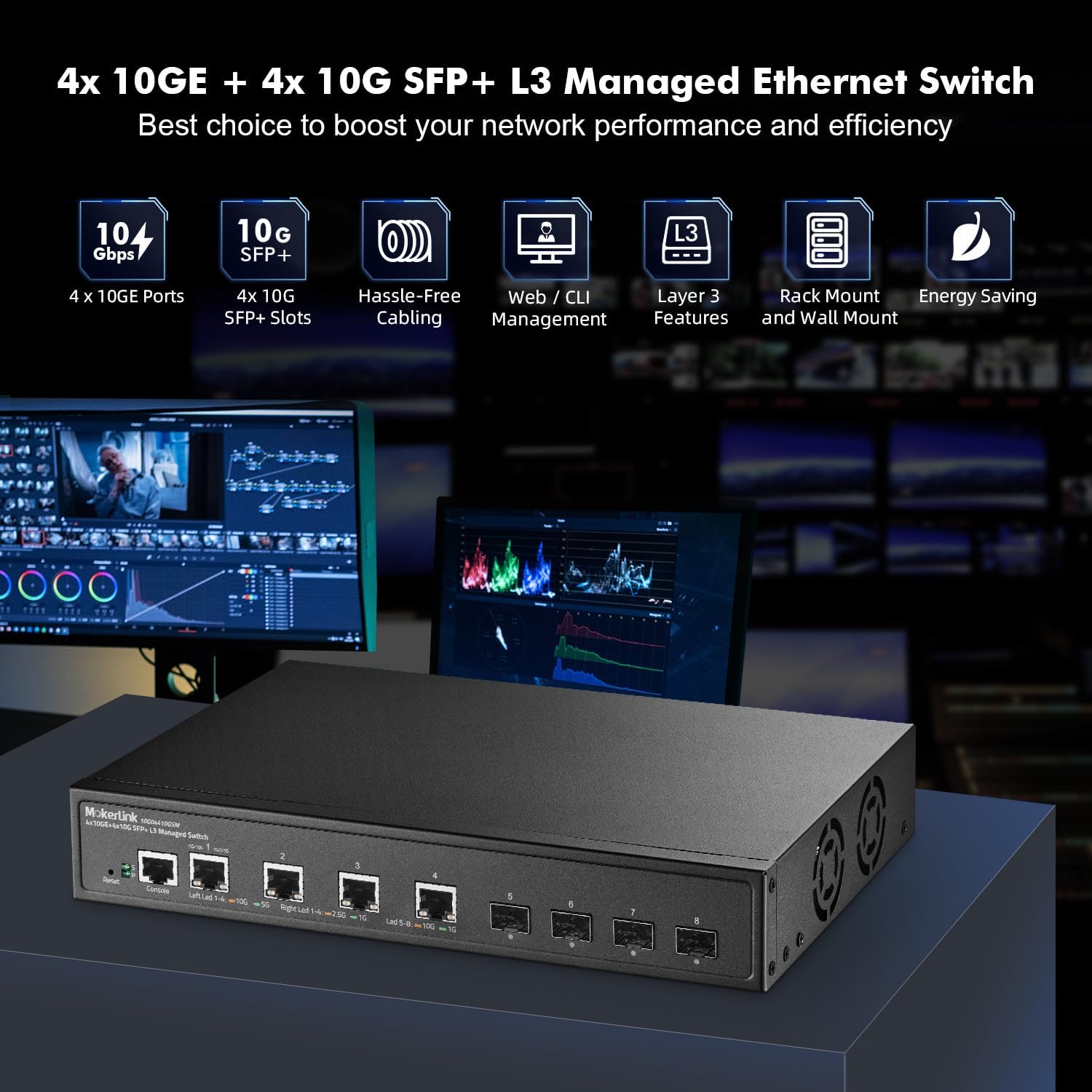
Figure 2.1: MokerLink 8-Port 10G Managed Ethernet Switch highlighting key features like 10G ports, SFP+ slots, Web/CLI management, L3 features, rack/wall mount, and energy saving.

Figure 2.2: Front and rear panel view of the switch, showing 4x10Gbps RJ45 ports, 4x10Gbps SFP+ slots, console port, reset button, power indicator, system indicator, and external power supply input.
3. Pake kontni
Verify the contents of your package upon opening. If any items are missing or damaged, please contact your vendor.
- 1 x MokerLink 10G Managed Switch
- 1 x pouvwa adaptè
- 1 x Manyèl Itilizatè (dokiman sa a)
- Mounting Accessories (for desktop or wall-mount installation)
4. Enstalasyon
4.1 Enstalasyon Fizik
The MokerLink 8-Port 10G Managed Ethernet Switch is designed for flexible deployment, supporting both desktop and wall-mount installations.
- Plasman Desktop: Mete switch la sou yon sifas plat epi ki estab, asire ke gen ase vantilasyon toutotou aparèy la.
- Mi-aliye: Use the provided mounting accessories to securely attach the switch to a wall. Ensure the mounting location is sturdy and allows for proper cable management and ventilation.
4.2 Konekte Aparèy Rezo yo
Connect your network devices (e.g., servers, workstations, NAS, WiFi 6/7 APs) to the switch's RJ45 or SFP+ ports.
- Pò RJ45: Use appropriate Ethernet cables for optimal performance. For 10Gbps connections, Cat6a or Cat7 cables are recommended. For 2.5Gbps/5Gbps, Cat5e or Cat6 cables are suitable.
- SFP+ Slots: Insert compatible 1G or 10G SFP/SFP+ optical modules into the slots, then connect fiber optic cables to the modules.

Figure 4.1: The switch connected to various high-performance devices such as WiFi 6/7 AP, servers, workstations, NAS, and 4K/8K video systems, illustrating cable type recommendations for different speeds.
4.3 Limen
Connect the provided power adapter to the switch's power input and then to a power outlet. The Power LED (P) on the front panel should illuminate, indicating the switch is receiving power. The System LED (S) will blink during startup and remain steady when the system is operational.
5. Operasyon Enstriksyon
5.1 Endikatè ki ap dirije
LED panèl devan yo bay enfòmasyon sou estati a:
- P (Power Indicator):
- On: pouvwa a founi.
- Off: Pa gen pouvwa.
- S (System Indicator):
- On: The system is normal.
- Off: System startup or abnormality.
- RJ45 Port LEDs (Left/Right):
- Left LED (Link/Activity): Orange for 10Gbps, Green for 5Gbps, 2.5Gbps, 1Gbps, or 100Mbps. Blinks for activity.
- Right LED (Speed): Orange for 10Gbps, Green for 1Gbps.
- SFP+ Port LEDs:
- Led: Orange for 10Gbps, Green for 1Gbps. Blinks for activity.
5.2 Aksè Inisyal nan Entèfas Jesyon an
Yo ka jere switch la atravè yon Web-based interface or Command Line Interface (CLI).
- Web Entèfas: Access the switch by entering its default IP address (typically 192.168.2.1) into a web browser. The default username is 'admin' and the default password is 'admin'.
- CLI: Connect to the console port using a console cable and a terminal emulator, or use Telnet/SSH for remote access.

Figure 5.1: Illustration of accessing the switch's management interfaces, including the web interface and command line interface, with default login credentials.
6. Management Features
The MokerLink 8-Port 10G Managed Ethernet Switch offers a comprehensive suite of Layer 2 and Layer 3 management features.
6.1 Layer 2 Switching Features
- VLAN (Rezo Lokal Vityèl): Supports 802.1Q Tag-based VLANs to segment networks and improve security and performance.
- Agregasyon Lyen (LACP): Combines multiple physical links into a single logical link to increase bandwidth and provide link redundancy.
- QoS (Kalite Sèvis): Prioritizes network traffic to ensure critical applications receive sufficient bandwidth and low latency.
- MSTP/RSTP/STP: Spanning Tree Protocols prevent network loops.
- Ankadreman Jumbo: Supports larger Ethernet frames for increased data throughput.

Figi 6.1: Egzample of 802.1Q Tag-based VLANs segregating network traffic for different devices like cameras, servers, and IP phones.

Figure 6.2: Illustration of Link Aggregation (LACP) connecting the switch to another switch and a NAS for enhanced bandwidth and resilience.

Figure 6.3: QoS mechanism prioritizing audio, video, and data traffic to reduce packet loss and latency.
6.2 Layer 3 Routing Features
- IPv4/IPv6 Management: Supports both IPv4 and IPv6 protocols for network addressing and routing.
- Wout estatik: Configurable static routes for directing traffic between different IP networks.
- ARP (pwotokòl rezolisyon adrès): Manages the mapping of IP addresses to MAC addresses.
- Loopback Interface: A virtual interface used for management and routing protocols.
6.3 Security and Diagnosis
- AAA/802.1X/MAC-Based Authentication: Provides robust user and device authentication.
- DoS Anti-Attack: Pwoteje kont atak Refus Sèvis.
- DHCP Snooping & IP Source Guard: Prevents unauthorized DHCP servers and IP spoofing.
- Sekirite pò: Limits the number of MAC addresses on a port to prevent unauthorized access.
- Kontwòl Tanpèt: Prevents network performance degradation due to excessive broadcast, multicast, or unknown unicast traffic.
- Port Mirwar: Duplicates network traffic from one port to another for monitoring and analysis.
- Ping, Traceroute, Port Tests: Diagnostic tools for network connectivity and performance.
- UDLD Protocol: Unidirectional Link Detection protocol to detect and disable unidirectional links.
- Deteksyon bouk: Identifies and removes network loops to prevent traffic disruptions.

Figure 6.4: Loop detection feature identifying and preventing network loops between two switches, ensuring stable network operation.
7. Antretyen
Antretyen regilye asire lonjevite ak pèfòmans optimal switch ou a.
- Mizajou mikrolojisyèl: Periodically check the MokerLink official website for firmware updates to enhance features and improve security. Follow the provided instructions for a safe upgrade process.
- Configuration Backup/Restore: Regularly back up your switch configuration to prevent data loss. This allows for quick restoration in case of misconfiguration or device replacement.
- Kondisyon anviwònman: Ensure the switch operates within recommended temperature and humidity ranges. Maintain clear airflow around the device to facilitate heat dissipation by the industrial-grade fan.
- Netwayaj: Kenbe switch la pwòp epi san pousyè. Sèvi ak yon twal mou epi sèk pou netwaye li.
NAN. Depanaj
Seksyon sa a adrese pwoblèm komen ou ka rankontre.
8.1 Pa gen pouvwa
- Asire w adaptè kouran an byen konekte ak switch la ak yon priz kouran ki fonksyone.
- Verifye si priz kouran an fonksyone byen lè w branche yon lòt aparèy.
- Tcheke adaptè kouran an pou wè si li pa gen okenn domaj vizib.
8.2 Pa gen lyen sou yon pò
- Check the Ethernet or fiber cable connection at both ends. Ensure cables are not damaged.
- Verifye ke aparèy ki konekte a limen epi li fonksyone byen.
- Ensure the correct cable type is used for the speed (e.g., Cat6a/7 for 10G RJ45).
- Check the port status in the switch's management interface.
- Try connecting to a different port on the switch or using a different cable.
8.3 Pa kapab jwenn aksè Web Entèfas
- Ensure your computer's IP address is in the same subnet as the switch's default IP (192.168.2.x, with subnet mask 255.255.255.0).
- Verify the switch's IP address has not been changed from the default (192.168.2.1).
- Vide kach navigatè w la oubyen eseye yon lòt navigatè.
- Dezaktive tanporèman nenpòt pare-feu oswa lojisyèl antivirus sou òdinatè w la.
8.4 Reyajiste nan Anviwònman faktori
If you forget the password or encounter persistent issues, you can restore the switch to its factory default settings.
- With the switch powered on, locate the Reyajiste bouton sou panèl devan an.
- Sèvi ak yon klips papye oswa yon objè pwenti menm jan an pou peze epi kenbe bouton Reyajiste a pandan apeprè 6 segonn.
- Release the button. The switch will reboot with factory default settings.
9. Espesifikasyon
| Karakteristik | Deskripsyon |
|---|---|
| Mak | MokerLink |
| Nimewo Modèl | 4x10G + 4x10G SFP Managed |
| Kantite pò | 9 (4x10Gbps RJ45, 4x10Gbps SFP+, 1xConsole) |
| Konpozan ki enkli | 10G Managed Switch |
| Koulè | Nwa |
| Aparèy konpatib | Desktop |
| Entèfas | RJ45, SFP+ |
| Pousantaj Transfè Done | 160 Gigabit pa segonn (Kapasite komitasyon) |
| Chanje Kalite | Managed (L3) |
| MAC Size Tablo Adrès | 16K |
| Pousantaj voye pake | 119.04 Mpps |
| Jesyon | Web, CLI, Telnet, SSH, SNMP |
| Konsomasyon pouvwa | Empty Load Power: <36W |
10. Garanti ak sipò
10.1 Enfòmasyon sou Garanti
The MokerLink 8-Port 10G Managed Ethernet Switch comes with a 1-ane garanti limite from the date of purchase. This warranty covers defects in materials and workmanship under normal use. It does not cover damage caused by misuse, accident, unauthorized modification, or external causes.
10.2 Sipò teknik
For technical assistance, troubleshooting, or warranty claims, please contact MokerLink customer support through the official website or your point of purchase. Please have your product model number and purchase information ready when contacting support.