
1. Pwodwi souview
The USX MOUNT XTL908 is a heavy-duty tilting TV wall mount designed for large televisions ranging from 60 to 120 inches. It supports TVs weighing up to 220 lbs and features a low-profile design, positioning the TV just 2.6 inches from the wall. The mount is compatible with VESA patterns up to 900x600mm and can be installed on wood studs (16-32 inches apart), concrete, or brick walls.

Image 1.1: The USX MOUNT XTL908 TV Wall Mount installed in a modern living room setting.

Image 1.2: The ultra-slim profile of the mount, showing the TV positioned close to the wall.
2. Enfòmasyon sou Sekirite
Read all instructions carefully before installation. If you have any questions, consult a qualified installer. Improper installation can result in serious injury or damage.
- Kapasite pwa: Pa depase kapasite pwa maksimòm 220 liv (100 kg). Sipò sa a fèt pou itilize sèlman avèk pwa maksimòm ki endike yo.
- Gwosè televizyon: Sipò sa a fèt pou televizyon ant 60 ak 120 pous.
- Kalite miray: Install only on wood studs, solid concrete, or brick walls. PA FÈ install on drywall alone.
- Stud Spacing: Ensure wood studs are spaced between 16 and 32 inches apart.
- Materyèl aliye: Use only the provided mounting hardware. If you require concrete anchors, please contact customer support.
- Integrity Test: After installation, perform an integrity test by gently pulling on the mount to ensure it is securely fastened to the wall.

Image 2.1: The robust construction of the mount, designed to securely hold TVs up to 220 lbs.
3. Pake kontni
Please verify that all components are present and undamaged before installation. If any parts are missing or defective, contact customer support.
- Asanble Plak Miray la
- Parantèz televizyon (2)
- Mounting Hardware Kit (screws, washers, spacers, anchors for concrete/brick)
- Mounting Modèl
- Manyèl Enstriksyon
4. Espesifikasyon
| Karakteristik | Spesifikasyon |
|---|---|
| Kalite aliye | Mi mòn |
| Kalite Mouvman | Panche |
| Mak | USX MOUNT |
| Materyèl | Metal |
| Koulè | Nwa |
| Aparèy konpatib | Televizyon |
| Maksimòm Ang Panche | 12 Degrees Down, 5 Degrees Up |
| Minimum Supported Screen Size | 60 pous |
| Maximum Supported Screen Size | 120 pous |
| Kapasite chaj maksimòm | 220 liv (100 kg) |
| VESA konpatibilite | Jiska 900x600mm |
| Wall Distance (Low Profile) | 2.6 pous |
| Stud Spacing Compatibility | 16-32 pous |

Image 4.1: Visual representation of VESA patterns supported and the maximum load capacity of 220 lbs.

Image 4.2: Technical drawing showing the dimensions of the TV interface and wall plate.

Imaj 4.3: Yon lòt view of the product dimensions, highlighting key measurements.
5. Enstalasyon ak Enstalasyon
Before you begin, ensure you have all necessary tools and that your wall type is suitable for this mount. The installation video below provides a visual guide.
Video 5.1: Official USX MOUNT XTL908 installation video, demonstrating the step-by-step mounting process.
5.1 Chèk Pre-Enstalasyon
- Verifye konpatibilite televizyon an: Check your TV's weight and VESA mounting pattern to ensure it falls within the mount's specifications (60-120 inches, up to 220 lbs, VESA up to 900x600mm).
- Idantifye Kalite Mi: Determine if your wall is wood stud, solid concrete, or brick.
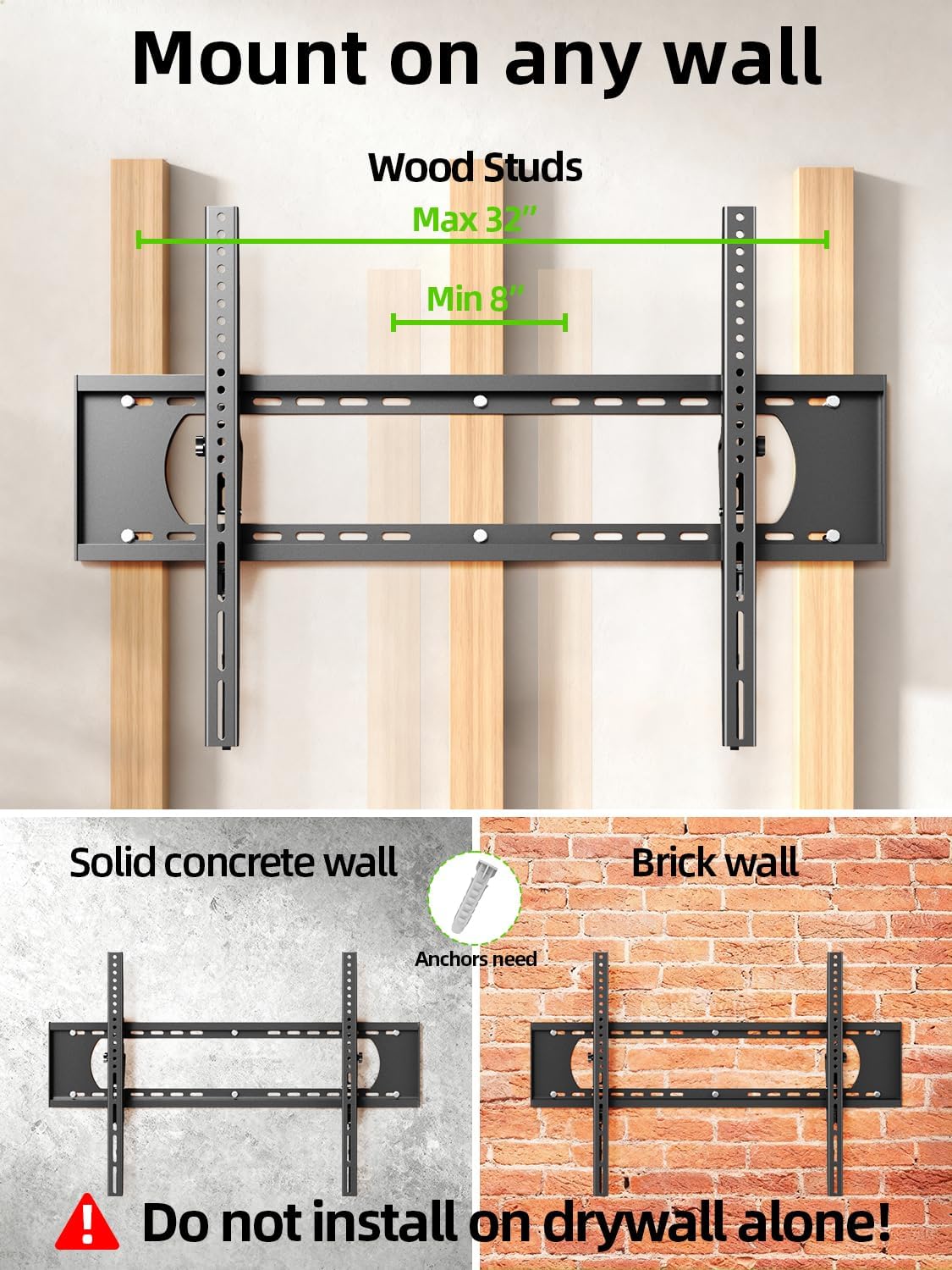
Image 5.2: The mount is suitable for wood studs (16-32" spacing), solid concrete, and brick walls. Not for drywall alone.
5.2 Mete Sipò Televizyon yo
Depending on your TV's back, choose the appropriate option:
- For Flat TV Back: Align the TV brackets with the VESA holes on the back of your TV. Secure them using the appropriate screws and washers from the hardware kit. Do not overtighten.
- For Irregular TV Back: If your TV has an irregular or curved back, use the provided spacers to create a flat mounting surface before attaching the brackets.
5.3 Monte Plak Miray la
Use the provided mounting template to mark the drill holes on your wall. Ensure the template is level before marking.
- Pou poto an bwa: Locate the center of your wood studs. Drill pilot holes (7/32 in. / 5.5mm diameter, 2.5 in. / 64mm depth). Secure the wall plate using lag bolts and washers. Do not use plastic anchors for wood studs.
- Pou miray beton/brik: Drill pilot holes (3/8 in. / 10mm diameter, 2.5 in. / 64mm depth). Insert concrete anchors into the drilled holes. Secure the wall plate using lag bolts and washers.
After securing the wall plate, perform an integrity test by pulling on the mount to ensure it is firmly attached to the wall.

Image 5.3: Simplified 3-step installation process: 1. Attach TV brackets, 2. Mount wall plate, 3. Hang up TV.
5.4 Hanging and Securing the TV
- Carefully lift the TV with the attached brackets and hook them onto the top edge of the wall plate.
- Desann televizyon an dousman jiskaske sipò yo angaje nèt ak plak miray la.
- Use the quick lock and release pull tabs to secure the TV to the wall plate, preventing accidental dislodgement.
6. Operasyon Enstriksyon
6.1 Ajiste Ang Enklinasyon an
The USX MOUNT XTL908 allows for easy tilt adjustment to optimize your viewing angle and reduce glare. The mount can tilt 5 degrees upwards and 12 degrees downwards.
- To adjust the tilt, loosen the tilting adjustment knobs located on the TV brackets.
- Panche televizyon an nan ang ou vle.
- Tighten the tilting adjustment knobs to secure the TV in place.
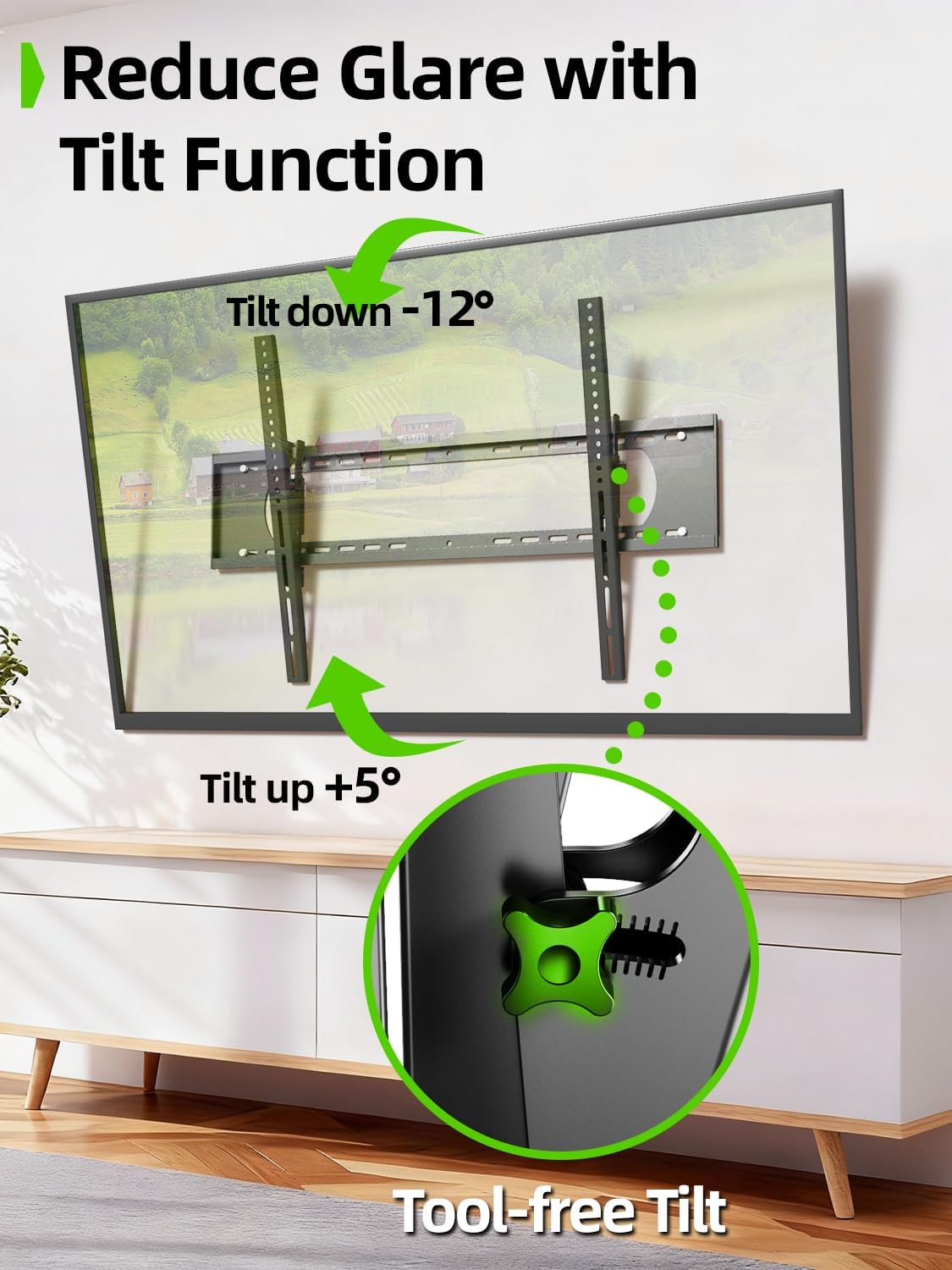
Image 6.1: The tilt function allows for easy adjustment up to +5° and down to -12° to reduce glare.

Image 6.2: The mount's tilt range for optimal viewsoti nan plizyè pozisyon.
6.2 Quick Lock and Release
The mount features pull tabs for easy locking and releasing of the TV from the wall plate.
- Pou fèmen the TV, ensure the pull tabs are pushed upwards into the locked position after hanging the TV.
- Pou lage the TV, gently pull down on the cords attached to the tabs. This will unlock the TV from the wall plate, allowing you to lift it off.

Image 6.3: The adjustable pull tabs for easy locking and releasing of the TV.

Image 6.4: Illustration of pulling the cords to release the TV from the mount.
7. Antretyen
Antretyen regilye asire lonjevite ak fonksyònman an sekirite nan sipò miray televizyon ou an.
- Netwayaj: Siye montur la avèk yon twal mou epi sèk pou retire pousyè a. Evite pwodui netwayaj abrazif oswa solvan.
- Tèks Peryodik: Periodically check all screws and bolts to ensure they are tight and secure. Re-tighten if necessary.
- Enspekte pou domaj: Inspect the mount for any signs of wear, corrosion, or damage. If any issues are found, contact customer support and do not use the mount until it is repaired or replaced.
NAN. Depanaj
If you encounter any issues during or after installation, refer to the following common problems and solutions.
| Pwoblèm | Kòz posib | Solisyon |
|---|---|---|
| Televizyon an pa nivo | Plak miray la pa nivo pandan enstalasyon an. | Remove TV, loosen wall plate screws, adjust level, re-tighten. Ensure to use a level during installation. |
| Mount feels loose on the wall | Screws not fully tightened; incorrect wall anchors used; wall material not suitable. | Ensure all lag bolts are fully tightened. Verify correct anchors for concrete/brick. Do not install on drywall alone. If issues persist, consult a professional. |
| TV cannot be tilted | Tilting adjustment knobs are too tight. | Loosen the tilting adjustment knobs on the TV brackets to allow movement. Re-tighten once desired angle is achieved. |
| TV cannot be removed from mount | Quick release pull tabs are in the locked position. | Pull down on the cords attached to the quick release tabs to unlock the TV. |
9. Garanti ak sipò
For warranty information or technical support, please refer to the contact details provided with your purchase or visit the official USX MOUNT websit la. Kenbe resi acha ou kòm prèv acha pou nenpòt reklamasyon garanti.
If you have any questions or require additional assistance, please do not hesitate to contact USX MOUNT customer service.