
Enstriksyon Sekirite Enpòtan
Lè w ap itilize aparèy elektrik, yo ta dwe toujou swiv prekosyon sekirite debaz yo, tankou sa ki annapre yo:
- Li tout enstriksyon yo anvan ou itilize griy pen an.
- Pa manyen sifas cho. Sèvi ak manch oswa bouton.
- Pou pwoteje tèt ou kont chòk elektrik, pa plonje kòd, ploge, oswa griye nan dlo oswa lòt likid.
- Sipèvizyon sere se nesesè lè nenpòt aparèy itilize pa oswa toupre timoun yo.
- Debranche soti nan priz lè yo pa itilize ak anvan netwaye. Kite refwadi anvan ou mete oswa retire pati yo.
- Pa opere nenpòt aparèy ki gen yon kòd oswa ploge ki domaje, oswa apre aparèy la fonksyone mal oswa li te domaje nan nenpòt fason.
- Pa kite kòd la pandye sou kwen yon tab oswa kontwa, oswa manyen sifas cho.
- Pa mete sou oswa toupre yon gaz cho oswa recho elektrik, oswa nan yon fou chofe.
- Pa sèvi ak aparèy la pou lòt itilizasyon ki gen entansyon.
- Pa mete manje ki twò gwo, anbalaj metalik, oswa istansil nan griy pen an paske yo ka kreye yon dife oswa risk pou pran chòk elektrik.
- Yon dife ka rive si tostè yo kouvri oswa manyen materyèl ki ka pran dife, tankou rido, rido, mi, ak lòt bagay, lè yo ap fonksyone.
- Pa eseye retire manje lè tostè a konekte.
- Pa opere poukont ou.
Pwodwi souview
The WHALLULTRA Touchscreen Toaster is a 2-slice appliance designed for efficient and versatile toasting. It features a modern touchscreen interface, durable stainless steel construction, wide slots to accommodate various bread types, and an integrated warming rack. This toaster offers multiple functions including Bagel, Defrost, Reheat, and Cancel, along with adjustable shade settings.
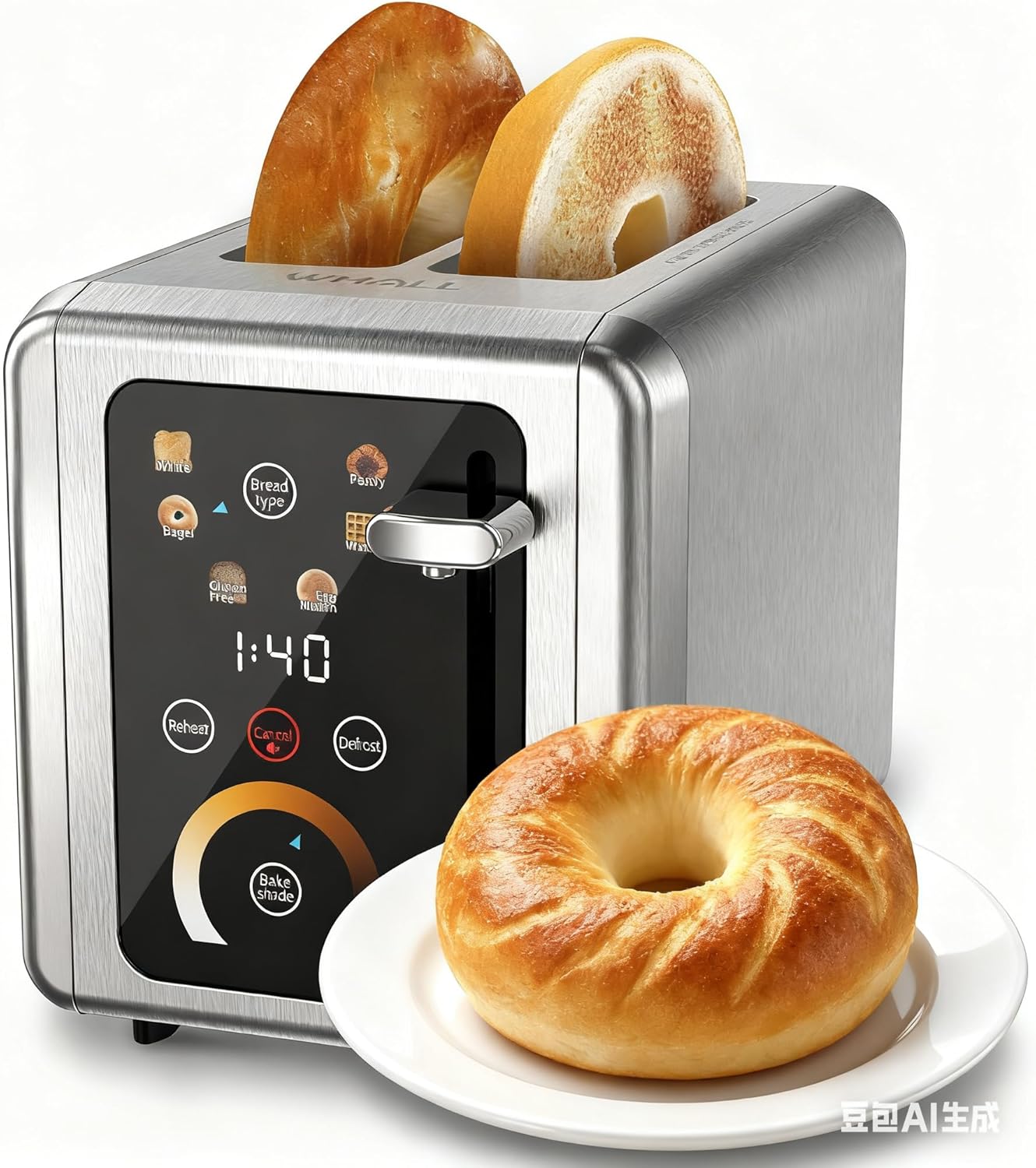
Image: The WHALLULTRA Touchscreen Toaster, showcasing its stainless steel finish and touchscreen control panel, with two toasted bagel halves emerging from the slots and a fresh bagel on a plate beside it.
Enstalasyon
- Dekonpoze: Carefully remove the toaster and all packaging materials. Retain packaging for future storage or transport.
- Plasman: Place the toaster on a stable, flat, heat-resistant surface, away from flammable materials. Ensure adequate ventilation around the toaster.
- Premye Itilizasyon (Burn-off): Before first use, operate the toaster without bread on the highest shade setting to burn off any manufacturing residues. A slight odor or smoke may be present; this is normal. Ensure the area is well-ventilated.
- Konekte pouvwa: Ploge kòd elektrik la nan yon priz elektrik estanda.
Enstriksyon Operasyon
Operasyon debaz
- Etap 1: Mete tranch pen nan fant griye yo.
- Etap 2: Use the touchscreen to select the desired bread type (e.g., White, Bagel, Gluten Free, Eng Muffin, Pastry, Waffle) and adjust the toast shade level. Press 'Defrost' or 'Reheat' if needed.
- Etap 3: Push the toast lever down until it locks into place. The toasting cycle will begin.
- Etap 4: Once the countdown ends, the toasted bread will automatically pop up.

Image: A visual guide illustrating the four basic steps of operating the toaster: inserting bread, selecting settings on the touchscreen, pushing down the lever, and the bread popping up when done.
Fonksyon Panel Kontwòl

Imaj: Yon imaj detaye view of the toaster's touchscreen control panel, highlighting the 'Bread Type', 'Cancel', 'Defrost', and 'Reheat' buttons with their respective functions explained.
- Bread Type: Press this button to cycle through different bread types (White, Bagel, Gluten Free, Eng Muffin, Pastry, Waffle) for optimized toasting.
- Anile: Press to stop the current toasting cycle immediately. A long press for 2 seconds will mute the toaster's sound.
- Deglase: Activates a longer toasting cycle (approximately 20% longer) suitable for toasting frozen bread.
- Chofe: Reheats bread for 30 seconds after a cycle has finished, without further browning.
Seleksyon lonbraj pen griye

Image: A graphic demonstrating various toast shade levels, from light to dark, with approximate toasting times ranging from 70 seconds to 230 seconds, indicating the toaster's adjustable shade control.
The toaster offers a range of shade settings, allowing you to customize your toast from lightly golden to dark and crispy. Use the 'Bake Shade' control on the touchscreen to select your preferred level. The display will show the remaining time for the selected shade.
Seleksyon Kalite Pen

Image: The WHALLULTRA Touchscreen Toaster centrally placed, with an arc of different bread types around it, including bagels, white bread, gluten-free bread, English muffins, waffles, and pastries, illustrating its versatility.
The 'Bread Type' function optimizes toasting for specific items. Select the appropriate type for best results:
- Blan: Standard setting for white bread.
- Bagel: Griye bò koupe beyè yo pandan y ap chofe bò ekstèn lan dousman.
- Gluten Free: Optimized for gluten-free bread, which often requires a different toasting profile.
- Eng Muffin: Suitable for English muffins.
- Patisri: Ideal for pastries and thicker items.
- Gofr: For toasting waffles.
Antretyen ak netwayaj
Netwayaj regilye asire pi bon pèfòmans epi li pwolonje lavi griye pen ou an.
- Toujou debranche griyè pen an epi kite l refwadi nèt anvan ou netwaye li.
- Plato ti kal pen: Pull out the crumb tray located at the bottom of the toaster. Dispose of crumbs and wipe the tray clean with a damp cloth. Ensure the tray is completely dry before reinserting. Clean the crumb tray regularly to prevent crumb buildup, which can be a fire hazard.
- Eksteryè: Siye deyò griy pen an avèk yon twal mou.amp Pa sèvi ak pwodui netwayaj abrazif oswa kousinen metal pou fwote, paske yo ka grate sifas la.
- Enteryè: Never insert any objects into the toaster slots to clean. If food becomes lodged, unplug the toaster and carefully invert it to shake out the food.
- Pa plonje Tostè a nan dlo oswa nenpòt lòt likid.
Depanaj
Si ou rankontre pwoblèm ak griyè pen ou a, gade pwoblèm ak solisyon komen sa yo:
| Pwoblèm | Kòz posib | Solisyon |
|---|---|---|
| Griyè pen an pa limen. | Pa branche; pwoblèm priz kouran; disjonktè a sote. | Asire w ke griyè pen an byen branche nan yon priz ki fonksyone. Tcheke disjonktè kay ou a. |
| Levie a pa rete anba. | Griyè pen an pa branche; pwoblèm mekanis entèn. | Asire w ke griyè pen an branche nan yon priz elektrik ki gen kouran. Si pwoblèm nan pèsiste, kontakte sèvis kliyan. |
| Bread is unevenly toasted. | Epesè pen inegal; akimilasyon myèt. | Ensure bread slices are of uniform thickness. Clean the crumb tray and check for any obstructions in the slots. |
| Lafimen oswa sant boule. | Crumb buildup; food lodged in slots; first use burn-off. | Immediately unplug the toaster. Clean the crumb tray. If food is lodged, carefully remove it after the toaster has cooled. Ensure adequate ventilation during first use. |
Espesifikasyon
- Modèl: WHALLULTRA Touchscreen Toaster 2 Slice
- Pouvwa: 850W
- Tranch: 2
- Materyèl: Nerjaveèi asye
- Fonksyon: Bagel, Defrost, Reheat, Cancel, Adjustable Shade Control, Multiple Bread Types
- Kontwòl: Entèfas tactile
Garanti ak sipò
Your WHALLULTRA Touchscreen Toaster is covered by a manufacturer's warranty against defects in material and workmanship under normal household use. Please refer to the warranty card included with your purchase for specific terms and conditions, including the warranty period and how to make a claim.
For technical support, troubleshooting assistance, or warranty inquiries, please contact WHALLULTRA customer service. Contact information can typically be found on the product packaging or the official WHALLULTRA websit.