
Entwodiksyon
The Rapoo M308 is a versatile multi-mode wireless mouse designed for efficiency and comfort. It features an ambidextrous design, allowing comfortable use for both right-handed and left-handed individuals. With its dual connectivity options, Bluetooth 5.0 and 2.4 GHz wireless, you can seamlessly connect to up to three devices and switch between them with ease. The mouse is engineered for long-lasting performance, offering a battery life of up to 12 months.
Kontni pake
- Rapoo M308 Multi-mode Wireless Mouse
- Reseptè USB (ki estoke andedan sourit la)
- 2 batri AA
- Gid Quick Start (manyèl sa a)
Pwodwi souview
Familiarize yourself with the components of your Rapoo M308 mouse.
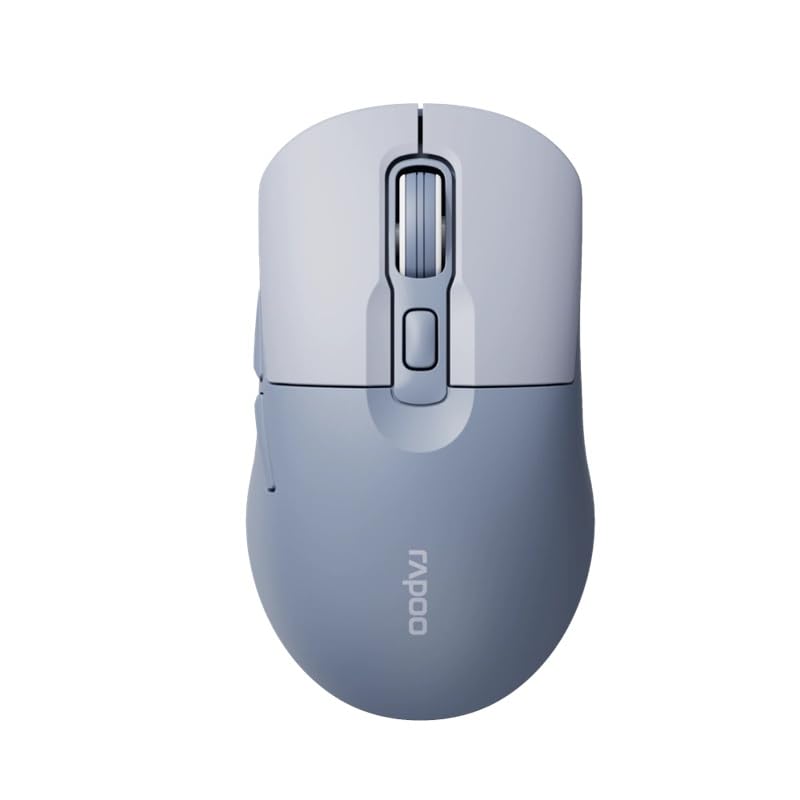
Image: The Rapoo M308 Multi-mode Wireless Mouse in blue, showcasing its ergonomic, ambidextrous design with a scroll wheel and multiple buttons.
- Bouton Goch: Fonksyon klike gòch estanda.
- Dwa bouton: Fonksyon estanda klike sou bò dwat la.
- wou woulo liv: Pou fonksyon defileman ak klike sou bouton mitan an.
- Bouton DPI: Ajiste sansiblite kurseur a (DPI).
- Mode Switch Button/Indicator: Switches between connected devices (2.4G, Bluetooth 1, Bluetooth 2) and indicates current mode.
- Bouton bò: Forward/Backward navigation (programmable).
- Lòj batri: Located on the underside, holds 2 AA batteries.
- Plas pou reseptè USB: Located inside the battery compartment for storage.
Enstalasyon
1. Enstalasyon batri
- Louvri kouvèti konpatiman batri a ki anba sourit la.
- Mete de pil AA yo nan plas yo, asire w polarite a kòrèk (+/-).
- Fèmen kouvèti lòj batri a.
2. Konekte atravè yon rezo san fil 2.4 GHz
- Remove the USB receiver from its storage slot inside the battery compartment.
- Ploge reseptè USB a nan yon pò USB ki disponib sou òdinatè w lan.
- Turn on the mouse. The mouse should automatically connect to your computer. The mode indicator light will show a steady green light for a few seconds.
3. Konekte via Bluetooth
The M308 mouse supports two Bluetooth connections (BT1 and BT2).
- Vire sourit la.
- Press the mode switch button to select either Bluetooth 1 (blue light flashes slowly) or Bluetooth 2 (blue light flashes slowly).
- Press and hold the mode switch button for 3 seconds until the blue light starts flashing rapidly. This indicates the mouse is in pairing mode.
- Sou òdinatè w la oswa aparèy ou an, ale nan paramèt Bluetooth yo epi chèche nouvo aparèy.
- Select "Rapoo M308" from the list of available devices to pair.
- Once paired, the blue light will become steady for a few seconds and then turn off.
Enstriksyon Operasyon
Chanje Ant Aparèy
The Rapoo M308 allows you to connect to up to three devices (one 2.4G wireless and two Bluetooth devices) and switch between them.
- Briefly press the mode switch button to cycle through the connected devices: 2.4G (green light), Bluetooth 1 (blue light), Bluetooth 2 (blue light).
- The indicator light will briefly illuminate in the corresponding color to confirm the selected mode.
DPI Ajisteman
Press the DPI button (usually located behind the scroll wheel) to cycle through different DPI settings. This changes the cursor speed and sensitivity. The indicator light may flash to show the current DPI level (e.g., one flash for low DPI, two for medium, etc.).
Antretyen
- Netwayaj: Sèvi ak yon twal mou epi sèk pou netwaye sourit la. Pou pousyè tè ki difisil pou netwaye, yon ti kras mouye.amp Ou ka itilize twal, men asire w pa gen imidite ki antre nan aparèy la.
- Ranplasman batri: When the mouse performance degrades or the indicator light signals low battery, replace the two AA batteries following the installation steps.
- Depo: When not in use for extended periods, turn off the mouse to conserve battery life. Store the USB receiver inside the mouse to prevent loss.
Depanaj
- Sourit la pa reponn:
- Tcheke si sourit la limen.
- Asire w pil yo byen enstale epi yo pa fin itilize. Ranplase yo si sa nesesè.
- For 2.4G connection, ensure the USB receiver is securely plugged into a working USB port. Try a different USB port.
- For Bluetooth connection, ensure the mouse is in the correct Bluetooth mode (BT1 or BT2) and successfully paired with your device. Re-pair if needed.
- Mouvman kurseur a pa regilye oswa ralanti:
- Netwaye detèktè optik ki anba sourit la.
- Asire w ke w ap itilize sourit la sou yon sifas ki apwopriye (ki pa reflete limyè, ki pa transparan).
- Ajiste paramèt DPI a avèk bouton DPI a.
- Pa ka chanje ant aparèy yo:
- Ensure all devices are properly connected (2.4G receiver plugged in, Bluetooth devices paired).
- Briefly press the mode switch button to cycle through modes. A long press will initiate Bluetooth pairing mode.
Espesifikasyon
| Non mak | Rapoo |
| Modèl | M308 |
| Koneksyon Teknoloji | Bluetooth 5.0, Frekans Radyo 2.4 GHz |
| Karakteristik espesyal | Lejè |
| Deteksyon Mouvman | Optik |
| Kantite bouton | 4 |
| Oryantasyon men | Anbidextr |
| Itilizasyon Rekòmande | Biwo |
| Aparèy konpatib | Odinatè pèsonèl, Laptop |
| Pwa atik | 50 gram |
| Sistèm operasyon | Linux, Mac, Windows |
| Lavi batri | 12 mwa |
| Kantite pil | 2 AA (Enkli) |
| Sous pouvwa | Batri Powered |
| OS minimòm obligatwa | Mac OS 14 Sonoma, Windows 11 |
| Materyèl | Plastik |
| Peyi orijin | Lachin |
| Konpozan ki enkli | Sourit |
Garanti ak sipò
The Rapoo M308 Multi-mode Wireless Mouse comes with a 2-ane garanti apati dat acha a. Garanti sa a kouvri domaj fabrikasyon ak fonksyònman ki pa kòrèk nan itilizasyon nòmal.
For technical support, warranty claims, or further assistance, please refer to the contact information provided on the Rapoo official website or your local distributor's support channels. Please retain your proof of purchase for warranty validation.