
1. Pwodwi souview
The Tilta PYXIS 6K/12K Camera Cage Base Kit (Model ES-T21-A) is a custom-designed camera cage system for the Blackmagic Design PYXIS 6K and 12K camera bodies. This kit provides enhanced protection, stability, and multiple mounting points for various camera accessories, improving the versatility and functionality of your camera setup. It includes a full camera cage, a NATO top handle, and a NATO side handle.
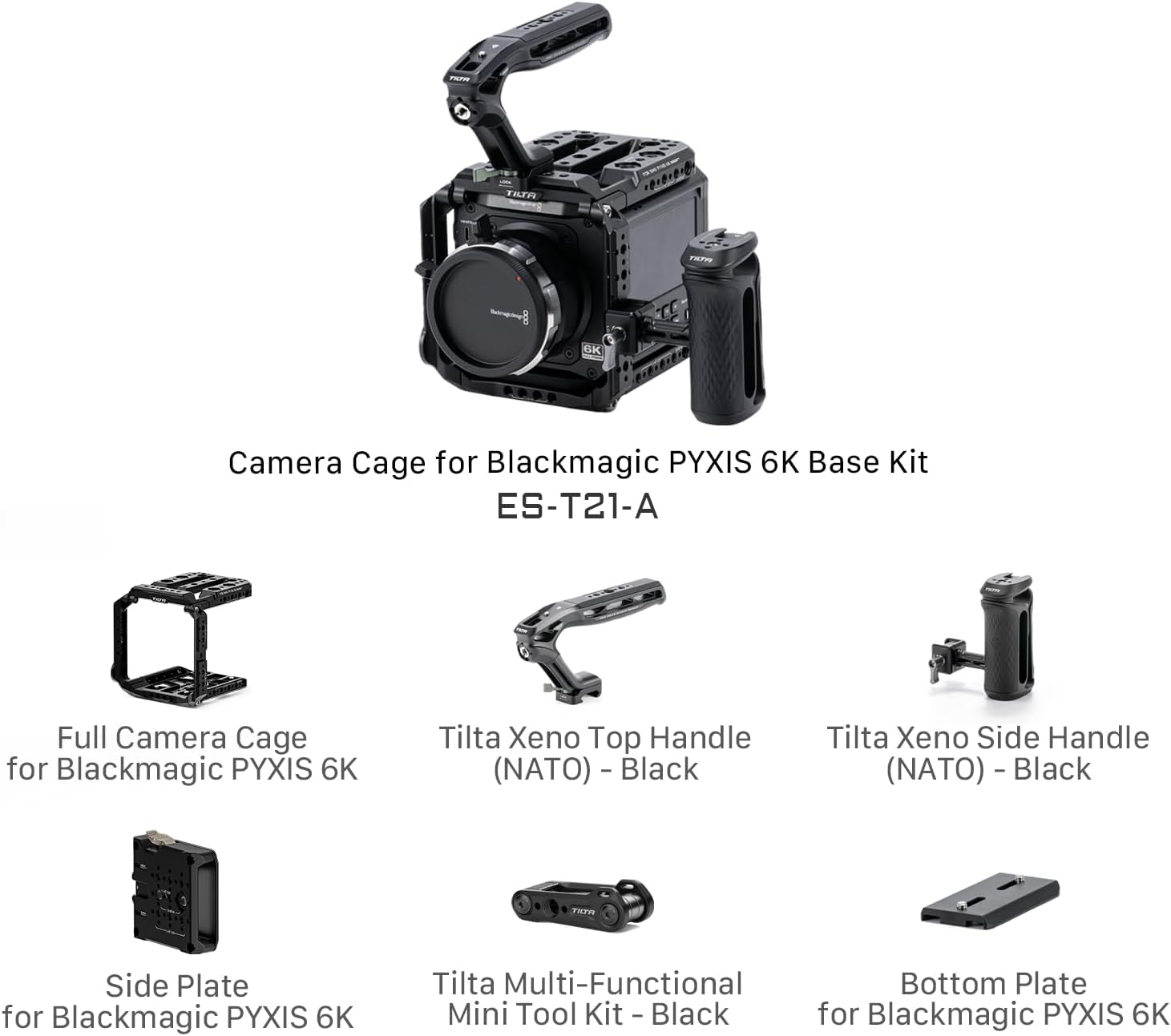
Image 1.1: The Tilta PYXIS 6K Camera Cage Base Kit assembled with a camera, showcasing the full cage, top handle, and side handle.
2. Pake kontni
Tanpri verifye ke tout atik ki nan lis anba a yo enkli nan pakè ou a:
- 1 x Full Camera Cage for PYXIS 6K
- 1 x Tilta Xeno Top Handle (NATO) - Black
- 1 x Tilta Xeno Side Handle (NATO) - Black
- 1 x Multi-Functional Mini Tool Kit (Black)
- 1 x Side Plate for Blackmagic PYXIS 6K
- 1 x Bottom Plate for Blackmagic PYXIS 6K

Imaj 2.1: Eksploze view showing all components of the Tilta PYXIS 6K Camera Cage Base Kit.
3. Enstalasyon ak Enstalasyon
3.1 Assembling the Camera Cage
- Attach the Bottom Plate: Secure the bottom plate to the base of your Blackmagic PYXIS 6K/12K camera using the provided screws. Ensure it is firmly tightened.
- Mount the Full Camera Cage: Carefully place the full camera cage around your camera, aligning it with the bottom plate and any other attachment points on the camera body. Secure the cage using the designated screws.
- Install the Side Plate: Attach the multi-functional side plate to the side of the camera cage. This plate supports vertical configurations and features an SSD mounting slot.
3.2 Attaching Handles and Accessories
The cage features various mounting points for accessories:
- NATO Top Handle: Slide the Tilta Xeno Top Handle onto the NATO rail located on the top plate of the cage. Tighten the locking mechanism to secure it. This handle offers increased flexibility for low-angle shots and carrying the setup.
- NATO Side Handle: The Tilta Xeno Side Handle can be mounted on either the left or right side NATO rail of the cage. Slide it onto the rail and tighten the locking screw for a secure grip.
- Additional Mounting Points: The cage includes ARRI Anti-Twist 3/8"-16 threads, standard 1/4"-20 and 3/8"-16 threads, Cold Shoe mounts, and Rosette mounts for attaching monitors, microphones, lights, and other accessories.

Imaj 3.1: Kote view of the cage highlighting various mounting points including Top Plate, ARRI Anti-Twist, SSD Unlock Lever, 3/8"-16 threads, Cold Shoe, Safety Pin, Multi-functional Side Plate, NATO Rail, and Rosette.

Imaj 3.2: Anlè view of the cage showing clearance for exhaust, 1/4"-20 & 3/8"-16 threads, NATO Rail, and Cold Shoe mounts.
3.3 SSD Mounting
The side plate features a dedicated slot for mounting an SSD. This slot is compatible with hard drives between 52mm and 60mm in width and less than 12mm in thickness. Use the unlock lever to secure or release the SSD.
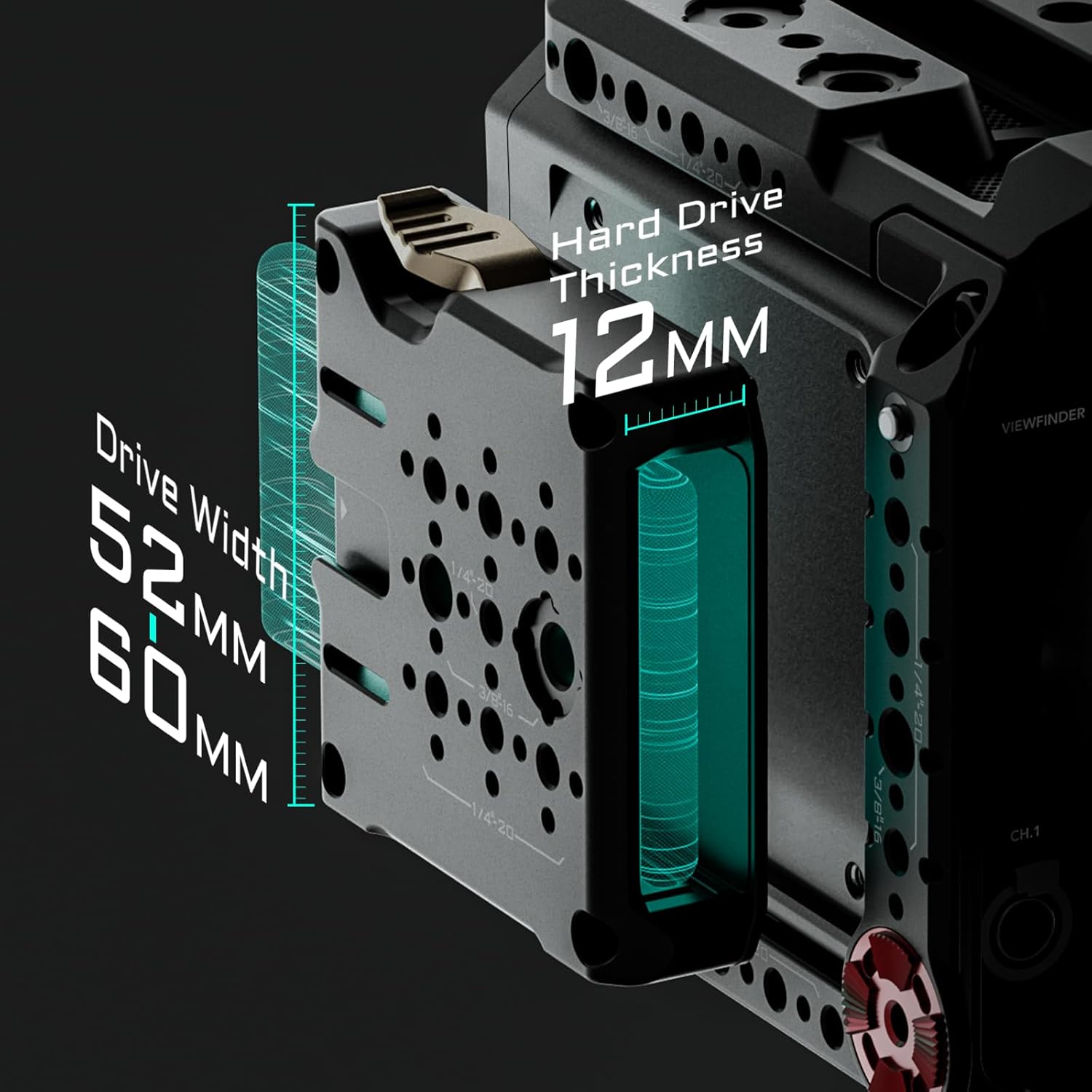
Image 3.3: Illustration of the SSD mounting slot on the side plate, showing compatible drive width (52mm-60mm) and thickness (max 12mm).
3.4 Dissipation chalè
The cage's design incorporates clearance for the camera body's heat dissipation vents. Both the bottom and top plates are engineered to avoid obstructing these vents, ensuring the camera's cooling performance remains unaffected during operation.

Imaj 3.4: Gwo plan view of the cage's design, illustrating the clearance provided for the camera's heat dissipation vents.
4. Operasyon Enstriksyon
4.1 Vertical Shooting Mode
The multi-functional side plate can be utilized as a bottom plate to enable vertical shooting configurations. This provides ample space between rods and the lens for most accessories, making it suitable for social media content creation or specific cinematic styles.
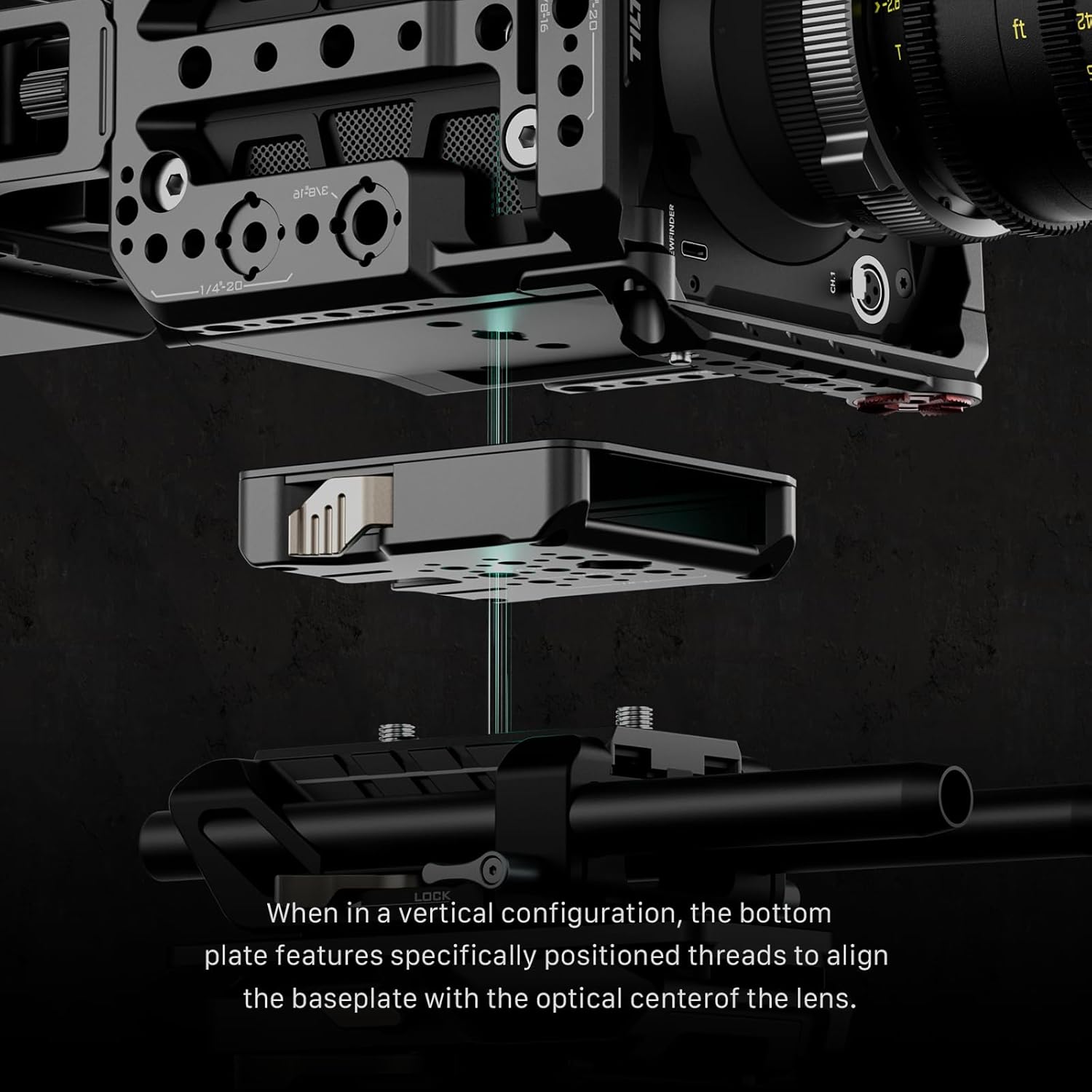
Image 4.1: The camera cage configured for vertical shooting, demonstrating how the side plate functions as a base.
4.2 Accessory Mounting
Utilize the various mounting points (NATO rails, ARRI Rosettes, Cold Shoe mounts, 1/4"-20 and 3/8"-16 threads) to attach external monitors, follow focus systems, matte boxes, wireless video transmitters, and other production tools. Ensure all accessories are securely fastened to prevent accidental detachment during use.
5. Antretyen
To ensure the longevity and optimal performance of your Tilta PYXIS 6K/12K Camera Cage Base Kit, follow these maintenance guidelines:
- Netwayaj: Wipe the cage and its components with a soft, dry cloth after each use to remove dust and fingerprints. For stubborn dirt, a slightly damp Ou ka itilize yon twal, epi seche l touswit apre. Evite pwodui netwayaj abrazif oswa solvan.
- Enspeksyon: Periodically inspect all screws, bolts, and locking mechanisms for tightness. Re-tighten any loose components to maintain structural integrity.
- Depo: Store the camera cage in a clean, dry environment, away from extreme temperatures and humidity, when not in use.
NAN. Depanaj
This section addresses common issues you might encounter with your camera cage.
- Pwoblèm: The camera feels loose within the cage.
Solisyon: Ensure all mounting screws connecting the camera to the bottom plate and the cage to the camera body are securely tightened. Check that the camera is correctly seated in the cage. - Pwoblèm: Accessories are not securely attaching to mounting points.
Solisyon: Verify that the accessory's mounting mechanism (e.g., NATO clamp, screw thread) is compatible with the cage's mounting point. Ensure all locking levers or screws are fully engaged and tightened. - Pwoblèm: Difficulty inserting or removing an SSD.
Solisyon: Ensure the SSD dimensions (width 52-60mm, thickness <12mm) are compatible. Use the unlock lever to fully release the SSD. Do not force the SSD into the slot.
7. Espesifikasyon
| Nimewo Modèl | ES-T21-A |
| Mak | Tilta |
| Koulè | Nwa |
| Aparèy konpatib | Blackmagic Design PYXIS 6K, Blackmagic Design Cinema Camera 6K |
| Pwa atik | 1.97 Kilogram |
| Mounting Points | NATO Rails, ARRI Rosette, Cold Shoe, 1/4"-20 threads, 3/8"-16 threads with positioning pins |
| SSD konpatibilite | Width 52-60mm, Thickness <12mm |
| Materyèl | Aluminum Alloy, SUS304 |
8. Garanti ak sipò
8.1 Enfòmasyon sou Garanti
This Tilta product is covered by a Garanti manifakti 1 zan from the date of purchase. The warranty covers defects in materials and workmanship under normal use. It does not cover damage caused by misuse, accidents, unauthorized modifications, or normal wear and tear.
8.2 Sipò pou Kliyan
For technical assistance, warranty claims, or product inquiries, please contact Tilta customer support through their official website or the retailer from whom you purchased the product. Please have your product model number (ES-T21-A) and proof of purchase ready when contacting support.