
1. Entwodiksyon
Thank you for choosing the Lefant M3L Robot Vacuum and Mop. This intelligent cleaning device is designed to simplify your home cleaning routine by efficiently vacuuming and mopping various floor types. Please read this manual thoroughly before using the product to ensure proper operation, maintenance, and safety.
For optimal performance, follow the instructions carefully and keep this manual for future reference.
2. Enfòmasyon enpòtan sou sekirite
Before using the Lefant M3L, please observe the following safety precautions:
- Timoun ki gen laj 8 an ak pi wo a ak moun ki gen kapasite fizik, sansoryèl oswa mantal redwi oswa ki pa gen eksperyans ak konesans yo kapab itilize aparèy sa a si yo te ba yo sipèvizyon oswa enstriksyon konsènan itilizasyon aparèy la an sekirite epi yo konprann danje ki genyen ladan yo. .
- Timoun yo ta dwe sipèvize pou asire ke yo pa jwe ak aparèy la.
- Netwayaj ak antretyen itilizatè pa dwe fèt pa timoun san sipèvizyon.
- Do not use the robot in environments with open flames, flammable materials, or explosive substances.
- Ensure the charging dock is placed on a level surface against a wall, with no obstacles within 1 meter in front and 0.5 meters on either side.
- Do not immerse the robot or its electronic components in water.
- Sèvi sèlman ak adaptè kouran orijinal la ak estasyon chajman ki soti nan manifakti a.
- Remove any loose cables, small objects, or fragile items from the floor before operation to prevent entanglement or damage.
- Do not use the robot to clean liquids, burning objects, or sharp objects.
- Si kòd elektrik la domaje, li dwe ranplase pa manifakti a, ajan sèvis li yo, oswa moun ki kalifye menm jan an pou evite yon danje.
3. Pake kontni
Please check if all accessories are present and in good condition:
- Lefant M3L Robot Vacuum and Mop
- Chaje waf
- Adaptè pouvwa
- Fatra
- Tank dlo ak pad mop
- Bwòs bò (2 pè)
- HEPA Filter (1 installed, 1 spare)
- Zouti netwayaj
- Manyèl itilizatè
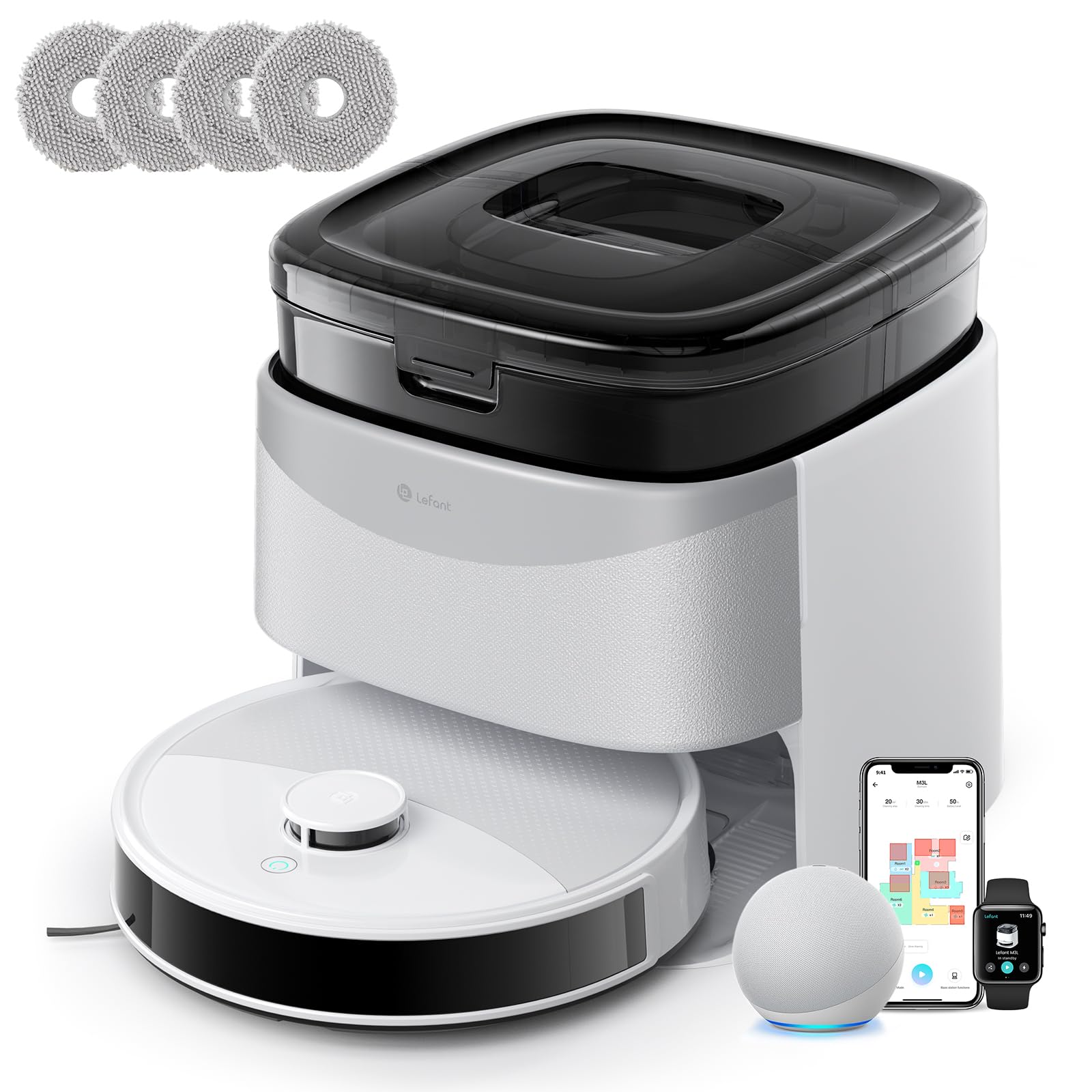
Image 1: Lefant M3L Robot Vacuum and Mop with its included accessories. This image shows the main unit, charging dock, power adapter, dustbin, water tank, mop pad, side brushes, and cleaning tool.
4. Pwodwi souview
4.1 Robot Top View
- Pouvwa/Pwòp bouton: Press to start/pause cleaning. Hold to power on/off.
- Limyè Endikatè: Shows battery status and working mode.
- Bouton pou lage fatra a: Press to remove the dustbin.
4.2 Robot Bottom View
- Bwòs bò yo: Ranmase pousyè ak debri sou kwen ak bor yo.
- Wou kondwi: Pèmèt robo a deplase sou divès sifas.
- Rou Inivèsèl: Provides 360-degree movement.
- Kontak chaje: Connect with the charging dock for power.
- Drop Sensors: Detekte kwen yo epi anpeche tonbe.
- Bwòs prensipal: Bwòs santral pou netwayaj pwofon.
- Water Tank/Mop Pad Slot: Area for attaching the water tank and mop pad.
4.3 Chaje Dock
- Endikatè chaje: Montre estati chaj la.
- Kontak chaje: Connect with the robot for power.
- Pouvwa Port: Konekte ak adaptè pouvwa a.
5. Gid Enstalasyon
5.1 Prepare Robo a
- Retire fim pwoteksyon yo: Remove all protective films from the robot and charging dock.
- Enstale bwòs bò yo: Press the side brushes onto the square posts at the bottom of the robot until they click into place. Ensure the 'L' and 'R' marks match.
- Install Dustbin: Open the top cover of the robot and insert the dustbin until it locks securely.

Image 2: Illustration of attaching the side brushes to the underside of the robot. Align the brush with the corresponding post and push until it clicks.
5.2 Positioning the Charging Dock
- Mete waf chaje a sou yon sifas ki di, plat, kont yon miray.
- Ensure there are no obstacles within 1 meter (3 feet) in front of the dock and 0.5 meters (1.5 feet) on either side.
- Connect the power adapter to the charging dock and plug it into a wall outlet. The indicator light on the dock will illuminate.

Image 3: Diagram showing the recommended clear space around the charging dock for optimal robot navigation.
5.3 Premye chaj
Place the robot onto the charging dock, ensuring the charging contacts on the robot align with those on the dock. The robot's indicator light will pulse during charging and turn solid when fully charged. For first-time use, charge the robot for at least 6 hours.
5.4 Connecting to the Lefant App
- Download the "Lefant" app from the App Store (iOS) or Google Play Store (Android).
- Anrejistre yon kont epi konekte.
- Tap "+" to add a device and select your Lefant M3L model.
- Follow the in-app instructions to connect the robot to your home Wi-Fi network (2.4GHz only).
- Once connected, you can control the robot, set schedules, and monitor cleaning status via the app.
6. Operasyon Enstriksyon
6.1 Kòmanse yon sik netwayaj
- Manyèl Kòmanse: Press the Power/Clean button on the robot once. The robot will automatically start cleaning in Auto mode.
- Kontwòl aplikasyon: Open the Lefant app, select your M3L robot, and tap "Start Cleaning".
- Kontwòl vwa: If integrated with a smart assistant (e.g., Alexa, Google Assistant), use voice commands like "Alexa, ask Lefant to start cleaning."
6.2 Mete yon poz/Rekòmanse netwayaj la
Press the Power/Clean button on the robot or use the app to pause a cleaning cycle. Press again to resume.
6.3 Returning to Charging Dock
The robot will automatically return to the charging dock when its battery is low or when a cleaning cycle is complete. You can also send it back manually via the app.
6.4 Using the Mopping Function
- Ranpli tank dlo: Open the water tank cover and fill it with clean water. Do not use cleaning solutions that are not approved by Lefant.
- Mete kousen mop la: Securely attach the mop pad to the bottom of the water tank.
- Enstale tank dlo a: Slide the filled water tank into the designated slot at the back of the robot until it clicks.
- Kòmanse yon sik netwayaj. Kounye a, robo a pral pase aspiratè epi pase mop an menm tan.

Image 4: Steps for filling the water tank and attaching the mop pad before inserting it into the robot.
Nòt: Remove the water tank before charging the robot or if it will be inactive for an extended period.
6.5 Cleaning Modes (via App)
- Oto Netwaye: The robot intelligently navigates and cleans your entire home.
- Netwaye tach: Netwaye yon zòn espesifik pi entans.
- Netwayaj kwen: Netwaye sou mi yo ak kwen mèb yo.
- Netwayaj Pwograme: Fikse lè espesifik pou robo a netwaye otomatikman.
7. Antretyen
Antretyen regilye asire pèfòmans optimal epi pwolonje lavi aspiratè robo ou a.
7.1 Cleaning the Dustbin and Filter (After each use)
- Peze bouton pou lage bwat pousyè a epi rale bwat pousyè a deyò.
- Louvri kouvèti bwat fatra a epi vide sa ki ladan l nan yon bwat fatra.
- Remove the HEPA filter and sponge filter. Tap them gently to remove dust. Do not wash the HEPA filter with water.
- Rinse the dustbin with water (ensure it's completely dry before reinstallation).
- Reassemble the filters and dustbin, then reinsert into the robot.

Image 5: Visual guide on how to remove, empty, and clean the dustbin and its filters.
7.2 Cleaning the Side Brushes (Weekly)
Remove the side brushes by pulling them upwards. Use the cleaning tool to remove any hair or debris tangled around them. Rinse with water if necessary and allow to air dry completely before reattaching.
7.3 Cleaning the Water Tank and Mop Pad (After each mopping session)
Empty any remaining water from the tank. Remove the mop pad and wash it by hand or machine. Allow both to air dry completely before storage or next use.
7.4 Cleaning Sensors and Charging Contacts (Monthly)
Wipe the drop sensors (on the bottom of the robot) and the charging contacts (on the robot and charging dock) with a clean, dry cloth. This ensures proper navigation and charging.

Imaj 6: Gwo plan view of the robot's underside, highlighting the locations of the drop sensors and charging contacts for cleaning.
NAN. Depanaj
| Pwoblèm | Kòz posib | Solisyon |
|---|---|---|
| Robo a pa limen. | Batri fèb; Entèriptè a etenn. | Charge the robot; Ensure the main power switch (usually on the side/bottom) is ON. |
| Robo a pa ka chaje. | Charging contacts dirty; Dock not powered; Robot not properly aligned. | Clean charging contacts; Check power adapter connection; Manually place robot on dock. |
| Robo a bloke souvan. | Too many obstacles; Loose cables; High thresholds. | Clear the cleaning area; Use virtual boundaries if available; Block off problematic areas. |
| Pòv pèfòmans netwayaj. | Dustbin full; Filters clogged; Side brushes worn. | Vide bwat pousyè a; Netwaye/ranplase filtè yo; Netwaye/ranplase bwòs bò yo. |
| Fonksyon mop la pa mache. | Water tank empty; Mop pad dirty/dry; Water outlet clogged. | Fill water tank; Clean/wet mop pad; Check water tank for blockages. |
| Pwoblèm koneksyon aplikasyon an. | Incorrect Wi-Fi password; Router too far; 5GHz Wi-Fi used. | Ensure 2.4GHz Wi-Fi; Re-enter password; Move robot closer to router; Restart router/robot. |
9. Espesifikasyon
| Karakteristik | Detay |
|---|---|
| Non modèl | M3L |
| Mak | Lefant |
| Dimansyon (L x W x H) | 32L x 32l x 9.7H centimeters |
| Pwa atik | 9.7 Kilogram |
| Kalite batri | Lityòm-ion |
| Kalite filtre | HEPA |
| Kalite kontwòl | Kontwòl App, Kontwòl Vwa |
| Karakteristik espesyal | Dry and Wet Cleaning, Carpet Cleaning |
| Sifas rekòmande | Hard floors, Wood floors, Tiles, Carpets |
| Faktè fòm | Round |
| Sous pouvwa | Batri Powered |
| Konpozan ki enkli | Mop head, Water tank |
10. Garanti ak Sipò Kliyan
Lefant products come with a standard manufacturer's warranty. For detailed warranty terms and conditions, please refer to the warranty card included in your package or visit the official Lefant websit.
If you encounter any issues or have questions regarding your Lefant M3L Robot Vacuum and Mop, please contact Lefant Customer Support. You can usually find contact information (email, phone, or online chat) on the official Lefant website or through the Lefant app.
Please have your model number (M3L) and purchase information ready when contacting support.