
1. Entwodiksyon
Welcome to the user manual for your SGIN Android Tablet 10.1 Inch, Model GE8300. This manual provides essential information for setting up, operating, maintaining, and troubleshooting your new tablet. Designed with children in mind, this tablet features a durable case, parental controls, and pre-installed educational content through Kidoz software. Please read this manual thoroughly to ensure proper use and to maximize your tablet's potential.
2. Pwodwi souview
The SGIN Android Tablet 10.1 Inch is equipped with a 10.1-inch HD IPS display, a quad-core processor, 4GB RAM, and 64GB of internal storage. It runs on Android 13 and includes a protective case with an adjustable bracket.
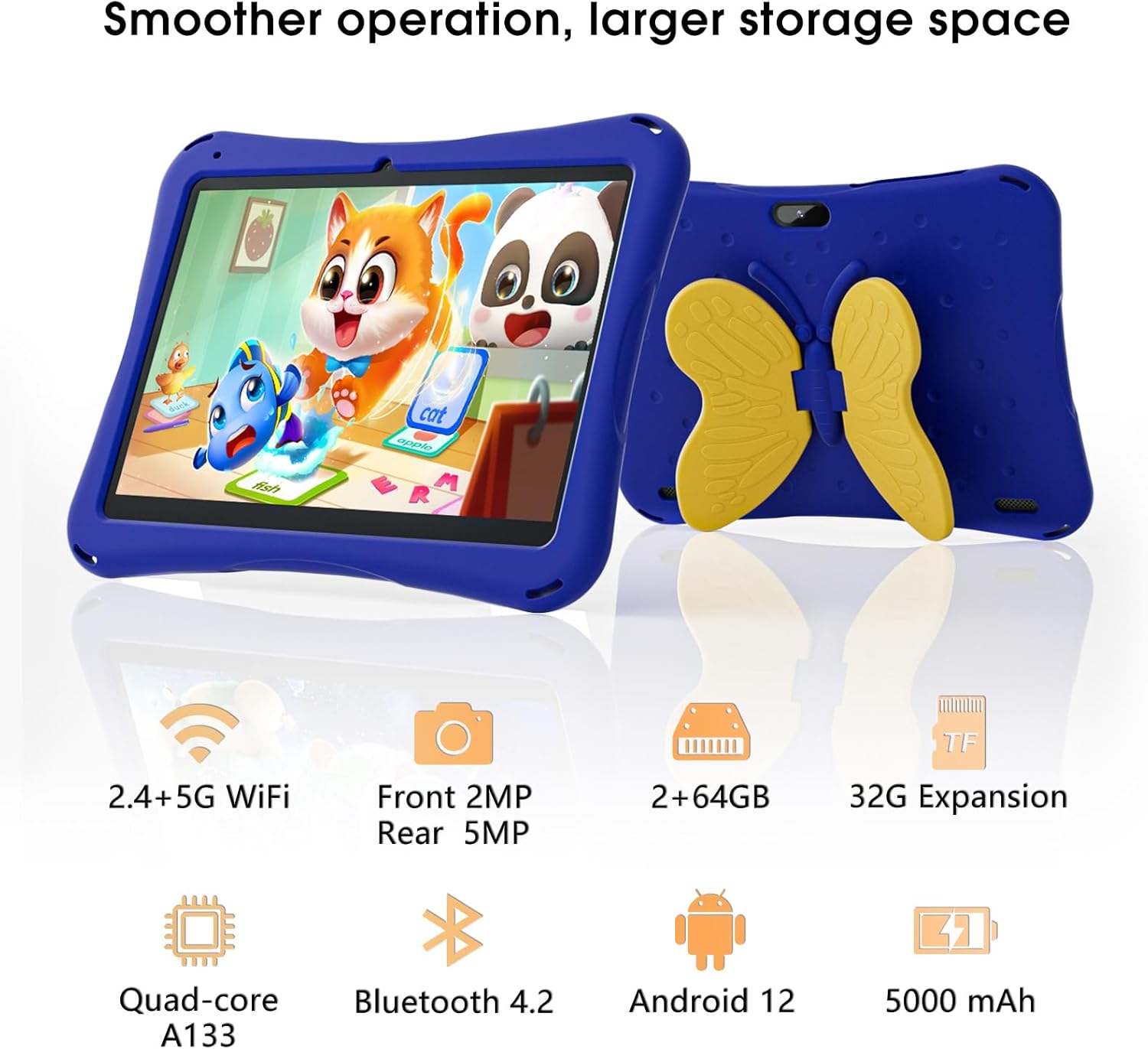
Image: SGIN Android Tablet 10.1 Inch with its protective blue case and yellow butterfly stand.
Konpozan tablèt

Image: Detailed diagram illustrating the various components and ports of the SGIN Android Tablet.
- Kamera devan: Pou apèl videyo ak selfie.
- Kamera dèyè: Pou pran foto ak videyo.
- Oratè: Pou pwodiksyon odyo.
- Kalite-C Port: Pou chaje ak transfè done.
- TF Kat plas: Pou depo ki ka elaji.
- Kas ekoutè Jack: Pou konekte kas ekoutè ak fil.
- Ogmante Volim: Button to raise the audio level.
- Diminye Volim: Button to lower the audio level.
- Support: Adjustable stand integrated into the protective case.
3. Enstalasyon
3.1 Chaje tablèt la
Before first use, fully charge the tablet using the provided Type-C cable and power adapter. The 5000mAh battery provides approximately 6-8 hours of usage on a full charge. A charging indicator will typically appear on the screen.
3.2 Limen/Etenyen
- Pou limen: Press and hold the power button (usually located on the side) until the SGIN logo appears.
- Pou etenn: Press and hold the power button, then select 'Power Off' from the options on the screen.
- Pou rekòmanse: Press and hold the power button, then select 'Restart' from the options.
3.3 Premye Enstalasyon ak Koneksyon Wi-Fi
Upon first power-on, follow the on-screen prompts to complete the initial Android 13 setup. This includes selecting your language, region, and connecting to a Wi-Fi network. The tablet supports both 2.4G and 5G Wi-Fi for stable internet connectivity.
- Ale nan Anviwònman > Rezo ak entènèt > Wi-Fi.
- Aktive Wi-Fi a On.
- Chwazi rezo ou vle a nan lis la.
- Antre modpas la si yo mande w, epi tape Konekte.
4. Operasyon Enstriksyon
4.1 Navigasyon debaz
The tablet uses a touch-sensitive screen for navigation. Common gestures include tapping to select, swiping to scroll, pinching to zoom, and long-pressing for additional options.
4.2 Itilizasyon Kamera
The tablet features a 2MP front-facing camera and a 5MP rear camera. To use the camera:
- Louvri a Kamera aplikasyon.
- Select between front and rear cameras using the switch icon.
- Tape bouton deklanchè a pou pran yon foto oswa pou kòmanse/sispann anrejistreman videyo.
4.3 Jesyon Depo
The tablet comes with 64GB of internal storage. If more space is needed, you can expand it by inserting a TF (microSD) card into the TF card slot. The tablet supports expansion up to 34GB.
4.4 Koneksyon Bluetooth
The tablet supports Bluetooth 4.2 for connecting to wireless accessories such as headphones or speakers.
- Ale nan Anviwònman > Aparèy ki konekte > Preferans koneksyon > Bluetooth.
- Aktive Bluetooth On.
- Chwazi aparèy ou an nan lis aparèy ki disponib pou konekte.
5. Parental Control Features
The SGIN tablet includes a built-in parental control security system to manage your child's usage and content access.
- Mete modpas: Create a password to secure parental control settings.
- Limit Tan Devan Ekran: Define daily usage limits for the tablet.
- Filtrage kontni: Eliminate unwanted ads and create specific media files or approved websites for your children.
- Plizyè Kont: Set up individual accounts for each child, allowing personalized settings and content access.
6. Kidoz Kids Software
The tablet comes with the Kidoz Kid's software pre-installed, offering a safe and engaging environment for children.
- Accessing Kidoz: Launch the Kidoz app from the home screen.
- Kids Store: Explore thousands of free games and educational apps available for download within the Kidoz environment.
- Kontni edikatif: Kidoz provides content that supports learning in subjects like math, language, music, and painting.
7. Antretyen
7.1 Netwayaj
Use a soft, lint-free cloth to clean the screen and the tablet's body. For stubborn smudges, slightly dampRense twal la avèk dlo. Evite pwodui chimik ki agresif oswa materyèl abrazif.
7.2 Swen Batri
To prolong battery life, avoid exposing the tablet to extreme temperatures. Charge the tablet regularly and avoid letting the battery completely drain frequently.
7.3 Mizajou lojisyèl
Tcheke regilyèman pou wè si sistèm nan ap fonksyone byen pou asire pi bon pèfòmans ak sekirite. Ale nan Anviwònman > Sistèm > Aktyalizasyon sistèm lan.
7.4 Ka Pwoteksyon
The included kid-proof case is designed to protect the tablet from dust, bumps, and drops. It also features a hollow design for heat dissipation. Ensure the tablet is properly seated within the case for maximum protection.

Image: The durable anti-drop protective case with its adjustable bracket.
NAN. Depanaj
If you encounter issues with your SGIN tablet, refer to the following common solutions:
- Tablèt pa limen: Ensure the tablet is charged. Connect it to the charger and wait a few minutes before attempting to power it on again.
- Ekran ki pa reponn: If the screen becomes unresponsive, try restarting the tablet by holding down the power button for approximately 10-15 seconds until it powers off, then power it on normally.
- Pwoblèm koneksyon Wi-Fi: Check if other devices can connect to the Wi-Fi network. Restart your Wi-Fi router. On the tablet, forget the network and reconnect.
- Pèfòmans Ralanti: Close unused applications running in the background. Clear cache data for apps. Consider performing a factory reset if performance issues persist (back up important data first).
- Aplikasyon k ap kraze: Ensure apps are updated to their latest versions. Clear the app's cache and data via Anviwònman > Aplikasyon yo > [Non Aplikasyon an] > Depo ak kach.
Pou pwoblèm ou pa rezoud ak etap sa yo, tanpri kontakte sèvis kliyan.
9. Espesifikasyon
Key technical specifications for the SGIN Android Tablet 10.1 Inch Model GE8300:
| Karakteristik | Spesifikasyon |
|---|---|
| Nimewo Modèl | GE8300 |
| Gwosè ekran | 10.1 pous |
| Rezolisyon ekspozisyon | 1280 x 800 piksèl (HD IPS) |
| Processeur | 1.6 GHz Quad-core (Allwinner A133) |
| RAM | 4GB (2GB fizik + 2GB ekspansyonab) |
| Depo Entèn | 64GB ROM |
| Depo dilatabl | Up to 34GB via TF Card |
| Sistèm operasyon | Android 13 |
| Kapasite batri | 5000mAh |
| Kamera devan | 2MP |
| Kamera dèyè | 5MP |
| Koneksyon san fil | 2.4G/5G WiFi, Bluetooth 4.2 |
| Koulè | Deep Blue |
| Dimansyon pasèl | 32.2 x 20.4 x 4.7 cm; 1.04 kg |
10. Garanti ak sipò
10.1 Pwodwi Garanti
The SGIN Android Tablet 10.1 Inch Model GE8300 comes with a 1-ane garanti apati dat acha a. Garanti sa a kouvri domaj fabrikasyon anba itilizasyon nòmal. Tanpri konsève prèv acha ou pou reklamasyon garanti.
10.2 Sipò pou Kliyan
If you require further assistance or have questions not covered in this manual, please contact SGIN customer support. Refer to the product packaging or the official SGIN websit la pou jwenn enfòmasyon kontak ki pi resan yo.