
1. Entwodiksyon
The DOOGEE Note56X Pro is an Android 16 smartphone designed for optimal performance and user experience. It features a sleek design, a powerful octa-core processor, a high-capacity battery, and advanced camera capabilities. This manual provides essential information for setting up, operating, and maintaining your device.

This image displays the DOOGEE Note56X Pro smartphone in light blue and black, showcasing pwofesyonèl elegant li yofile and key features such as its 8.45mm ultra-thin design, 6150mAh silicon-carbon battery, integrated Gemini AI with Android 16, 128GB expandable ROM, and a 6.56-inch HD+ 90Hz display.
2. Ki sa ki nan bwat la
Verifye ke tout atik yo prezan nan anbalaj pwodwi ou a:
- 1 x DOOGEE Note56X Pro Smartphone
- 1 x kab chaje
- 1 x Chargeur
- 1 x pwotèj ekran (pre-aplike)
- 1 x SIM Card Ejection Tool
- 1 x ka pwoteksyon
- 1 x bwat anbalaj
- 1 x manyèl itilizatè
- XNX x Kat Sèvis
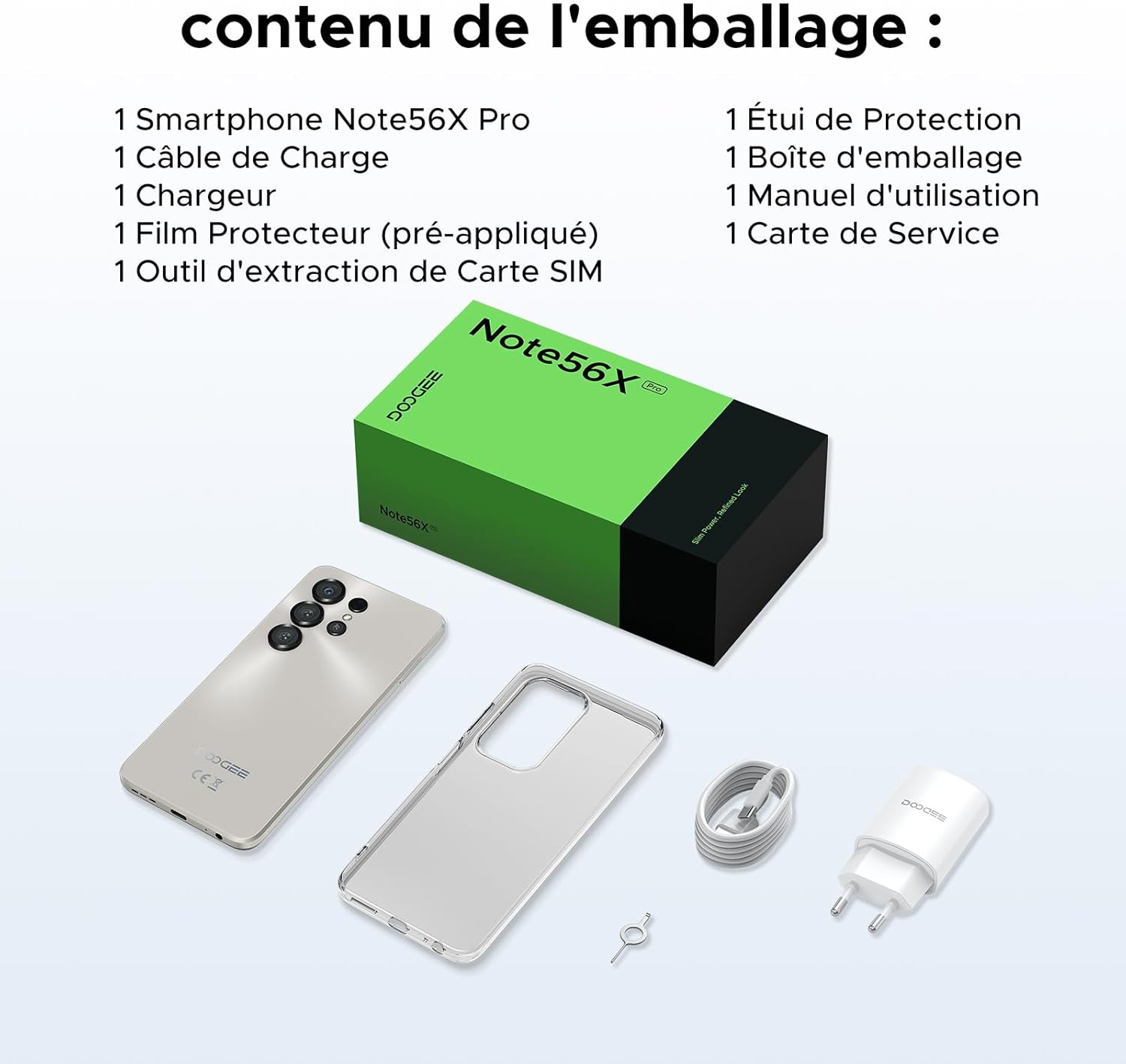
This image shows the contents included in the DOOGEE Note56X Pro packaging: the smartphone, a charging cable, a charger, a pre-applied screen protector, a SIM card ejection tool, a protective case, the packaging box, a user manual, and a service card.
3. Kòmanse
3.1. Mete kat SIM
The DOOGEE Note56X Pro supports Dual SIM functionality. To insert your SIM card(s):
- Jwenn plato kat SIM lan sou bò aparèy la.
- Use the provided SIM ejection tool to open the tray.
- Mete kat Nano-SIM ou yo ak/oswa kat microSD ou yo nan plato a ak kontak lò yo anba.
- Pouse plato a tounen nan fant lan avèk anpil atansyon jiskaske li aliyen ak aparèy la.
3.2. Powering On / Off
- Pou limen: Peze epi kenbe bouton Power la jiskaske logo DOOGEE a parèt.
- Pou etenn: Peze epi kenbe bouton pouvwa a jiskaske opsyon pouvwa yo parèt sou ekran an, answit chwazi "Etenn".
- Pou rekòmanse: Peze epi kenbe bouton pouvwa a jiskaske opsyon pouvwa yo parèt, answit chwazi "Rekòmanse".
3.3. Inisyal Enstalasyon
Lè w limen aparèy la pou premye fwa, swiv enstriksyon ki parèt sou ekran an pou w konplete premye konfigirasyon an:
- Chwazi lang ou.
- Konekte nan yon rezo Wi-Fi.
- Konekte avèk kont Google ou a oubyen kreye yon nouvo.
- Set up screen lock (PIN, pattern, password, fingerprint, or Face ID).
- Review epi aksepte tèm ak kondisyon yo.
4. Opere aparèy ou an
4.1. Montre
The Note56X Pro features a 6.56-inch HD+ IPS Waterdrop display with a 90Hz refresh rate, offering smooth visuals and vibrant colors. The 90% screen-to-body ratio provides an immersive vieweksperyans nan.

This graphic highlights the display features of the DOOGEE Note56X Pro, including a 90Hz refresh rate for smooth visuals, support for 16.7 million colors, and a 90% screen-to-body ratio for an immersive vieweksperyans nan.
A brief video demonstrating the smooth gaming experience on the DOOGEE Note56X Pro's 6.56-inch HD+ 90Hz display, showing responsive gameplay.
4.2. Pèfòmans
Powered by an UNISOC T7225 Octa-Core processor, the Note56X Pro ensures fluid multitasking and efficient application launch. It comes with 32GB of RAM (4GB physical + 28GB virtual) and 128GB of internal storage, expandable up to 2TB via a TF card (sold separately).

This image presents a technical diagram of the UNISOC T7225 Octa-Core processor, highlighting its 1.8 GHz high frequency and Mali G57 ARM GPU, ensuring smooth performance for web browsing, online learning, and chats.

This graphic illustrates the memory configuration of the DOOGEE Note56X Pro, featuring 32GB RAM (4GB physical + 28GB virtual) and 128GB ROM, expandable up to 2TB with a TF card (sold separately), providing ampespas pou aplikasyon ak medya.
A short video highlighting the internal components of the DOOGEE Note56X Pro, specifically the Octa-Core UNISOC T7225 processor and the 32GB RAM (4GB + 28GB virtual) and 128GB ROM configuration.
4.3. Batri
Equipped with a 6150mAh Silicon-Carbon battery, the Note56X Pro offers extended usage time and supports 5W reverse charging. The battery is designed for durability, with up to 1000 charge/discharge cycles and an estimated 4-year lifespan.

A detailed diagram showing the internal structure of the 6150mAh Silicon-Carbon battery within the DOOGEE Note56X Pro, emphasizing its extended endurance, 1000 charge/discharge cycles, 4-year lifespan, 20% reduced size, and 5W reverse charging capability.
Yon ti prezantasyon videyoasing the sleek design, vertical lens arrangement, ultra-thin 8.45mm body, lightweight 195g build, and available colors (Midnight Black, Glacier Blue, Titanium Grey Mist) of the DOOGEE Note56X Pro.
4.4. Kamera
Capture clear and vibrant photos with the Note56X Pro's camera system:
- Kamera prensipal: 13MP with AI recognition, HDR, Pro Mode, Smile Capture, Panoramas, Burst Mode, Night Mode, and Fun Filters.
- Kamera devan: 8MP with Beauty Mode and Portrait Mode for natural selfies.

This graphic highlights the features of the 13MP main camera on the DOOGEE Note56X Pro, including AI recognition, HDR, Pro Mode, Smile Capture, Panoramas, Burst Mode, Night Mode, and Fun Filters, illustrated with a landscape photo taken by the phone.

This image showcases the 8MP front camera features of the DOOGEE Note56X Pro, including Beauty Mode and Portrait Mode, designed to simplify photography and produce bright, natural selfies.

This graphic details the intelligent features of the Google Smart Camera on the DOOGEE Note56X Pro, such as displaying search results, text extraction and translation, homework analysis, plant and animal identification, and online search capabilities.
4.5. Koneksyon
The device supports 4G cellular networks, Wi-Fi, Bluetooth 5.0, and NFC for secure contactless payments. It also includes GPS for precise navigation and OTG functionality for connecting external devices.
4.6. Karakteristik sekirite
The Note56X Pro offers multiple security options to protect your data:
- ID figi: Unlock your phone using facial recognition.
- Rekonesans anprent: Yon detèktè anprent dijital ki monte sou bò a bay aksè rapid e an sekirite.
- Opsyon PIN estanda, Modèl, ak Modpas disponib tou.
4.7. Operating System and AI
Running on Android 16, the Note56X Pro provides an intuitive and secure user experience. It integrates Google Gemini AI, offering intelligent assistance for various tasks.

A visual representation of the Android 16 operating system interface on the DOOGEE Note56X Pro, showcasing various application icons and a clean, intuitive user experience.

This image shows the Google Gemini AI chat interface on the DOOGEE Note56X Pro, demonstrating its capability for planning vacations, discussing current events, and practicing interview kesyon.
5. Espesifikasyon
| Karakteristik | Spesifikasyon |
|---|---|
| Mak | DOOGEE |
| Non modèl | Note56X Pro |
| Sistèm operasyon | Android 16 |
| Gwosè ekran | 6.56 pous |
| Rezolisyon ekran | 720 x 1612 |
| Rafrechisman pousantaj | 90 Hz |
| Processeur | UNISOC T7225 Octa-Core |
| Gwosè RAM enstale a | 32 GB (4GB fizik + 28GB vityèl) |
| Kapasite Depo memwa | 128 GB (Ekspansib jiska 2TB) |
| Kalite batri | Lityòm-polymère |
| Kapasite batri | 6150 mAh |
| Teknoloji selilè | 4G |
| Wireless Carrier | All carriers (Unlocked) |
| Koneksyon | Wi-Fi, Bluetooth 5.0, NFC |
| Karakteristik espesyal | Dual SIM, Integrated GPS, USB OTG Support, Face ID, Fingerprint Recognition |
| Audio Jack | 3.5 mm |
| Dimansyon (Epesè) | 8.45 mm |
| Pwa | 195 g |

Yon bò view of the DOOGEE Note56X Pro, emphasizing its ultra-thin 8.45mm profile and lightweight 195g construction, designed for easy portability and comfortable handling throughout the day.

This image displays the DOOGEE Note56X Pro in its available elegant colors: Midnight Black, Titanium Grey Mist, and Glacier Blue, showcasing the aesthetic options for the device.
6. Antretyen
To ensure the longevity and optimal performance of your DOOGEE Note56X Pro, follow these maintenance guidelines:
- Netwayaj: Sèvi ak yon twal mou ki pa gen pousyè pou netwaye ekran an ak kò a. Evite materyèl abrazif oswa pwodui chimik ki agresif.
- Mizajou lojisyèl: Tcheke epi enstale mizajou sistèm yo regilyèman pou benefisye de dènye karakteristik yo, patch sekirite yo, ak amelyorasyon pèfòmans yo. Ale nan Anviwònman > Sistèm > Mizajou sistèm.
- Swen batri: Avoid extreme temperatures. Do not let the battery completely drain frequently. Use the original charger for optimal charging.
- Jesyon Depo: Netwaye sa ki pa nesesè detanzantan files and uninstall unused apps to free up storage space and maintain device speed.
- Pwoteksyon: Use the provided protective case and screen protector to guard against scratches and minor impacts.
NAN. Depanaj
If you encounter issues with your DOOGEE Note56X Pro, try the following solutions:
- Aparèy pa Limen: Asire w batri a chaje. Konekte chajè a epi tann kèk minit anvan ou eseye limen l ankò.
- Ekran an pa reponn: Fòse rekòmanse aparèy la lè w peze epi kenbe bouton Pouvwa a pandan apeprè 10-15 segonn.
- Aplikasyon k ap plante/bloke: Efase kach aplikasyon ki gen pwoblèm nan (Anviwònman > Aplikasyon > [Non aplikasyon an] > Depo ak kach > Efase kach). Si pwoblèm nan pèsiste, dezenstale epi enstale aplikasyon an ankò.
- Pòv lavi batri: Tcheke itilizasyon aplikasyon an nan background nan (Anviwònman> Batri). Reduce screen brightness, disable unused features like Wi-Fi, Bluetooth, GPS when not needed.
- Pwoblèm koneksyon rezo: Aktive epi dezaktive Mòd Avyon an. Rekòmanse aparèy la. Tcheke si kat SIM nan antre. Reyajiste paramèt rezo yo (Anviwònman > Sistèm > Opsyon Reyajiste > Reyajiste Wi-Fi, mobil ak Bluetooth).
- Fingerprint/Face ID Not Working: Ensure your fingers are clean and dry for fingerprint scanning. For Face ID, ensure adequate lighting and that your face is clearly visible to the front camera. Re-register your fingerprint or face if necessary.
- Pèfòmans Ralanti: Close unused background apps. Clear cache and temporary files. Consider a factory reset as a last resort (Anviwònman> Sistèm> Opsyon Reyajiste> Efase tout done (reset faktori) - Nòt: Sa ap efase tout done ki sou telefòn ou an. Fè yon kopi enfòmasyon enpòtan yo anvan.).
8. Garanti ak sipò
Your DOOGEE Note56X Pro comes with a 24-month warranty and a 30-day return policy. For any questions or assistance, please contact DOOGEE customer service via Amazon. Our dedicated support team is available to help you.

This image displays DOOGEE's customer service commitments: a 30-day money-back and free return guarantee, a 2-year limited warranty, and 24/7 online individual assistance.