
1. Pwodwi souview
The DOOGEE Note 56 is a modern smartphone designed for daily use, featuring a powerful Octa-Core processor, a large 6150 mAh battery, and a vibrant 6.56-inch HD+ display with a 90 Hz refresh rate. This manual provides essential information for setting up, operating, and maintaining your device.

Figi 1.1: Devan ak dèyè view of the DOOGEE Note 56, showcasing its sleek design and camera setup.
2. Ki sa ki nan bwat la
- DOOGEE Note 56 Smartphone
- Adaptè pouvwa
- USB kab
- Zouti èkstrè SIM
- Gid Quick Start
- Ka pwoteksyon (ka varye selon rejyon an)
- Pwotektè ekran (pre-aplike oswa enkli)
3. Enstalasyon
3.1 Mete kat SIM ak kat MicroSD
The DOOGEE Note 56 supports Dual SIM functionality and MicroSD card expansion up to 2TB. Follow these steps to insert your cards:
- Etenn telefòn ou.
- Jwenn plato kat SIM lan sou bò aparèy la.
- Mete zouti pou retire kat SIM lan nan ti twou ki akote plato a epi pouse dousman jiskaske plato a soti.
- Mete kat Nano-SIM ou yo ak/oswa kat MicroSD ou yo nan fant ki deziyen pou yo sou plato a. Asire w ke yo byen oryante.
- Pouse plato a tounen nan telefòn nan ak anpil atansyon jiskaske li fè yon klik.
3.2 Powering On/Off and Initial Setup
To power on your device, press and hold the Power button until the DOOGEE logo appears. To power off, press and hold the Power button, then select 'Power off' from the options. On first use, follow the on-screen instructions to set up your language, Wi-Fi, Google account, and security features.
4. Opere aparèy ou an
4.1 Navigasyon debaz
The DOOGEE Note 56 runs on Android 16, offering an intuitive user interface. Use gestures or the navigation bar at the bottom of the screen to navigate:
- Kay: Swipe up from the bottom or tap the Home button to return to the home screen.
- Retounen: Swipe from the left or right edge, or tap the Back button to go back to the previous screen.
- Aplikasyon ki sot pase yo: Swipe up and hold from the bottom, or tap the Recent Apps button to view epi chanje ant aplikasyon ki louvri yo.
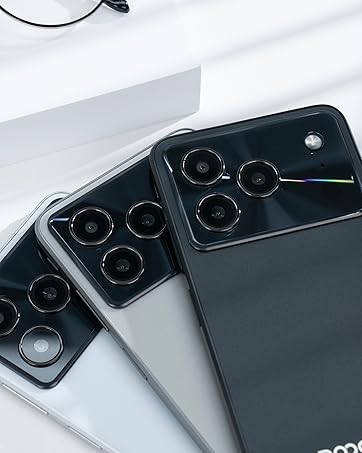
Figure 4.1: Android 16 operating system interface on the DOOGEE Note 56.
4.2 Apèl ak Mesaj
To make a call, open the Phone app, enter the number, and tap the call icon. For messaging, open the Messages app, select a contact or start a new conversation, type your message, and send.
4.3 Fonksyon Kamera
The DOOGEE Note 56 features an 8 MP rear camera and a 5 MP front camera. Open the Camera app to access various modes such as Photo, Video, Portrait, and more. Tap the shutter button to capture photos or start/stop video recording.

Figure 4.2: Camera features and AI scene recognition.
4.4 Anviwònman ekspozisyon
Customize your 6.56-inch HD+ 90 Hz IPS display by going to Anviwònman > Display. Here you can adjust brightness, dark mode, screen timeout, and refresh rate for a smoother visual experience.

Figure 4.3: The 90 Hz HD+ display provides smooth visuals.
5. Depo ak Pèfòmans
The DOOGEE Note 56 is equipped with 24GB RAM (3GB physical + 21GB virtual) and 64GB of internal storage, expandable up to 2TB via a MicroSD card (sold separately). This configuration ensures smooth multitasking and ampespas pou aplikasyon, foto ak videyo ou yo.
Figure 5.1: Memory configuration of the DOOGEE Note 56.
6. Konektivite ak Sekirite
6.1 Koneksyon Rezo
The device supports 4G LTE for fast mobile data. Ensure your SIM cards are active and correctly inserted. For Wi-Fi, go to Anviwònman > Rezo ak entènèt > Wi-Fi and connect to your preferred network.

Figure 6.1: Supported network connections for the DOOGEE Note 56.
6.2 figi ID
Unlock your phone quickly and securely using Face ID. To set it up, go to Anviwònman > Sekirite > Debloke figi epi swiv enstriksyon ki sou ekran an pou anrejistre figi ou.
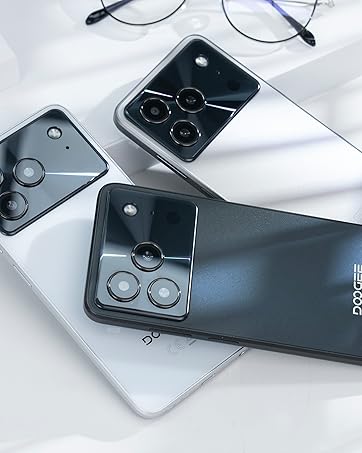
Figure 6.2: Instant facial recognition for unlocking.
6.3 OTG and GPS
The device supports OTG (On-The-Go) for connecting USB accessories like flash drives. GPS functionality provides accurate location services for navigation and location-based apps.
7. Jesyon batri
The DOOGEE Note 56 is equipped with a 6150 mAh silicon-carbon battery, offering extended usage. It supports 10W fast charging. To optimize battery life:
- Ajiste klète ekran an.
- Fèmen aplikasyon ki pa itilize yo kouri nan background nan.
- Aktive mòd ekonomize batri a lè sa nesesè.
- Evite tanperati ekstrèm.
Figure 7.1: The 6150 mAh battery provides long-lasting power.

Figure 7.2: Estimated usage times on a single charge.
8. Antretyen
8.1 Mizajou lojisyèl
Tcheke regilyèman pou wè si gen mizajou lojisyèl pou asire aparèy ou an gen dènye fonksyonalite ak patch sekirite yo. Ale nan Anviwònman > Sistèm > Mizajou sistèm pou tcheke epi enstale mizajou yo.
8.2 Netwaye aparèy ou an
Sèvi ak yon twal mou ki pa gen pousyè pou netwaye ekran ak kò telefòn ou an. Evite itilize pwodui chimik ki agresif oswa materyèl abrazif.
NAN. Depanaj
9.1 Pwoblèm komen ak solisyon
- Telefòn nan pa limen: Asire w batri a chaje. Konekte l nan plato a pou omwen 10 minit, epi eseye limen l.
- Aplikasyon k ap kraze: Clear the cache of the problematic app (Settings > Apps > [App Name] > Storage & cache > Clear cache). If the issue persists, reinstall the app.
- Pòv lavi batri: Review Section 7 for battery optimization tips.
- Pwoblèm koneksyon rezo: Check if SIM cards are properly inserted. Restart the phone. Verify network settings in Settings > Network & internet.
10. Espesifikasyon
| Karakteristik | Spesifikasyon |
|---|---|
| Modèl | REMAK 56 |
| Sistèm operasyon | Android 16 |
| Ekspozisyon | 6.56-inch HD+ IPS, 90 Hz |
| Processeur | Octa-Nwayo |
| RAM | 24 GB (3GB + 21GB vityèl) |
| Depo Entèn | 64 GB |
| Depo dilatabl | Up to 2 TB MicroSD |
| Kamera dèyè | 8 MP |
| Kamera devan | 5 MP |
| Kapasite batri | 6150 mAh |
| Chaje | 10W vit chaje |
| Dimansyon | 8.45 mm epesè |
| Pwa | 262 g |
| Koneksyon | 4G, Dual SIM, Wi-Fi, Bluetooth, GPS, OTG |
| Sekirite | figi ID |
11. Videyo pwodwi ofisyèl yo
Video 11.1: DOOGEE Note 56 Plus Smartphone Overview. This video highlights the ultra-thin design, camera features, and overall elegance of the Note 56 Plus, which shares many characteristics with the Note 56 model.
Video 11.2: DOOGEE Note 56 Plus Ultra-thin Smartphone. This video focuses on the slim profile and aesthetic appeal of the Note 56 Plus, demonstrating its comfortable handling and modern look.
12. Garanti ak sipò
Your DOOGEE Note 56 smartphone comes with a limited warranty. Please refer to the warranty card included in your product packaging for specific terms and conditions. For technical support or service inquiries, please visit the official DOOGEE websit oswa kontakte sèvis kliyan yo.
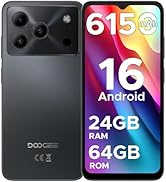
Figure 12.1: DOOGEE customer service details, including warranty and support options.