
1. Entwodiksyon
Thank you for choosing the MERCUSYS MC510 2K 3MP Outdoor WiFi Camera. This manual provides detailed instructions for the installation, operation, and maintenance of your security camera. Please read this manual carefully before use to ensure proper functionality and safety. The MC510 offers 2K 3MP resolution, 360-degree panoramic view, color night vision, two-way audio, smart motion detection, and IP65 weather resistance for reliable outdoor surveillance.

Image: MERCUSYS MC510 2K Pan/Tilt Wi-Fi Camera mounted on a wall, highlighting its 2K resolution and IP65 weather resistance.
2. Enfòmasyon sou Sekirite
- Ensure the power adapter is suitable for your local power supply.
- Pa ekspoze kamera a nan tanperati ekstrèm, imidite, oswa anviwònman koroziv.
- Evite mete kamera a toupre chan mayetik ki fò.
- Kenbe kamera a ak akseswa li yo lwen timoun yo.
- Sèlman sèvi ak akseswa espesifye pa manifakti a.
- Dekonekte kouran an anvan ou netwaye oswa fè antretyen.
- The camera is IP65 rated for outdoor use, but avoid submerging it in water.
3. Pake kontni
Verifye ke tout atik yo prezan nan pakè ou a:
- MC510 Camera × 1
- Pouvwa adaptè × 1
- Mounting Sticker × 1
- Mounting Support × 1
- Mounting Screws × 4 + Bracket Screws × 2
- Montaj lank × 4
- Waterproof Gasket × 1
- Gid Quick Start
4. Pwodwi souview
The MERCUSYS MC510 is a versatile outdoor security camera designed to provide comprehensive surveillance with advanced features.
Karakteristik kle:
- 2K QHD with 360° View: Provides clear 2K 3MP video and full 360° horizontal coverage to see every corner and detail.
- Smart Motion Detection and Person Tracking: Automatically detects and tracks motion or people, ensuring key activities remain in focus.
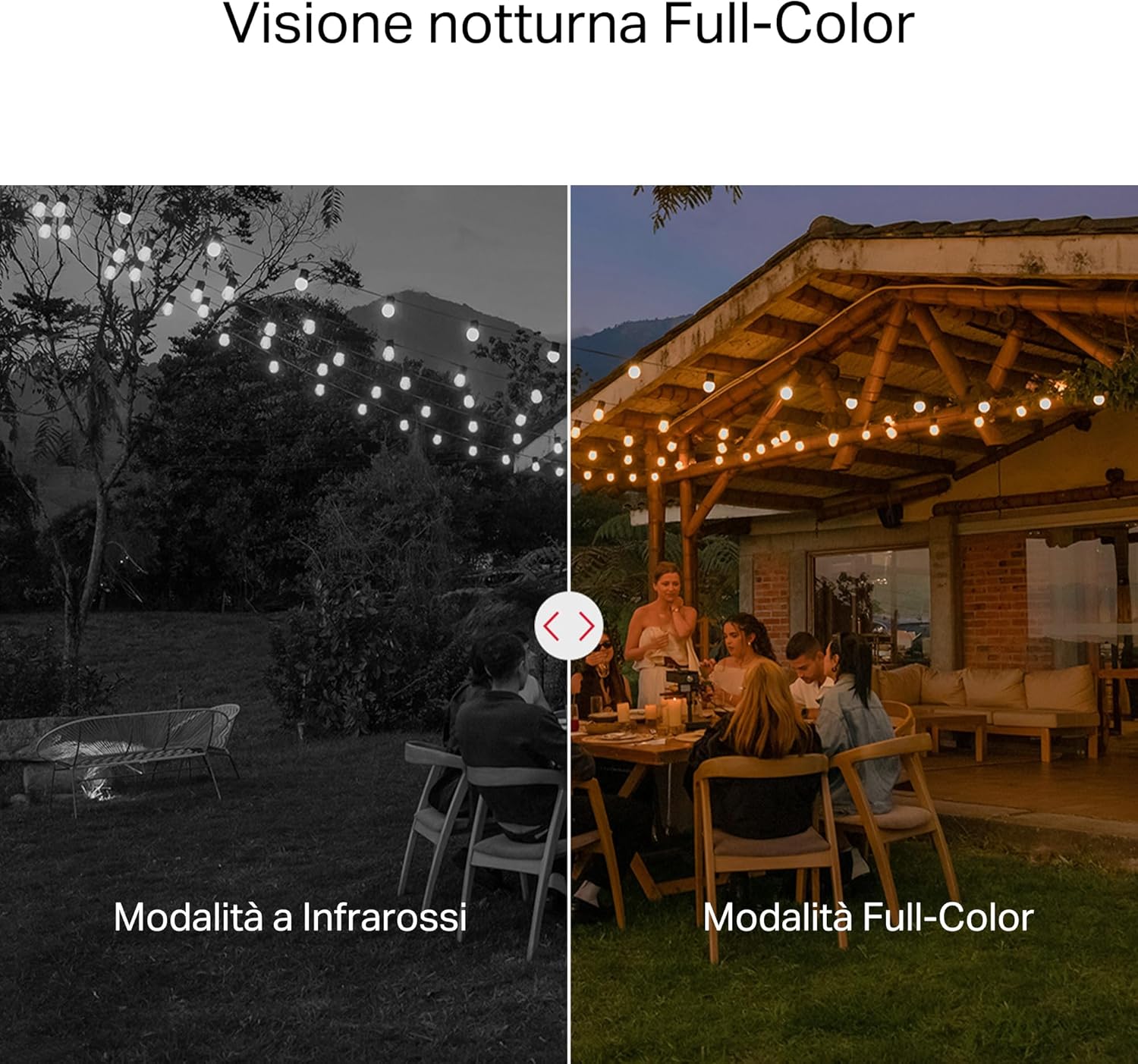
- Vizyon lannwit koulè: Provides vivid and detailed images even at night for 24/7 protection.
- Customizable Activity Zones: Helps filter out irrelevant events and sends alerts only when necessary.
- Depo lokal ak nwaj: Supports microSD cards up to 512GB and cloud storage for secure and flexible video backup.
- Weatherproof for Outdoor Use: IP65 certified for reliable performance in rain, dust, or snow. Easily mounts on walls, ceilings, or poles.
- Privacy Protection with Lens Shield: Activate the physical lens cover when surveillance is not needed for greater peace of mind at home.
- De-fason Audio: Kominike dirèkteman atravè kamera a.
Karakteristik vizyèl:

High-resolution 2K 3MP video capture.
360-degree panoramic rotation for full coverage.
Full-Color Night Vision for clear images in low light.

Physical lens shield for enhanced privacy.
5. Enstalasyon
5.1 Enstalasyon Fizik
The MC510 camera is designed for outdoor use and can be mounted on walls, ceilings, or poles. Its IP65 rating ensures protection against dust and water jets.
- Chwazi yon kote: Chwazi yon bon kote deyò ki bay sa ou vle a viewang ing epi li gen yon siyal Wi-Fi ki estab.
- Montaj: Use the provided mounting sticker to mark drill holes. Drill holes, insert anchors, and secure the mounting bracket with screws. Attach the camera to the bracket.
- Koneksyon pouvwa: Connect the power adapter to the camera and plug it into a power outlet. Ensure the waterproof gasket is properly installed for outdoor power connections.

Image: The camera is shown mounted outdoors, demonstrating its weather-resistant design.
5.2 Enstalasyon ak Koneksyon Aplikasyon an
The MC510 connects exclusively via Wi-Fi. An Ethernet port is not available.
- Telechaje App a: Download the official MERCUSYS app from your smartphone's app store (iOS or Android).
- Kreye kont: Louvri app a epi kreye yon nouvo kont oswa konekte si ou deja genyen youn.
- Ajoute kamera: Follow the in-app instructions to add your MC510 camera. This typically involves scanning a QR code on the camera and connecting it to your home Wi-Fi network.
5.3 Enstalasyon Kat MicroSD
For local storage, install a microSD card (up to 512GB, not included).
- Pouvwa Off: Disconnect the camera from power before inserting or removing the microSD card.
- Jwenn plas la: Refer to the camera's physical design to locate the microSD card slot, often protected by a cover.
- Mete kat: Dousman mete kat microSD la nan plas la jiskaske li klike sou plas li.
- Fòma Kat: After powering on the camera and connecting it to the app, navigate to the camera settings to format the microSD card.

Image: Close-up of the camera showing the microSD card slot, indicating flexible storage options.
6. Operasyon Enstriksyon
6.1 Viv View & Lèktur
- Viv View: Open the MERCUSYS app and select your MC510 camera to view manje a ap viv.
- Kontwòl Pan/Tilt: Use the controls in the app to remotely rotate the camera horizontally (pan) and vertically (tilt) to adjust the viewang ang.
- Lektur: Aksè anrejistre footage from the app's playback section. You can filter by date and event.

Image: Illustration of 360-degree rotation with motion tracking.
6.2 Deteksyon Mouvman ak Suivi
- Aktive Deteksyon: In the app settings, enable motion detection and person tracking.
- Customize Activity Zones: Defini zòn espesifik nan kamera a view where you want motion to be detected. This helps reduce false alarms.
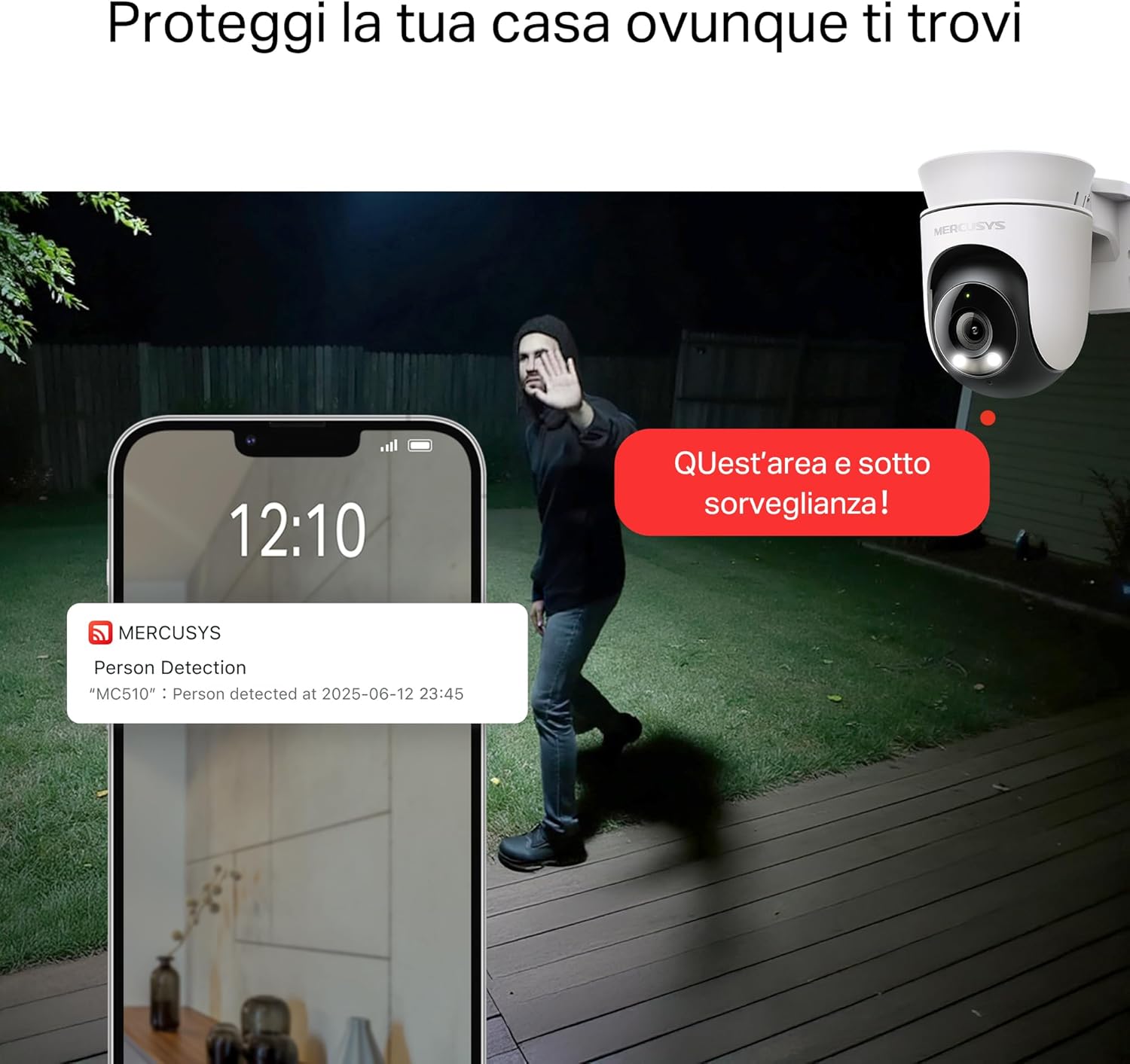
- Resevwa Alèt: The camera will send notifications to your smartphone when motion or a person is detected in the monitored zones.

Image: A person running in a yard, with detection boxes, demonstrating motion detection and tracking.
6.3 Odyo De-fason
Mikwofòn ak oratè entegre a pèmèt kominikasyon bidireksyonèl.
- Aktive odyo a: Nan viv la view Nan koòdone aplikasyon an, tape ikòn mikwofòn nan pou pale nan kamera a.
- Koute: The speaker icon allows you to hear audio from the camera's vicinity.

Image: A person detected by the camera, with a phone notification and an on-screen alert, demonstrating customizable alarms and two-way audio.
6.4 Vizyon lannwit koulè
The MC510 provides full-color night vision for enhanced clarity in low-light conditions.
- Aktivasyon otomatik: Color night vision activates automatically in low-light conditions.
- Envizib detèktè mòd: The camera also supports traditional infrared night vision (black and white) if preferred or in extremely dark environments.

Image: Comparison of infrared (monochrome) and full-color night vision modes.
6.5 Privacy Zone & Lens Shield
Protect your privacy by defining privacy zones or activating the physical lens shield.
- Zòn konfidansyalite: In the app, you can set up specific areas within the camera's view to be excluded from recording.
- Lens Shield: For complete privacy, use the app to activate the physical lens shield, which covers the camera lens.
7. Antretyen
7.1 Netwayaj
- Asire w kamera a etenn anvan ou netwaye li.
- Sèvi ak yon twal mou epi sèk pou siye kò kamera a.
- For the lens, use a lens cleaning cloth to avoid scratches. Do not use harsh chemicals or abrasive cleaners.
7.2 Mizajou Firmware
Regularly check for firmware updates through the MERCUSYS app. Updates provide new features, performance improvements, and security enhancements. Follow the in-app instructions to perform updates.
NAN. Depanaj
If you encounter issues with your MERCUSYS MC510 camera, refer to the following common problems and solutions:
| Pwoblèm | Solisyon posib |
|---|---|
| Kamera pa konekte ak Wi-Fi | Ensure the camera is within range of your Wi-Fi router. Check Wi-Fi password. Restart the camera and router. The MC510 only supports Wi-Fi connection, no Ethernet. |
| Move kalite videyo | Check your Wi-Fi signal strength. Ensure the camera lens is clean. Adjust camera placement to avoid glare or obstructions. |
| Pwoblèm deteksyon mouvman | Verify motion detection is enabled in the app. Adjust sensitivity settings. Ensure activity zones are correctly configured. |
| MicroSD card not working | Ensure the card is inserted correctly. Format the microSD card via the app. Try a different compatible microSD card. Power cycle the camera after inserting the card. |
| No two-way audio | Tcheke paramèt mikwofòn ak oratè yo nan aplikasyon an. Asire w volim telefòn ou an wo. |
9. Espesifikasyon
| Karakteristik | Detay |
|---|---|
| Mak | MERCUSYS |
| Non modèl | MC510 |
| Andedan kay la / Deyò Itilizasyon | Deyò |
| Koneksyon Pwotokòl | Wi-Fi |
| Kalite aliye | Plafon, Poto, Miray |
| Rezolisyon imaj toujou | 3 MP |
| Rating Pwoteksyon Entènasyonal | IP65 |
| Teknoloji san fil | Wi-Fi |
| Batri obligatwa | Non |
| Rezolisyon Capture Videyo | 2K 3MP |
| Fòma Capture Videyo | MPEG-4 |
| Kantite Atik | 1 |
| Konpozan ki enkli | MC510 Camera, Power Adapter, Mounting Sticker, Mounting Bracket, Mounting Screws, Mounting Anchors, Waterproof Gasket, Quick Start Guide |
| Peyi orijin | Lachin |
| Manifakti | TP-Link |
| Dimansyon atik | 14.1 x 9.3 x 12.2 cm |
10. Garanti ak sipò
For warranty information and technical support, please refer to the official MERCUSYS website or contact their customer service. Details can typically be found in the Quick Start Guide included with your product or on the manufacturer's websit.
Sipò sou entènèt: Vizite www.mercusys.com for FAQs, user manuals, and support resources.