
Entwodiksyon
This manual provides essential information for the setup, operation, maintenance, and troubleshooting of your AWOW Mini PC, Model BA7. Please read these instructions carefully before using the device.

Imaj: Plis paseview of the AWOW BA7 Mini PC, highlighting its compact design and key features.
Kontni pake
Verifye ke tout atik yo prezan nan pakè a:
- AWOW BA7 Mini PC
- Adaptè pouvwa
- Montaj Vis
- VESA Mount Support
- HDMI kab
- Manyèl Itilizatè (dokiman sa a)

Image: Illustration of the AWOW BA7 Mini PC and its included accessories: power adapter, screws, VESA mount, HDMI cable, and user manual.
Enstriksyon Enstalasyon
- Konekte periferik: Connect your keyboard, mouse, and monitor(s) to the appropriate ports on the Mini PC.
Imaj: Devan view of the Mini PC showing the Power Button, Type-C port, USB 3.2 ports, and 3.5mm Audio Jack.

Imaj: Dèyè view of the Mini PC showing the DC IN, DP1.2, HDMI2.0, USB 2.0 ports, and RJ45 LAN port.
- Koneksyon pouvwa: Connect the power adapter to the DC IN port on the Mini PC, then plug the adapter into a power outlet.
- Pouvwa sou: Peze bouton pouvwa a ki sitiye sou devan Mini PC a. Sistèm nan pral demarre.
- Premye konfigirasyon: Swiv enstriksyon ki sou ekran an pou w konplete konfigirasyon inisyal Windows 11 Pro a, ki gen ladan lang, rejyon, koneksyon rezo, ak kreyasyon kont itilizatè.
- Rezo Koneksyon:
- Branche: Connect an Ethernet cable to the RJ45 LAN port for a stable wired connection.
- San fil: During Windows setup or via Windows settings, connect to your Wi-Fi network using the built-in WiFi 6.
Enstriksyon Operasyon
Operasyon debaz
- Limen/Etenyen: Press the power button to turn on the PC. To shut down, use the Windows Start menu options (Shut down, Restart, Sleep). A short press on the power button can put the PC to sleep. A long press (approx. 5 seconds) will force a shutdown.
- Ekspozisyon Sòti: The Mini PC supports up to three 4K displays simultaneously via DP, HDMI, and USB-C. Connect your monitors and configure display settings in Windows.

Image: A user working with a triple monitor setup, demonstrating the Mini PC's multi-display capability.
- Koneksyon USB: Utilize the USB 2.0 and USB 3.0 ports for connecting external devices such as external hard drives, USB flash drives, printers, and other peripherals. The Type-C port also supports data transfer and display output.
- Odyo: Konekte kas ekoutè oswa oratè yo nan priz odyo 3.5mm lan.
Itilizasyon avanse
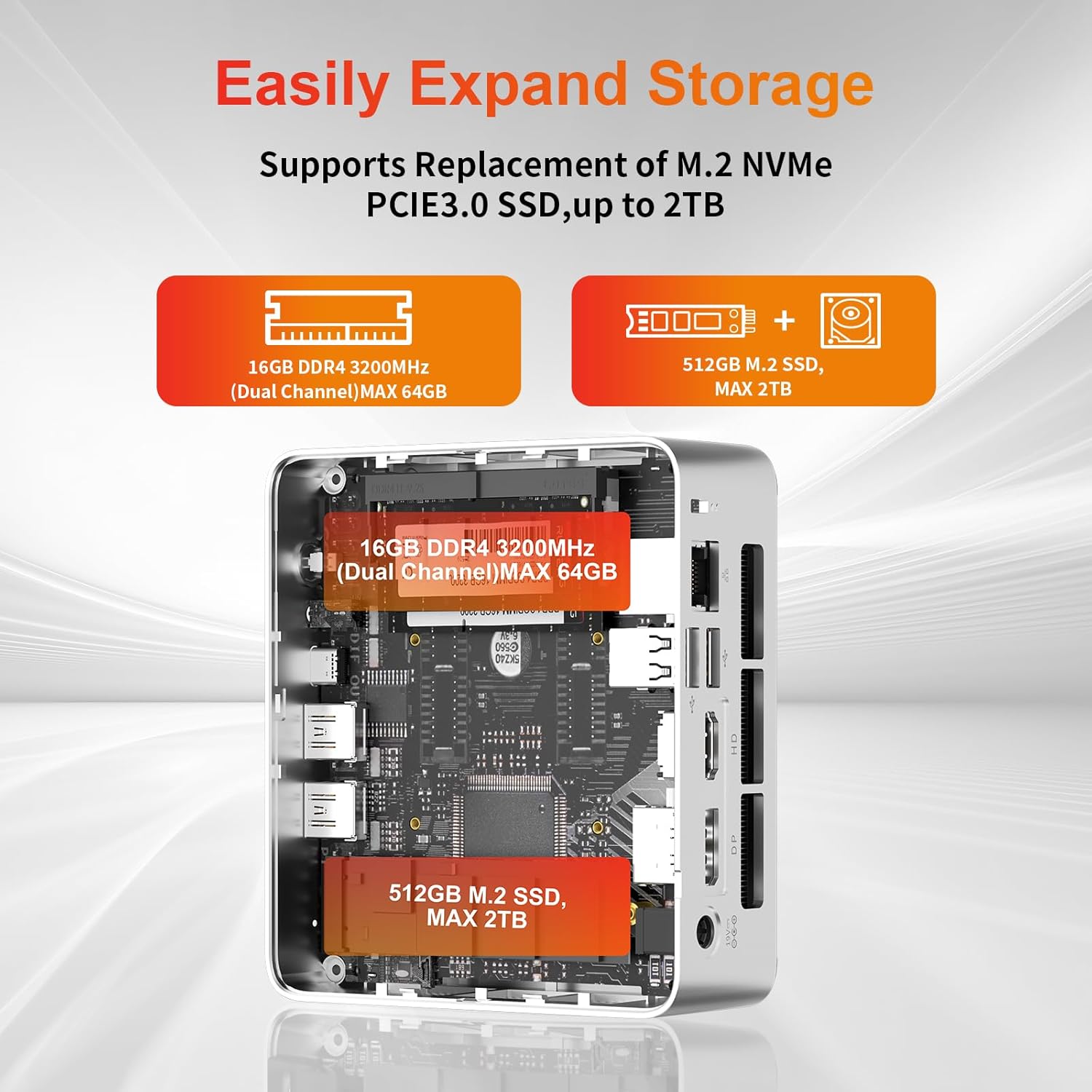
- Ekspansyon Depo: The Mini PC supports replacement of the M.2 NVMe PCIe 3.0 SSD up to 2TB. It also supports memory expansion up to 64GB DDR4.

Image: Diagram illustrating the internal components and options for expanding storage (M.2 SSD up to 2TB) and RAM (DDR4 up to 64GB).
- Montaj VESA: Use the included VESA mount bracket to attach the Mini PC to the back of a compatible monitor or to a wall mount, saving desk space.
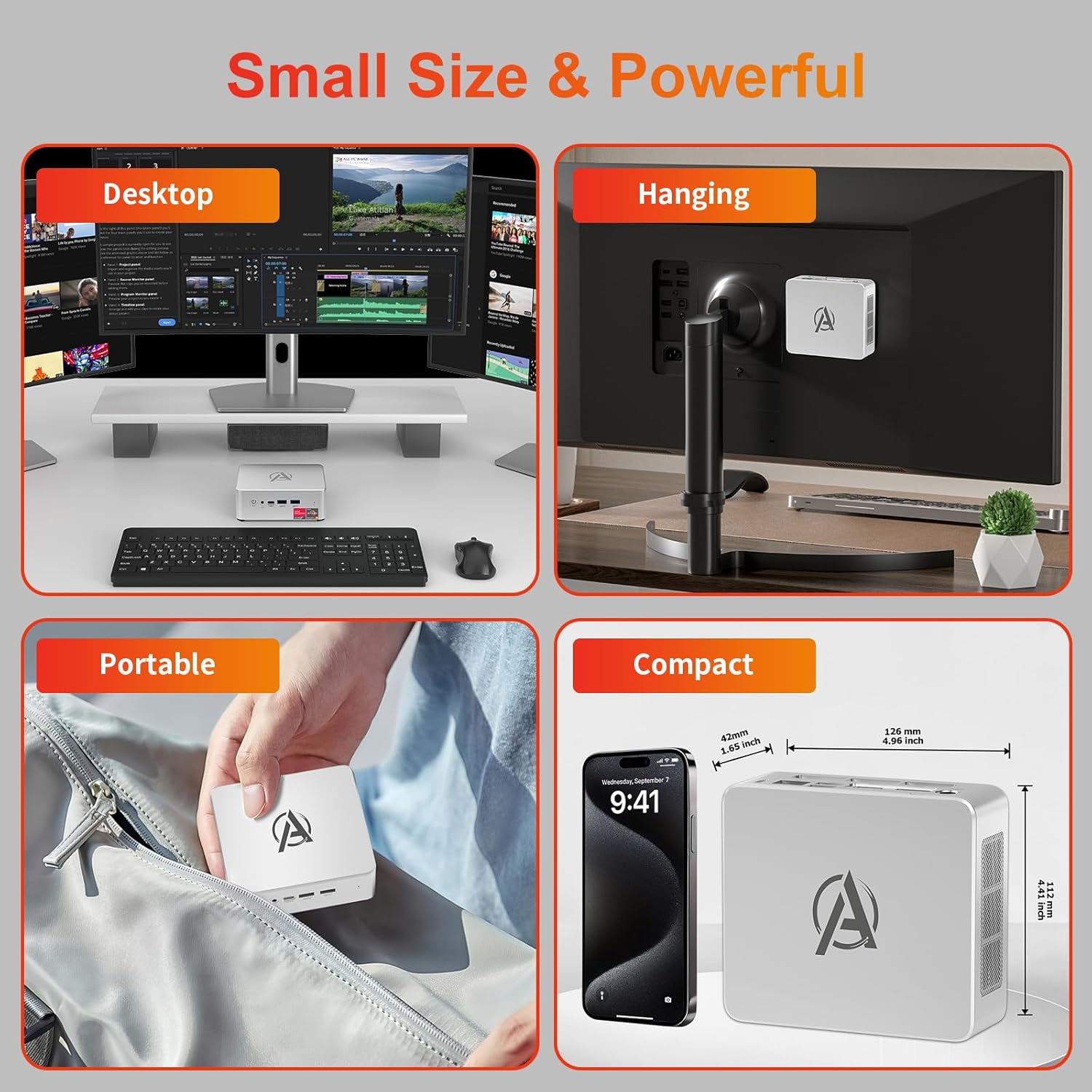
Image: Various usage scenarios for the Mini PC, including desktop, VESA-mounted behind a monitor, portable, and compact size comparison.
Antretyen
- Netwayaj: Use a soft, dry cloth to clean the exterior of the Mini PC. Do not use liquid cleaners or aerosols. Ensure ventilation openings are free from dust.
- Mizajou lojisyèl: Tcheke epi enstale mizajou Windows ak mizajou chofè regilyèman pou asire pèfòmans ak sekirite optimal.
- Jesyon Chalè: Ensure the Mini PC is placed in a well-ventilated area. Avoid blocking the air vents. The intelligent cooling system is designed for low noise and efficient heat dissipation.

Image: Diagram illustrating the internal cooling fan and heat sink, showing airflow for efficient heat dissipation.
- Jesyon Depo: Netwaye sa ki pa nesesè detanzantan files and applications to maintain system performance.
Depanaj
- Pa gen pouvwa:
- Tcheke si adaptè kouran an byen konekte ak Mini PC a ak priz kouran an.
- Asire w ke priz kouran an fonksyone.
- Eseye yon priz kouran diferan.
- Pa gen ekspozisyon:
- Verify that the HDMI/DP/USB-C cable is securely connected to both the Mini PC and the monitor.
- Asire w ke monitè a limen epi li configuré sou sous antre ki kòrèk la.
- Eseye yon lòt kab ekran oswa monitè si ou genyen.
- Pèfòmans Ralanti:
- Fèmen aplikasyon ki pa nesesè k ap fonksyone nan background nan.
- Tcheke epi enstale nenpòt mizajou Windows oswa mizajou chofè ki annatant.
- Asire w ke gen ase espas lib sou SSD a.
- Kontwole itilizasyon CPU ak RAM nan Manadjè Travay la pou idantifye pwosesis ki konsome anpil resous.
- Pwoblèm koneksyon rezo:
- For wired connections, ensure the Ethernet cable is properly connected and the router is working.
- For Wi-Fi, check if the Wi-Fi adapter is enabled and connected to the correct network. Restart your router/modem.
- Sistèm bloke/kraze:
- Rekòmanse Mini PC a.
- Ensure the system is not overheating (check ventilation).
- Run a system diagnostic or check Windows Event Viewer for error messages.
Espesifikasyon
| Modèl | AWOW BA7 Mini PC |
| Processeur | AMD Ryzen 5 7430U (6 Nwayo, 12 Fil, jiska 4.3 GHz) |
| Grafik | Grafik AMD Radeon entegre |
| RAM | 16GB DDR4 (Ekspansib jiska 64GB) |
| Depo | 512GB PCIe 3.0 M.2 SSD (Expandable up to 2TB) |
| Sistèm operasyon | Windows 11 Pro |
| Sòti videyo | DP1.2 (4K@60Hz), HDMI2.0 (4K@60Hz), USB-C (4K@60Hz) - Supports Triple Display |
| Koneksyon | WiFi 6, Bluetooth 5.2, 1000Mbps RJ45 LAN |
| Pò | 2x USB 3.2, 2x USB 2.0, 1x Type-C (Full Function), 1x DP1.2, 1x HDMI2.0, 1x RJ45 LAN, 1x 3.5mm Audio Jack, 1x DC IN |
| Dimansyon | 126mm x 112mm x 42mm (apeprè 4.96 x 4.41 x 1.65 pous) |
| Pwa | 398g (aparèy sèlman) Image: The Mini PC with its dimensions (126mm x 112mm x 42mm) and weight (398g) labeled. |
Garanti ak sipò
AWOW bay sipò konplè pou pwodwi li yo.
- Garanti: This product includes a 12-month service period from the date of purchase, covering manufacturing defects.
- Sipò teknik: Lifetime technical support is available for all AWOW products.
- Kontakte: For technical assistance, warranty claims, or any product-related inquiries, please visit the official AWOW websit oswa kontakte sèvis kliyan yo.

Image: AWOW brand message emphasizing fulfillment, lifetime technical support, and 12-month service.