
Entwodiksyon
The JBL GRIP is a compact, portable Bluetooth speaker designed to deliver powerful JBL Pro Sound. It features AI Sound Boost technology for optimized audio output with minimal distortion. With its durable, dustproof, and waterproof design, the JBL GRIP is suitable for various environments and activities. This manual provides essential information for the proper use and maintenance of your speaker.

Image: The JBL GRIP speaker lineup in different colors, highlighting its portability.
Ki sa ki nan bwat la
Upon unboxing your JBL GRIP speaker, please ensure all components are present:
- JBL GRIP Portable Bluetooth Speaker
- Gid Quick Start
- USB-C Charging Cable (Note: USB charging cable is not included in some regions, please check packaging)

Image: A purple JBL GRIP speaker, representing the main product.
Pwodwi souview
Familiarize yourself with the key features and components of your JBL GRIP speaker.
Kontwòl ak pò
- Bouton pouvwa: Sitiye sou panèl anwo a.
- Bouton appariement Bluetooth: Located on the top panel, for connecting to devices.
- Bouton jwe/poz: Sitiye sou panèl anwo a.
- Volim monte / desann bouton: Sitiye sou panèl anwo a.
- USB-C chaje pò: Located on the side panel, protected by a cover.
- Limyè anbyen: Integrated on the side panel, offering customizable lighting effects.

Imaj: Anlè view of the JBL GRIP speaker, highlighting the control buttons.
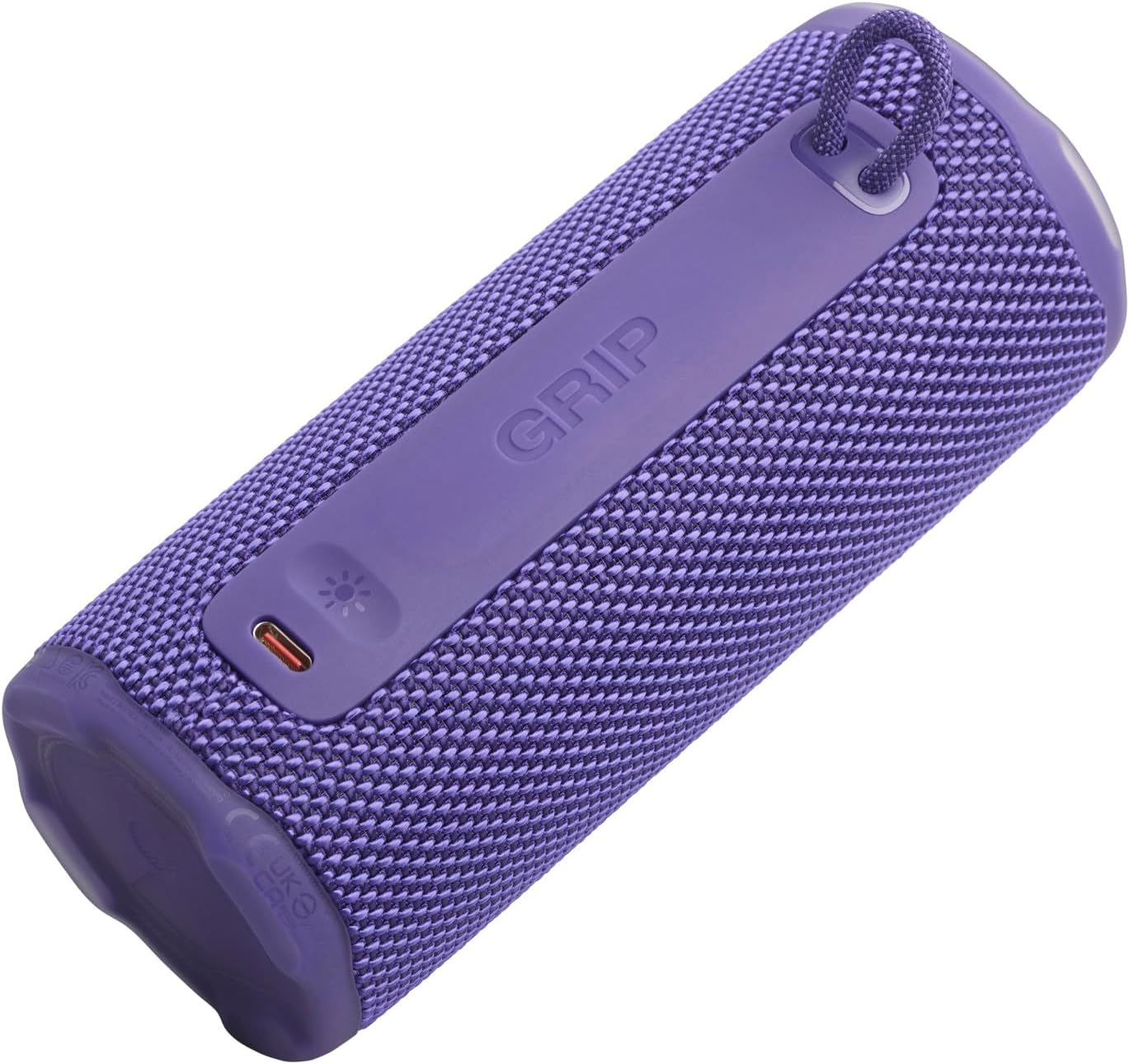
Imaj: Bò kote view of the JBL GRIP speaker, showing the USB-C charging port and the ambient light strip.
Karakteristik kle
- AI Sound Boost: Real-time music analysis algorithm optimizes output and suppresses distortion for enhanced sound quality.
- IP68 ki reziste pousyè ak enpèmeyab: Designed to withstand immersion in water and protect against dust ingress.
- Limyè anbyen: Customizable LED light on the speaker's rear panel to set the mood.
- Tan Lektur Long: Up to 12 hours of continuous playback, extendable by an additional 2 hours with Playtime Boost.
- Aura Cast Multi-Speaker Connection: Connect multiple JBL GRIP speakers for a wider sound experience.
- JBL Portable App Compatibility: Control settings, customize ambient light, and manage features via the dedicated app.

Image: An internal diagram of the JBL GRIP speaker, illustrating the AI Sound Boost chip and dual passive radiators for enhanced bass.
Enstalasyon
Chaje Oratè a
- Locate the USB-C charging port on the side of the speaker.
- Open the protective cover of the USB-C port.
- Connect one end of the USB-C charging cable to the speaker and the other end to a compatible USB power adapter (not included).
- Endikatè LED la ap montre eta chaj la. Yon chaj konplè pran apeprè 3 èdtan.
- Once fully charged, disconnect the cable and securely close the protective cover to maintain IP68 rating.
Pè Bluetooth
- Power on the JBL GRIP speaker by pressing the Power button.
- Press the Bluetooth button on the top panel. The LED indicator will flash, indicating pairing mode.
- On your device (smartphone, tablet, etc.), go to Bluetooth settings and select "JBL GRIP" from the list of available devices.
- Once connected, the LED indicator on the speaker will turn solid.
Enstriksyon Operasyon
Lektur debaz
- Jwe/Poz: Peze bouton Jwe/Paz la yon fwa.
- Kontwòl Volim: Sèvi ak bouton pou ogmante volim nan (+) ak bouton pou diminye volim nan (-).
- Sote Track: Double-press the Play/Pause button for next track. Triple-press for previous track.
Anbyen kontwòl limyè
The JBL GRIP features an ambient light that can be customized to match your mood.
- Default Modes: Cycle through pre-set light themes by pressing the dedicated light button (if available, otherwise use app).
- Pèsonalizasyon: For advanced customization of brightness and color, download and use the JBL Portable app.

Image: A JBL GRIP speaker displaying its customizable ambient light feature.
Aura Cast Multi-Speaker Connection
Aura Cast allows you to connect multiple JBL GRIP speakers for a synchronized audio experience.
- Ensure all JBL GRIP speakers are powered on and in pairing mode.
- Follow the instructions in the JBL Portable app to initiate Aura Cast pairing.
- Once connected, audio will play simultaneously across all linked speakers.

Image: A visual representation of multiple JBL speakers connected using Aura Cast for multi-room audio.
JBL pòtab aplikasyon
Download the JBL Portable app from your device's app store to unlock additional features and control options for your JBL GRIP speaker. The app allows you to:
- Ajiste paramèt egalizatè yo.
- Customize ambient light themes and brightness.
- Manage Aura Cast connections.
- Update speaker firmware.

Image: A screenshot of the JBL Portable app interface, showing customization options for sound and lighting.
Antretyen
Ki enpèmeyab ak ki reziste pousyè (IP68)
The JBL GRIP speaker is rated IP68, meaning it is dust-tight and protected against continuous immersion in water up to 1.5 meters for up to 30 minutes. To maintain this rating:
- Asire w kouvèti pò USB-C a byen fèmen anvan ou mete oratè a nan dlo oswa pousyè.
- Pa mete oratè a an kontak ak dlo sale oubyen lòt pwodui chimik. Si li antre an kontak ak dlo fre epi seche l byen.
- Avoid using the speaker in extreme temperatures.

Image: A JBL GRIP speaker in water, demonstrating its IP68 waterproof capability.
Netwayaj
Pou netwaye oratè ou a, sèvi ak yon twal mou.amp twal. Pa sèvi ak pwodui netwayaj abrazif oswa solvang.
Depanaj
| Pwoblèm | Solisyon posib |
|---|---|
| Oratè a pa limen. | Asire w batri a chaje. Konekte oratè a nan yon sous kouran avèk kab USB-C a. |
| Pa ka konekte atravè Bluetooth. |
|
| Pa gen son oswa volim nan ba. |
|
| Ambient light not working. | Check settings in the JBL Portable app. Ensure the speaker is powered on. |
Espesifikasyon
| Karakteristik | Detay |
|---|---|
| Non modèl | JBL GRIP |
| Nimewo Modèl Pwodwi | JBLGRIPPUR |
| Kalite Oratè | Portable oratè |
| Teknoloji san fil | Bluetooth |
| Bann Frekans | 2400MHz - 2483.5MHz |
| Repons Frekans | 20 KHz |
| Max Sorti pouvwa | 16 W |
| Sous pouvwa | Batri (Ion Lityòm) |
| Lavi batri | Up to 12 hours (extendable by 2 hours with Playtime Boost) |
| Tan pou chaje | Apeprè 3 èdtan |
| Waterproof/Dustproof Rating | IP68 |
| Dimansyon pwodwi (D x W x H) | 6.5 x 6.4 x 15.3 cm |
| Pwa pwodwi | 385 gram |
| Metòd kontwòl | App |
| Konpozan ki enkli | Gid Quick Start |

Image: A diagram illustrating the dimensions and weight of the JBL GRIP speaker.
Garanti ak sipò
The JBL GRIP speaker comes with a limited warranty. Please refer to the included Quick Start Guide or visit the official JBL websit la pou jwenn enfòmasyon detaye sou garanti a ak kontak pou sipò.
For technical assistance, troubleshooting, or to register your product, please visit www.jbl.com/support.