
1. Entwodiksyon
The Radtel RT-6D PRO DMR Radio is a dual-band two-way communication device designed for both amateur radio enthusiasts and professional users. It supports DMR Tier 1 and Tier 2 digital operations, as well as traditional analog communication, across VHF (144-148MHz) and UHF (420-450MHz) frequency ranges. This manual provides essential information for the proper setup, operation, and maintenance of your RT-6D PRO radio.
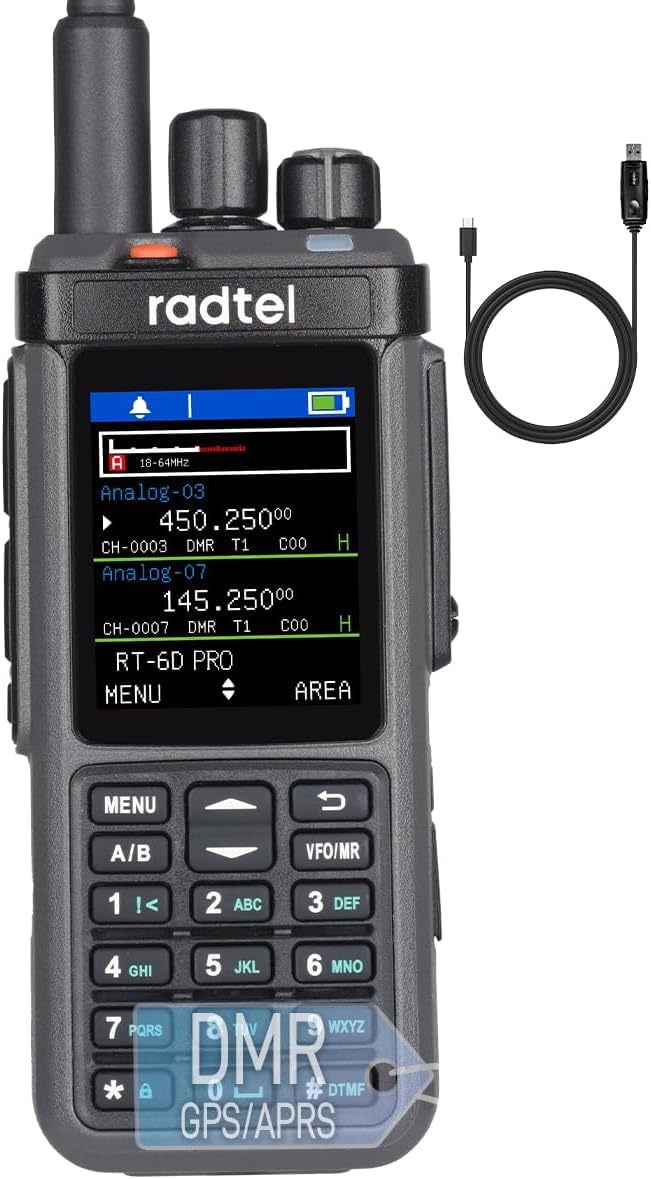
Figure 1: Radtel RT-6D PRO DMR Radio
2. Pake kontni
Verifye ke tout atik yo prezan nan pakè ou a:
- 1x RT-6D PRO Main unit
- 1x 2400mAh Batri Li-ion
- 1x Dual band antenna
- 1x Clip senti
- 1x baz chaje
- 1x Type-C Power cable
- 1x Manyèl Itilizatè Anglè
3. Pwodwi souview
3.1 Radio Components

Figure 2: Radtel RT-6D PRO Labeled Components
Familiarize yourself with the main parts of your radio:
- Antèn: Pou transmèt ak resevwa siyal.
- Bouton chanèl: Yo itilize pou chwazi chanèl.
- Volume/ON/OFF Button: Controls power and audio volume.
- Limyè Endikatè: Montre estati radyo a (pa egzanp, ap transmèt, ap resevwa, ap chaje).
- PTT1 / PTT2: Push-to-Talk buttons for initiating transmissions.
- Side-key: Programmable function button.
- Klavye: For manual frequency input, menu navigation, and DTMF tones.
- Oratè: Sòti yo resevwa odyo.
- Ekouteur Jack: Pou konekte akseswa odyo ekstèn yo.
- Type-C Charging/Programming Port: For battery charging and connecting to a computer for programming.
3.2 Karakteristik kle
- GPS and APRS Functionality: Integrated GPS for location services and APRS for position reporting.
- Promiscuous Mode: Automatically scans and monitors digital channels for active talk groups and color codes.
- USB Kalite-C Port: Conveniently handles both charging and programming.
- Large Data Capacity: Stores 2,000 contacts, manages 90 Talk Group lists (up to 128 groups each), and accesses a global database of 500,000 contacts with CSV import capability.
- Channel and Zone Capacity: Supports 256 zones and 1024 channels.
- Ankripteman: Operates with AES-256 encryption protocols.
- One-Touch Frequency Scanner: Simplifies signal identification.
- Alèt metewolojik NOAA: Provides live weather feeds.

Figure 3: Radtel RT-6D PRO Feature Icons
4. Inisyal Enstalasyon
4.1 Enstalasyon ak Chaje Batri
- Aliyen batri Li-ion 2400mAh la ak konpatiman batri a sou dèyè radyo a.
- Glise batri a nan plas li jiskaske li klike byen.
- To charge, connect the Type-C power cable to the radio's Type-C port and a compatible power source (e.g., wall adapter, car charger, power bank, or computer USB port). The indicator light will show charging status.
4.2 Antèn Atachman
- Screw the dual-band antenna clockwise onto the antenna connector at the top of the radio until it is finger-tight. Do not overtighten.
4.3 Basic Power On/Off
- To power on, rotate the Volume/ON/OFF button clockwise until you hear a click and the display illuminates.
- To power off, rotate the Volume/ON/OFF button counter-clockwise until you hear a click and the display turns off.
5. Operasyon debaz
5.1 Seleksyon chanèl
Rotate the Channel Knob at the top of the radio to cycle through available channels. The selected channel will be displayed on the screen.
5.2 Ajiste Volim
After powering on, rotate the Volume/ON/OFF button to increase or decrease the audio output level.
5.3 Transmèt ak Resevwa
- To transmit, press and hold one of the PTT (Push-to-Talk) buttons (PTT1 or PTT2) on the side of the radio. Speak clearly into the microphone.
- Lage bouton PTT a pou sispann transmisyon an epi retounen nan mòd resepsyon.
- When receiving a signal, the indicator light will illuminate, and audio will be heard through the speaker or connected earphone.
5.4 Contact Management
The RT-6D PRO supports extensive contact management features:
- Local Contacts: Store up to 2,000 individual contacts.
- Talk Group Lists: Manage up to 90 Talk Group lists, each supporting up to 128 groups.
- Global Database: Access a built-in global database of 500,000 contacts.
- Import Functionality: Import custom contact lists via CSV files for streamlined call management.

Figure 4: Contact Management Interface
5.5 GPS and APRS Functions
The integrated GPS module allows the radio to determine its location. This data can be used for APRS (Automatic Packet Reporting System) to transmit your position to other APRS-enabled devices or networks.
5.6 Alèt Meteo NOAA yo
The radio can receive NOAA weather alerts, providing timely information on severe weather conditions in your area.
6. Karakteristik avanse
6.1 DMR Tier 1 & Tier 2 Operation
The RT-6D PRO supports both DMR Tier 1 (unlicensed, direct mode) and Tier 2 (licensed, repeater mode) digital communication, offering enhanced audio quality and spectral efficiency compared to analog modes.

Figure 5: 1024 Channel Capacity and Call Types
6.2 Promiscuous Mode
This mode allows the radio to automatically scan and monitor all digital channels, identifying active talk groups and color codes without prior programming, facilitating seamless communication in dynamic environments.
6.3 Encryption Protocols (AES-256)
For secure communications, the RT-6D PRO supports AES-256 encryption, ensuring privacy and preventing unauthorized interception of your transmissions.
6.4 Programming via Type-C Port
The radio can be programmed using Customer Programming Software (CPS) via the Type-C USB port. This allows for customization of channels, contacts, talk groups, and other advanced settings. Refer to the specific CPS software manual for detailed programming instructions.

Figure 6: 10W High Power Transmission
7. Enfòmasyon sou Sekirite
Please read and adhere to the following safety guidelines to ensure safe operation and prevent damage to your radio:
- Anviwònman Fonksyònman: Operate the radio in environments with temperatures between 0-40°C and below 2000m altitude. Operating outside these conditions may damage the radio.
- Valè SAR: The radio has been tested for Head SAR (25mm from device) and Body SAR (0mm from device, with headset and belt clip). Specific Absorption Rate (SAR) values are: Face up (25mm): 0.277W/Kg; Back (0mm): 4.061W/Kg; Hand (0mm): 4.270W/Kg.
- Sekirite batri: Risk pou eksplozyon si batri a ranplase pa yon kalite ki pa kòrèk. Jete pil yo itilize dapre règleman lokal yo.
- Avètisman Jeneral: Be cautious of electric shock, flammable materials, and ionizing radiation.
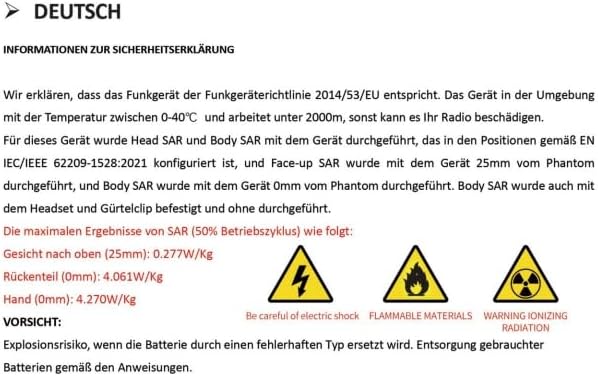
Figure 7: Safety Declaration (German original, summarized above)
8. Antretyen ak Swen
Proper care will extend the life of your Radtel RT-6D PRO radio:
- Netwayaj: Sèvi ak yon mou, damp twal pou netwaye deyò radyo a. Pa sèvi ak pwodui chimik ki agresif oswa solvan.
- Rezistans dlo: Radyo sa a se Pa reziste dlo. Avoid exposure to water, rain, or high humidity.
- Swen batri: Store the battery in a cool, dry place when not in use. Avoid overcharging or fully discharging the battery frequently.
- Depo: When storing for extended periods, remove the battery and store the radio in a dry, dust-free environment.
NAN. Depanaj
9.1 Pwoblèm komen ak solisyon
| Pwoblèm | Kòz posib | Solisyon |
|---|---|---|
| Radyo a pa limen | Low or depleted battery; improperly installed battery. | Charge the battery fully. Ensure the battery is correctly installed. |
| Poor signal reports or audio quality | Loose antenna connection; incorrect microphone gain setting; wrong frequency/channel. | Ensure antenna is securely attached. Adjust microphone gain via CPS if available. Verify correct frequency and channel settings. |
| Difficulty programming via Type-C port | Incorrect CPS version; driver issues; antivirus interference; faulty cable. | Download the latest CPS from the official Radtel website. Install necessary drivers. Temporarily disable antivirus software during installation/programming. Try a different Type-C cable. |
| Incorrect time display or GPS issues | Firmware bug; poor GPS signal reception; incorrect UTC offset setting. | Check for firmware updates. Ensure the radio has a clear view of the sky for GPS signal acquisition. Verify UTC offset settings in the radio menu or CPS. |
| Radio stops receiving intermittently | Software/firmware issue; channel interference. | Restart the radio. Try switching to a different channel and then back. Check for firmware updates from Radtel. |
10. Espesifikasyon
| Karakteristik | Spesifikasyon |
|---|---|
| Nimewo Modèl | RT-6D PRO |
| Pwa atik | 1.45 liv |
| Dimansyon pwodwi | 1.5 x 2.36 x 9.84 inches (radio body: 1.57"D x 2.36"W x 10.23"H) |
| Kalite batri | 1x 9V Li-ion battery (included) |
| Kantite Chanèl | 1024 |
| Gamme frekans | 144-148Mhz / 420-450Mhz |
| Pale Range Maksimòm | 6 Kilomèt |
| Voltage | 7.4 Volts |
| Nivo rezistans dlo | Pa reziste dlo |
| Karakteristik espesyal | GPS/APRS, Type C Charging, Digital/Analog, 500K Global Contacts |

Figure 8: Radtel RT-6D PRO Dimensions
11. Garanti ak sipò
11.1 Enfòmasyon sou Garanti
The Radtel RT-6D PRO radio comes with a 1-ane garantiTanpri konsève prèv acha ou a pou reklamasyon garanti a.
11.2 Sipò pou Kliyan
For technical assistance, troubleshooting beyond this manual, or warranty inquiries, please contact Radtel customer support through their official website or the retailer where the product was purchased. Ensure you have your model number and purchase details ready when contacting support.


