
1. Pwodwi souview
The Sunster TB10 Diesel Air Heater is a versatile and efficient heating solution designed for various applications including vehicles (cars, RVs, campers, trucks), tents, and homes. This model features advanced Wi-Fi and Bluetooth connectivity for smart control via a dedicated mobile application, alongside a user-friendly LCD control panel. Its integrated toolbox design ensures portability and ease of installation, while optimized combustion technology provides rapid heating and energy efficiency.
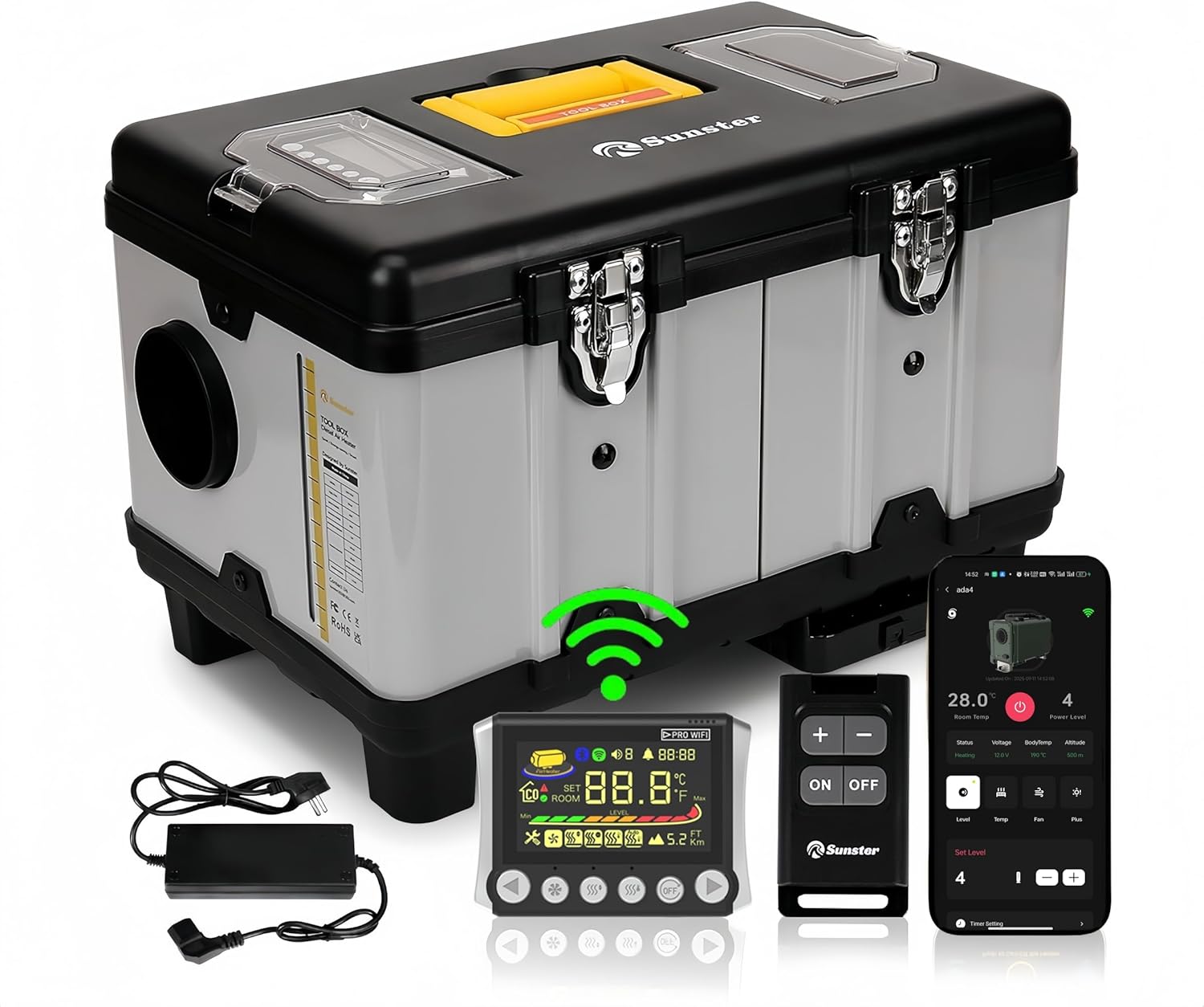
Imaj 1.1: Sunster TB10 Diesel Air Heater and its control accessories.
2. Enfòmasyon sou Sekirite
Please read and understand all safety warnings and instructions before operating this product. Failure to follow these instructions may result in electric shock, fire, explosion, or serious injury.
- Ensure proper ventilation when operating the heater to prevent carbon monoxide buildup.
- Pa bloke ouvèti pou antre lè a oswa ouvèti pou sòti lè a.
- Kenbe materyèl ki ka pran dife yo nan yon distans ki an sekirite ak aparèy chofaj la.
- Always use the correct fuel type (diesel) and power supply (12V, 24V, or 110-240V via transformer).
- The heater is equipped with overheat protection (≥ 518 °F/270 °C). Do not bypass or modify safety features.
- Kenbe lwen timoun ak bèt kay.
- Dekonekte kouran an anvan ou fè nenpòt antretyen oswa netwayaj.

Imaj 2.1: Integrated safety features of the heater.
3. Product Components & Specifications
3.1 Sa ki nan bwat la
- Diesel heater (with LCD control panel)
- Remote switch
- AC power supply (110-240V transformer)
- Installation Accessories (including 4-meter switch extension cable, heat protection sleeve, battery power cord, exhaust pipe, fixture accessories set, 6.9ft air outlet pipe, silencer)

Imaj 3.1: Tout konpozan ki enkli nan pake pwodwi a.
3.2 Dyagram Estrikti

Imaj 3.2: Detailed structure diagram of the heater.
3.3 Espesifikasyon pwodwi
| Spesifikasyon | Detay |
|---|---|
| Mak | Solèy |
| Modèl | TB10 Diesel Air Heater WiFi Version (WIFI-TB10) |
| Sorti pouvwa | 8KW |
| Voltage Konpatibilite | 12V/24V/110V-240V |
| Kalite gaz | Diesel |
| Kapasite tank gaz | 6 Liters (Built-in) |
| Konsomasyon gaz | 0.16-0.45 liters/hour |
| Heating Area Coverage | 20-25 square meters (approx. 215-270 sq ft) |
| Pwoteksyon Surchof | ≥ 518 °F/270 °C |
| Metòd kontwòl | LCD Panel, Remote Control, Wi-Fi Smart App, Bluetooth |
| Pwa atik | 22 liv |
| Dimansyon pake | 18.5 x 14.96 x 12.6 pous |
4. Enstalasyon ak Enstalasyon
The Sunster TB10 Diesel Air Heater is designed for rapid assembly and portability. Follow these guidelines for safe and effective setup.
4.1 Koneksyon pouvwa
- Pou DC 12V/24V operation: Connect directly to a vehicle battery (motorhomes, automobiles, boats, trucks, tractors) using the provided battery power cord.
- Pou AC 110-240V operation: Use the included AC power supply transformer to plug the heater into a standard power outlet (professional workshop, garage, home).
- Ensure all connections are secure and correct voltage apwovizyone.

Imaj 4.1: Multiple power options for the Sunster TB10 heater.
4.2 Exhaust and Air Duct Installation
- The intake pipe has a fixed air filter at the bottom, requiring no additional installation.
- Install exhaust pipes on the side of the unit to prevent blockage.
- Utilize the exhaust pipe protective cover for safety.
- Connect the air outlet pipe to direct heated air.

Imaj 4.2: Rapid assembly for exhaust and intake components.
4.3 Control Panel Placement
The included 4-meter extension cable allows for mounting the LCD control panel indoors, providing easier access and operation, especially when the main heater unit is placed outside.
5. Operasyon Enstriksyon
The Sunster TB10 Diesel Air Heater offers multiple control methods: LCD panel, remote control, Wi-Fi smart app, and Bluetooth. This section details their operation.
5.1 LCD Control Panel Overview

Imaj 5.1: LCD Monitor with button functions.
5.2 Remote Control Matching
To match the remote control with the heater:
- On the LCD panel, long press the [OFF] epi [Right button] simultaneously to enter match mode. The screen will display "Add".
- On the remote control, long press the [Plus button] to enter matching mode.
- The LCD screen will display "Suc" upon successful matching.
- You can now check the switch status and adjust settings (temperature, gear, mode) via the remote.
5.3 Wi-Fi App Connection & Functions
The Sunster app allows remote control of your heater via Wi-Fi. Ensure your phone is connected to a 2.4GHz Wi-Fi network.
- Ajoute Aparèy: In the app, click "Add Device", then select "Wi-Fi" to add. Choose your Wi-Fi network, enter the password, and follow the app's guidelines to put the device into network configuration mode (long press the add button on the LCD panel after power on).
- Mod de kontwòl: Once connected, you can control various modes:
- Mòd Kovèti pou: Adjust the power level using plus/minus buttons.
- Tanperati Mode: Mete tanperati a vle.
- Mòd vantilasyon: Control fan speed.
- Anviwònman revèy: Set timed hours and minutes for automatic turn on/off.
- Paramèt Paramèt: Access "More Settings" in the app to modify:
- Temperature Unit (Fahrenheit/Celsius)
- Altitude Unit (meters/feet)
- Voice Languages (English, Russian, German)
- Timezone
- Tanperati Offset
- Nivo ekleraj
- Start/Stop Temperature Offset
- Wi-Fi On/Off
- Reyajiste Anviwònman
- Pataje Aparèy: Share control of the device with others using a share code.
- Ensure Wi-Fi is turned off on the heater (via parameter settings or by switching it on/off on the LCD panel).
- In the app, click "Add Device", then select "Bluetooth" connection.
- Select the Bluetooth name corresponding to your device (e.g., BYD-0509).
- Confirm binding. You can now control the heater via Bluetooth.
- Limen/Etenyen: In shutdown state, press the desired mode button to turn it on. In operation state, press the [OFF] button to turn off the heater.
- Ajisteman Anviwònman: In operation state, press the [Decrease/Increase] buttons to adjust the setting gear or temperature.
- Chanje mòd: Peze a [Mòd] button to cycle through different modes (Gear, Temperature, Ventilation).
- Antre nan Mòd Anviwònman: In operation state, long press the [OFF] button for 3 seconds to enter setting mode. Use [Decrease/Increase] buttons to navigate through settings (F0-FF).
- F0: Current Time Setting (Press Ventilation button to set hours, then minutes. Press Ventilation again to confirm.)
- F1: Timing Start Time Setting (Press Ventilation button to set hours, then minutes. Press Ventilation again to confirm.)
- F2: Set the Running Time After Timing Start (Range 00:00-10:00, 30 minutes is 1 unit. 00:00 is unlimited time. Press Ventilation again to confirm.)
- F3: Timing Function On or Off (ON indicates turn-on timing, OF indicates shutdown timing. Press Ventilation again to confirm.)
- F4: Voice Broadcast Language Setting (E=English, G=German, R=Russian, --=Mute. Press Ventilation again to confirm.)
- F5: Ambient Temperature Compensation Setting (Adjustment range: -27°F to +27°F. Press Ventilation again to confirm.)
- F6: Constant Temperature Mode Function Setting (ON=turned on, OF=turned off. Press Ventilation again to confirm.)
- F7: Temperature Unit Switch Setting (Cycle between Fahrenheit and Celsius. Press Ventilation again to confirm.)
- F8: Altitude Unit Switch Setting (Switch between kilometers and thousand feet. Press Ventilation again to confirm.)
- F9: Screen Brightness Adjustment (Adjustment range 0-10. Press Ventilation again to confirm.)
- FA: Network Configuration with Sub Devices
- FB: Ambient Temperature Reading (ON represents sub-device ambient temp, OF represents control panel ambient temp.)
- FC: Temperature Difference for Automatic Startup in Constant Temperature Mode
- FD: Temperature Difference for Automatic Shutdown in Constant Temperature Mode
- FE: Wi-Fi Function On/Off (ON=turn on, OF=turn off. Press Ventilation again to confirm.)
- FF: Wi-Fi Configuration (View Wi-Fi connection, OTA upgrade, unbind from APP, pre-registration, connection status.)
5.4 Bluetooth Operation (without Wi-Fi)
If Wi-Fi is not available, you can operate the heater via Bluetooth:
5.5 Manual Control Panel Functions (2409PW)
The LCD control panel allows direct operation and setting adjustments.
Setting Mode Items (F0-FF):
Videyo 5.1: Detailed operation guide for the 2409PW control panel, including remote matching, app connectivity, and function settings.
6. Antretyen
Regular maintenance ensures optimal performance and longevity of your Sunster TB10 Diesel Air Heater.
- Netwayaj: Netwaye deyò aparèy chofaj la detanzantan avèk yon twal mou, damp twal. Pa sèvi ak pwodui netwayaj abrazif oswa solvang.
- Filtè lè: The fixed air filter at the bottom should be checked and cleaned regularly to ensure proper airflow.
- Sistèm echapman: Inspect the exhaust pipes and protective cover for any damage or blockages. Ensure exhaust gases are safely directed away from enclosed spaces.
- Tank gaz: Keep the fuel tank clean and free of contaminants. Use only clean diesel fuel.
- Depo: When not in use for extended periods, ensure the heater is clean, dry, and stored in a safe location.
NAN. Depanaj
If you encounter issues with your heater, refer to the following common troubleshooting steps:
- Chofaj la pa kòmanse: Check power connections, fuel level, and ensure the control panel is properly connected and powered.
- Pa gen pwodiksyon chalè: Verify the selected mode (e.g., not in ventilation mode), check temperature settings, and ensure fuel is flowing.
- Error codes on LCD: Refer to the detailed error code list in the full user manual (accessible via the app under "User Manual" or included physical manual) for specific diagnostics.
- Pwoblèm koneksyon aplikasyon an: Ensure your phone's Wi-Fi is 2.4GHz, the heater's Wi-Fi is enabled, and the device is within range. Try re-adding the device or resetting Wi-Fi settings.
- Kontwòl remote la pa reponn: Check remote battery, ensure it's matched correctly (refer to section 5.2).
8. Firmware Upgrade (OTA)
To ensure your heater has the latest features and improvements, perform Over-The-Air (OTA) firmware upgrades via the mobile app.
- Prepare for Upgrade: First, switch the heater power off. Then, hold down the left and right buttons on the LCD panel simultaneously and connect the power supply. The screen will show "otA". Keep pressing until the last four IDs of the machine appear.
- Initiate Upgrade via App: In the app, navigate to the "Personal Center" interface, then select "Firmware Upgrade".
- Chwazi Vèsyon: Find the ID corresponding to your local machine. Select the desired version number to upgrade.
- Start Upgrade: Click "Update Now". The app will show the update progress. Keep the device close to the phone and avoid operation during the transfer.
- Konplete: The screen will show "Suc" and the app will indicate "Update complete" upon successful upgrade.
9. Garanti ak sipò
For warranty information, technical support, or service inquiries, please refer to the contact details provided with your purchase or visit the official Sunster websit la. Kenbe resi acha ou kòm prèv acha pou reklamasyon garanti.