
1. Entwodiksyon ak souview
The Pard Bobcat 640 Thermal Monocular is a compact, high-performance thermal imaging optic designed for spotting and ranging in various conditions. It integrates advanced thermal sensing technology with a precise laser rangefinder to provide clear visibility and accurate distance measurements.
Karakteristik kle yo enkli:
- Lantiy Objektif 35mm: Bay yon pakèt domèn view and excellent light gathering capabilities.
- 2.6x Optical Magnification & 8x Digital Zoom: Offers versatile viewing options from wide scans to detailed close-ups.
- 640x512 Thermal Sensor: Features a 12µm pixel pitch and ≤18mk NETD for high-resolution thermal imagery, detecting even subtle temperature differences.
- Integrated 1000m Laser Rangefinder (LRF): Ensures accurate distance measurement up to 1,094 yards.
- 1920x1080 OLED Display: Delivers bright, sharp, and high-contrast images for enhanced viewing.
- Konsepsyon kontra enfòmèl ant ak lejè: Measuring 1.77 x 2.13 x 6.14 inches, it is built for portability and quick deployment.
2. Ki sa ki nan bwat la
Upon opening the product packaging, ensure all items are present and in good condition. The standard package contents for the Pard Bobcat 640 Thermal Monocular include:
- Pard Bobcat 640 Thermal Monocular Unit
- Rechargeable 18650 Batri
- USB-C Chaje Kab
- Protective Carry Pouch
- pwaye Corydon
- Lens netwayaj twal
- Manyèl itilizatè
3. Enstalasyon
3.1 Enstalasyon batri
The Pard Bobcat 640 uses a single 18650 rechargeable battery. To install or replace the battery:
- Locate the battery compartment cover, typically found on the side or bottom of the monocular.
- Open the cover by sliding or twisting it according to the indicator.
- Insert the 18650 battery with the positive (+) terminal facing the correct direction as indicated inside the compartment.
- Byen fèmen kouvèti lòj batri a.
3.2 Power On/Off
To power on the device, press and hold the Power button (usually an orange or prominent button) for approximately 3 seconds until the display activates. To power off, press and hold the Power button again for 3 seconds.
3.3 Focus and Diopter Adjustment
For a clear image, adjust the focus and diopter:
- Bag konsantre: Rotate the objective lens focus ring (at the front of the device) until the target image appears sharp.
- Ajisteman dioptri: Rotate the diopter adjustment ring (around the eyepiece) to fine-tune the clarity of the display for your individual eyesight.
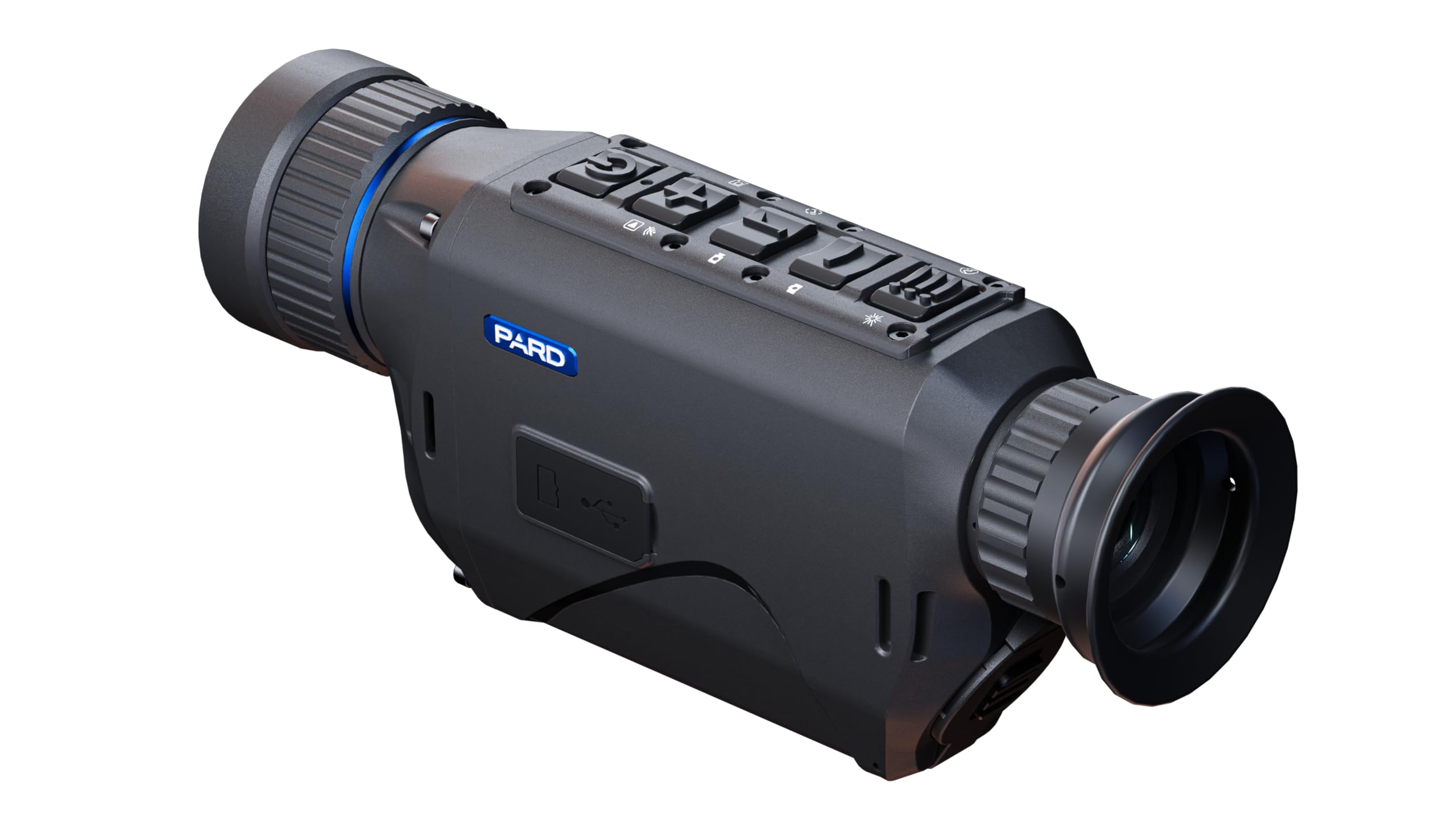
Figure 1: The Pard Bobcat 640 Thermal Monocular, showcasing its compact design and ergonomic controls.

Figi 2: Top view of the monocular, highlighting the power, zoom, rangefinder, and menu buttons.
4. Operasyon Enstriksyon
4.1 Kontwòl debaz yo
- Bouton pouvwa: Press and hold to turn on/off. Short press may activate standby mode or other functions depending on context.
- Bouton Zoom: Use the designated buttons (often marked with '+' and '-') to adjust the digital zoom level.
- LRF Button: Short press to activate the laser rangefinder and measure distance to a target.
- Bouton meni: Press to access the main menu for settings adjustments.
- Bouton palèt: Cycle through different thermal color palettes (e.g., White Hot, Black Hot, Red Hot, Color, Green Monochrome) to optimize viewing for various scenarios.
4.2 Thermal Palettes
The Bobcat 640 offers multiple thermal palettes to enhance target detection and identification:
- Blan cho: Hot objects appear white, colder objects appear black.
- Nwa cho: Hot objects appear black, colder objects appear white.
- Wouj cho: Displays heat signatures in shades of red for easy identification.
- Koulè: Uses a spectrum of colors to represent temperature differences.
- Green Monochrome: Provides a green-tinted image, often preferred for reduced eye strain during prolonged use.
4.3 Recording Photos and Videos
The monocular is capable of capturing still images and recording video footage. Refer to the on-screen menu for specific recording options and storage management.

Figi 3: Devan view of the monocular, showing the 35mm objective lens and integrated laser rangefinder emitters.

Figi 4: Dèyè view of the monocular, illustrating the eyepiece and diopter adjustment ring.
5. Antretyen
Proper maintenance ensures the longevity and optimal performance of your Pard Bobcat 640.
- Netwayaj lantiy: Use the provided lens cleaning cloth or a soft, lint-free cloth specifically designed for optics. Gently wipe the objective lens and eyepiece. Avoid using abrasive materials or harsh chemicals.
- Swen batri: Always use the recommended 18650 rechargeable batteries. Charge batteries fully before use and store them in a cool, dry place when not in use. Do not expose batteries to extreme temperatures.
- Depo: Store the monocular in its protective carry pouch in a dry, dust-free environment. Avoid direct sunlight and extreme temperatures.
- Netwayaj jeneral: Siye eksteryè aparèy la ak yon mou, damp twal. Pa sèvi ak solvang oswa pwodui netwayaj abrazif.
NAN. Depanaj
If you encounter issues with your Pard Bobcat 640, refer to the following common troubleshooting steps:
- Aparèy pa limen: Ensure the battery is correctly installed and fully charged. Try using a different charged battery if available.
- Imaj ki pa klè: Adjust the objective lens focus ring and the eyepiece diopter adjustment ring. Ensure lenses are clean and free from smudges or debris.
- Rangefinder Not Working: Ensure there are no obstructions between the device and the target. Check that the LRF function is enabled in the settings menu.
- Kout lavi batri: Ensure the battery is fully charged. Reduce screen brightness or disable unnecessary features to conserve power. Consider replacing old batteries.
- Aparèy la bloke/pa reponn: Power off the device by holding the power button. If unresponsive, remove and reinsert the battery to perform a hard reset.
For persistent issues, please contact Pard customer support.
7. Espesifikasyon
| Karakteristik | Spesifikasyon |
|---|---|
| Non modèl | Bobcat 640 |
| Nimewo Modèl Atik | BO6-35/LRF |
| Dyamèt lantiy objektif | 35 Milimèt |
| Agrandisman Optical | 2.6x |
| Zoom dijital | 8x |
| Rezolisyon Capteur tèmik | 640x512 |
| Pitch Pitch | 12µm |
| NETD Sensitivity | ≤18mk |
| Integrated Rangefinder | 1000m (1,094 yards) |
| Kalite ekspozisyon | OLED |
| Rezolisyon ekspozisyon | 1920x1080 |
| Horizontal FOV (at 100m) | 16.5 m |
| Diagonal FOV | 10° |
| Dimansyon pwodwi (D x W x H) | 1.77" x 1.77" x 6.14" |
| Pwa atik | 2 liv |
| Sous pouvwa | 18650 rechargeable batri |
8. Garanti ak sipò
Pard products are designed for durability and reliable performance. For specific warranty details, please refer to the official Pard website or contact your authorized dealer. Typically, thermal devices come with a manufacturer's warranty covering defects in materials and workmanship.
For customer support, technical assistance, or warranty claims, please visit the official Pard Store oubyen kontakte sèvis kliyan yo dirèkteman.