
1. Enfòmasyon sou Sekirite
Tanpri li epi konprann tout enstriksyon sekirite yo anvan ou itilize pwodui sa a. Kenbe manyèl sa a pou referans pita.
- Pa ekspoze aparèy la nan tanperati ekstrèm, limyè solèy dirèk, oswa imidite ki wo.
- Evite jete oswa sibi aparèy la nan gwo enpak.
- Pa demonte oswa eseye repare aparèy la tèt ou. Sa ka anile garanti a epi lakòz domaj.
- Use only the specified charging cable and power adapter (5V/1A) to charge the device.
- Kenbe aparèy la lwen dlo ak lòt likid.
- Jete pil yo selon règleman lokal yo.
2. Pake kontni
- PRUNUS J-168 Digital Portable Radio
- USB-C Chaje Kab
- senti ponyèt
- Manyèl itilizatè
3. Pwodwi souview
The PRUNUS J-168 radio features a compact design with an intuitive button layout and a clear display.
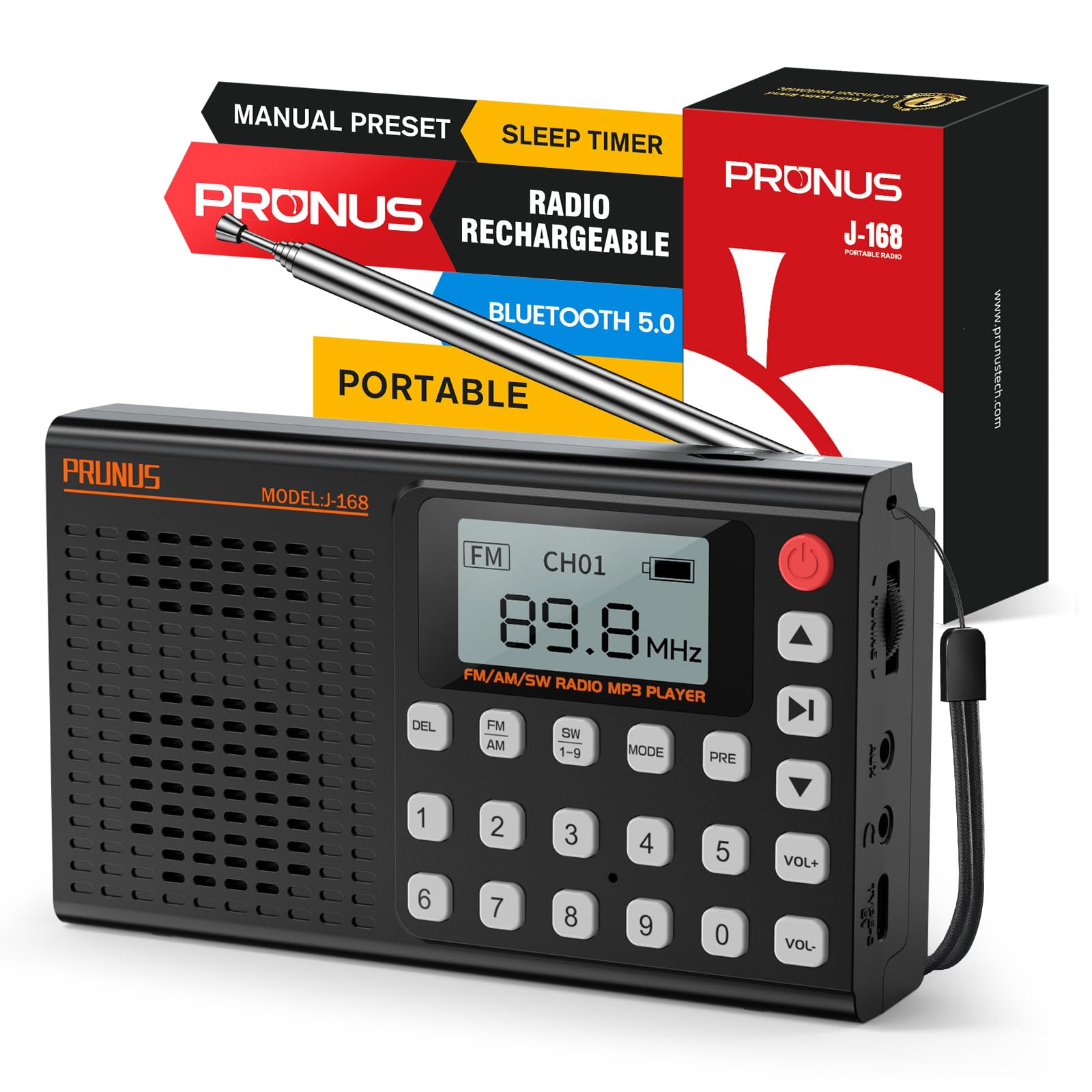
Imaj: Devan view of the PRUNUS J-168 radio, showing the speaker grille, display, and numeric keypad.
Kontwòl ak pò:
- Ekspozisyon ekran: Shows frequency, mode, battery status, and other information.
- Klavye nimerik (0-9): For direct frequency input and channel selection.
- Bouton DEL: Delete preset stations.
- Bouton FM/AM/SW: Select radio bands.
- Bouton MODE: Switch between radio, Bluetooth, TF card, and AUX modes.
- PRE Button: Preset/Recall stations.
- Bouton jwe/poz: Control playback in media modes.
- Bouton Track Previous/Next: Navigate tracks or search channels.
- VOL+/- Buttons: Ajiste volim.
- Bouton pouvwa: Turn the radio on/off.
- Antèn teleskopik: Pou amelyore resepsyon radyo.
- Rou akor: For fine-tuning radio frequencies.
- USB-C chaje pò: Pou chaje batri entèn lan.
- TF Kat plas: For playing music from a TF/Micro SD card.
- Antre AUX: Pou konekte aparèy odyo ekstèn.
- Jack ekoutè 3.5mm: Pou koute prive.
- Sipò pliyab: For convenient placement on flat surfaces.
4. Enstalasyon
4.1 Premye chaj
Before first use, fully charge the radio. Connect the supplied USB-C cable to the radio's charging port and the other end to a 5V/1A USB power adapter (not included) or a computer's USB port.
- Endikatè batri a sou ekran an ap montre eta chaj la.
- Yon chaj konplè anjeneral pran 3-4 èdtan.
4.2 Ekstansyon Antèn
For optimal radio reception, extend the telescopic antenna to its full length (42 cm / 16.5 in).
Image: A hand extending the telescopic antenna from the top of the PRUNUS J-168 radio.
5. Operasyon Enstriksyon
5.1 Power On/Off
Peze a Bouton pouvwa (red button on the top right) to turn the radio on or off.
5.2 Mòd Radyo (FM/AM/SW)
Peze a FM, AM, oswa SW 1-9 buttons to select the desired radio band.
5.2.1 Auto Search and Store
Nan mòd radyo, peze epi kenbe la Jwe/Poz button to automatically search for and store all available stations. The radio will scan frequencies and save them to preset channels.
Video: Demonstrates auto-searching and storing radio stations. The display shows the frequency changing and channels being saved.
5.2.2 Akor Manyèl
- Rou akor: Rotate the tuning wheel on the side of the radio to adjust the frequency step by step.
- Antre frekans dirèk: Use the numeric keypad to enter a specific frequency (e.g., for 104.3 MHz, press 1-0-4-3).
- Next/Previous Available Channel: Yon ti tan peze la Previous / Next Track buttons to jump to the next or previous available station.
5.2.3 Prekonfigirasyon ak Rapèl Estasyon yo
- To Preset: Konekte sou estasyon ou vle a. Peze epi kenbe bouton an PRE button. The display will show 'CHXX'. Enter the desired channel number using the numeric keypad, then press PRE ankò pou konfime.
- Pou raple: Enter the channel number directly using the numeric keypad (e.g., for CH14, press 1 then 4).
- To Delete a Preset: Select the preset channel you wish to delete. Press and hold the DEL bouton. Konfime sipresyon an lè yo mande w.
5.3 Bluetooth mòd
Peze a MÒD button until 'Bluetooth Mode' appears on the display.
- The radio will enter pairing mode, indicated by a blinking Bluetooth icon.
- On your smartphone or other Bluetooth device, search for 'PRUNUS J-168' and connect.
- Once connected, you can play audio from your device through the radio. Use the radio's Jwe/Poz epi Previous / Next Track bouton pou kontwole lèktur.
Video: Shows connecting a smartphone via Bluetooth to the PRUNUS J-168 radio and controlling music playback.
5.4 Mòd Kat TF/SD
Insert a TF/Micro SD card (up to 32GB, FAT32 format) with MP3 audio files into the TF card slot. The radio will automatically switch to TF card mode or you can select it using the MÒD bouton.
- Sèvi ak la Jwe/Poz epi Previous / Next Track bouton pou kontwole lèktur.
- The radio offers 6 EQ presets (Normal, Classical, Pop, etc.) for TF card mode.
5.5 AUX Mode
Connect an external audio device (e.g., MP3 player, smartphone) to the radio's AUX input using a 3.5mm audio cable. Press the MÒD button until 'AUX Mode' appears.
- Audio will be played from the connected device. Control playback from the external device.
5.6 Revèy dòmi
Minitè dòmi an pèmèt radyo a etenn otomatikman apre yon peryòd defini.
- Peze a Revèy dòmi button (often combined with another function, refer to button labels).
- Sèvi ak la Previous / Next Track buttons to adjust the timer from 0 to 90 minutes.
- Confirm your selection. A clock icon will appear on the display when the sleep timer is active.
Video: Demonstrates setting the sleep timer on the PRUNUS J-168 radio, showing the timer adjustment and the clock icon appearing on the display.
5.7 Itilizasyon kas ekoutè
Plug 3.5mm headphones into the headphone jack for private listening. The radio's speaker will automatically mute.
5.8 Foldable Stand
The radio includes a foldable stand on the back for convenient upright placement on flat surfaces.
6. Antretyen
- Netwayaj: Sèvi ak yon twal mou epi sèk pou netwaye sifas radyo a. Pa sèvi ak pwodui netwayaj abrazif oswa solvan.
- Depo: Lè w pa itilize radyo a pou yon bon bout tan, sere l nan yon kote ki fre epi sèk.
- Swen batri: Pou pwolonje lavi batri a, evite dechaje batri a nèt souvan. Chaje l regilyèman, menm si w pa ap itilize l.
NAN. Depanaj
- Pa gen pouvwa: Asire w batri a chaje. Konekte chajè a epi eseye ankò.
- Resepsyon radyo ki pa bon: Lonje antèn teleskopik la nèt. Eseye chanje pozisyon radyo a oubyen deplase l nan yon zòn ki gen pi bon siyal.
- Bluetooth pa konekte: Ensure the radio is in Bluetooth mode and your device's Bluetooth is enabled. Make sure the radio is not connected to another device.
- TF Card Not Playing: Ensure the TF card is inserted correctly and contains compatible MP3 files. Check if the card is formatted to FAT32.
- Pa gen son: Check the volume level. Ensure headphones are not plugged in if you want sound from the speaker.
8. Espesifikasyon
- Nimewo Modèl: J-168
- Mak: PRUNUS
- Koulè: Nwa
- Materyèl: Akrilonitrile butadien stirèn (ABS)
- Sous pouvwa: Batri rechargeable
- Batri: 1 Lithium-ion (2000 mAh)
- Pò chaje: USB-C (5V/1A)
- Max pouvwa Sòti: 3 Watts
- Gwoup Radyo: FM (87-108 MHz), AM (522-1710 kHz), SW (3.2-21.85 MHz)
- Koneksyon: Bluetooth, AUX, Kat TF
- Kas ekoutè Jack: 3.5mm
- Karakteristik espesyal: Built-in Flashlight (Information not explicitly in feature bullets, but often a common radio feature. Removed as it's not in the provided feature bullets.)
- Dimansyon: Apeprè 13.9 x 8 x 3.2 cm (5.47 x 3.15 x 1.26 pous)
- Pwa: Apeprè 196 g (0.43 lbs)
9. Garanti ak sipò
This product comes with a standard manufacturer's warranty. For detailed warranty information or technical support, please refer to the contact information provided on the product packaging or the official PRUNUS websit.