
1. Entwodiksyon
Welcome to the DOOGEE Note56 user manual. This guide provides essential information on setting up, operating, and maintaining your new smartphone. The DOOGEE Note56 is a SIM-free smartphone running on Android 16, featuring a 6.56-inch 90Hz HD+ display, a large 6150mAh battery, and an 8MP AI camera. Please read this manual carefully to ensure optimal performance and longevity of your device.
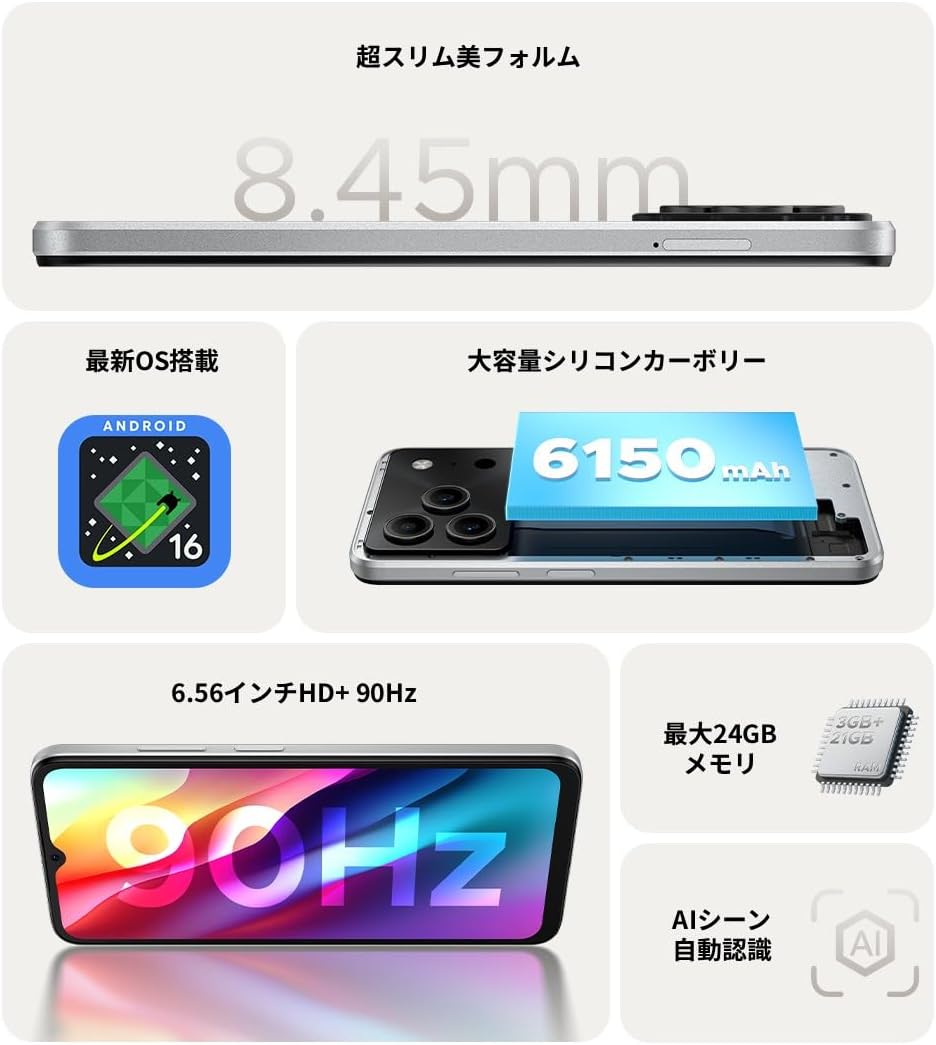
Figi 1.1: Plis paseview of DOOGEE Note56 key features.
2. Aparèy souview
The DOOGEE Note56 is designed with a sleek and lightweight profile, measuring 8.45mm thin and weighing 195g. It features a geometric lens module for its camera system and a durable build.

Figure 2.1: The ultra-slim and lightweight design of the DOOGEE Note56.
3. Kòmanse
3.1 Kontni pake a
Asire w tout atik yo prezan nan pake pwodwi w la:
- 1 x DOOGEE Note56 Smartphone
- 1 x tip-C USB kab
- 1 x pouvwa adaptè
- 1 x Pre-applied Protective Film
- 1 x SIM Plato Ejector PIN
- 1 x Telefòn Ka
- 1 x bwat pakè
- 1 x manyèl enstriksyon
- 1 x kat garanti

Figure 3.1: Included accessories with your DOOGEE Note56.
3.2 Enstalasyon kat SIM
Your DOOGEE Note56 supports Dual SIM functionality. To install your SIM card(s):
- Jwenn plato SIM lan sou bò aparèy la.
- Insert the SIM ejector pin into the small hole next to the tray and press gently until the tray pops out.
- Mete kat Nano-SIM ou yo ak/oswa kat microSD ou yo nan fant ki deziyen pou yo sou plato a. Asire w ke kontak lò yo anba.
- Pouse plato a tounen nan aparèy la avèk prekosyon jiskaske li kole ak kote a.
3.3 Premye Limen ak Konfigirasyon
Pou premye fwa, limen aparèy ou an:
- Peze epi kenbe bouton Power la jiskaske logo DOOGEE a parèt.
- Swiv enstriksyon yo sou ekran an pou chwazi lang ou, konekte ak Wi-Fi a, epi konfigire kont Google ou.
- You can also set up security features like face recognition during this process.
3.4 Chaje Aparèy la
Connect the Type-C USB cable to the charging port at the bottom of the phone and the other end to the power adapter. Plug the adapter into a wall outlet. The battery indicator on the screen will show charging status. For optimal battery life, fully charge the device before first use.
4. Opere aparèy ou an
4.1 Sistèm operasyon Android 16
The DOOGEE Note56 runs on the latest Android 16 operating system, offering a faster, more secure, and intuitive user experience. Key features include:
- Pèfòmans Amelyore: Improved app launch speeds and overall system responsiveness.
- Simplified UI: An easy-to-navigate interface suitable for all users.
- Stronger Security: Advanced privacy protection features to keep your data safe.
- Karakteristik entelijan: Customize screen colors, Super Clipboard, Dual System Mode, Smart Body Sensing, Memory Expansion, and Screen Optimization.

Figi 4.1: Karakteristik prensipal sistèm operasyon Android 16 la.
4.2 Ekspozisyon Karakteristik
Experience smooth visuals on the 6.56-inch HD+ IPS display with a 90Hz refresh rate. This ensures fluid scrolling and video playback, reducing eye strain. The display also includes dedicated Reading Mode and Night Mode for comfortable viewing nan divès kondisyon ekleraj.

Figure 4.2: The 6.56-inch HD+ 90Hz display for a smooth visual experience.
4.3 Fonksyon Kamera
Capture vibrant and natural photos with the 8MP AI main camera and 5MP front camera. The AI correction automatically optimizes settings for various scenes, including people, landscapes, and food. Enjoy diverse shooting modes:
- HDR: Pou yon ekspozisyon ekilibre nan limyè difisil.
- Mode Pro: Manual control over camera settings.
- Smile Capture: Li pran yon foto otomatikman lè li detekte yon souri.
- Panorama: Kaptire yon bèl peyizaj views.
- Mòd lannwit: Improved low-light photography.
- Filtè: Apply various effects to your photos.
- Beauty Mode (Front Camera): Enhance selfies.
- Portrait Effects (Front Camera): Add depth to your selfies.

Figure 4.3: AI scene recognition automatically adjusts camera settings for optimal results.

Figure 4.4: Capturing clear moments with the 8MP main camera.

Figure 4.5: Easy selfies with the 5MP front camera.
4.4 Jesyon batri
The DOOGEE Note56 is equipped with a large 6150mAh Silicon-Carbon battery, providing extended usage throughout the day. The convenient Type-C charging port ensures easy and smooth charging.
- Supports approximately 1000 charge/discharge cycles.
- 20% smaller in size for a lighter design.
- Estimated usage times: 7 hours web browsing, 49.5 hours music playing, 14 hours video watching, 28 hours calling.
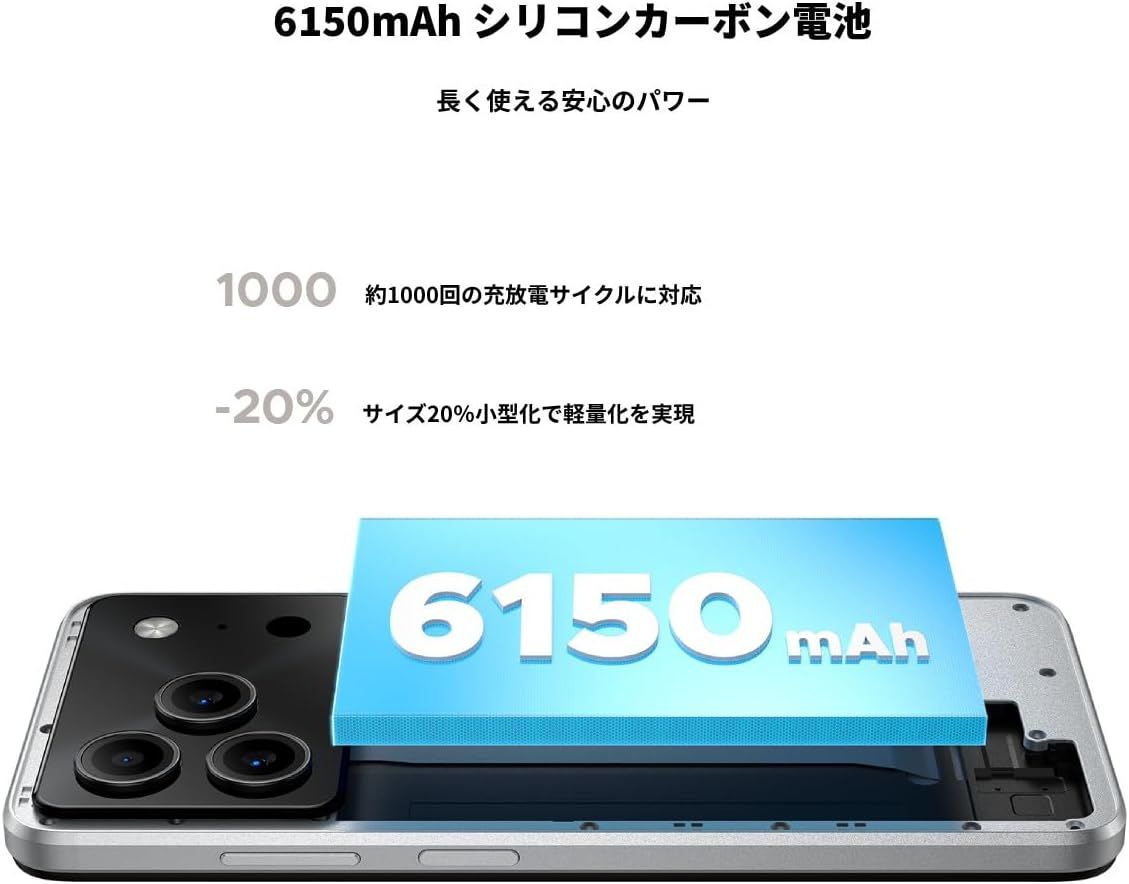
Figure 4.6: The 6150mAh Silicon-Carbon battery provides long-lasting power.

Figure 4.7: Slim design with powerful battery performance.
4.5 Pèfòmans ak Depo
The DOOGEE Note56 is powered by a Unisoc SC9863A Octa-core processor for smooth and efficient operation. It comes with 24GB of RAM (including virtual expansion) and 64GB of internal storage, expandable up to 2TB with a microSD card, ensuring ampespas pou aplikasyon ou yo, foto ou yo, ak files.

Figure 4.8: Internal memory configuration for smooth multitasking.
4.6 Konektivite ak lòt karakteristik
The device supports 4G Dual SIM, allowing you to manage work and personal life separately. It includes standard connectivity options like Bluetooth and Wi-Fi. Additional features:
- USB OTG: Konekte aparèy USB ekstèn yo.
- GPS: For accurate navigation.
- Jack ekoutè 3.5mm: Enjoy music and calls with wired headphones.
- Radyo FM: Listen to your favorite radio stations anytime.

Figure 4.9: Face recognition, GPS navigation, and FM radio features.

Figure 4.10: Connect wired headphones via the 3.5mm jack.
4.7 Karakteristik Sekirite Sosyal
The DOOGEE Note56 offers convenient and secure unlocking methods:
- Rekonesans figi: Debloke aparèy ou an rapidman e an sekirite avèk figi ou.
- Rekonesans anprent: (If applicable, check device for sensor) Another secure method for unlocking and authenticating.
5. Antretyen ak Swen
To ensure the longevity and optimal performance of your DOOGEE Note56, follow these maintenance guidelines:
- Netwayaj: Sèvi ak yon twal mou ki pa gen pousyè pou netwaye ekran an ak kò a. Evite pwodui chimik ki agresif oswa materyèl abrazif.
- Kondisyon anviwònman: Evite ekspoze aparèy la nan tanperati ekstrèm, limyè solèy dirèk, oswa imidite twòp.
- Mizajou lojisyèl: Tcheke epi enstale mizajou sistèm yo regilyèman pou benefisye de dènye karakteristik yo, patch sekirite yo, ak amelyorasyon pèfòmans yo.
- Swen batri: Avoid fully discharging the battery frequently. For long-term storage, keep the battery charged to around 50%.
- Pwoteksyon: Use the provided phone case and screen protector to guard against scratches and minor impacts.
NAN. Depanaj
If you encounter issues with your DOOGEE Note56, try the following basic troubleshooting steps:
- Aparèy pa limen: Asire w batri a chaje. Konekte chajè a epi tann kèk minit anvan ou eseye limen l ankò.
- Pwoblèm chaj: Check the charging cable and adapter for damage. Try a different outlet or charging accessory.
- Pwoblèm koneksyon rezo: Ensure your SIM card is correctly inserted. Check if airplane mode is off. Restart the device.
- Aplikasyon an bloke/kraze: Fèmen aplikasyon ki gen pwoblèm nan epi relouvri li. Si pwoblèm nan pèsiste, rekòmanse telefòn ou.
- Pèfòmans Ralanti: Close unnecessary background apps. Clear cache for frequently used apps. Consider freeing up storage space.
For more detailed troubleshooting or persistent issues, please refer to the FAQ section on the product page or contact customer support.
7. Espesifikasyon
Key technical specifications for the DOOGEE Note56:
| Karakteristik | Spesifikasyon |
|---|---|
| Gwosè ekran | 6.56 pous |
| Kapasite batri | 6150 mAh |
| Koulè | Blan |
| Non mak | DOOGEE |
| Manifakti | DOOGEE |
| Ane lage | 2025 |
| Konpozan ki enkli | SIM Tray Ejector, USB Cable, Power Adapter, Phone Case |
| OS konpatib | Android 16 |
| Lòt Fonksyon | USB OTG, Dual SIM, Expandable Memory |
| Koneksyon | Bluetooth, fil |
| Kalite ekspozisyon | LCD |
| Dimansyon pwodwi | 16.38 x 7.58 x 0.84cm; 195g |
| Sistèm operasyon | Android 16 |
| Gwosè RAM enstale a | 24 GB |
| CPU vitès | 1.6 GHz |
| Kapasite Depo memwa | 64 GB |
8. Garanti ak sipò
Your DOOGEE Note56 comes with a 12-month quality warranty (excluding human-caused damage) and a 30-day refund guarantee. The product is fully compatible with major Japanese carrier networks.
If you require support or have any questions, please contact our customer service. You can typically find contact information by clicking on the seller's name below the "Add to Cart" button on the product page and selecting "Ask a Question."