
Entwodiksyon
This manual provides detailed instructions for the proper use, setup, and maintenance of your ALLmeter Digital Dial Indicator with Magnetic Base. Designed for high-precision measurements, this tool is suitable for various applications in machine shops, automotive repair, and industrial settings. Please read this manual thoroughly before operating the device to ensure accurate results and safe handling.
Ki sa ki nan bwat la
Lè w ap ouvri pake a, verifye si tout konpozan sa yo la:
- Digital Dial Endikatè
- Magnetic Base with Flexible Arm
- 1.5V batri
- Bwat Depo Pòtab
- Manyèl Enstriksyon (dokiman sa a)
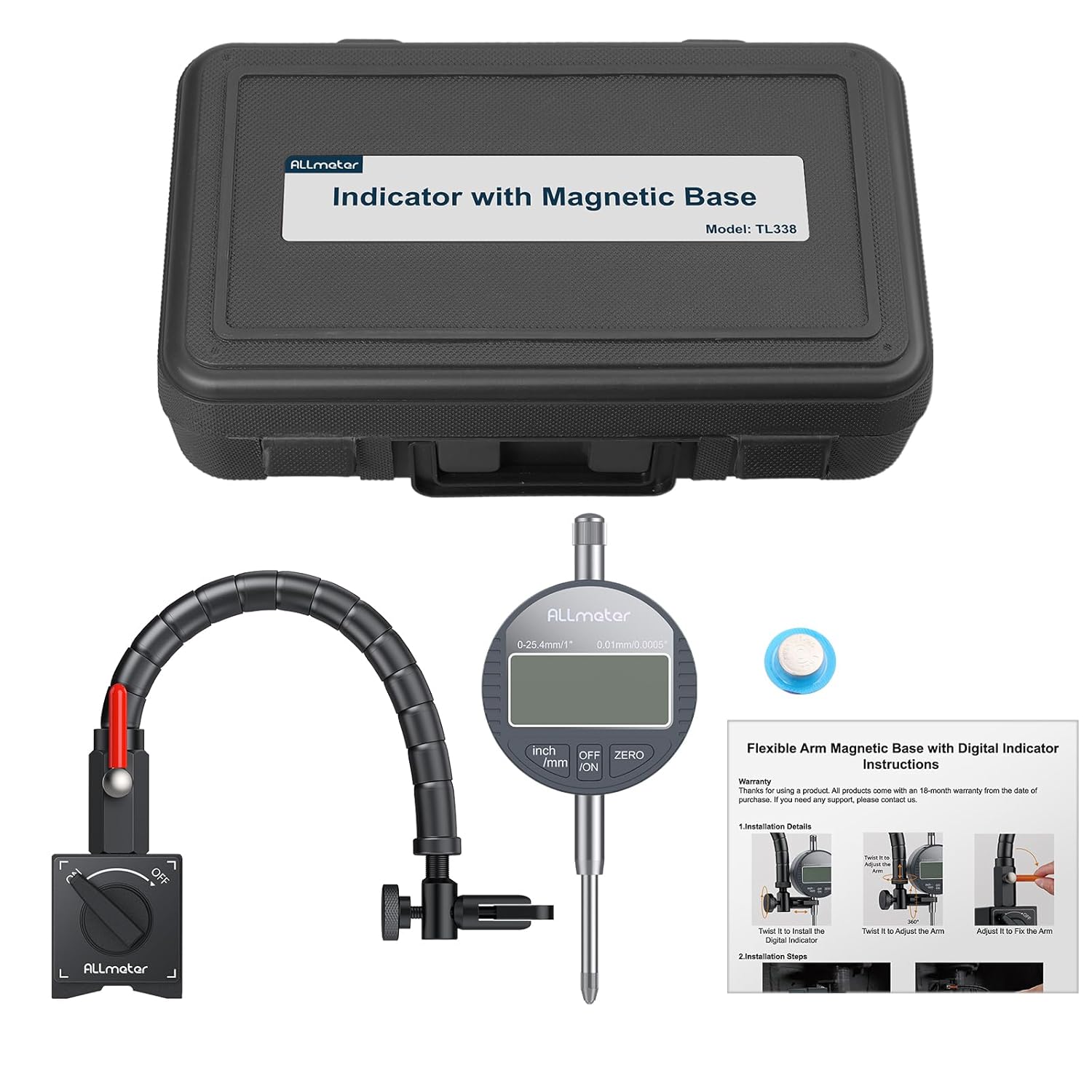
Image: All components included in the ALLmeter Digital Dial Indicator set, neatly arranged for inspection.
Karakteristik pwodwi
- Segondè Precision: Offers 0.01mm (0.0005") resolution and a 0-1 inch/25.4mm measuring range for accurate results.
- Pozisyon fleksib: Features a 360° adjustable magnetic base with 176lbs (80kg) tensile force for secure attachment and versatile positioning.
- Robust & Easy Use: Constructed with an aluminum alloy body, includes an auto-off function, and supports unit conversion between inches and millimeters.
- Inivèsèl konpatibilite: Designed to fit all 4-14mm dial indicators, making it suitable for various machinery, including lathes, presses, and CNC machines.
- Twous konplè: Comes with a battery, portable box, and this manual for immediate use.

Imaj: Plis paseview of the ALLmeter Digital Dial Indicator and its key features.
Enstalasyon ak Enstalasyon
Follow these steps to set up your digital dial indicator and magnetic base:
- Attach Flexible Arm to Magnetic Base: Securely screw the flexible arm into the magnetic base. Ensure it is tightened to prevent movement during use.
- Position Magnetic Base: Place the magnetic base on a clean, flat ferrous surface. Rotate the ON/OFF switch on the base to the "ON" position to activate the magnet and secure the base.
- Install Digital Dial Indicator: Insert the stem of the digital dial indicator into the clamp at the end of the flexible arm. Tighten the adjusting screw to firmly hold the indicator in place.
- Ajiste pozisyon bra: Use the rotary lever on the flexible arm to adjust its angle and position. The 360° rotating twist allows for precise alignment of the indicator's probe with the measurement point.
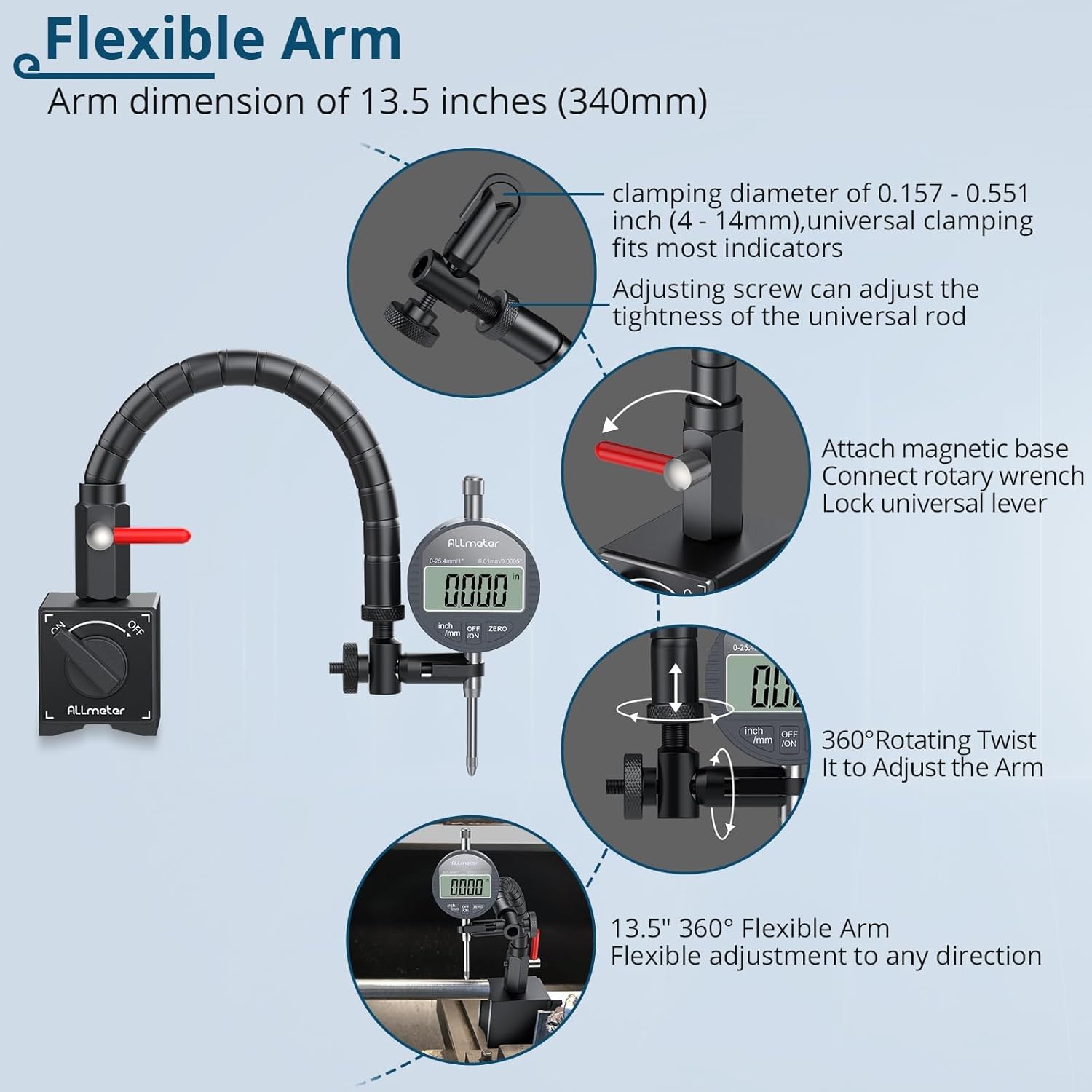
Image: Components of the flexible arm and magnetic base, illustrating adjustment points.

Image: Visual guide for the installation process, from securing the base to preparing for measurement.
Video: Demonstrates the assembly and initial setup of the ALLmeter Digital Dial Indicator with Magnetic Flex Arm.
Enstriksyon Operasyon
Once the indicator is installed, follow these steps for accurate measurements:
- Pouvwa sou: Press the "ON/OFF" button to turn on the digital dial indicator.
- Chwazi inite yo: Press the "inch/mm" button to switch between imperial (inches) and metric (millimeters) units as needed.
- Anviwònman zewo: Position the probe against the reference surface or the starting point of your measurement. Press the "ZERO" button to set the current position as zero.
- Pran mezi: Gently move the object or the indicator to measure the desired dimension. The digital display will show the displacement from the zero point.
- Pouvwa Off: Press the "ON/OFF" button again to turn off the indicator when not in use. The device also features an auto-off function to conserve battery.

Imaj: Detaye view of the digital dial indicator's interface and controls.

Image: The dial indicator set measuring a brake rotor, illustrating a practical application.
Antretyen
Proper maintenance ensures the longevity and accuracy of your ALLmeter Digital Dial Indicator:
- Netwayaj: Wipe the indicator and magnetic base with a soft, dry cloth after each use. Avoid using solvents or abrasive cleaners.
- Depo: Store the device in its portable storage box in a dry, dust-free environment when not in use.
- Ranplasman batri: If the display becomes dim or unresponsive, replace the 1.5V battery. Refer to the indicator's battery compartment for specific instructions.
- Evite enpak: Protect the indicator from drops or impacts, as this can affect its precision.
- Swen Baz Mayetik: Keep the magnetic surfaces clean and free of debris to ensure maximum holding force.
Depanaj
If you encounter issues with your digital dial indicator, consider the following:
- Ekspozisyon pa travay:
- Check if the battery is correctly installed.
- Ranplase pil la si li fèb oswa fin itilize.
- Ensure the ON/OFF button has been pressed.
- Lekti ki pa kòrèk:
- Ensure the magnetic base is securely attached to a stable, flat ferrous surface.
- Verify that the indicator is firmly clamped in the flexible arm and not loose.
- Clean the probe tip and the measurement surface to remove any debris.
- Perform a zero-setting calibration before taking measurements.
- Magnetic Base Not Holding:
- Ensure the ON/OFF switch on the magnetic base is in the "ON" position.
- Clean the magnetic surfaces and the mounting surface.
- The magnetic base requires a ferrous material surface at least 30mm thick for maximum pull force.
Espesifikasyon
| Karakteristik | Spesifikasyon |
|---|---|
| Mezire Range | 0-1 pous / 0-25.4 milimèt |
| Rezolisyon | 0.01 mm (0.0005 pous) |
| Magnetic Base Tensile Force | 176 liv (80 kg) |
| Longè bra fleksib | 13.5 pous (340 mm) |
| Endikatè konpatibilite | 4-14 mm dial indicators |
| Sous pouvwa | 1.5V batri |
| Pwa atik | 3.53 liv |
| Dimansyon pake | 12.44 x 7.64 x 3.5 pous |
| Nimewo Modèl | ALL090FBA |

Imaj: Egzamples of the dial indicator set being used in different precision measurement scenarios.
Garanti ak sipò
ALLmeter products come with a 15-month warranty from the date of purchase. If you require any support, have questions, or need to claim warranty service, please contact ALLmeter customer service through the retailer where the product was purchased or visit the official ALLmeter websit pou enfòmasyon kontak.
ALLmeter is committed to providing precise, accurate, and stable measuring tools. We strive for unparalleled quality in each product to ensure customer satisfaction.