
1. Entwodiksyon
This manual provides detailed instructions for the installation, operation, and maintenance of your new XTRONS Android 14 Qualcomm 665 Car Stereo. Please read this manual thoroughly before using the product to ensure proper functionality and safety.
1.1 Applicable Models & Years
This car stereo is compatible with the following vehicle models and years:
- For BMW: E46 4-door Sedan (1998-2005), E46 2-door Coupe (1999-2006), E46 2-door Convertible (1999-2006), E46 5-door Touring (1999-2005), E46 3-door Hatchback (2000-2004), E46 M3 (2000-2006)
- For Rover: Rover 75 (1999-2005)
- For MG: ZT (2001-2005)

Figure 1: Applicable Models & Years
1.2 Nòt Konpatibilite Enpòtan
Before installation, please check your car's center console and air-conditioning cover for compatibility. If necessary, remove the air-conditioning cover to fit the unit perfectly. Additional cables may be required depending on your vehicle's original setup.

Figure 2: Important Notes on Compatibility and Required Cables
2. Karakteristik kle
- 9-inch QLED IPS Screen: 1280*800 high-definition QLED display with a capacitive touchscreen, 178° wide viewing angle, powered by Adreno 610 GPU for ultra-smooth 4K entertainment.
- High Performance CPU: Qualcomm Snapdragon 665 Octa-Core processor with 8GB RAM and 256GB ROM storage, running Android 14 for responsive performance.
- Koneksyon Smartphone: Built-in Wireless Car Auto Play, Built-in Wireless & Wired Android Auto, and Bluetooth 5.0 for calls and voice control.
- Built-in DSP: Digital Amplifier Processing (TDA7808) and DTS Digital Sound (Si47925) for enhanced audio fidelity and interference immunity.
- Optimized CANbus Decoding: Seamless integration with vehicle features like steering wheel control, ACC control, reversing control, and door status.
- Split Screen & Picture-in-Picture: Run two applications side-by-side or watch videos while multitasking.
- Wi-Fi Doub Band: Supports both 2.4GHz and 5GHz bands for faster and more stable internet connectivity.
2.1 Karakteristik Vizyèl

Figure 3: 9-inch QLED IPS Screen
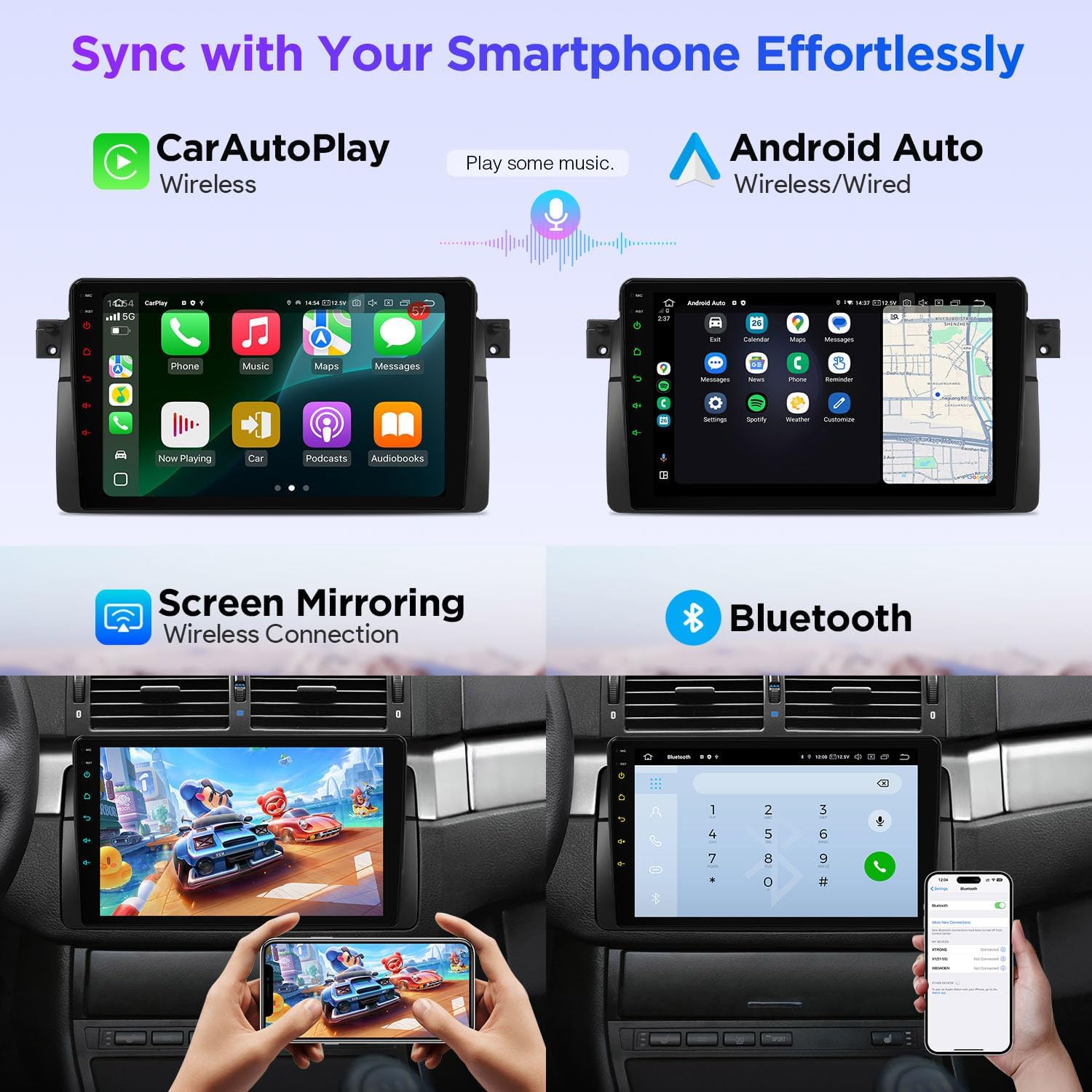
Figure 4: Smartphone Connectivity (CarPlay & Android Auto)

Figure 5: Smart and Intuitive UI with Day/Night Mode
2.2 Karakteristik odyo

Figure 6: DTS Digital Sound and DSP Controls
2.3 Entegrasyon Veyikil
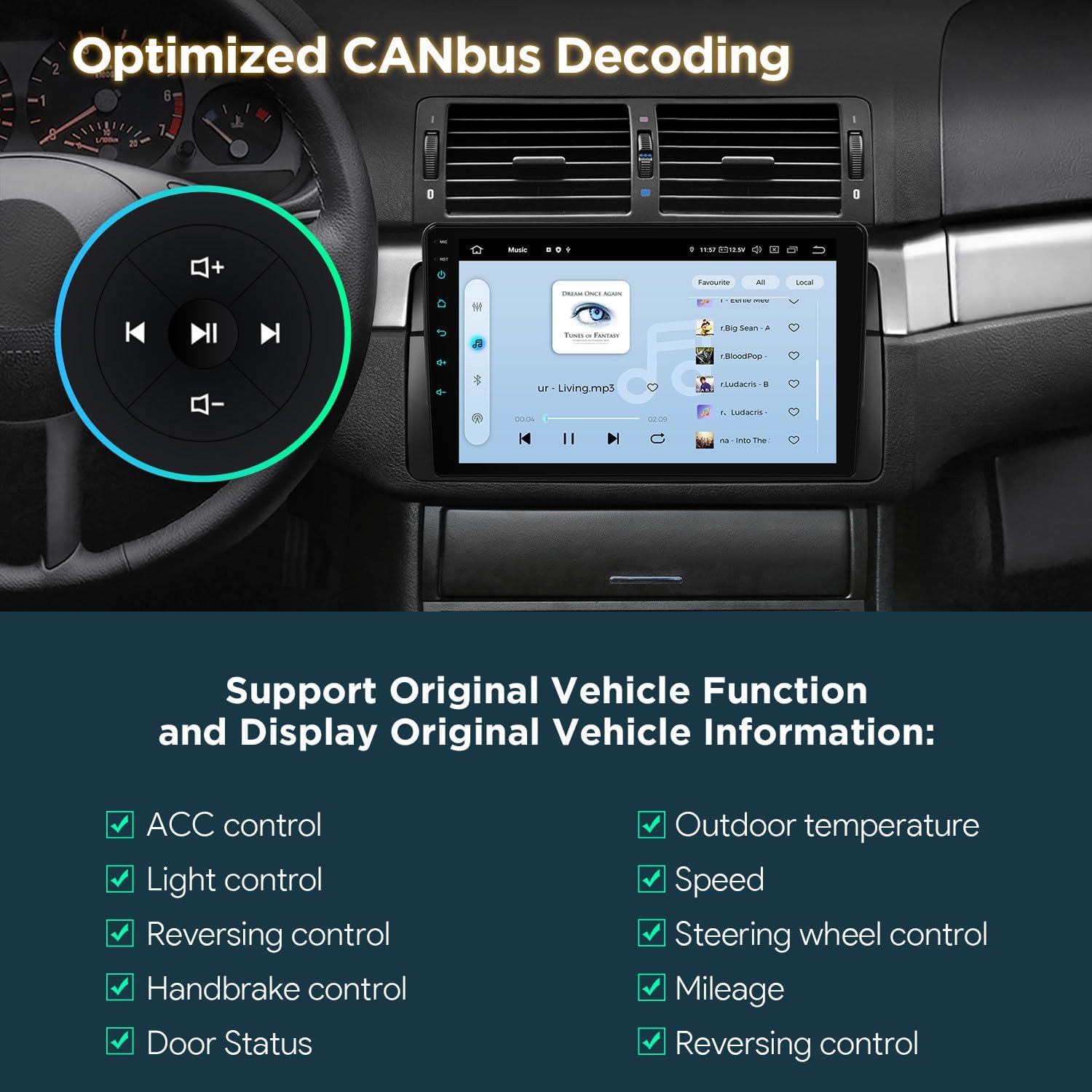
Figure 7: Optimized CANbus Decoding
3. Enstalasyon ak Enstalasyon
Seksyon sa a bay yon jeneral souview of the installation process. For detailed, step-by-step instructions, please refer to the included English Manual and German Manual.
3.1 Debalè ak Konpozan

Figure 8: Package Content and Accessories
3.2 Installation Process Overview
Installation typically involves removing the existing car stereo, connecting the provided wiring harness and accessories, and securing the new head unit. Ensure all connections are secure before reassembling the dashboard.
Video 1: XTRONS 9 Inch Qualcomm Car Stereo for BMW E46 M3 Rover 75 MG ZT - Product Overview and Features. This video provides a visual overview of the product's features and how it integrates into the car environment.
Video 2: Eonon Car Stereo for E46X6S - Installation Guide. This video demonstrates the installation process for a car stereo in a BMW E46, which is highly relevant for this product.
4. Operasyon Enstriksyon
4.1 Navigasyon nan Entèfas Itilizatè (UI)
The unit features a smart and intuitive UI with customizable day/night modes and quick access toggles for your favorite applications. Navigate through menus by swiping and tapping the QLED touchscreen.
4.2 Entegrasyon Smartphone (CarPlay ak Android Auto)
Connect your smartphone wirelessly via Bluetooth for Wireless Car Auto Play (iPhone) or Wireless & Wired Android Auto (Android phones). This allows access to navigation, calls, music, and voice assistants (Siri/Google Assistant) directly from the head unit.
4.3 Bluetooth 5.0
Utilize Bluetooth 5.0 for hands-free calling and audio streaming. Pair your device through the Bluetooth settings menu on the head unit.
4.4 Built-in DSP Audio Control
Access the built-in Digital Sound Processor (DSP) to fine-tune your audio experience. Adjust equalizer settings, sound field, and other audio parameters to your preference.
4.5 Split Screen & Picture-in-Picture
To activate split-screen mode, long-press an app icon and drag it to one side of the screen. For Picture-in-Picture, start a video and then navigate to another app; the video will continue playing in a small, movable window.
4.6 Navigasyon GPS
The unit supports various GPS navigation applications. Download your preferred navigation app from the Play Store and follow its instructions for route planning and guidance.
4.7 AHD Camera Input
Connect an AHD (Analog High Definition) camera for clear rearview or front-view display. The system automatically switches to the camera view lè ranvèse.
4.8 Dual Band Wi-Fi
Connect to available Wi-Fi networks (2.4GHz or 5GHz) to access online features, download apps, and browse the internet.
5. Antretyen
To ensure the longevity and optimal performance of your XTRONS car stereo, follow these maintenance guidelines:
- Netwayaj ekran: Use a soft, lint-free cloth to gently wipe the QLED touchscreen. For stubborn smudges, slightly dampen the cloth with a screen cleaner designed for electronics. Avoid harsh chemicals or abrasive materials.
- Mizajou lojisyèl: Periodically check for software updates through the unit's settings menu to ensure you have the latest features and performance enhancements.
- Kontwòl Tanperati: Evite ekspoze aparèy la a tanperati ekstrèm pou yon peryòd tan pwolonje.
- Tcheke Koneksyon: Detanzantan, tcheke tout koneksyon fil elektrik yo pou asire yo byen fèm epi yo pa gen korozyon.
NAN. Depanaj
If you encounter any issues with your car stereo, please refer to the following common troubleshooting steps:
- Pa gen pouvwa: Check all power connections and ensure the vehicle's ignition is on. Verify the fuse is intact.
- Pa gen son: Check speaker connections, volume levels, and audio settings (including DSP). Ensure the correct audio source is selected.
- Ekran taktil la pa reponn: Eseye rekòmanse aparèy la. Si pwoblèm nan pèsiste, fè yon reset faktori (nòt: sa ap efase tout done itilizatè yo).
- Siyal GPS pèdi: Asire w antèn GPS la byen enstale epi li gen yon vizyon klè. view nan syèl la.
- Pwoblèm koneksyon Bluetooth/Wi-Fi: Ensure Bluetooth/Wi-Fi is enabled on both the head unit and your device. Try re-pairing or reconnecting.
- CANbus Functions Not Working: Verify the CANbus box and cable are correctly installed and configured.
For more detailed troubleshooting or persistent issues, please consult the full English Manual or contact XTRONS customer support.
7. Espesifikasyon
| Karakteristik | Deskripsyon |
|---|---|
| Mak | XTRONS |
| Modèl | B0FMJSN8NP |
| Sistèm operasyon | Android 14 |
| CPU | Qualcomm Snapdragon 665 Octa Core |
| RAM | 8GB |
| Kapasite Depo memwa | 256 GB |
| Gwosè ekran | 9 pous |
| Kalite ekspozisyon | QLED, panèl IPS |
| Rezolisyon | 1280 * 800 |
| Koneksyon Teknoloji | Bluetooth 5.0, USB, Dual Band Wi-Fi (2.4GHz & 5GHz) |
| Karakteristik espesyal | Bluetooth, Touchscreen, Built-in DSP, Wireless CarPlay, Android Auto, Optimized CANbus Decoding, Split Screen, Picture-in-Picture |
| Sipòte Sistèm Navigasyon Satelit | GPS |
| Metòd kontwòl | Manyen, Vwa |
8. Ki sa ki nan bwat la
The following components are included with your XTRONS Car Stereo:
- 1 × ISO Wiring Harness
- 1 × RCA Cable
- 1 × Radio Antenna Cable
- 1 × 4G +Antenna (4G Function not supported in USA)
- 1 × 4G -Antenna
- 1 × GPS Antenna
- 2 × USB kab
- 1 × CANbus Box
- 1 × Camera Cable
- 1 × CANbus Cable
- 1 × Manyèl Anglè
- 1 × German Manual
9. Garanti & Sipò
9.1 Enfòmasyon sou Garanti
Pwodwi sa a vini ak yon 1 Ane Manifakti GarantiTanpri konsève prèv acha ou a pou reklamasyon garanti a.
9.2 Sipò pou Kliyan
For technical assistance, troubleshooting, or warranty inquiries, please contact XTRONS customer support through their official websit la oswa enfòmasyon kontak ki nan anbalaj pwodwi ou a.