
RORRY T1-5000
RORRY 5000mAh Portable Charger (Model T1-5000) Instruction Manual
Brand: RORRY | Model: T1-5000
1. Entwodiksyon
Thank you for choosing the RORRY 5000mAh Portable Charger. This compact and versatile power bank is designed to keep your devices charged on the go, featuring built-in cables for various devices and an integrated Apple Watch charger. Its lightweight design and keychain attachment make it an ideal travel companion.
2. Pake kontni
- RORRY 5000mAh Portable Charger (Model T1-5000)
- USB-C to USB-C Charging Cable (for recharging the power bank)
- Manyèl Enstriksyon
3. Pwodwi souview
Familiarize yourself with the features of your RORRY Portable Charger:
- Chargeur entegre pou Apple Watch: Magnetic charging pad for Apple Watch.
- Kab USB-C entegre: Pou chaje aparèy konpatib ak USB-C.
- Kab zeklè entegre: For charging iPhone and AirPods.
- Pò Antre/Sòti USB-C: For recharging the power bank and charging other devices.
- Limyè endikatè ki ap dirije: Display remaining battery capacity.
- Keychain Attachment: Pou portabilite fasil.

Imaj: Devan view of the RORRY Portable Charger highlighting the built-in USB-C and Lightning cables, and the magnetic Apple Watch charging pad.
4. Setup: Recharging the Power Bank
Before first use, fully charge your RORRY Portable Charger.
- Locate the USB-C input/output port on the side of the power bank.
- Connect the provided USB-C to USB-C charging cable to this port.
- Konekte lòt bout kab la nan yon adaptè kouran USB konpatib (pa enkli).
- Limyè endikatè LED yo ap limen pou montre pwogrè chaj la. Tout kat limyè yo ap rete fiks lè chaj la fin chaje.
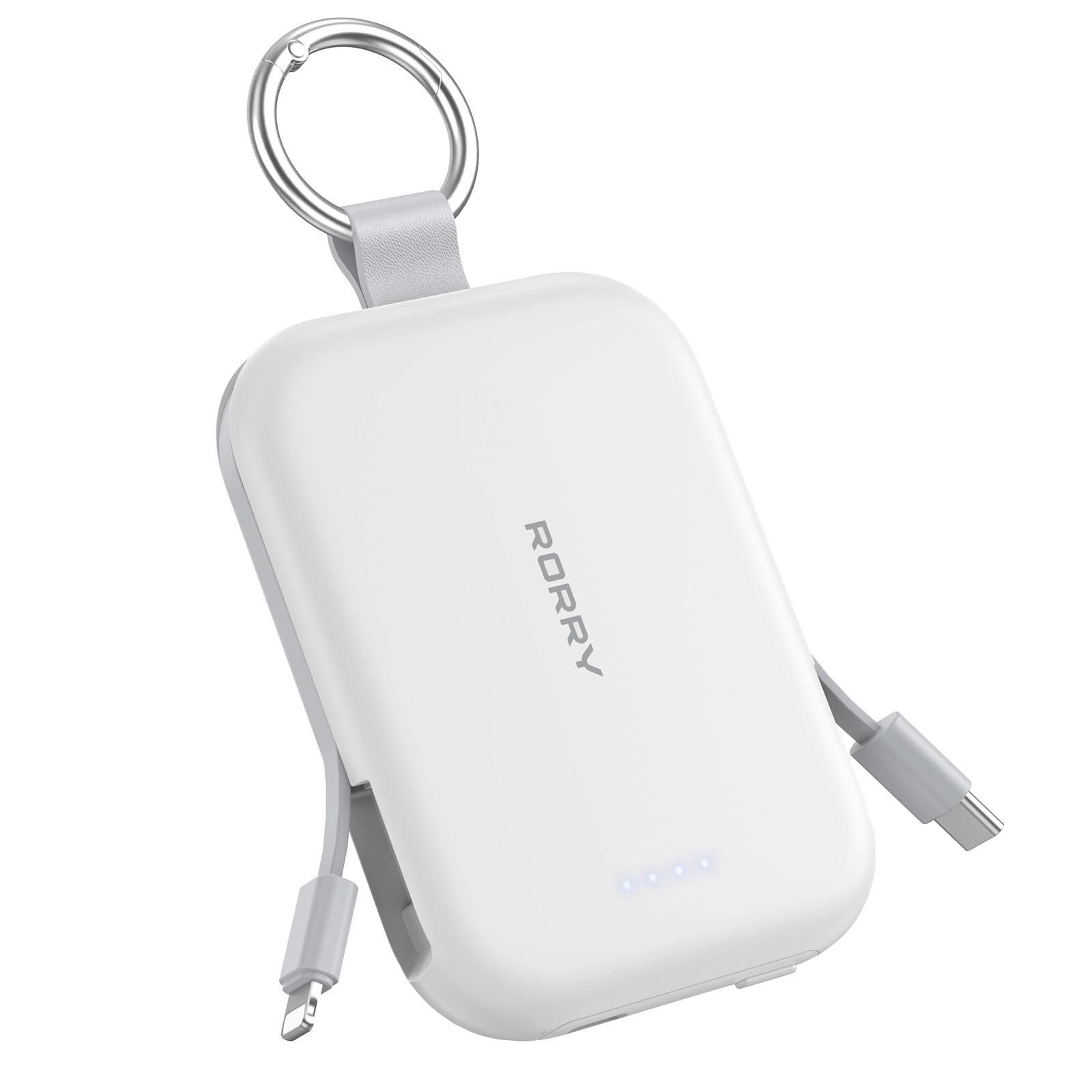
Image: The RORRY Portable Charger connected via its USB-C port to a charging cable, indicating the process of recharging the power bank itself.
5. Operasyon Enstriksyon
5.1. Chaje Apple Watch ou a
- Press the power button on the side of the power bank to activate it.
- Place your Apple Watch onto the magnetic charging pad on the top surface of the power bank.
- Ensure the watch is properly aligned for charging to begin. The watch screen will indicate charging status.

Image: An Apple Watch placed on the magnetic charging pad of the RORRY Portable Charger, showing it is actively charging.
5.2. Charging iPhone and AirPods (Lightning)
- Gently pull out the built-in Lightning cable from the side of the power bank.
- Connect the Lightning connector to your iPhone or AirPods charging case.
- The device will begin charging automatically.

Image: The RORRY Portable Charger using its built-in Lightning cable to charge an iPhone, demonstrating its direct connectivity.
5.3. Charging USB-C Devices
- Gently pull out the built-in USB-C cable from the side of the power bank.
- Connect the USB-C connector to your compatible device (e.g., Android phone, tablet, Nintendo Switch).
- The device will begin charging automatically.

Image: The RORRY Portable Charger utilizing its built-in USB-C cable to charge a compatible device, showcasing adaptabilite li.
5.4. Chaje similtane
The RORRY Portable Charger supports charging up to three devices simultaneously using its built-in cables and Apple Watch charging pad.

Image: A RORRY Portable Charger connected to an iPhone via Lightning cable, AirPods via USB-C cable, and an Apple Watch on its magnetic pad, all charging at the same time.
6. Enfòmasyon sou Sekirite
Your RORRY Portable Charger is equipped with multiple safeguards to ensure safe and reliable operation:
- Pwoteksyon Surchof: Prevents the device from reaching excessive temperatures.
- Pwoteksyon Surkouran: Guards against excessive electrical current flow.
- Overvoltage Pwoteksyon: Pwoteje kont vòltage monte.
- Pwoteksyon Kout Awondisman: Li fèmen otomatikman nan ka ta gen yon kous kout.
Always use the charger in a well-ventilated area and avoid exposing it to extreme temperatures or moisture.
7. Espesifikasyon
| Karakteristik | Detay |
|---|---|
| Dimansyon pwodwi | 3.86 x 2.85 x 0.65 pous |
| Pwa atik | 4.5 ons |
| Nimewo Modèl Atik | T1-5000 |
| Kapasite batri | 5000 Miliamp Orè |
| Kalite batri | 1 batri ityòm Ion (enkli) |
| Kalite Connector | USB Type C (for input/output) |
| Karakteristik espesyal | Built-in Cables (USB-C, Lightning), LED Indicator Lights, Pocket Size, Slim, Apple Watch Charger |
| Manifakti | Shenzhen Xianyang famasyetik teknoloji co, Ltd |
8. Antretyen
- Keep the power bank clean and dry. Use a soft, dry cloth for cleaning.
- Evite jete oswa sibi aparèy la nan gwo enpak.
- Sere nan yon kote ki fre epi sèk, lwen limyè solèy dirèk ak tanperati ki wo.
- Pa eseye demonte oswa modifye bank pouvwa a.
NAN. Depanaj
- Aparèy pa chaje:
- Asire w ke bank pouvwa a byen chaje (tcheke endikatè LED yo).
- Peze bouton pouvwa a pou aktive bank pouvwa a.
- Verify that the cables are securely connected to both the power bank and your device.
- For Apple Watch, ensure proper alignment on the magnetic pad.
- Batri pouvwa a pa rechaje:
- Ensure the USB-C cable is correctly connected to the power bank's input port and a working power adapter.
- Eseye yon lòt adaptè kouran USB oswa yon priz miray.
10. Garanti & Sipò
RORRY products are designed for reliability and performance. For any questions, technical support, or warranty claims, please contact RORRY DIRECT customer service.
- Sèvis apre-lavant: 7X24H support available.
- Exchange Service: 30-Day Exchange Service.
- Care Plan: 12-Months Care Plan.
Contact information can typically be found on the product packaging or the official RORRY websit.

Image: RORRY customer service details, including 7x24H After-sales Service, 30-Day Exchange Service, and 12-Months Care Plan.
11. Videyo pwodwi ofisyèl yo
Watch this official video from RORRY DIRECT for more information on your portable charger:
RORRY Portable Charger, 5000mAh Portable Charger Power Bank
Videyo: Yon finiview of the RORRY 5000mAh Portable Charger, demonstrating its features and usage. This video is provided by RORRY DIRECT.
Ask a question about this manual
Ask about setup, troubleshooting, compatibility, parts, safety, or missing instructions. Manuals+ will review the question and use this page’s manual context to help answer it.