
Entwodiksyon
This manual provides instructions for the Brydge 10.9 MAX+ Wireless Keyboard Case. This product is designed to enhance your iPad experience by providing a physical keyboard with a multi-touch trackpad and a protective case. Please read this manual thoroughly before use to ensure proper operation and care.
Konpatibilite
The Brydge 10.9 MAX+ Wireless Keyboard Case is compatible with the following iPad models:
- iPad 10th Generation (Model Numbers: A2696, A2757, A2777)
- iPad A16 (11th Generation) (Model Numbers: A3354, A3355, A3356)
Enpòtan: This keyboard case is not designed for use with iPad Air, iPad Pro, iPad 9th Gen, or older iPad models.
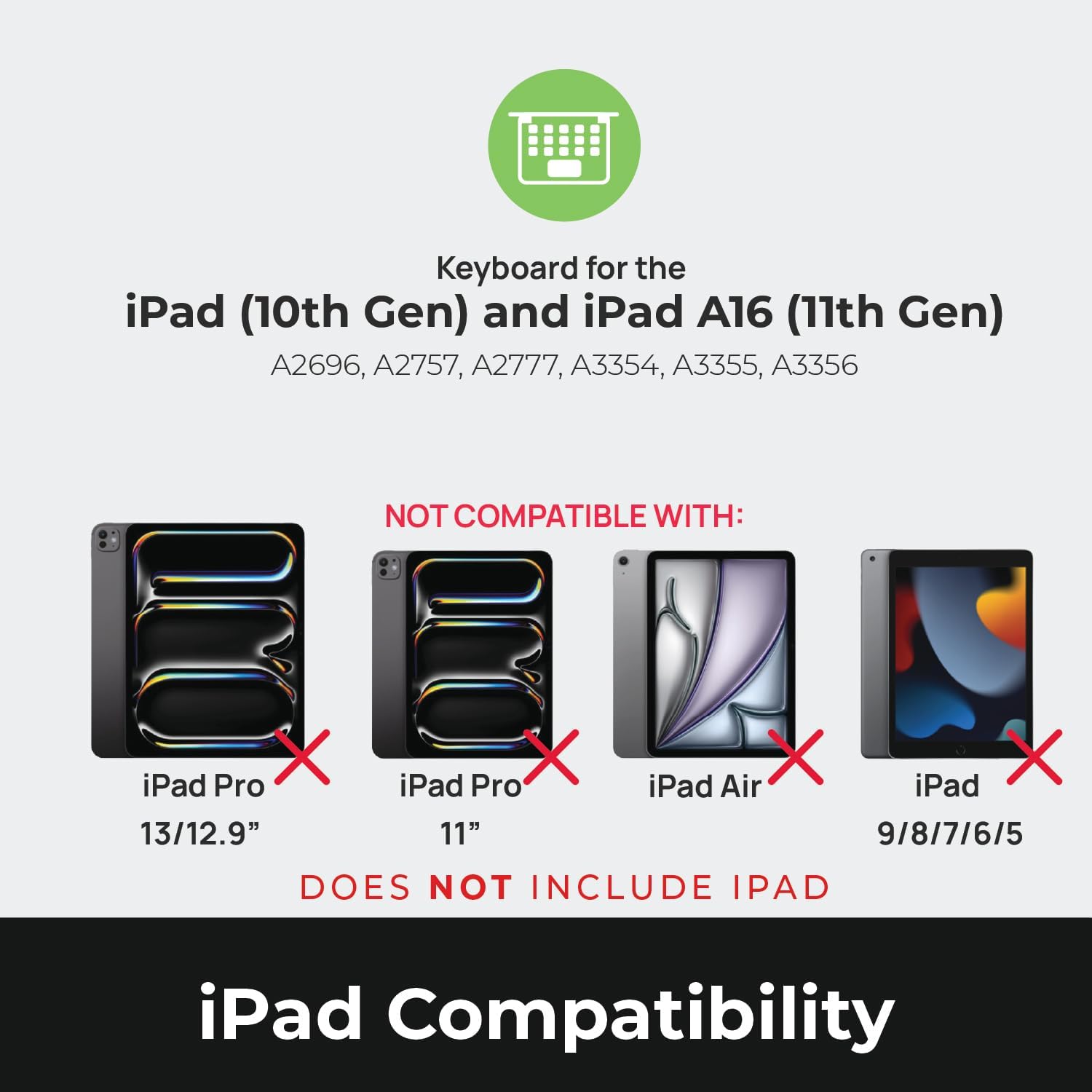
Image: Compatibility chart showing supported iPad models (10th Gen, A16 11th Gen) and incompatible models (iPad Pro 13/12.9", iPad Pro 11", iPad Air, iPad 9/8/7/6/5).
Ki sa ki nan bwat la
Lè w ap debale, asire w tout bagay yo la:
- 1 x Brydge 10.9 MAX+ Wireless Keyboard
- 1 x Detachable Magnetic SnapFit Case
- 1 x Manyèl Itilizatè (dokiman sa a)
Note: An iPad and USB-C charging cable are not included. The USB-C cable typically comes with your iPad.

Image: Depiction of the box contents, including the keyboard, case, and user manual.
Enstriksyon Enstalasyon
1. Attaching Your iPad to the SnapFit Case
- Carefully align your iPad with the SnapFit Case.
- Gently press the iPad into the case until it is securely seated. The case is designed for a snug fit to provide protection.
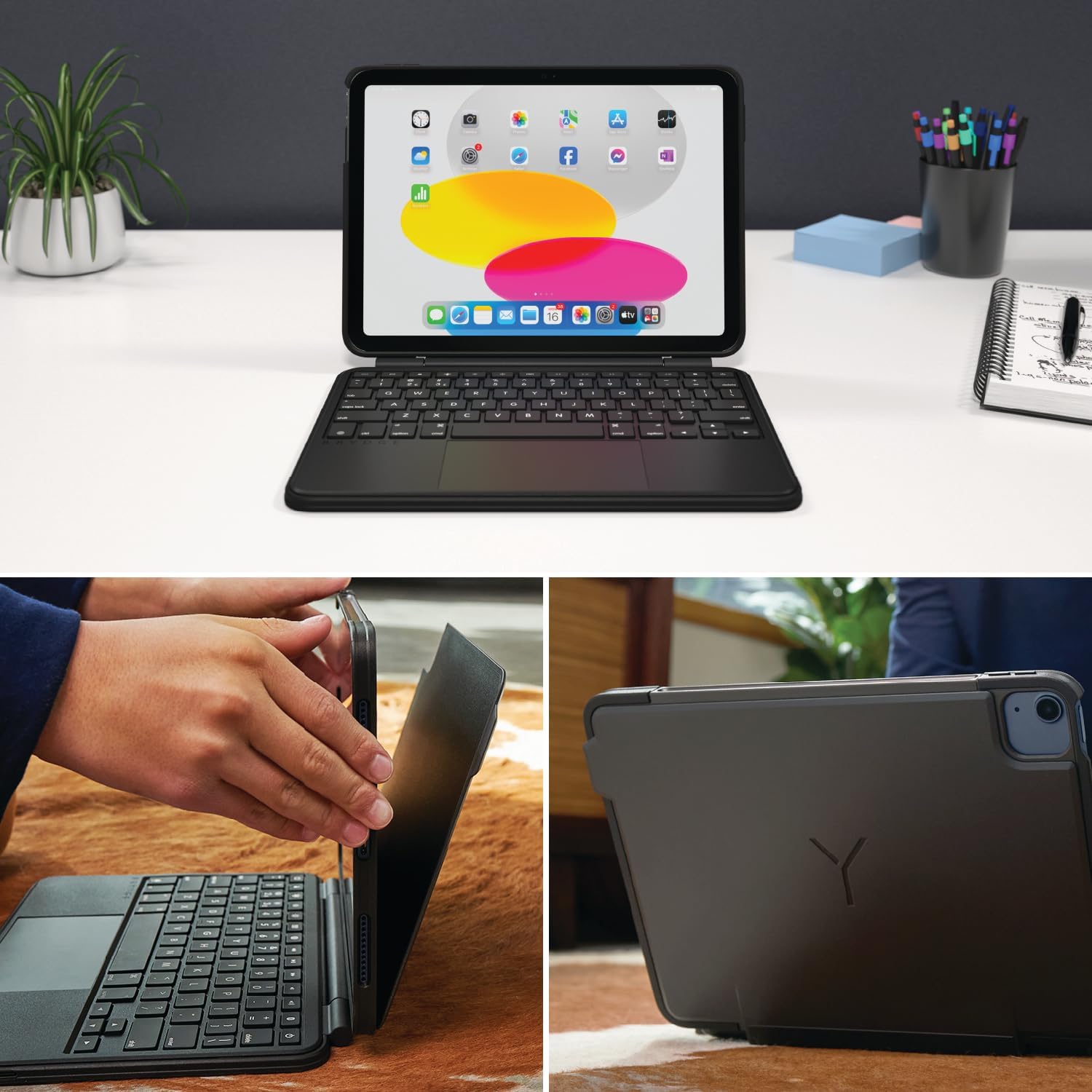
Image: Shows the process of attaching the iPad to the SnapFit case and the case attached to the keyboard.
2. Connecting the Case to the Keyboard
The SnapFit Case features a magnetic back cover that securely attaches to the Brydge keyboard. Simply align the back of the cased iPad with the magnetic area on the keyboard base until it snaps into place.
3. Chaje klavye a
Before first use, it is recommended to fully charge the keyboard. Use a USB-C cable (not included) to connect the keyboard's charging port to a power source. The charging port is typically located on the side or back of the keyboard.
4. Pè Bluetooth
- Asire w klavye a chaje epi li limen.
- Sou iPad ou a, ale nan Anviwònman > Bluetooth.
- Limen Bluetooth.
- The Brydge keyboard should appear in the "Other Devices" list. Tap on its name to connect.
- If prompted, enter the pairing code displayed on your iPad using the Brydge keyboard, then press Antre.
The keyboard features Instant-On™ Connectivity via Bluetooth 5.0, providing a quick and stable connection once paired.

Image: Illustrates the keyboard's Bluetooth 5.0 and Instant-On connectivity features.
Enstriksyon Operasyon
Fonksyon klavye
- Kle retroeklere: The keyboard features adjustable backlit keys with 3 brightness levels. Use the dedicated function keys (usually located in the top row) to cycle through brightness settings or turn the backlight off.
- Kle Fonksyon: The top row of keys provides quick access to iPadOS functions such as Home, Search, Brightness, Media Controls, and Volume.
Pavèt taktil milti-touche
The integrated multi-touch trackpad supports various iPadOS gestures for navigation and interaction. Refer to your iPad's settings for a full list of supported gestures.
- Klike: Press down on the trackpad to perform a click.
- Defile: Sèvi ak de dwèt pou defile monte oswa desann.
- Zoom: Zongle ak de dwèt pou rale nan oswa soti.
- App Switcher: Swipe up with three fingers to open the App Switcher.
- Ekran Kay: Swipe up with one finger from the bottom edge to return to the Home Screen.

Image: Highlights the detachable magnetic SnapFit case and the native multi-touch trackpad.
Ajisteman Viewang yo
The keyboard allows for a screen rotation of up to 135 degrees, enabling various viewang imaj pou tape, desine, oswa konsomasyon medya.

Image: Displays key features including up to 3-month battery life, 3 levels of backlit keys, and 0-130° viewang ing.
Lavi batri
The keyboard offers up to 3 months of battery life on a single charge, depending on usage and backlight settings. To conserve battery, the keyboard will enter sleep mode after a period of inactivity.
Antretyen
- Netwayaj: Sèvi ak yon mou, damp, lint-free cloth to clean the keyboard and case. Avoid abrasive cleaners or solvents.
- Depo: Lè w pa itilize klavye a pou yon bon bout tan, asire w ke li byen chaje epi sere l nan yon kote ki fre epi sèk.
- Swen batri: To prolong battery life, avoid fully discharging the keyboard frequently. Charge it when the battery indicator is low.
Depanaj
Klavye a pa konekte via Bluetooth
- Asire w klavye a chaje.
- Verifye si Bluetooth la aktive sou iPad ou a.
- Bliye aparèy la nan paramèt Bluetooth iPad ou a epi eseye konekte li ankò.
- Rekòmanse iPad ou a ak klavye a.
Trackpad Not Responding or Moving Erratically
- Ensure the keyboard is fully charged. Low battery can affect trackpad performance.
- Clean the trackpad surface with a soft, dry cloth to remove any debris or smudges.
- Dekonekte epi rekonekte koneksyon Bluetooth la.
- Check for any firmware updates for the Brydge keyboard via the Brydge Connect App (if available).
Kle pa reponn
- Confirm the keyboard is powered on and connected via Bluetooth.
- Tcheke pou nenpòt obstak fizik anba kle yo.
- If specific keys are not working, try restarting the keyboard and iPad.
Espesifikasyon
| Nimewo Modèl | BRY8042 |
| Dimansyon pwodwi | 10"L x 7.65"W x 0.8"H (10 x 7.65 x 0.8 pous) |
| Pwa atik | 1.85 liv |
| Koneksyon Teknoloji | Bluetooth 5.0 |
| Deskripsyon klavye | San fil |
| Karakteristik espesyal | Backlit, Rechargeable, Multi-Touch Trackpad, Detachable Magnetic SnapFit Case |
| Koulè | Nwa |
| Materyèl | Polikarbonat, Poliuretan tèmoplastik (TPU) |
| Batri | 1 Nonstandard Battery (included), up to 3 months battery life |
| Viewing Ang | Jiska 135 degre |
Garanti ak sipò
This product is subject to a standard return policy, typically 30 days from the date of purchase for refunds or replacements. For specific warranty details, please refer to the documentation provided with your purchase or contact Brydge customer support.
For technical assistance, troubleshooting, or warranty claims, please visit the official Brydge support website or contact their customer service department. Contact information can usually be found on the Brydge websit la oubyen nan materyèl anbalaj yo.
Note: Protection plans may be available for purchase separately.