
1. Entwodiksyon
This manual provides detailed instructions for the installation, operation, and maintenance of your XTRONS IQ Series 7-inch Android 14 Car Stereo. This head unit is designed for specific BMW E39 and E39 M5 models, offering advanced features such as a QLED touch screen, GPS navigation, Bluetooth, DSP, CarPlay, and Android Auto.
Applicable Models & Years
- For BMW E39 M5 (1999-2003)
- For BMW E39 (1995-2003)
Ensure your vehicle matches these specifications for proper compatibility and installation.
2. Karakteristik kle
- 7-inch QLED IPS Screen: 1280x720 high-definition capacitive touchscreen for clear visuals and responsive interaction.
- High Performance CPU: Qualcomm Snapdragon 665, 8GB RAM, and Android 14 for smooth operation and app compatibility.
- CarPlay san fil ak Android Auto: Seamless smartphone integration for navigation, calls, music, and voice assistants.
- Advanced Audio Experience: Digital Amplifier Processing (TDA7808) and DTS Digital Sound (Si47925) for high-fidelity audio.
- Smart and Intuitive UI: User-friendly interface with Day/Night Mode and quick access to favorite apps.
- Optimized CANbus Decoding: Supports original vehicle functions like steering wheel control, ACC, reversing control, and door status.
- Split Screen & Picture-in-Picture: Multitask with two applications simultaneously.
- Wi-Fi Doub Band: Supports 2.4GHz and 5GHz for faster and more stable internet connectivity.
- GPS entegre: Integrated navigation system for route guidance.
- FM/AM Radio with RDS: Access to radio stations with enhanced data services.
- AHD Camera Input: Supports high-definition camera input for improved visibility.
3. Gid Enstalasyon
3.1 Nòt Konpatibilite Enpòtan
Anvan ou kontinye ak enstalasyon, ak anpil atansyon review the following compatibility information to ensure proper fitment and functionality.
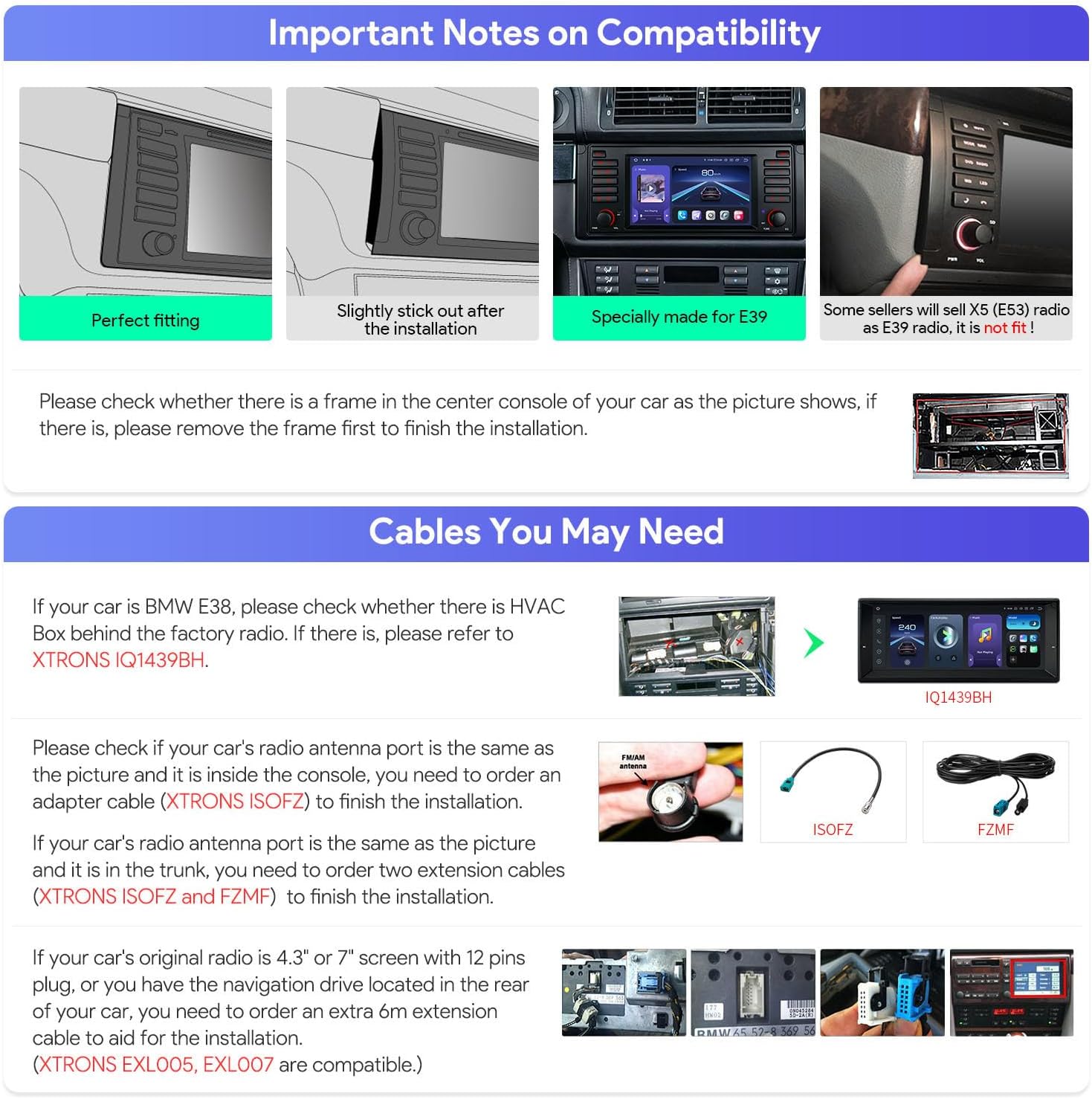
Imaj: Important Notes on Compatibility. This image illustrates various compatibility checks for BMW E38 and E39 models, including frame checks and radio antenna port types.
- Center Console Frame: Check if your car's center console has a frame as shown in the image. If present, remove the frame before installation.
- BMW E38 HVAC Box: For BMW E38 models, check for an HVAC Box behind the factory radio. If present, refer to XTRONS IQ1439BH for compatibility.
- Radio Antenna Port: If your car's radio antenna port matches the picture and is inside the console, you may need an ISOFOZ adapter cable. If your car's radio antenna port is in the trunk, you may need to order two extension cables: XTRONS ISOFOZ epi FZMZF.
- Original Radio Display: If your car's original radio has a 4.3" or 7" screen with a 12-pin plug, or if you have the navigation drive located in the rear of your car, you will need a 6m extension cable for installation. Compatible models include XTRONS EXL005 and EXL007.
3.2 Kontni Pake
Verifye ke tout konpozan ki nan lis anba a yo prezan nan pake ou anvan ou kòmanse enstalasyon an.

Imaj: Package Content. This image displays the main unit, ISO wiring harness, RCA cable, CANbus cable, 4G+ antenna, 4G- antenna, CANbus box, USB cables, camera cable, GPS antenna, radio antenna cable, fitting kits, English manual, and German manual.
- 1 × Main Unit
- 1 × ISO Wiring Harness
- 1 × RCA Cable
- 1 × Radio Antenna Cable
- 1 × 4G+ Antenna (Note: 4G Function not supported in USA)
- 1 × 4G- Antenna
- 1 × GPS Antenna
- 2 × USB kab
- 1 × CANbus Cable
- 1 × Camera Cable
- 1 × Fitting Kits
- 1 × CANbus Box
- 1 × Manyèl Anglè
- 1 × German Manual
3.3 Dimansyon Fizik
Refer to the diagram below for the physical dimensions of the head unit to ensure it fits your vehicle's dashboard opening.

Imaj: Size Diagram. This image shows the front and side dimensions of the XTRONS car stereo, including width (285mm), height (120mm), and depth (177mm, 100mm, 30mm for various parts).
Detailed wiring and mounting instructions are provided in the included English and German manuals. Professional installation is recommended.
4. Operasyon Enstriksyon
4.1 User Interface and Display
The 7-inch QLED IPS screen provides a clear and responsive interface. The system features a Smart UI with customizable elements and a Day/Night mode for optimal visibility.
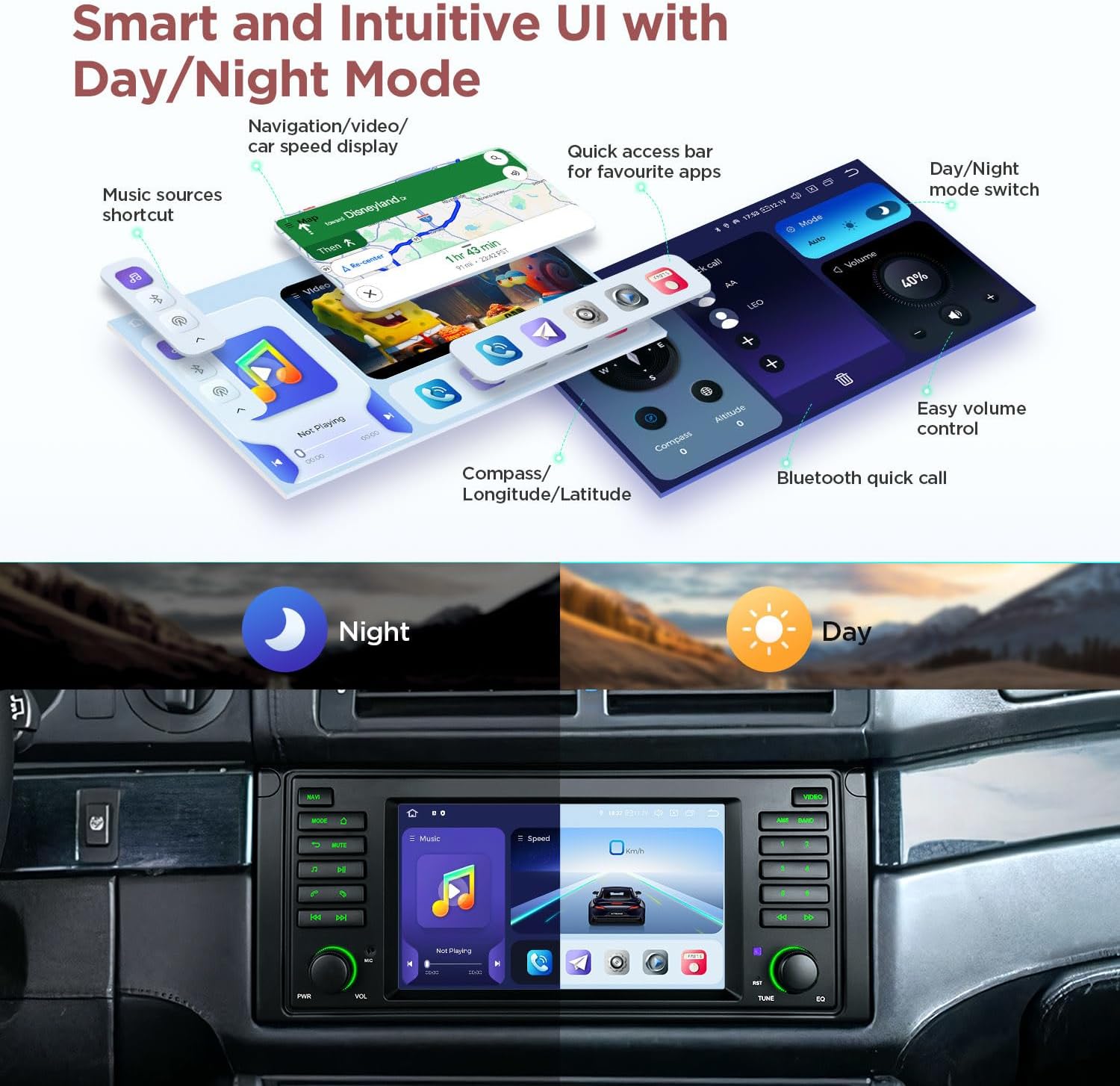
Imaj: Smart and Intuitive UI with Day/Night Mode. This image displays the user interface with navigation, music shortcuts, quick access bar for apps, compass, volume control, and Bluetooth quick call features, showing both day and night modes.
Physical buttons on the unit allow for precise control of common functions, enhancing safety while driving.
Videyo: XTRONS 7 Inch Android Car Stereo for BMW E39 / E39 M5. This video demonstrates the physical buttons, 7-inch QLED screen, smart UI, music source shortcuts, car model selections, quick display features, adding favorite apps, Day/Night mode, built-in CarPlay, Android Auto, DSP chipset, 4K video playback, split view, Wi-Fi, 4G module, Bluetooth calling, AHD camera input, FM/AM radio with RDS, built-in GPS, and screen mirroring capabilities of the XTRONS car stereo.
4.2 Smartphone Connectivity (CarPlay & Android Auto)
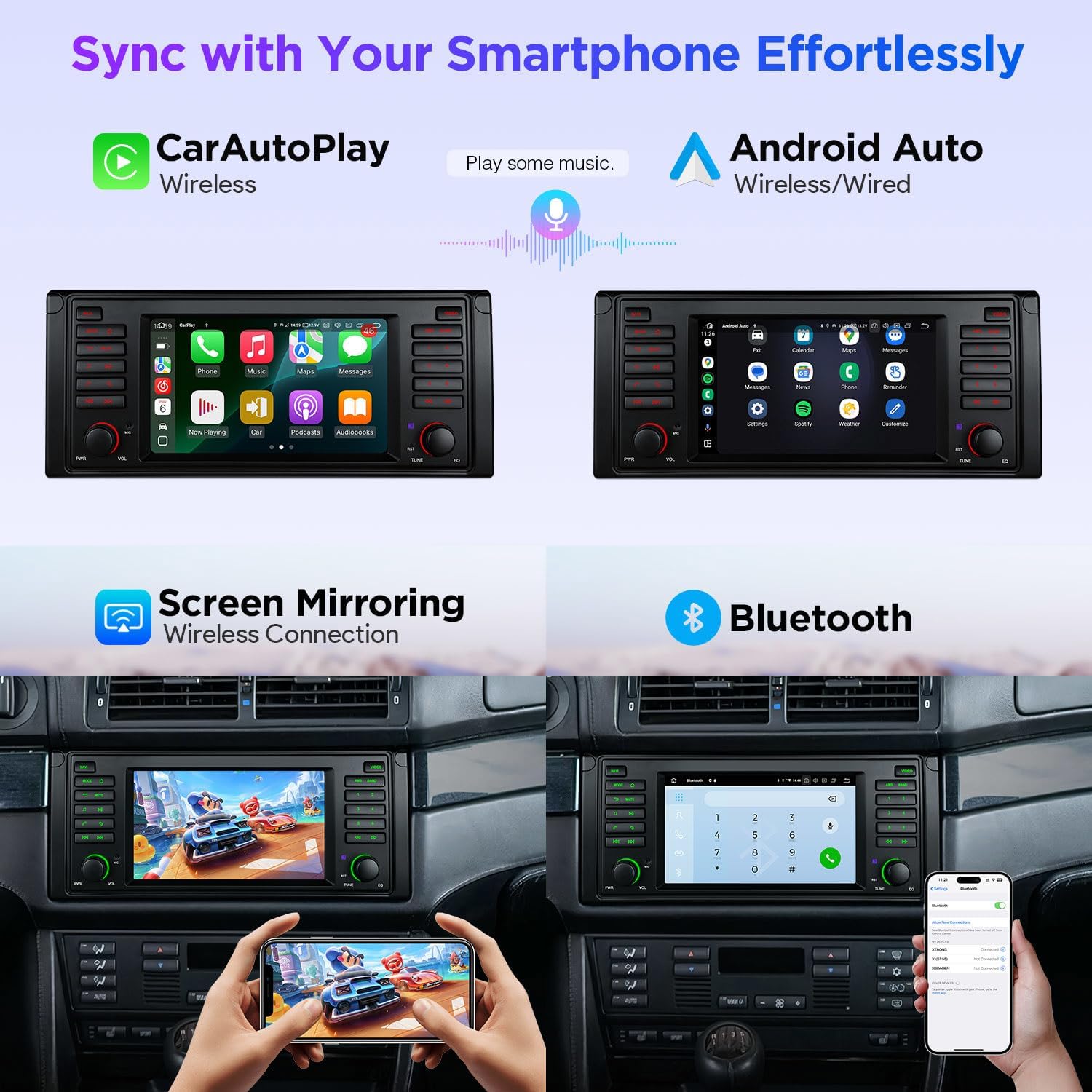
Connect your smartphone wirelessly for Apple CarPlay or wirelessly/wired for Android Auto. This allows access to navigation, calls, messages, and music directly from your car stereo.

Imaj: Sync with Your Smartphone Effortlessly. This image shows the car stereo displaying both Wireless CarPlay and Wireless/Wired Android Auto interfaces, along with Screen Mirroring and Bluetooth connectivity options.
4.3 Audio Features (DSP & DTS Sound)
The integrated Digital Signal Processor (DSP) and DTS Digital Sound technology provide a customizable and high-quality audio experience. Adjust equalizer settings, delay, volume, and frequency to optimize sound output.
Imaj: DTS Digital Sound, Experience Studio-Quality Sound in Your Car Today. This image illustrates the various audio settings available, including Equalizer, Delay, DTS effects, Volume balance, and Frequency adjustments for different speaker outputs.
4.4 Navigation (Built-in GPS)
Utilize the built-in GPS for reliable navigation. The system provides clear route guidance and map displays.
4.5 Connectivity (Wi-Fi & 4G)
The unit supports dual-band Wi-Fi (2.4GHz and 5GHz) for internet access. A built-in 4G module is also available, requiring a SIM card for 4G network connectivity (Note: 4G function not supported in USA).
4.6 Camera Input (AHD)
The system supports AHD (Analog High Definition) camera input, providing clear views for parking and reversing maneuvers.
4.7 Original Vehicle Function Support
Through optimized CANbus decoding, the car stereo integrates with and supports various original vehicle functions:
Imaj: Optimized CANbus Decoding. This image shows the car stereo interface and lists supported original vehicle functions: ACC control, Light control, Steering wheel control, Reversing control, and Handbrake control.
- ACC control
- Kontwòl limyè
- Kontwòl volan
- Kontwòl ranvèse
- Kontwòl fren men
5. Espesifikasyon
| Karakteristik | Deskripsyon |
|---|---|
| Mak | XTRONS |
| Modèl | B0FMDQMDWN |
| Gwosè ekran | 7-inch QLED IPS |
| Rezolisyon | 1280x720 |
| Sistèm operasyon | Android 14 |
| Processeur | Qualcomm Snapdragon 665 Octa Core |
| RAM | 8GB |
| ROM | 256GB |
| Koneksyon | Bluetooth 5.0, Dual Band Wi-Fi (2.4GHz/5GHz), USB |
| Karakteristik espesyal | Built-in Wireless CarPlay & Android Auto, DSP, DTS Sound, GPS Navigation, AHD Camera Input, Split Screen, Picture-in-Picture, CANbus Decoding |
| Metòd kontwòl | Aplikasyon, Manyen, Vwa |
| Aparèy konpatib | Smartphone, iPhone |
NAN. Depanaj
This section provides solutions to common issues you might encounter. For more detailed troubleshooting, please refer to the comprehensive manual included in your package or contact XTRONS customer support.
Pwoblèm komen ak solisyon:
- Pa gen pouvwa: Ensure all power cables are securely connected. Check the vehicle's fuse box for blown fuses.
- Pa gen son: Verify speaker connections. Check volume levels and audio output settings (e.g., DSP settings). Ensure the mute function is not active.
- Pwoblèm koneksyon Bluetooth: Ensure Bluetooth is enabled on both the car stereo and your smartphone. Delete previous pairings and attempt to re-pair.
- Pèt siyal GPS: Asire w antèn GPS la byen enstale epi li gen yon vizyon klè. view of the sky. Move the vehicle to an open area if signal is weak.
- Ekran taktil la pa reponn: Eseye rekòmanse aparèy la. Si pwoblèm nan pèsiste, ou ka bezwen fè yon reset faktori (konsilte manyèl konplè a pou enstriksyon).
- CarPlay/Android Auto pa konekte: Ensure your phone's operating system is up to date. For wired connections, try a different USB cable. For wireless, check Wi-Fi and Bluetooth connections.
7. Garanti & Sipò
7.1 Pwodwi Garanti
The XTRONS IQ Series Car Stereo comes with a 1 Ane Manifakti GarantiTanpri konsève prèv acha ou a pou reklamasyon garanti. Garanti a kouvri domaj nan materyèl ak nan fabrikasyon anba itilizasyon nòmal.
7.2 Sipò pou Kliyan
For technical assistance, installation queries, or warranty service, please contact XTRONS customer support through their official websit la oubyen enfòmasyon kontak ki nan anbalaj pwodwi w la. Ou kapab vizite tou XTRONS Store on Amazon pou resous adisyonèl.