
Entwodiksyon
This manual provides detailed instructions for the installation, operation, and maintenance of your 10L0L Golf Cart GPS Speedometer, Model ELE-00026-J. This device is designed to provide accurate speed, direction, and other essential driving data for various golf cart models, including Yamaha, EZGO, and Club Car. Please read this manual thoroughly before use to ensure proper functionality and safety.

Image: The 10L0L Golf Cart GPS Speedometer mounted on a golf cart dashboard, showing its integration into the vehicle's interior.
Kontni pake
Verifye ke tout atik yo prezan nan pakè a:
- 1 x 10L0L Golf Cart GPS Speedometer Unit
- 1 x ventouse mòn
- 1 x USB pouvwa Kab
- 2 x Traceless Adhesive Stickers
- 1 x Manyèl Itilizatè (dokiman sa a)
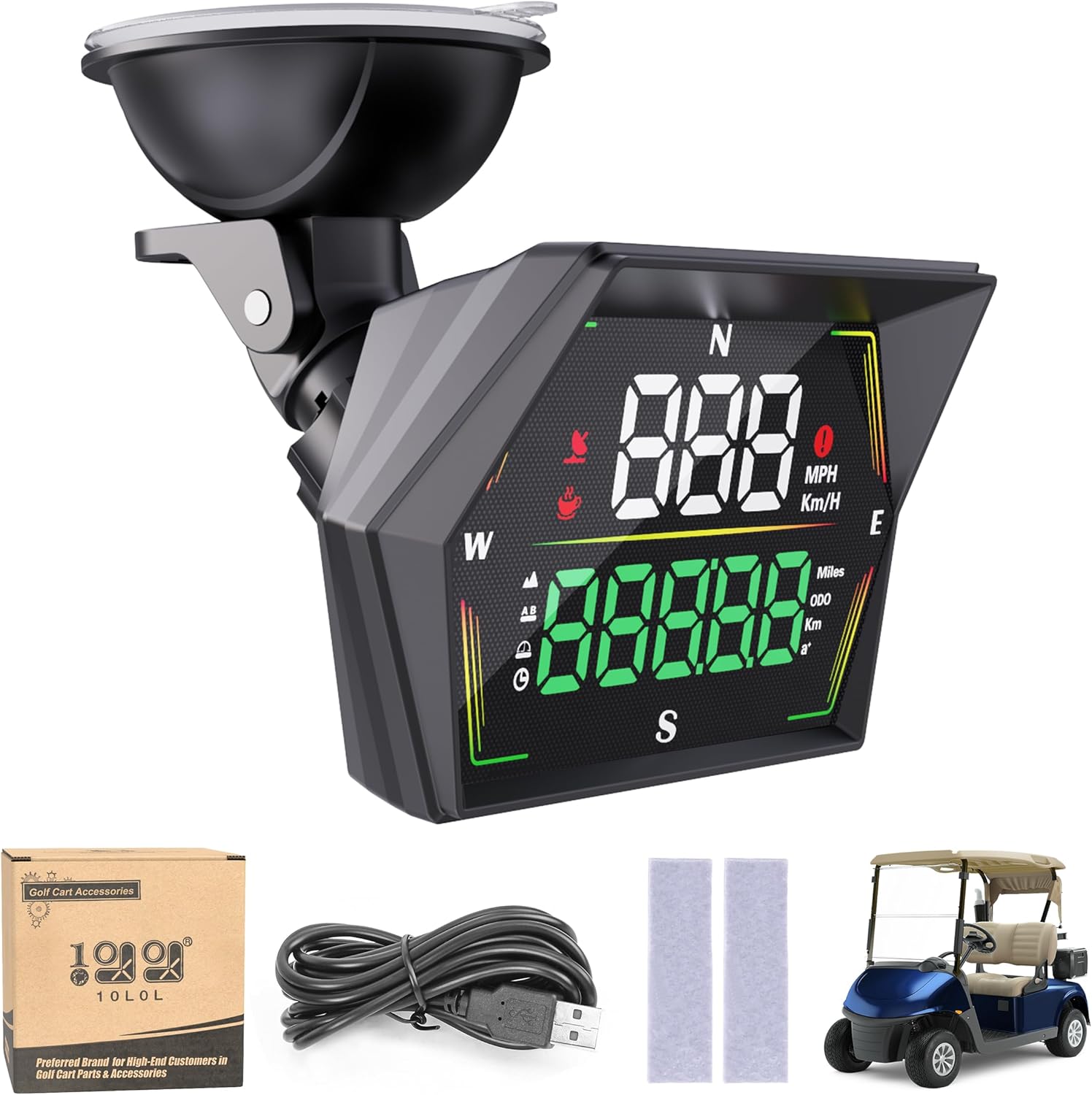
Image: The main speedometer unit, USB cable, and adhesive pads, representing the typical package contents.
Karakteristik pwodwi
- Pinpoint GPS Accuracy: Utilizes GPS and BDS satellites for precise speed, direction, and distance tracking.
- Smart Safety Alarms: Includes overspeed and fatigue driving alerts for enhanced safety.
- Durable & Multi-Functional: Constructed from robust ABS material, tracking trip time, distance, and ODO mileage.
- Tool-free Installation: Equipped with sturdy suction cups and traceless stickers for easy plug-and-play setup.
- Sun-Readable Display: Anti-glare screen with automatic brightness adjustment for clear visibility in various lighting conditions.
Enstalasyon ak Enstalasyon
The 10L0L Golf Cart GPS Speedometer offers two primary installation methods: suction cup mounting or direct adhesive application.
1. Suction Cup Mounting
- Clean the desired mounting surface (e.g., windshield, dashboard) to ensure it is free of dust and grease.
- Attach the suction cup mount to the back of the speedometer unit.
- Press the suction cup firmly onto the clean surface and engage the locking mechanism (if present) to secure it.
- Adjust the angle of the speedometer for optimal viewing.
2. Direct Adhesive Application
- Clean the desired mounting surface thoroughly.
- Peel the protective backing from the traceless adhesive stickers.
- Apply the stickers to the back of the speedometer unit or directly to the dashboard.
- Press the speedometer firmly onto the surface for several seconds to ensure a strong bond.

Image: Illustration showing two mounting options: direct adhesive application and suction cup mounting, with the suction cup offering 360-degree rotation.
Koneksyon pouvwa
Connect the provided USB power cable to the speedometer and plug the other end into a suitable USB power source (e.g., a USB port on your golf cart, a USB adapter). The device will power on automatically.
Akizisyon Siyal GPS
Upon powering on, the speedometer will begin searching for GPS and BDS satellite signals. This process typically takes a few seconds. Once a stable signal is acquired, the satellite icon will illuminate, and the speed display will show "0" (or your current speed if moving). Ensure the device has a clear view nan syèl la pou yon resepsyon siyal optimal.
Enstriksyon Operasyon
The 10L0L GPS Speedometer provides various data points and alerts.

Image: A detailed breakdown of the G21 display, indicating the location of speed, compass, satellite icon, overspeed alarm, fatigue driving icon, speed unit, altitude, travel distance, travel time, mileage, and acceleration time.
Fonksyon ekspozisyon
- Speed Display Area: Shows current speed in MPH or KM/H.
- konpa: Indicates driving direction (N, S, E, W).
- Ikon satelit: Illuminates when a GPS signal is acquired.
- Zòn ekspozisyon milti-fonksyon: Displays various metrics such as:
- Altitid
- Distance Traveled (Trip Distance)
- Total Mileage (ODO)
- Tan vwayaj
- Acceleration Time (0-100km/h or 0-60mph)
- Inite vitès: Indicates whether speed is displayed in MPH or KM/H.
- Ekleraj anbyen: Automatic adjustment for display brightness.
Setting Speed Units (MPH/KMH)
The device allows switching between Miles Per Hour (MPH) and Kilometers Per Hour (KM/H). Refer to the device's physical buttons for unit selection. Typically, a short press of a specific button (often labeled 'M' or 'Unit') cycles through available units.
Alam Sekirite Sosyal
- Alèt twòp vitès:
You can set a custom speed limit. If your golf cart exceeds this limit, the overspeed alarm icon will illuminate, and an audible alert may sound (if equipped) to remind you to reduce speed.
- Avètisman Fatig Kondwi:
The device is programmed to remind you to take a break after approximately 4 hours of continuous driving. The fatigue driving icon will appear to prompt a rest period.

Image: Visual representation of the overspeed alarm (speedometer icon) and fatigue driving alarm (coffee cup icon) as they appear on the display.
Ajisteman klète otomatik
The display features an automatic light-sensitive function that adjusts brightness based on ambient light conditions. This ensures optimal visibility whether driving in bright sunlight or at night.

Image: A split image illustrating the speedometer's display clarity in both auto-darkened night mode and clearly visible daylight mode, due to automatic sensitivity adjustment.

Image: A visual representation of the speedometer's multi-functional display, showcasing travel distance, compass, and acceleration time features.
Antretyen
- Netwayaj: Use a soft, dry cloth to clean the display and exterior. Avoid abrasive cleaners or solvents.
- Depo: If storing the golf cart for an extended period, disconnect the speedometer from its power source.
- Rezistans dlo: The device is IP65 waterproof, offering protection against splashes and rain. However, avoid submerging the unit in water.

Image: The speedometer displayed outdoors in rainy conditions, emphasizing its IP65 waterproof protection against rain and water.
Depanaj
| Pwoblèm | Kòz posib | Solisyon |
|---|---|---|
| Aparèy pa limen. | Pa gen ekipman pou kouran oswa kab la gen pwoblèm. | Check USB cable connection. Ensure power source is active. Try a different USB port or cable. |
| No GPS signal / Speed display shows "---". | Obstrue view of the sky, initial signal acquisition in progress, or device interference. | Asire ke aparèy la gen yon klè view of the sky. Wait a few minutes for signal acquisition. Move away from tall buildings or dense foliage. Restart the device. |
| Lekti vitès ki pa egzak. | Weak GPS signal or temporary interference. | Ensure a strong GPS signal (satellite icon illuminated). Drive in an open area. |
| Ekran an twò fèb oswa twò klere. | Automatic brightness adjustment is not functioning optimally. | Ensure the light sensor is not obstructed. The device automatically adjusts brightness; manual adjustment is not typically available. |
| Overspeed or Fatigue alert not working. | Settings not configured or temporary software glitch. | Verify alert settings (if configurable via buttons). Restart the device. |
Espesifikasyon
| Karakteristik | Detay |
|---|---|
| Nimewo Modèl | ELE-00026-J |
| Mak | 10L0L |
| Pwa atik | 6.7 ons (0.19 kilogram) |
| Dimansyon pake | 4.45 x 4.02 x 2.91 pous |
| Kalite ekspozisyon | Digital |
| Antre Entèfas Imèn | Bouton |
| Kalite aliye | Dashboard Mount, Panel Mount (Suction Cup, Adhesive) |
| Kalite Sèvis Machin | Gòlf kabwa |
| Evalyasyon ki enpèmeyab | IP65 |

Image: Detailed product dimensions for the speedometer unit and its suction cup mount.
Garanti ak sipò
The 10L0L Golf Cart GPS Speedometer comes with a 2-ane garanti. For technical support, warranty claims, or any inquiries regarding your product, please contact 10L0L customer service through the retailer where the product was purchased or visit the official 10L0L websit pou enfòmasyon kontak.