
1. Entwodiksyon
Welcome to the DOOGEE Note 56 user manual. This guide provides essential information to help you set up, operate, and maintain your new smartphone. The DOOGEE Note 56 is an unlocked Android 16 smartphone featuring a powerful Octa-Core processor, a large 6150mAh battery, and a vibrant 6.56-inch 90Hz HD+ display. It is designed for efficient daily use, photography, and connectivity.
2. Ki sa ki nan bwat la
Your DOOGEE Note 56 package includes the following items:
- 1 x DOOGEE Note 56 Cell Phone
- 1 x bwat anbalaj
- 1 x manyèl itilizatè
- 1 x Protective Film (Pre-applied)
- 1 x PIN kat SIM
- 1 x Type-C Port Cable
- 1 x Chargeur
- 1 x kat garanti
- 1 x TPU Protective Case
3. Aparèy souview
Familiarize yourself with the physical components and design of your DOOGEE Note 56.
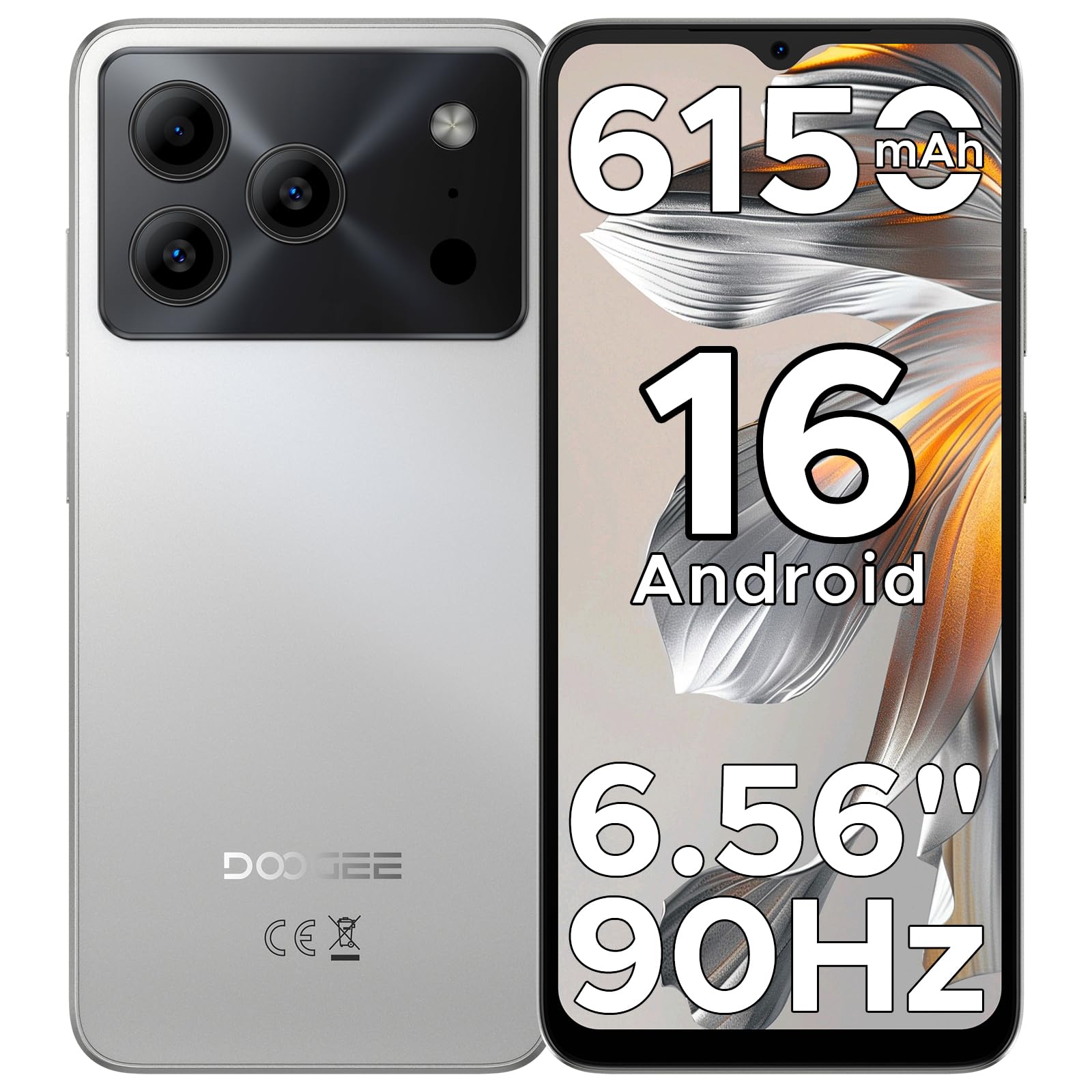
Image: The DOOGEE Note 56 smartphone, showcasing its slim design and key features such as the 8.45mm ultra-slim body, 6150mAh Silicon-Carbon Battery, Up-To-Date Android 16, 6.56" 90Hz Display, AI Scene Recognition, Instant Face Unlock, and 3.5mm Headphone Jack.

Imaj: Yon gwo plan view of the DOOGEE Note 56 highlighting its ultra-slim 8.45mm profile and lightweight 195g design, emphasizing its pocket-friendly and refined appearance.
Bouton fizik ak pò:
- Bouton pouvwa: Sitiye sou bò a, yo itilize li pou limen/etenn aparèy la oswa reveye/dòmi ekran an.
- Bouton Volim: Sitiye sou bò a, yo itilize li pou ajiste volim medya ak apèl.
- USB Kalite-C Port: Sitiye anba a, yo itilize li pou chaje ak transfere done.
- Jack ekoutè 3.5mm: Sitiye anlè a, pou konekte kas ekoutè filaire.
- Plas pou kat SIM/TF: Located on the side, for inserting SIM cards and a TF (microSD) card.
4. Enstalasyon
4.1. Mete kat SIM ak TF
- Jwenn fant kat SIM/TF la sou bò telefòn ou an.
- Insert the provided SIM eject tool into the small hole next to the slot to open the tray.
- Place your Nano-SIM card(s) and/or TF card into the tray according to the diagram on the tray.
- Pouse plato a tounen nan fant lan avèk anpil atansyon jiskaske li aliyen ak kò telefòn nan.
4.2. Premye Limen ak Konfigirasyon
- Peze epi kenbe bouton Power la jiskaske logo DOOGEE a parèt.
- Swiv enstriksyon yo sou ekran an pou chwazi lang ou, konekte ak Wi-Fi a, epi konfigire kont Google ou.
- Configure security settings, including Face Unlock, for quick and secure access.
5. Operasyon Enstriksyon
5.1. Sistèm operasyon Android 16
Your DOOGEE Note 56 runs on the latest Android 16 OS, offering an intuitive and secure user experience. Navigate through apps, customize your home screen, and access various features with ease.

Image: A visual representation of the Android 16 operating system interface on the DOOGEE Note 56, showing various app icons and system settings.
5.2. Face Unlock
For convenient and secure unlocking, your device supports Face Unlock. To set it up:
- Ale nan Anviwònman > Sekirite > Degaje figi.
- Swiv enstriksyon ki sou ekran an pou anrejistre figi ou.
- Ensure good lighting conditions during registration for optimal performance.

Image: A user demonstrating the Instant Face Unlock feature on the DOOGEE Note 56, highlighting its quick and secure access capabilities.
5.3. Gemini AI Integration
The DOOGEE Note 56 integrates Gemini AI features, enhancing your device's intelligence and responsiveness. This includes smart body sensing, dual system mode, super clipboard, memory expansion, screen optimization, and customizable screen colors.
Video: This video demonstrates how to utilize and upgrade Gemini AI features on a DOOGEE smartphone, showcasing its capabilities within the Android 16 operating system.
6. Karakteristik Kamera
Capture memorable moments with the DOOGEE Note 56's advanced camera system.
6.1. Rear Camera (8MP)
The 8MP main camera delivers clear, natural photos. Features include:
- HDR: Amelyore ranje dinamik pou yon ekspozisyon ekilibre nan ekleraj difisil.
- Mode Pro: Ofri kontwòl manyèl sou paramèt kamera yo.
- Mòd lannwit: Amelyore kalite foto nan kondisyon ki pa twò klere.
- Rekonesans sèn IA: Automatically detects 12 scenes and optimizes settings for stunning shots.
- Mòd pòtrè: Creates a depth-of-field effect for professional-looking portraits.
- Smile Capture: Li pran yon foto otomatikman lè li detekte yon souri.
- Panoramas: Capture wide-angle scenic views.
- Burst Shots: Pran plizyè foto youn apre lòt byen vit.
- Filtè amizan: Apply creative filters to your photos.

Image: An illustration of the DOOGEE Note 56's camera capabilities, including AI Scene Recognition icons and various sample photos taken with the 8MP main camera and 5MP front camera.
6.2. Front Camera (5MP)
The 5MP front camera is perfect for selfies and video calls, featuring Beauty Mode and Portrait Effect for bright and natural results.
7. Koneksyon
Stay connected with a range of network and wireless options.
- 4G Doub SIM: Supports two SIM cards for flexible network usage.
- Wi-Fi: Konekte sou rezo san fil pou jwenn aksè a entènèt.
- Bluetooth 4.2: Pou konekte ak akseswa san fil.
- GPS: Pou sèvis navigasyon ak lokalizasyon.
- Radyo FM: Enjoy your favorite radio stations.
7.1. Supported Network Bands:
- GSM: B2/3/5/8
- WCDMA: B1/2/4/5/8
- TDD: B38 / 40/41
- FDD: B1/2/3/4/5/7/8/18/19/20/25/26/28A/28B/66
- Sipò: EDGE/GPRS
8. Jesyon batri
The DOOGEE Note 56 is equipped with a large 6150mAh Silicon-Carbon battery for extended usage.

Imaj: Yon entèn view of the DOOGEE Note 56 highlighting its 6150mAh Silicon-Carbon Battery, emphasizing its longer lifespan, unmatched durability, 1000 charge cycles, 4 years durable battery, 20% smaller size, and 5W reverse charging capability.
Video: This video highlights the 6150mAh Silicon-Carbon Battery of the DOOGEE Note 56, showcasing its capacity and efficiency.
8.1. Chaje Envès OTG
The device supports OTG (On-The-Go) reverse charging, allowing you to use your Note 56 to charge other compatible devices.
8.2. Tips for Extending Battery Life:
- Adjust screen brightness to a lower level.
- Dezaktive Wi-Fi, Bluetooth, ak GPS lè w pa ap itilize yo.
- Fèmen aplikasyon ki an background.
- Enable battery saver mode in settings.

Image: This image illustrates various usage scenarios for the DOOGEE Note 56, demonstrating its extended battery life for web browsing (7 hours), music playing (49.5 hours), video watching (14 hours), and calling (28 hours).
9. Depo ak Pèfòmans
The DOOGEE Note 56 is powered by a UNISOC SC9863A Octa-Core processor, ensuring smooth performance for applications and daily tasks.
- RAM: 24GB (virtual RAM expansion, 8GB physical RAM).
- Depo Entèn: 64GB.
- Depo dilatabl: Supports up to 2TB via TF (microSD) card (TF card needs to be purchased separately).

Image: A visual representation of the DOOGEE Note 56's internal memory and storage, showing 64GB ROM and 24GB RAM (3GB+21GB virtual expansion), emphasizing smooth multitasking and ample espas.
10. Montre
Experience immersive visuals on the 6.56-inch HD+ 90Hz IPS waterdrop screen.
- Gwosè: 6.56 pous
- Rezolisyon: 720 x 1612 piksèl
- Pousantaj rafrechisman: 90Hz
- Rapò aspè: 20:9
- PPI: 269

Image: The DOOGEE Note 56 display showcasing its 6.56-inch HD+ screen with a 90Hz refresh rate, designed for smooth viewing and social media interaction.
11. Antretyen ak Swen
To ensure the longevity and optimal performance of your DOOGEE Note 56, follow these care guidelines:
- Evite ekspoze telefòn nan nan tanperati ekstrèm, limyè solèy dirèk, oswa imidite twòp.
- Sèvi ak sèlman chajè ak kab ki apwouve.
- Netwaye ekran an ak kò a avèk yon twal mou ki pa gen pousyè.
- Utilize the provided TPU protective case and pre-applied protective film to guard against scratches and minor impacts.
NAN. Depanaj
If you encounter issues with your DOOGEE Note 56, try the following basic troubleshooting steps:
- Aparèy pa limen: Asire w batri a chaje. Konekte chajè a epi tann kèk minit anvan ou eseye limen l ankò.
- Ekran an pa reponn: Rekòmanse aparèy la lè w peze epi kenbe bouton Power la pandan apeprè 10-15 segonn.
- Pwoblèm rezo: Check if your SIM card is properly inserted. Verify network settings and ensure you have an active plan with your carrier.
- Aplikasyon an fè aksidan: Vide kach aplikasyon ki gen pwoblèm nan oubyen enstale li ankò. Asire w ke lojisyèl aparèy ou an ajou.
For more complex issues, refer to the official DOOGEE support websit oswa kontakte sèvis kliyan.
13. Espesifikasyon
| Karakteristik | Detay |
|---|---|
| Non modèl | REMAK 56 |
| Sistèm operasyon | Android 16 |
| Processeur | UNISOC SC9863A Octa-Core (1.6 GHz CPU Speed) |
| RAM | 24 GB (8GB fizik + 16GB vityèl) |
| Depo Entèn | 64 GB |
| Depo dilatabl | Jiska 2 TB atravè kat TF |
| Gwosè ekspozisyon | 6.56 pous |
| Rezolisyon ekspozisyon | 720 x 1612 (HD+) |
| Rafrechisman pousantaj | 90 Hz |
| Kamera dèyè | 8 MP |
| Kamera devan | 5 MP |
| Kapasite batri | 6150 Miliamp Èdtan (Li-Po) |
| Koneksyon | 4G Dual SIM, Wi-Fi, Bluetooth 4.2, GPS, FM Radio, USB Type-C |
| Audio Jack | 3.5 mm |
| Dimansyon | 6.45 x 2.98 x 0.33 pous |
| Pwa atik | 6.9 ons (195 gram) |
| Karakteristik espesyal | Dual SIM, Expandable Memory, Supports USB OTG, Face Unlock |
14. Garanti ak sipò
Your DOOGEE Note 56 comes with a warranty. Please refer to the included Warranty Card in your product package for detailed information on warranty terms, conditions, and duration.
For technical support, service, or further inquiries, please visit the official DOOGEE website or contact their customer service channels. Keep your purchase receipt and warranty card handy for any claims.