
1. Entwodiksyon
Thank you for choosing the DazzlingStage 60W 9LED RGBW Stage Wall Wash Bar Light. This manual provides essential information for the safe and effective operation of your lighting fixture. Please read it thoroughly before installation and use, and retain it for future reference.
Sa a stage light bar features 9 high-power RGBW LEDs, offering a wide spectrum of colors and dynamic lighting effects suitable for various events and venues.

Imaj 1.1: Plis paseview of the DazzlingStage 60W 9LED RGBW Stage Wall Wash Bar Lights in various colors.
2. Enstriksyon Sekirite
- Sekirite elektrik: Asire ekipman pou pouvwa a voltage matches the specifications of the fixture. Always disconnect power before cleaning, servicing, or moving the unit.
- Enstalasyon: Install the fixture in a well-ventilated area, away from heat sources. Ensure secure mounting to prevent accidental falls.
- Operasyon: Do not look directly into the light source when the fixture is operating, as it can cause eye damage. Avoid operating the unit in wet or damp kondisyon yo.
- Antretyen: Refer all servicing to qualified personnel. Do not attempt to repair the unit yourself.
- Timoun: Kenbe aparèy la pa rive nan men timoun yo.
3. Pake kontni
Lè w ap debale, tanpri verifye si tout atik ki nan lis anba a yo enkli epi yo an bon kondisyon:
- DazzlingStage 60W 9LED RGBW Stage Wall Wash Bar Light (x1 per pack)
- Power Cord (x1 per pack)
- Remote Control (x1 per pack)
- Mounting Bracket (x1 per pack)
- Knobs (x2 per pack)
- Black Gaskets (x2 per pack)
- Instruction Manual (x1 per pack)

Imaj 3.1: Kontni ki enkli nan pake pwodwi a.
4. Pwodwi konpozan
Familiarize yourself with the main components of the light bar:
- Etalaj LED: 9 RGBW LEDs for color mixing.
- Kontwòl Panel: Features a 4-digit LED display and control buttons (MENU, UP, DOWN, ENTER) for mode selection and parameter adjustment.
- DMX IN/OUT Ports: For connecting to a DMX controller or linking multiple units.
- Power IN/OUT: For power connection and daisy-chaining power to other units.
- Mounting Support: Adjustable bracket for floor standing or truss mounting.
- Dissipateur chalè: Integrated cooling system to maintain optimal operating temperature.

Image 4.1: Key components and dimensions of the light bar.
5. Enstalasyon ak Enstalasyon
The DazzlingStage Wall Wash Bar Light offers flexible installation options:
5.1 Monte Support a
Attach the included mounting bracket to the light bar using the provided knobs and gaskets. Ensure the bracket is securely fastened.
5.2 Opsyon Plasman
- Etaj kanpe: The bracket allows the light bar to stand upright on a flat surface. Adjust the angle as needed.
- Truss Mounting: Sèvi ak cl ki apwopriyeamps (not included) to attach the bracket to a lighting truss. Ensure the truss and clamps can support the weight of the fixture.
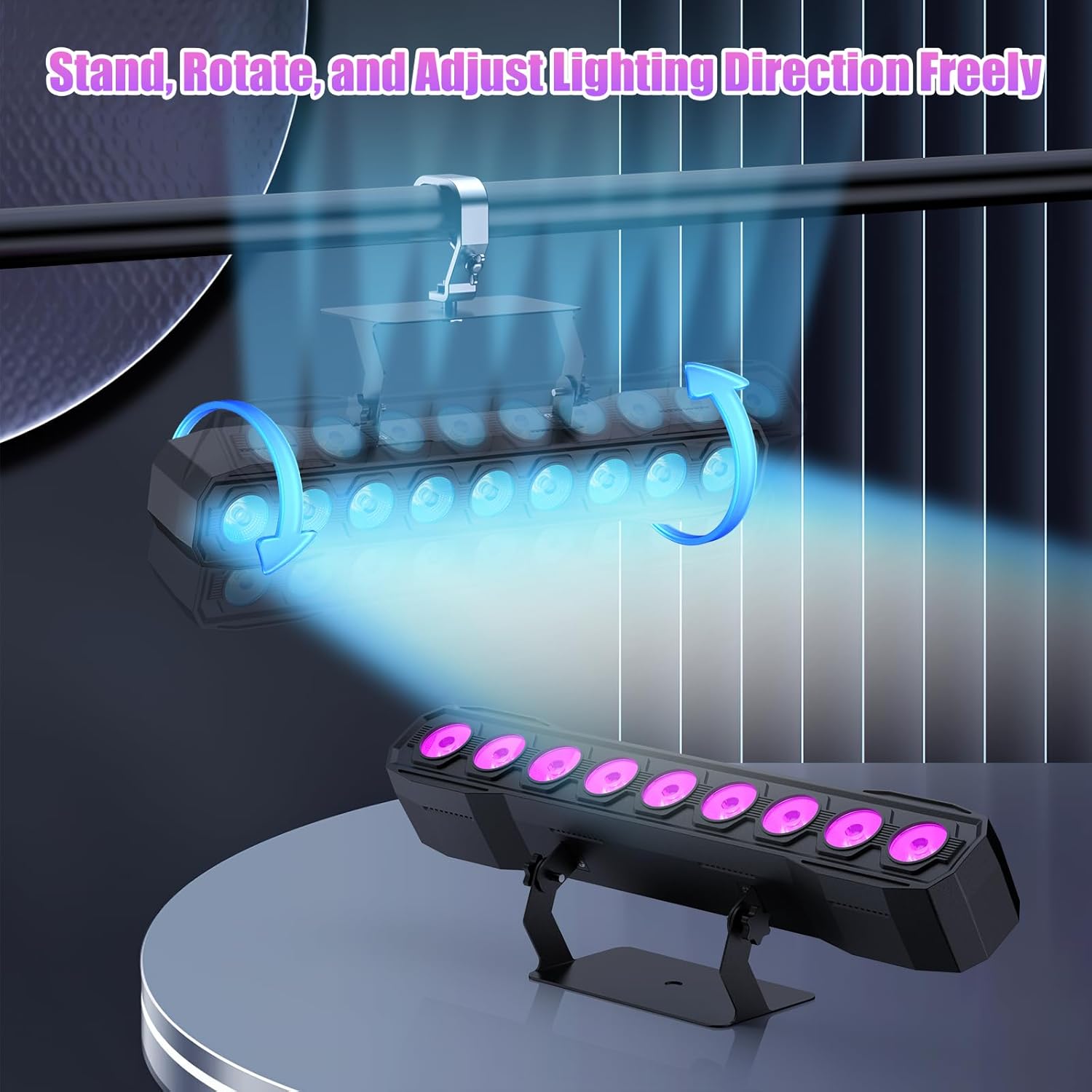
Image 5.1: Illustration of mounting and angle adjustment options.
5.3 Koneksyon pouvwa
Connect the power cord to the Power IN port on the back of the fixture and then to a suitable power outlet. Multiple units can be daisy-chained using the Power OUT port to simplify wiring for larger setups.
6. Operasyon Modes
The DazzlingStage Wall Wash Bar Light supports several control modes:
- Kontwòl DMX512: For professional control via a DMX console.
- Mòd oto: Pre-programmed lighting sequences.
- Sound-Activated Control: Limyè yo reyaji ak son anbyen.
- Kontwòl Remote: Convenient wireless control using the included remote.
- Mòd Mèt-Esklav: Link multiple units where one acts as a master and others as slaves, synchronizing effects.
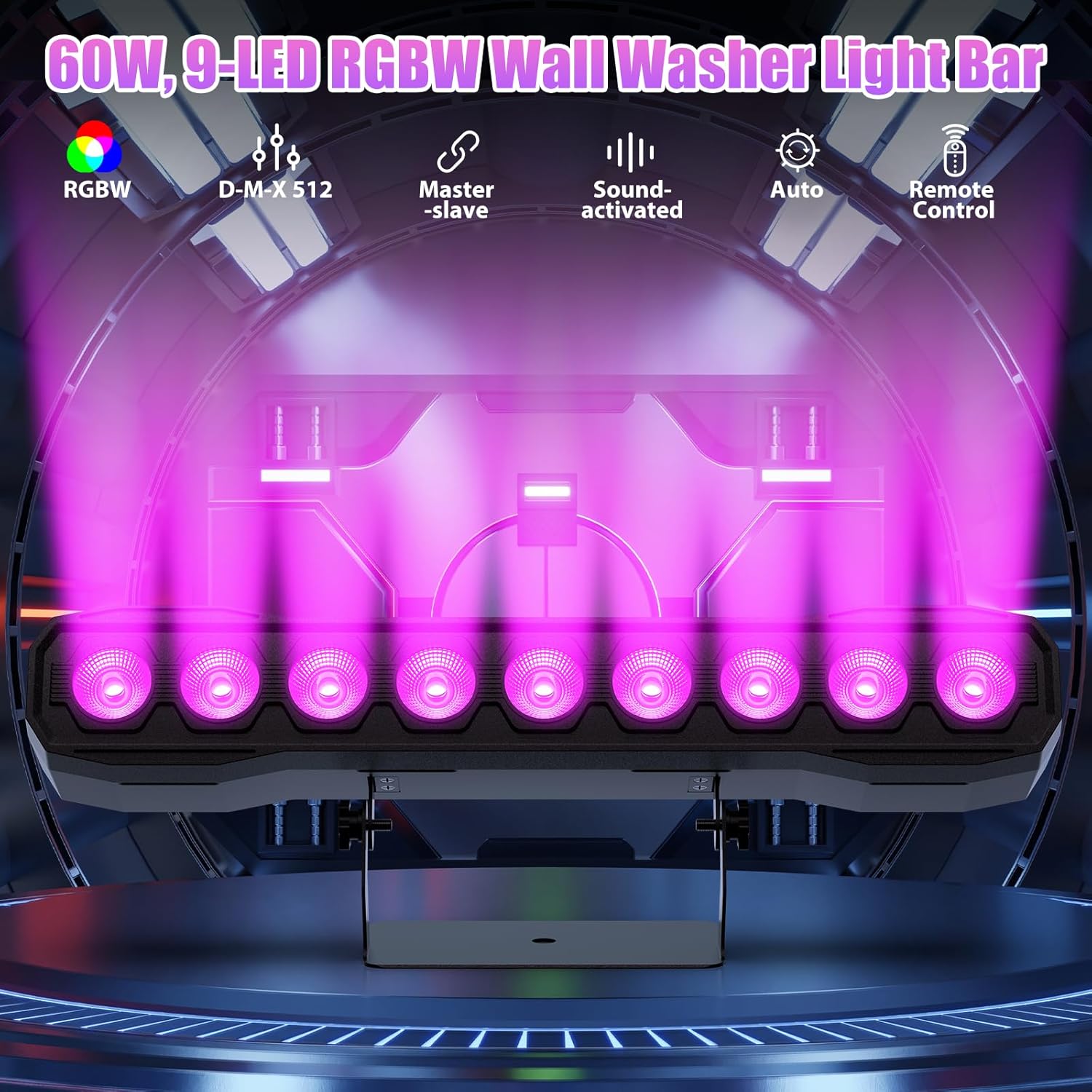
Imaj 6.1: Plis paseview of available control modes.
6.1 Display Panel Operation
Use the buttons on the back of the fixture to navigate the menu and select modes:
- MENI: Fè sik nan opsyon meni prensipal yo.
- LEVE / DESANN: Adjusts values or navigates sub-menus.
- ANTRE: Konfime seleksyon an.
6.2 Efè ekleraj
The fixture supports various dynamic effects:
- Melanj koulè: Over 16.7 million color combinations with 0-100% linear dimming.
- Strobe: Flashing effect.
- Ale: Instant color changes.
- Fennen: Tranzisyon lis ant koulè yo.
- Batman kè: Gradual changing effects.
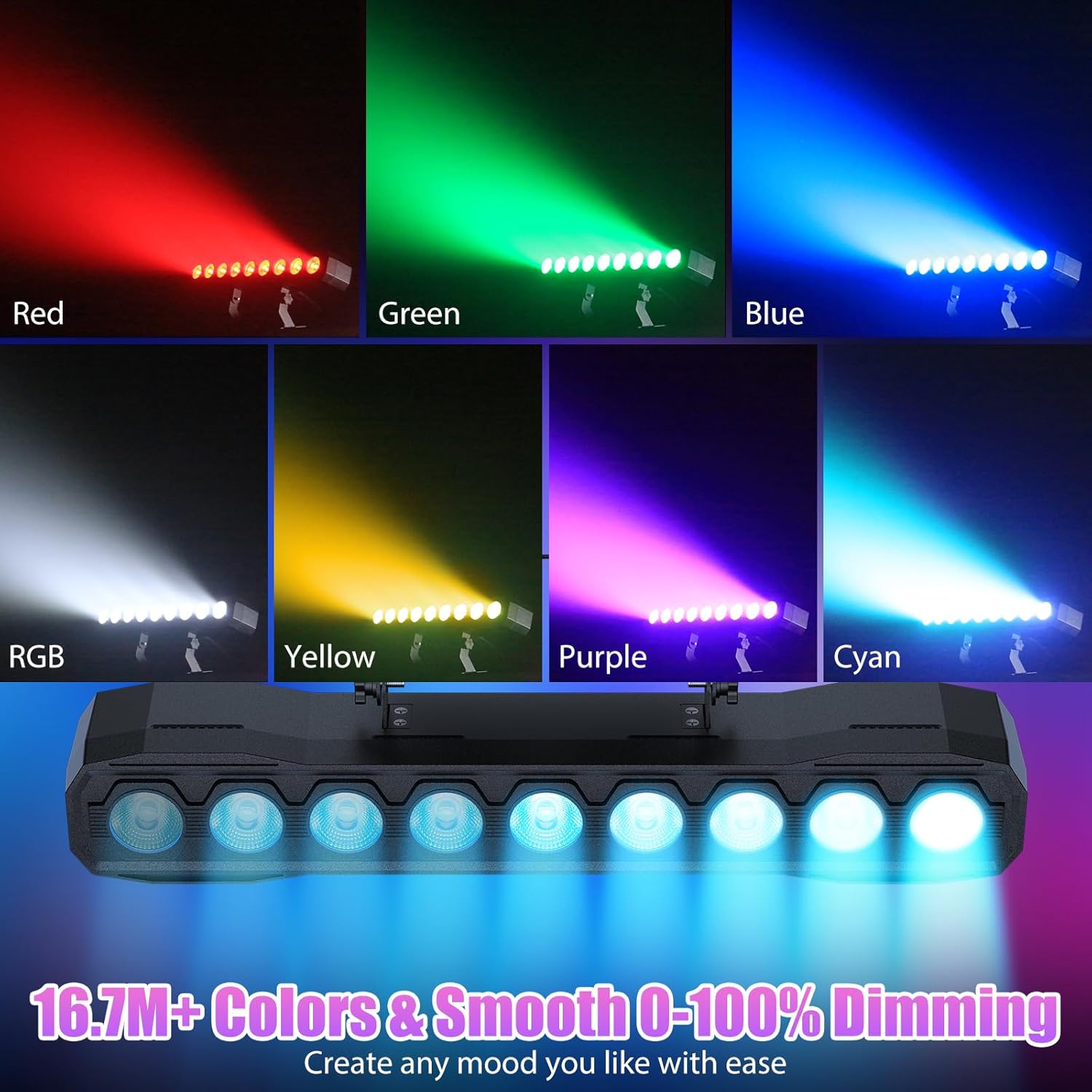
Imaj 6.2: Egzanpamples of color mixing and dimming capabilities.

Image 6.3: Visual representation of Strobe, Jump, Fade, and Pulse effects.
7. Fonksyon kontwòl Remote
Kontwòl remote ki enkli a bay aksè pratik a plizyè fonksyon:
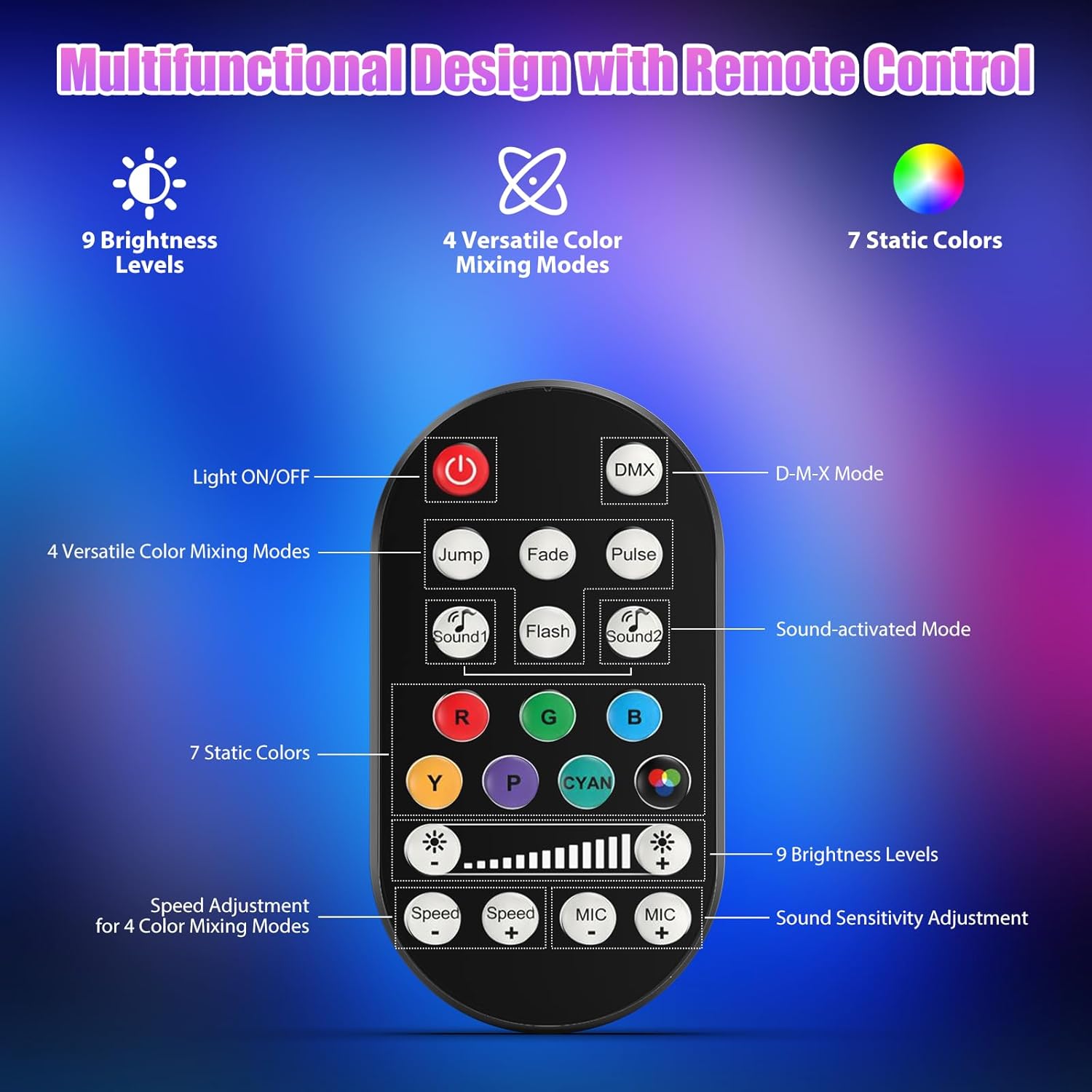
Image 7.1: Remote control layout and functions.
- Limyè ON/OFF: Limen oswa etenn inite a.
- DMX: Activates DMX control mode.
- Jump, Fade, Pulse, Flash: Selects different color mixing modes.
- Sound1, Sound2: Activates sound-activated modes with different sensitivities.
- R, G, B, Y, P, Cyan, White: Selects static colors.
- Nivo klète: Adjusts the overall intensity of the light (9 levels).
- Vitès +/-: Adjusts the speed of dynamic effects.
- MIC +/-: Adjusts the sound sensitivity for sound-activated modes (15 levels).
8. DMX512 Control
For advanced control, connect the fixture to a DMX512 controller. The light bar typically uses 4 or 8 DMX channels. Refer to the display panel for DMX address setting and channel assignments.
8.1 DMX Address Setting
Use the MENU, UP, DOWN, and ENTER buttons on the fixture's display panel to set the DMX starting address. The display will show 'AXXX' where XXX is the address (e.g., A001).
8.2 DMX Channel Functions (Example - 8 Channel Mode)
| Chèn | Fonksyon | Range Valè | Deskripsyon |
|---|---|---|---|
| CH1 | Mèt gradyasyon | 0-255 | Klate jeneral (0% a 100%) |
| CH2 | Wouj entansite | 0-255 | Red LED brightness (0% to 100%) |
| CH3 | Entansite vèt | 0-255 | Green LED brightness (0% to 100%) |
| CH4 | Entansite ble | 0-255 | Blue LED brightness (0% to 100%) |
| CH5 | Entansite blan | 0-255 | White LED brightness (0% to 100%) |
| CH6 | Strobe/Effect | 0-255 | 0-10: No function; 11-255: Strobe speed (slow to fast) |
| CH7 | Pwogram Auto | 0-255 | Selects and controls speed of built-in auto programs |
| CH8 | Son aktif | 0-255 | Activates sound mode and adjusts sensitivity |
Tablo 8.1: Egzample DMX Channel Functions (may vary slightly by firmware version).
9. Antretyen
Antretyen regilye asire pèfòmans optimal epi pwolonje lavi ekipman ou an.
- Netwayaj: Periodically clean the lens and housing with a soft, lint-free cloth. Do not use abrasive cleaners or solvents. Ensure the fixture is powered off and cool before cleaning.
- Enspeksyon: Tcheke regilyèman kab kouran yo, kab DMX yo, ak pyès ki nan konpitè yo pou wè si gen nenpòt siy itilizasyon oswa domaj. Ranplase konpozan ki domaje yo imedyatman.
- Depo: When not in use for extended periods, store the fixture in a dry, dust-free environment.
NAN. Depanaj
Si ou rankontre pwoblèm, gade pwoblèm ak solisyon komen sa yo:
| Pwoblèm | Kòz posib | Solisyon |
|---|---|---|
| Pa gen pouvwa | Power cable disconnected; No power from outlet; Blown fuse | Check power cable connection; Test outlet with another device; Replace fuse if necessary |
| Pa gen pwodiksyon limyè | Dimmer channel at 0%; Incorrect mode selected; DMX signal issue | Increase dimmer level; Select desired operating mode; Check DMX cable and address settings |
| Incorrect colors/effects | Incorrect DMX channel values; Remote control interference | Verify DMX channel settings; Ensure remote is pointed directly at the sensor; Check for other IR interference |
| Mòd son aktive pa travay | Microphone sensitivity too low; No sound input | Increase MIC sensitivity via remote or display; Ensure sufficient sound is present near the fixture |
| Surchof aparèy | Poor ventilation; Blocked heat sink | Ensure adequate airflow around the unit; Clean any dust or debris from the heat sink fins |
11. Espesifikasyon
| Karakteristik | Detay |
|---|---|
| Mak | DazzlingStage |
| Nimewo Modèl | ZQ06190 |
| Sous limyè | 9 x 60W RGBW dirije |
| Melanj koulè | RGBW 4-in-1, 16.7 million colors |
| Dimming | 0-100% gradyasyon elektwonik lineyè |
| Angle gwo bout bwa | 35 ° Gran Ang |
| Mòd kontwòl | DMX512, Auto, Sound-Activated, Remote Control, Master-Slave |
| Chanèl DMX | 4 or 8 Channels (selectable) |
| Ekspozisyon | Ekspozisyon ki ap dirije 4 chif |
| Materyèl | Akrilonitrile butadien stirèn (ABS) |
| Dimansyon pwodwi | 18.1 x 5.5 x 5.1 pous (46 x 14 x 13 cm) |
| Pwa atik | Apeprè. 1.98 liv (0.9 kg) |
| Antre pouvwa | AC 100-240V, 50/60Hz |
| Manifakti | Shenzhen Zhuoqiong Technology Co., Ltd. |
12. Garanti ak sipò
DazzlingStage products are designed for reliability and performance. For warranty information, please refer to the terms and conditions provided at the time of purchase or contact your retailer.
If you require technical assistance or have questions not covered in this manual, please contact DazzlingStage customer support through the retailer's platform or the official brand website. Please have your model number (ZQ06190) and purchase details ready when contacting support.