
Entwodiksyon
Mèsi pou acha aasing the INGA Computer Speaker MZ-631. This USB plug-and-play desktop speaker is designed to provide enhanced stereo sound and deep bass for your computer, laptop, or Mac. Its convenient clamp design allows for easy attachment to most monitors, saving valuable desk space. This manual provides detailed instructions for setup, operation, maintenance, and troubleshooting to ensure optimal performance and longevity of your speaker.
Kontni pake
Tanpri tcheke pake a pou atik sa yo:
- 1 x INGA Computer Speaker (Model MZ-631)
- 1 x manyèl itilizatè
- 1 x USB-C to USB-A Adapter (included for versatile connectivity)
Pwodwi souview
The INGA MZ-631 speaker features a compact design with an integrated clamping mechanism for monitor attachment. It delivers 10 Watts of stereo sound with enhanced bass through dual precision-tuned speakers and a passive radiator. Connectivity is simplified with a single USB cable for both audio and power.
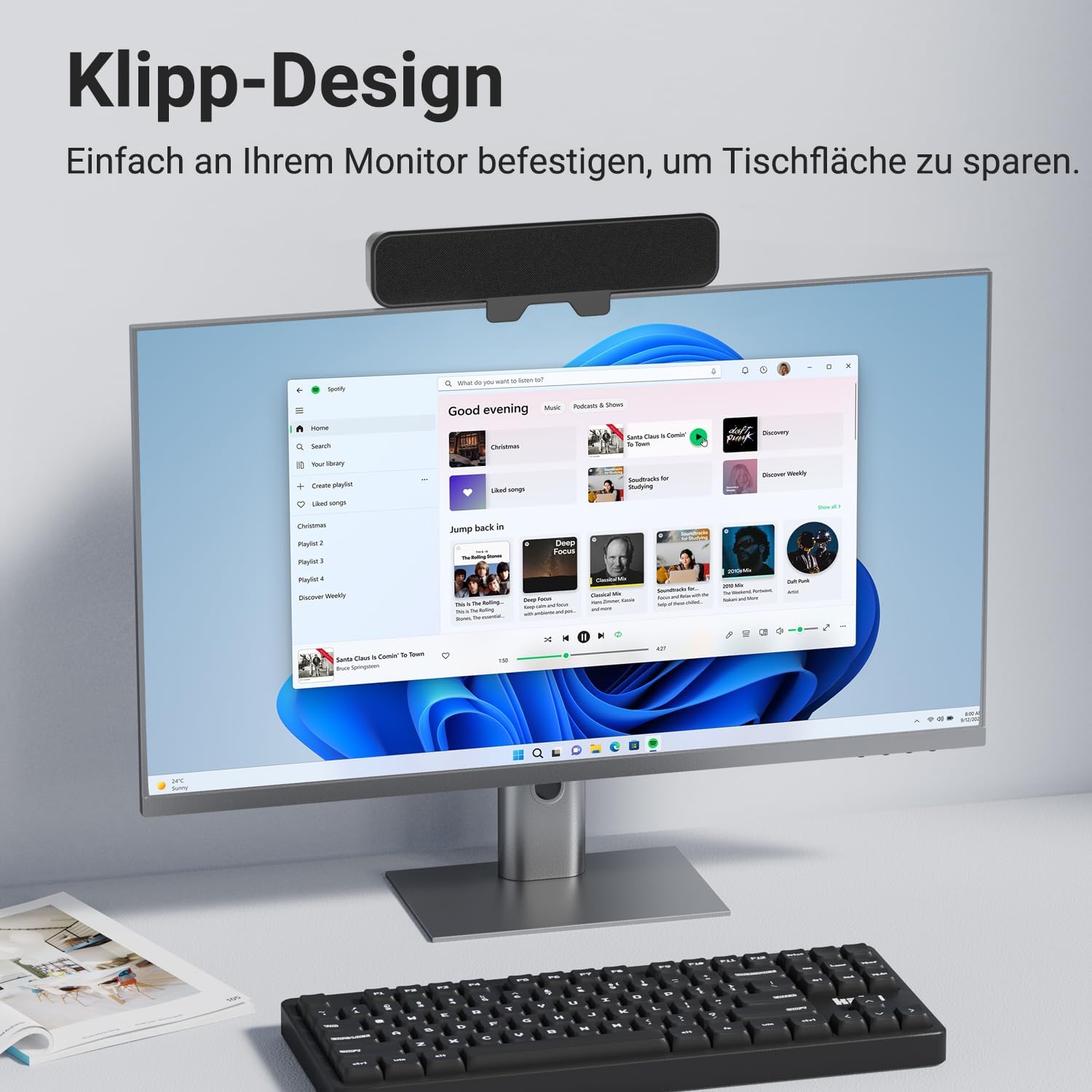
Imaj: Devan view of the INGA Computer Speaker MZ-631, shown clamped to the top of a computer monitor, displaying its sleek design and space-saving placement.
Karakteristik kle:
- Enhanced Stereo Sound with Rich Audio & Deep Bass: Dual speakers and a passive radiator provide balanced, powerful, and clear audio.
- Instant Plug & Play Setup: Single USB cable for audio and power, no additional drivers or software needed.
- Secure Clip System: Enhanced clamping mechanism fits most monitors up to 1.5 inches thick, with protective silicone pads. (Note: Not compatible with curved-back monitors.)
- Multi-Function Controls: Top-mounted buttons for Volume Down, Mute, Volume Up, and Power.
- Inivèsèl konpatibilite: Works with PC, Mac, Laptops, and other devices via USB.
Enstriksyon Enstalasyon
1. Konekte Oratè a
- Locate the USB cable attached to the INGA Computer Speaker.
- Plug the USB connector into an available USB port on your computer (PC or Mac). If your computer only has USB-C ports, use the included USB-C to USB-A adapter.
- The speaker will automatically power on and be recognized by your operating system as an audio output device.

Image: The INGA Computer Speaker connected via its USB cable to a laptop, illustrating the plug-and-play setup. The control buttons (Volume+, Mute, Volume-, Power) are visible on top.
2. Audio Output Selection
After connecting, ensure your computer's audio output is set to the INGA speaker.
- Windows: Right-click the speaker icon in the taskbar, select "Sound settings" or "Playback devices," and choose "INGA Speaker" as the default output device.
- MacOS: Go to System Settings > Sound > Output, and select "INGA Speaker."
Installation (Monitor Mounting)
The INGA MZ-631 speaker is designed for easy and secure attachment to most flat-panel monitors.
- Gently open the clamping mechanism on the back of the speaker.
- Position the speaker on top of your monitor, ensuring the front grille faces you.
- Ajiste cl laamp so that it securely grips the top edge of your monitor. The protective silicone pads will prevent scratches and ensure a firm hold.
- Ensure the speaker is stable and does not obstruct your monitor's view oswa vantilasyon.
Nòt enpòtan: This speaker is not compatible with curved-back monitors due to its mounting requirements. The clamping mechanism is designed for monitors up to 1.5 inches (approximately 3.8 cm) thick.

Imaj: Yon imaj detaye view of the speaker's clamping mechanism, showing how it securely attaches to the top edge of a monitor, highlighting the 1-inch (2.54 cm) thickness capacity.
Alternative Placement: Desktop
If monitor mounting is not suitable, the speaker can also be placed directly on your desk in front of your monitor. Ensure it is on a stable, flat surface.

Image: Demonstrates various placement options for the speaker, including clamping to the top or bottom of a monitor, or resting on a desk surface.
Enstriksyon Operasyon
The INGA MZ-631 speaker features intuitive controls located on the top panel.
Imaj: Yon gwo plan view of the speaker's top panel, clearly showing the four control buttons: Volume Down, Mute, Volume Up, and Power.
- Bouton pouvwa (⏻): Peze pou limen oswa etenn oratè a.
- Bouton pou monte volim (+): Peze pou ogmante volim.
- Bouton Diminye Volim (-): Peze pou diminye volim la.
- Bouton bèbè (🔇): Press to instantly mute or unmute the audio.
Eksperyans odyo
The speaker is engineered to deliver a rich audio experience with clear dialogues and powerful bass, suitable for various applications including music, movies, and online meetings.

Image: An internal diagram of the speaker, highlighting its dual speaker drivers and passive radiator, which contribute to its 10W audio output and enhanced sound quality.
Antretyen
To ensure the longevity and optimal performance of your INGA Computer Speaker, follow these simple maintenance guidelines:
- Netwayaj: Use a soft, dry cloth to wipe the speaker's surface. Do not use liquid cleaners, aerosols, or solvents, as these may damage the finish or internal components.
- Depo: Lè w pa itilize oratè a pou yon bon bout tan, sere l nan yon kote ki fre epi sèk, lwen limyè solèy dirèk ak tanperati ekstrèm.
- Manyen: Evite lage oratè a oswa sibi gwo enpak.
- Anviwònman: Keep the speaker away from water, moisture, and excessive dust.
Depanaj
If you encounter issues with your INGA Computer Speaker, please refer to the following common problems and solutions:
| Pwoblèm | Kòz posib | Solisyon |
|---|---|---|
| Pa gen son soti nan oratè la. |
|
|
| Son defòme oswa klè. |
|
|
| Speaker does not clamp securely to monitor. |
|
|
If the problem persists after trying these solutions, please contact INGA Customer Service for further assistance.
Espesifikasyon
| Karakteristik | Detay |
|---|---|
| Non modèl | MZ-631 |
| Mak | INGA |
| Kalite Oratè | Siveye Moun k ap pale |
| Koneksyon Teknoloji | USB |
| Audio Sòti Mode | Stereo |
| Konfigirasyon chanèl son antoure | 2.0 |
| Oratè maksimòm pwodiksyon pouvwa | 10 Watts |
| Repons Frekans | 20000 KHz |
| Antre Voltage | 5 Vòlt (DC) |
| Sous pouvwa | Fil elektrik (USB) |
| Kalite aliye | Clip |
| Materyèl | Plastik |
| Koulè | Nwa |
| Dimansyon pwodwi | 8"P x 2"L x 3"H (apeprè 20.3cm P x 5.1cm L x 7.6cm H) |
| Pwa atik | 12.3 ons (apeprè 348 gram) |
| Metòd kontwòl | Pouse bouton |
| Aparèy konpatib | Desktop, Laptop, MAC, PC, Smartphone, Tablet |
| Karakteristik espesyal | Bass Boost, Clip-on, Hi Res Audio, Portable, USB-C to USB Port |
Garanti ak sipò
Enfòmasyon sou Garanti
The INGA Computer Speaker MZ-631 comes with a Limited Warranty. Please refer to the warranty card included in your package for specific terms and conditions.
Sipò pou Kliyan
INGA is committed to providing lifetime technical support for its products. If you have any questions, concerns, or require assistance with your speaker, please do not hesitate to contact our Customer Service team. We aim to resolve all inquiries within 24 hours.
Enfòmasyon pou kontakte:
Please visit the official INGA websit la oubyen gade enfòmasyon kontak ki sou anbalaj pwodwi w la oubyen sou kat garanti a.