
1. Entwodiksyon
This manual provides essential information for the safe and efficient operation of your Tornado 65UA5300E 65-inch 4K Frameless Android Smart TV. Please read it thoroughly before using the product and retain it for future reference.

Imaj 1.1: Devan view of the Tornado 65UA5300E Smart TV, showcasing its frameless design and included stand.
2. Enfòmasyon sou Sekirite
Toujou swiv prekosyon sekirite debaz yo lè w ap itilize televizyon sa a pou diminye risk dife, chòk elektrik, ak blesi.
- Pa ekspoze televizyon an ak lapli oswa imidite.
- Asire bon vantilasyon; pa bouche ouvèti vantilasyon yo.
- Pa mete televizyon an sou yon kabwa, yon sipò, yon trépied, yon sipò oswa yon tab ki pa estab.
- Dekonekte televizyon an pandan tanpèt zèklè oswa lè ou pa itilize li pou yon bon bout tan.
- Refere tout sèvis yo bay pèsonèl sèvis kalifye.
3. Pake kontni
Verifye ke tout atik yo prezan nan pakè a:
- Tornado 65UA5300E 65-inch 4K Frameless Android Smart TV
- Kontwòl Remote
- Pouvwa kab
- Sipò pou televizyon (2 moso)
- Vis pou Asanblaj Sipò a
- Manyèl Itilizatè (dokiman sa a)
4. Enstalasyon
4.1 Debake
Carefully remove the TV from its packaging. It is recommended to keep the original packaging for potential future transport or servicing.
4.2 Tache kanpe la
If you are not wall-mounting the TV, attach the included stand pieces. Place the TV face down on a soft, flat surface to prevent screen damage. Align each stand piece with the corresponding slots on the bottom of the TV and secure them with the provided screws.
Imaj 4.1: Anba view of the TV, illustrating the designated areas for stand attachment.
4.3 Montaj mi
For wall mounting, remove the stand (if attached). Use a VESA-compatible wall mount (not included) that supports the TV's weight and dimensions. Consult a professional for wall mounting to ensure safety and proper installation.

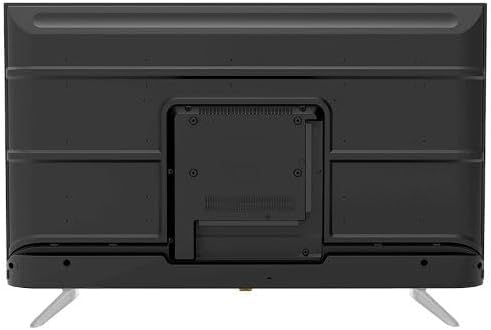
Imaj 4.2: Dèyè view of the TV, highlighting the VESA mounting pattern and various input/output ports.
4.4 Konekte periferik
Konekte aparèy ekstèn ou yo ak televizyon an lè l sèvi avèk pò ki apwopriye yo:
- HDMI: For high-definition devices like Blu-ray players, gaming consoles, or set-top boxes. The TV has 3 HDMI ports, one with ARC support.
- USB: For connecting USB storage devices to play media (video, photos, music). The TV has 2 USB ports.
- LAN: Pou yon koneksyon entènèt filaire.
- Antre RF: For connecting an antenna or satellite dish for the built-in digital receiver.
- Sòti odyo dijital (optik): Pou konekte ak yon sistèm odyo ekstèn.
- Jack kas ekoutè (3.5mm): Pou konekte kas ekoutè.

Imaj 4.3: Kote view of the TV, illustrating the accessible side input ports.
4.5 Premye Limen ak Sòsye Enstalasyon
After connecting the power cable, press the power button on the remote control or TV. The TV will guide you through an initial setup wizard, including language selection, network connection (Wi-Fi or LAN), channel scanning, and Google account setup for Android TV features.
5. Itilizasyon televizyon an
5.1 Remote Control Overview
The included remote control allows you to navigate the TV's functions. It features dedicated buttons for power, volume, channel, input selection, smart TV apps (Netflix, YouTube, Prime Video, Disney+), Google Assistant voice search, and menu navigation.
5.2 Fonksyon debaz
- Limen/Etenyen: Peze bouton pouvwa a.
- Kontwòl Volim: Sèvi ak bouton Monte/Diminye Volim yo.
- Seleksyon chanèl: Use the Channel Up/Down buttons or numeric keypad.
- Sous Antre: Press the 'Input' button to select between HDMI, AV, TV, etc.
5.3 Karakteristik Smart TV (Android 11)
Your TV runs on Android 11, providing access to a wide range of smart features:
- Aplikasyon: Access pre-installed apps like Netflix, YouTube, Prime Video, Disney+, Shahid VIP, and download more from the Google Play Store.
- Google Asistan: Use voice commands via the remote control for search, control, and information.
- Chromecast entegre: Voye kontni ki soti nan telefòn entelijan ou oswa tablèt ou dirèkteman sou televizyon an.
- Web Navigatè: Navige sou entènèt la dirèkteman sou televizyon ou.
- Bluetooth 5.0: Konekte kas ekoutè san fil, oratè, oswa lòt aparèy Bluetooth.
5.4 Anviwònman Imaj ak Son
Customize ou vieweksperyans mizik ak koute atravè meni paramèt televizyon an:
- Mòd foto: Select from Dynamic, Game, Sports, Cinema, or User-defined modes.
- Tanperati koulè: Adjust to Normal, Cool, or Warm.
- Mòd son: Choose from Smart, User, Game, Movie, Music, or News.
- Dolby Digital Plus: Enhanced audio processing for compatible content.
6. Antretyen
6.1 Netwaye televizyon an
- Ekran: Siye ekran an dousman avèk yon twal mou ki pa gen pousyè. Pou mak ki difisil pou retire, sèvi ak yon pwodui netwayaj ekran ki fèt espesyalman pou televizyon, aplike sou twal la, pa dirèkteman sou ekran an.
- Kò: Wipe the TV's frame and back panel with a soft, dry cloth. Do not use abrasive cleaners or solvents.
6.2 Mizajou lojisyèl
Ensure your TV's software is up to date for optimal performance and security. Connect the TV to the internet and check for updates periodically through the settings menu.
NAN. Depanaj
Si ou rankontre pwoblèm, gade solisyon komen sa yo:
| Pwoblèm | Solisyon posib |
|---|---|
| Pa gen pouvwa | Check if the power cable is securely plugged into the TV and the wall outlet. Ensure the outlet is functional. |
| Pa gen imaj, men gen son | Tcheke sous opinyon an. Asire w ke aparèy ekstèn yo limen epi yo konekte kòrèkteman. |
| Pa gen son, men imaj la la | Check the volume level and mute status. Verify audio settings and external audio connections. |
| Remote kontwòl pa travay | Ranplase pil yo. Asire w pa gen okenn obstak ant telekòmand lan ak detèktè IR televizyon an. |
| Pa ka konekte ak Wi-Fi | Tcheke routeur ak modèm ou. Antre modpas Wi-Fi a ankò. Eseye rekòmanse televizyon an ak routeur la. |
Si pwoblèm nan kontinye, kontakte sipò kliyan.
8. Espesifikasyon
| Karakteristik | Detay |
|---|---|
| Nimewo Modèl | 65UA5300E |
| Gwosè ekran | 65 pous |
| Teknoloji ekspozisyon | dirije |
| Rezolisyon | 4K UHD (3840 x 2160) |
| Aspè rapò | 16:9 |
| Viewing Ang | 178 Degre |
| Klète | 250 cd/m² |
| Rafrechisman pousantaj | 50/60 Hz |
| Sipò HDR | HDR10, HLG |
| Teknoloji Audio | Dolby Digital Plus, Surround Sound |
| Pouvwa Sòti Audio | 10W x 2 |
| Sistèm operasyon | Android 11 |
| Memwa Entèn | 16 GB |
| Koneksyon | Wi-Fi, Bluetooth 5.0, LAN |
| Antre | RF Input (Digital) x1, Video Input x1, HDMI x3 (ARC), USB x2, LAN x1 |
| Sòti yo | Digital Audio Output (Optical) x1, Headphone Jack (3.5mm) x1 |
| Pwovizyon pou pouvwa | AC 90-240V / 50Hz |
| Sispansyon pouvwa | 0.5W |
| Dimansyon (W x H x D) san kanpe | 1446 x 832 x 84 mm |
| Dimansyon (W x H x D) ak kanpe | 1446 x 892 x 305 mm |
| Pwa nèt | 15.32 kg |
| Pwa Brit | 21.32 kg |
| Peyi orijin | Lejip |
9. Garanti
This Tornado TV comes with a 3-year full free warranty. Please retain your proof of purchase for warranty claims. For specific terms and conditions, refer to the warranty card included with your product or contact Tornado customer service.
10. Sipò
For further assistance, technical support, or service inquiries, please contact Tornado customer service. Contact details can typically be found on the manufacturer's official websit la oubyen sou kat garanti a.