
1. Entwodiksyon
This manual provides essential information for setting up, operating, and maintaining your NIMO 17.3" IPS FHD Gaming Laptop. Designed for both productivity and entertainment, this laptop features an AMD Ryzen 7 8745HS processor, 64GB DDR5 RAM, and a 2TB PCIe 4.0 SSD, ensuring a responsive and powerful user experience.
Image 1.1: NIMO 17.3" FHD Gaming Laptop overview, highlighting key features.
2. Ki sa ki nan bwat la
Tanpri verifye ke tout atik yo prezan lè w ap debale l:
- 1 x NIMO N177 Laptop
- 1 x Chargeur rapid Kalite-C 100W PD
- 1 x manyèl itilizatè
- Windows 11 Home (Pre-enstale)
3. Inisyal Enstalasyon
3.1 Limen epi chaje
- Connect the provided 100W Type-C PD Fast Charger to the laptop's USB-C port and a power outlet.
- Louvri kouvèti laptop la. Laptop la ka limen otomatikman, oubyen ou ka bezwen peze bouton pouvwa a.
- Allow the battery to charge fully before initial use. A 15-minute charge can provide approximately 2 hours of use.

Image 3.1: Illustration of the laptop charging process and battery life.
3.2 Windows 11 Configuration
Follow the on-screen prompts to complete the Windows 11 setup process. This includes selecting your region, connecting to a Wi-Fi network, and creating a user account.
3.3 Enstalasyon Lektè Anprent Dwèt
For enhanced security and quick login, set up the integrated fingerprint reader:
- Navigate to Windows Settings > Accounts > Sign-in options.
- Select 'Fingerprint recognition (Windows Hello)' and follow the instructions to register your fingerprint.

Image 3.2: The backlit keyboard and fingerprint sensor for secure login.
4. Kijan pou itilize òdinatè pòtab ou a
4.1 Pèfòmans ak Miltitasking
Your NIMO laptop is equipped with an AMD Ryzen 7 8745HS processor (8-core/16-thread, up to 4.9GHz) and 64GB DDR5 RAM, providing robust performance for demanding applications, gaming, and seamless multitasking. The 2TB PCIe 4.0 SSD ensures fast boot times and rapid data access.

Image 4.1: Details of the AMD Ryzen 7 8745HS processor.

Image 4.2: Laptop demonstrating seamless multitasking with ample storage and RAM.
4.2 Montre
The 17.3" FHD (1920x1080) IPS anti-glare display offers immersive visuals with vibrant colors and wide viewing angles. The ultra-thin bezel design provides an 85% screen-to-body ratio for an expansive vieweksperyans nan.

Image 4.3: The 17.3" FHD IPS display for visual clarity.
4.3 Klavye ak Touchpad
The full-size keyboard includes a numeric keypad and features backlighting for comfortable typing in various lighting conditions. The precision gesture touchpad allows for intuitive navigation and supports multi-touch gestures.
4.4 Webkam
2MP entegre a webcam is suitable for video calls and online meetings. For privacy, the laptop includes a physical privacy switch to disable the webCam lè yo pa itilize.

Image 4.4: Privacy-focused camera convenience with a built-in switch.
5. Koneksyon
5.1 Pò ak Entèfas
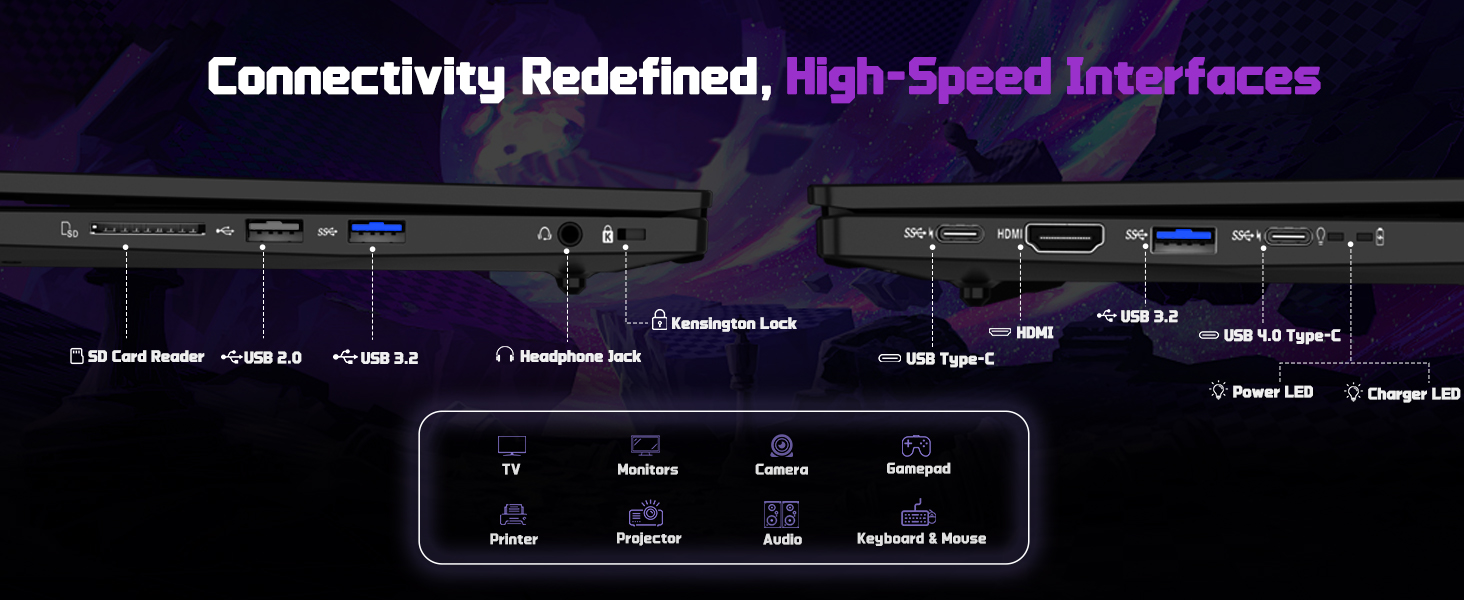
The NIMO N177 laptop offers a variety of ports for connecting peripherals and external displays:
- 1 x USB 2.0 Port
- 3 x USB 3.0 pò
- 1 x USB 4.0 Type-C Port (supports 100W PD charging, data transfer, and display output)
- XNX x HDMI Port
- 1 x Jack ekoutè
- 1 x SD Card Reader
- 1 x Kensington Lock emplacement

Image 5.1: Detailed diagram of the laptop's high-speed interfaces.
5.2 Koneksyon san fil
The laptop supports 802.11a/b/g/n/ac Wi-Fi for reliable wireless internet access and Bluetooth for connecting wireless accessories.
6. Antretyen
6.1 Netwayaj
- Sèvi ak yon twal mou ki pa gen pousyè pou netwaye ekran an ak sifas ekstèn yo.
- Evite itilize pwodwi chimik piman bouk oswa materyèl abrazif.
- For the screen, use a specialized screen cleaner and a microfiber cloth.
6.2 Mizajou lojisyèl
Regularly check for and install Windows updates and driver updates to ensure optimal performance and security. You can find driver updates on the NIMO official websit.
6.3 Depo ak manyen
Store the laptop in a cool, dry place. Avoid exposing it to extreme temperatures, direct sunlight, or excessive moisture. Handle the laptop with care to prevent physical damage.
NAN. Depanaj
If you encounter issues with your NIMO laptop, try the following common troubleshooting steps:
- Pa gen pouvwa: Ensure the charger is securely connected to both the laptop and a working power outlet. Check if the power adapter's LED indicator is on.
- Pwoblèm ekspozisyon: If the screen is blank, try connecting an external monitor to verify if the laptop is functioning. Adjust display settings in Windows.
- Pèfòmans Ralanti: Fèmen aplikasyon ki pa nesesè yo, tcheke pou pwosesis an background, epi asire w ke gen ase espas depo lib.
- Pwoblèm koneksyon: For Wi-Fi issues, restart your router and the laptop. For peripheral issues, ensure drivers are updated and connections are secure.
- Sistèm nan pa reponn: Peze epi kenbe bouton pouvwa a pandan 10-15 segonn pou fòse yon etennman, apresa rekòmanse laptop la.
For persistent issues, refer to the support section or contact NIMO customer service.
8. Espesifikasyon
| Karakteristik | Spesifikasyon |
|---|---|
| Mak | NIMO |
| Non modèl | NIMO N177L |
| Gwosè ekran | 17.3 pous |
| Rezolisyon ekran | 1920 x 1080 Pixels (FHD IPS) |
| Processeur | AMD Ryzen 7 8745HS (8 Cores, up to 4.9 GHz) |
| RAM | 64 GB DDR5 (4800 MHz) |
| Disk Drive | 2 TB SSD (PCIe 4.0) |
| Koprosesè grafik | AMD Radeon 780M (Entegre) |
| Sistèm operasyon | Windows 11 Kay |
| Kalite san fil | 802.11a/b/g/n/ac |
| Pò USB | 1 x USB 2.0, 3 x USB 3.0, 1 x USB 4.0 Kalite-C |
| Karakteristik espesyal | Klavye retroeklere, lektè anprent, odyo HD, klavye nimerik |
| Mwayèn lavi batri | 15.5 Hours (75Wh) |
| Pwa atik | 3.84 liv |
| Dimansyon pwodwi | 15.66 x 9.99 x 0.74 pous |
| Koulè | Nwa |
9. Garanti ak sipò
9.1 Enfòmasyon sou Garanti
Your NIMO laptop is backed by a 2-ane garanti. This warranty covers manufacturing defects and ensures your satisfaction. The product also includes partial U.S. assembly.
9.2 Règleman pou Retounen Atik
NIMO offers hassle-free 90-jou retounen from the date of purchase. Please refer to your purchase documentation for detailed return instructions.
9.3 Sipò pou Kliyan
Our dedicated support team is available to assist you with any questions or issues. You can contact us via:
- Imèl: service@nimopc.com
- Ofisyèl nou an website or product page (for contact details).
We aim to provide quick solutions and a worry-free experience.
Imaj 9.1: Plis paseview of NIMO's customer commitment and support.