
Bikevee Bikevee Cycling GPS Computer & Bikevee Out Front Mount
Manyèl itilizatè
Bikevee Wireless Cycling GPS Computer
Model: Bikevee Cycling GPS Computer & Out Front Mount
1. Entwodiksyon
This manual provides detailed instructions for the Bikevee Wireless Cycling GPS Computer, a device designed to track and display various cycling data. It features a 2.4-inch LCD display with auto backlight, IPX7 waterproofing, and multi-satellite GPS tracking for accurate data collection.
1.1 Karakteristik kle
- Pwolonje lavi batri: Equipped with a 650mAh rechargeable battery, providing up to 28 hours of continuous use.
- Precision GPS Tracking: Utilizes 5-satellite systems (GPS, BDS, GLONASS, Galileo, QZSS) for stable and accurate signal reception.
- Dirab ak enpèmeyab: IPX7 waterproof rating ensures resistance to rain and splashes.
- Ekspozisyon klè: 2.4-inch LCD screen with automatic backlight for visibility in various lighting conditions.
- Done konplè: Tracks speed (MPH/KM/H), distance, time, temperature, altitude, gradient, and more.
1.2 Sa ki nan bwat la
Verifye ke tout konpozan yo prezan nan pake a:
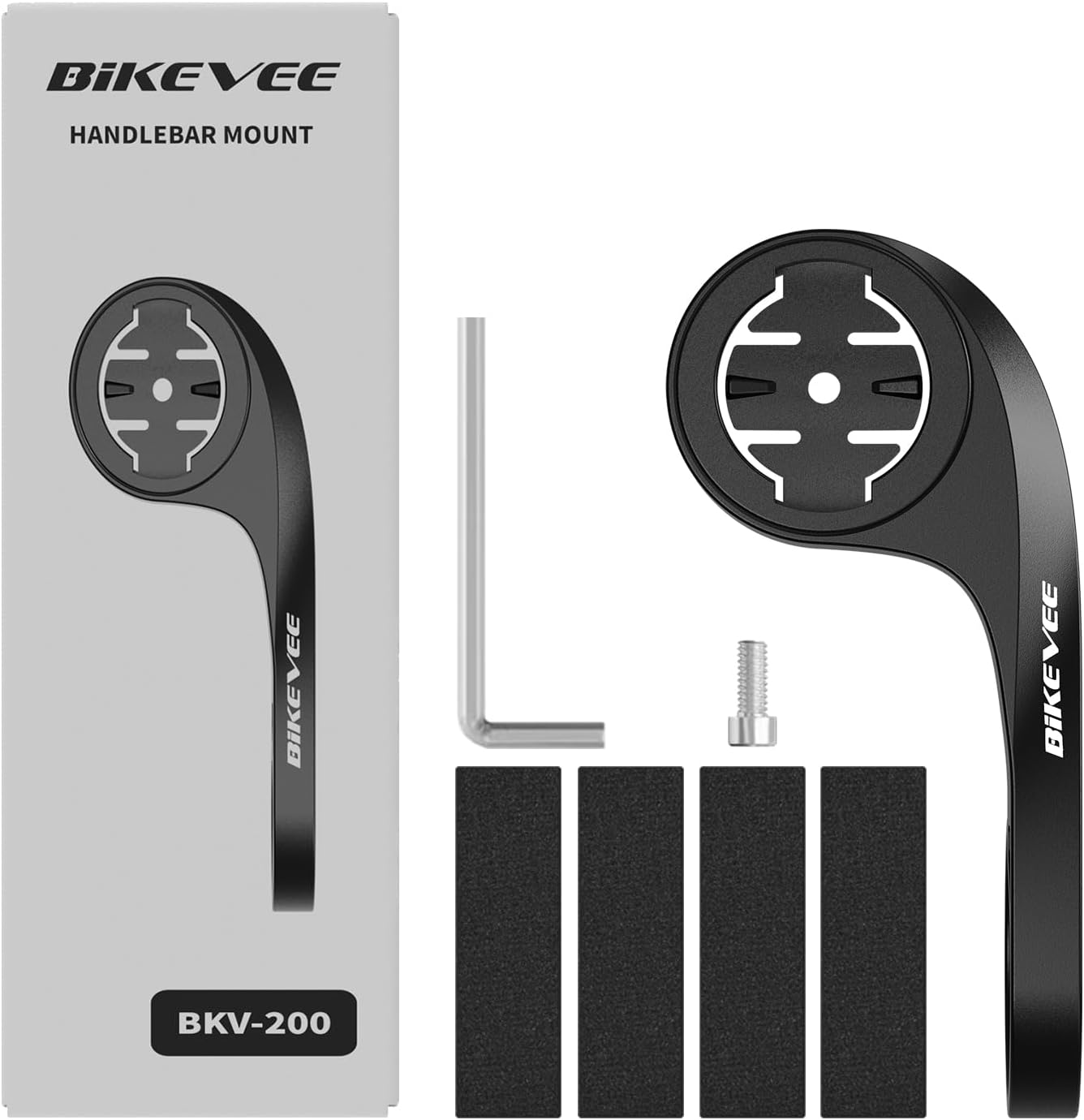
Figure 1.1: Package Contents. Includes Bike Computer, Charging Cable, Rubber Rings, Mount, Rubber Pad, and User Manual.
- Bikevee GPS Cycling Computer
- Mòn bisiklèt estanda
- Out Front Mount
- Kawotchou kousinen
- Chaje kab (Tip-C)
- Rubber Rings for Mount Installation
- Manyèl itilizatè
2. Enstalasyon ak Enstalasyon
2.1 Chaje Aparèy la
Before first use, fully charge the Bikevee GPS Computer. Connect the provided Type-C charging cable to the device's charging port and a USB power source. The battery indicator on the screen will show charging status.
2.2 Monte Aparèy la
The Bikevee GPS Computer comes with both a standard bike mount and an out front mount. Choose the mount that best suits your preference and bicycle setup.
2.2.1 Standard Bike Mount Installation
- Mete kousinen kawotchou a sou gidon oswa tij bisiklèt ou a.
- Position the standard bike mount on top of the rubber pad.
- Secure the mount using the provided rubber rings, wrapping them around the handlebar/stem and hooking them onto the mount.
- Align the Bikevee GPS Computer with the mount's grooves and twist clockwise until it locks into place.
2.2.2 Out Front Mount Installation

Figure 2.1: Bikevee Out Front Mount.
- Place the rubber pad around your bicycle's handlebar where you intend to install the mount.
- Position the out front mount over the rubber pad.
- Use the provided Allen key to tighten the screw on the mount's clamp around the handlebar until it is secure.
- Align the Bikevee GPS Computer with the mount's grooves and twist clockwise until it locks into place.
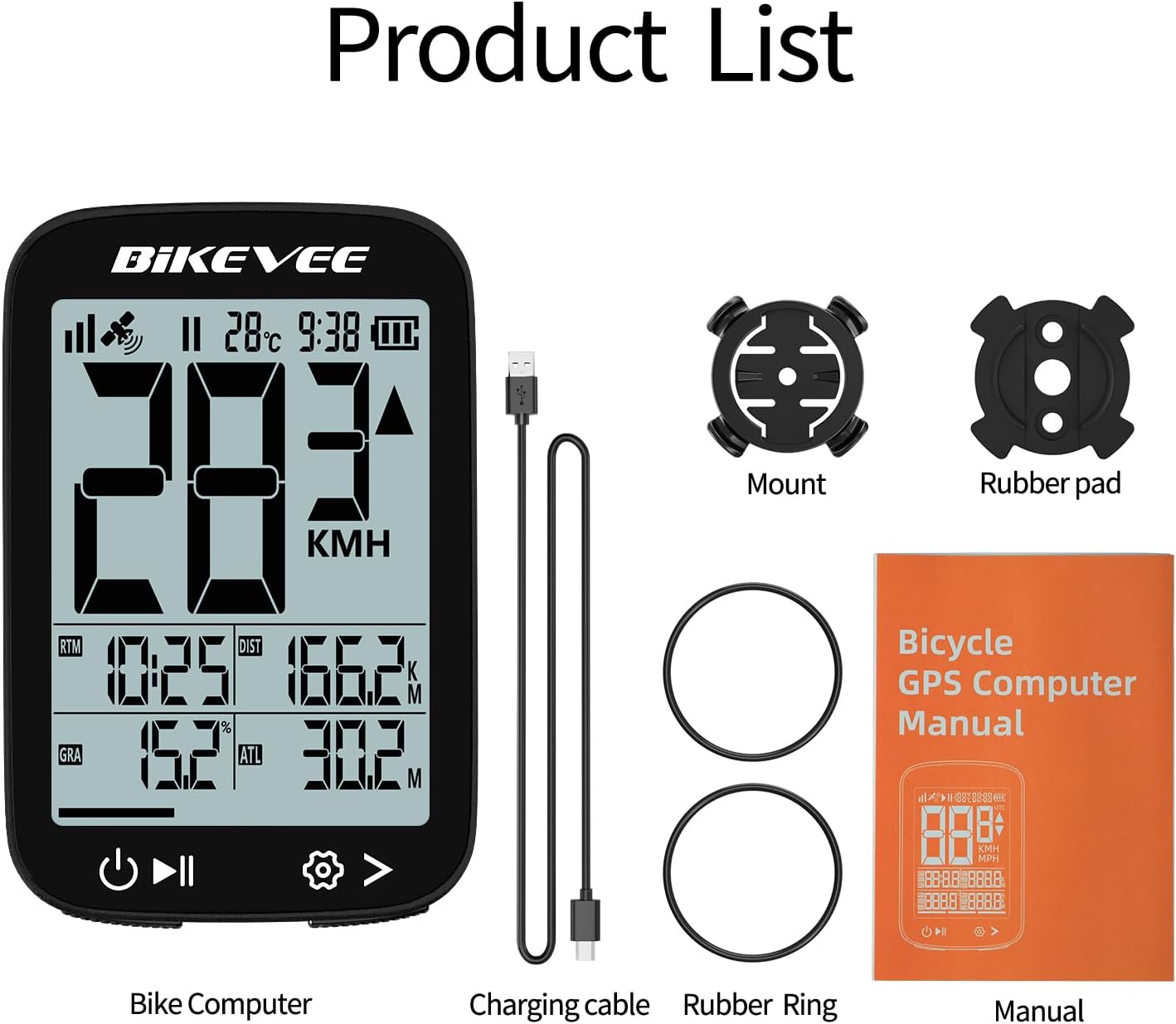
Figure 2.2: Handlebar Mount Components.
2.3 Premye Limen ak Paramèt
- Pouvwa sou: Press and hold the power button (usually located at the bottom left) until the screen illuminates.
- Seleksyon inite: Upon first power-on or after a reset, you may be prompted to select your preferred unit of measurement (MPH or KM/H). Use the navigation buttons to select and confirm.
- Akizisyon GPS: Take the device outdoors to an open area to allow it to acquire GPS satellite signals. This may take a few moments. A stable GPS signal icon will appear once connected.
3. Operasyon Enstriksyon
3.1 Operasyon debaz
- Limen/Etenyen: Press and hold the left button to power on or off.
- Start/Pause/Stop Ride: Press the middle button to start recording a ride. Press again to pause. Press and hold to stop and save the ride data.
- Chanjman Paj: Use the right button to cycle through different data display pages.
- Ekleraj: The device features an automatic backlight that adjusts based on ambient light conditions.
3.2 Data Display and Interpretation
The Bikevee GPS Computer displays up to 14 types of cycling data, providing comprehensive insights into your ride.
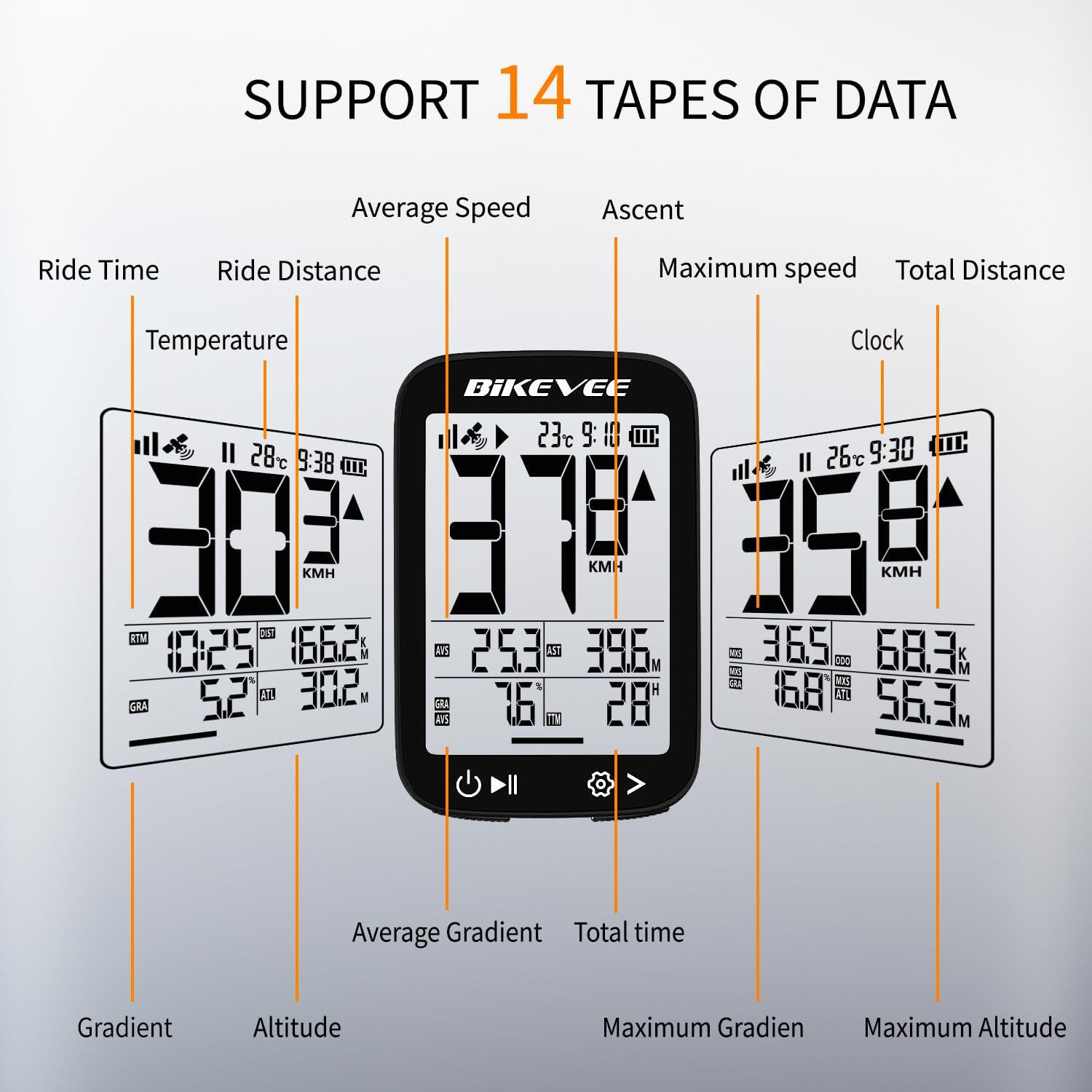
Figure 3.1: Supported Data Types Display.
- Vitès aktyèl la: Displays your real-time speed (MPH or KM/H).
- Mwayèn vitès: The average speed for the current ride.
- Vitès maksimòm: Vitès ki pi wo a anrejistre pandan kous aktyèl la.
- Tan woulib: Duration of the current active ride.
- Ride Distance: Distans ki kouvri pandan woulib aktyèl la.
- Distans Total (Odomèt): Cumulative distance recorded by the device.
- Tanperati: Tanperati anbyen.
- Revèy: Tan aktyèl la.
- Monte: Total elevation gained during the ride.
- gradyan: Current incline or decline percentage.
- Altitid: Current elevation above sea level.

Figure 3.2: Display Icons and Their Meanings.
- Satellite Signal: Endike fòs siyal GPS la.
- IPX7: Confirms waterproof rating.
- Nivo batri: Montre kantite chaj batri ki rete.
- Otomatik ekleraj: Indicates auto backlight feature is active.
- Kalite-C: Denotes the charging port type.
- Konparezon vitès: Arrow indicates if current speed is higher or lower than average speed.
4. Antretyen ak Swen
4.1 Netwaye Aparèy la
To maintain optimal performance and appearance, clean the device regularly:
- Siye ekran an ak kò a ak yon twal mou,amp twal.
- Avoid using abrasive cleaners, solvents, or chemical sprays, as these can damage the device's surface or internal components.
- Asire w ke kouvèti pò chaje a byen fèmen pou anpeche pousyè ak dlo antre.
4.2 Rezistans dlo (IPX7)

Figure 4.1: IPX7 Waterproof Feature.
The Bikevee GPS Computer has an IPX7 waterproof rating, meaning it is protected against temporary immersion in water (up to 1 meter for 30 minutes). However, it is important to note:
- Pa plonje aparèy la nan dlo pou yon tan long.
- Evite jè dlo ki gen gwo presyon.
- Ensure the charging port cover is sealed before exposure to water.
4.3 Swen ak Depo Batri
- Sere aparèy la nan yon kote ki fre, sèk lè li pa itilize.
- Avoid exposing the device to extreme temperatures (hot or cold) for prolonged periods.
- Pou depo alontèm, chaje batri a apeprè 50% pou prezève sante batri a.
NAN. Depanaj
If you encounter issues with your Bikevee GPS Computer, refer to the following common problems and solutions:
| Pwoblèm | Kòz posib | Solisyon |
|---|---|---|
| Aparèy pa limen. | Batri ki ba. | Chaje aparèy la nèt avèk kab Kalite-C ki vini ak li a. |
| No GPS signal or inaccurate readings. | Obstrue view of sky; initial signal acquisition. | Move to an open outdoor area. Wait a few minutes for signal acquisition. Avoid dense forests or tunnels. |
| Ekran an fèb oswa ou pa ka li li. | Auto backlight setting; low battery. | Ensure sufficient battery charge. The backlight adjusts automatically; try moving to a different lighting condition. |
| Aparèy la bloke oswa li vin pa reponn. | Pwoblèm lojisyèl. | Fè yon reset mou lè w peze epi kenbe bouton pouvwa a pandan 10-15 segonn jiskaske aparèy la rekòmanse. |
6. Espesifikasyon
Detailed technical specifications for the Bikevee Wireless Cycling GPS Computer:

Figure 6.1: Device Dimensions and Weight.
- Modèl: Bikevee Cycling GPS Computer
- Ekspozisyon: 2.4-inch LCD, Automatic Backlight
- Batri: 650mAh Rechargeable Lithium-ion
- Lavi batri: Jiska 28 èdtan (itilizasyon kontinyèl)
- GPS Systems: GPS, BDS, GLONASS, Galileo, QZSS (5-satellite tracking)
- Evalyasyon ki enpèmeyab: IPX7
- Dimansyon: Approximately 70mm (Height) x 45mm (Width) / 2.76in x 1.77in
- Pwa: Approximately 50g / 0.11lb
- Pò chaje: Kalite-C USB
- Data Types Supported: 14 types (e.g., Speed, Distance, Time, Temperature, Altitude, Gradient)
7. Enfòmasyon sou Garanti
The Bikevee Wireless Cycling GPS Computer is covered by a limited manufacturer's warranty. This warranty typically covers defects in materials and workmanship under normal use. Please retain your proof of purchase for warranty claims.
For specific warranty terms and conditions, including duration and coverage details, please refer to the warranty card included with your product or contact Bikevee customer support directly.
8. Sipò pou Kliyan
If you have any questions, require technical assistance, or need to report an issue with your Bikevee Wireless Cycling GPS Computer, please contact our customer support team.
- Sipò sou entènèt: Visit the official Bikevee websit pou FAQ, gid depanaj, ak fòm kontak.
- Sipò Imèl: Gade anbalaj pwodwi ou a oswa enfòmasyon ofisyèl la. websit pou adrès imel sèvis kliyan an.
When contacting support, please be prepared to provide your product model number (Bikevee Cycling GPS Computer) and a detailed description of the issue.
Ask a question about this manual
Ask about setup, troubleshooting, compatibility, parts, safety, or missing instructions. Manuals+ will review the question and use this page’s manual context to help answer it.