
boAt Rockerz Trinity Gen 2
boAt Rockerz Trinity Gen 2 Bluetooth Neckband Earphones User Manual
Model: Rockerz Trinity Gen 2
Entwodiksyon
Thank you for choosing the boAt Rockerz Trinity Gen 2 Bluetooth Neckband Earphones. This manual provides essential information for setting up, operating, and maintaining your earphones. Please read it carefully to ensure proper use and to maximize your listening experience. These earphones are designed for extended audio playback, high-resolution sound, and clear communication.
Ki sa ki nan bwat la
- boAt Rockerz Trinity Gen 2 Earphones
- Chaje kab
- Manyèl itilizatè
The package includes the boAt Rockerz Trinity Gen 2 Earphones, a charging cable, and this user manual.
Pwodwi souview
The boAt Rockerz Trinity Gen 2 features a flexible neckband design with in-ear earbuds. It includes integrated controls for media playback, call management, and voice assistant activation. The neckband houses the battery and main electronics.
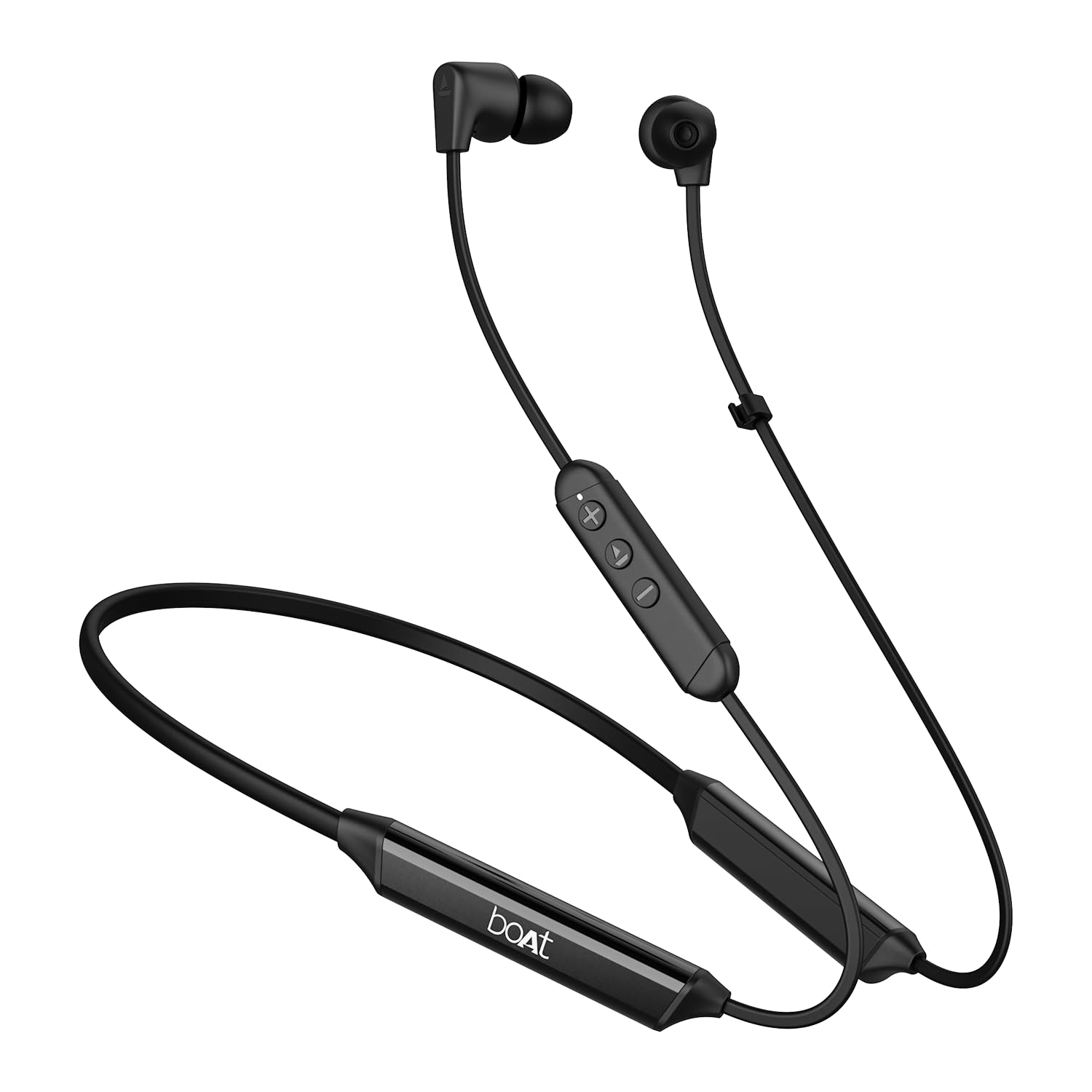
Image: The boAt Rockerz Trinity Gen 2 neckband earphones, highlighting the flexible neckband and in-ear design.

Imaj: Yon imaj detaye view of the boAt Rockerz Trinity Gen 2 earbuds and the inline control panel, showing buttons for volume and playback.
Enstalasyon
1. Chaje ekoutè yo
Before first use, fully charge your earphones. Connect the provided charging cable to the charging port on the neckband and to a USB power source. The LED indicator will show charging status. A full charge provides up to 150 hours of playback. With ASAP Charge, 10 minutes of charging provides up to 24 hours of playback.
Image: The boAt Rockerz Trinity Gen 2 neckband, illustrating its long battery life with "150 HOURS PLAYBACK" text.
2. Powering On / Off
- Pou limen: Press and hold the Multi-function button (usually the center button on the inline control) for approximately 3 seconds until the LED indicator flashes blue and you hear a power-on prompt.
- Pou etenn: Press and hold the Multi-function button for approximately 5 seconds until the LED indicator flashes red and you hear a power-off prompt.
3. Pè Bluetooth
- Asire w ke kas ekoutè yo etenn.
- Press and hold the Multi-function button for about 5-7 seconds until the LED indicator flashes red and blue alternately, indicating pairing mode.
- On your device (smartphone, laptop), enable Bluetooth and search for available devices.
- Select "boAt Rockerz Trinity Gen 2" from the list of found devices.
- Yon fwa konekte, endikatè LED la ap flache ble dousman, epi w ap tande yon son konfimasyon.

Image: The boAt Rockerz Trinity Gen 2 earphones connected to both a smartphone and a tablet, illustrating the dual pairing feature.
4. Dual Pairing (Multipoint)
The Rockerz Trinity Gen 2 supports dual pairing, allowing connection to two devices simultaneously. After pairing with the first device, disable Bluetooth on that device. Put the earphones back into pairing mode and connect to the second device. Once connected to the second device, re-enable Bluetooth on the first device. The earphones will automatically connect to both devices, allowing seamless switching between them for calls and media.
Enstriksyon Operasyon
Kontwòl debaz yo
- Jwe/Poz: Peze bouton Multi-fonksyon an yon fwa.
- Volim moute: Peze bouton '+' la.
- Volim desann: Peze bouton '-' la.
- Pwochen Track: Peze epi kenbe bouton '+' la.
- Track Previous: Peze epi kenbe bouton '-' la.
- Reponn/Fen Apèl: Peze bouton Multi-fonksyon an yon fwa.
- Rejte apèl: Peze epi kenbe bouton Multi-fonksyon an pou 2 segonn.
- Aktive Asistan Vwa: Doub peze bouton Multi-fonksyon an.
Odyo Hi-Res ak LDAC
The Rockerz Trinity Gen 2 supports Hi-Res Audio with LDAC codec, providing superior sound quality. Ensure your connected device also supports LDAC for the best audio experience. This feature allows for high-resolution audio transmission over Bluetooth, preserving more detail from your music.

Image: The boAt Rockerz Trinity Gen 2 earphones displaying the "Hi-Res Audio Wireless" and "LDAC" logos, indicating high-resolution audio support.
Mòd EQ doub
Switch between different equalizer modes to customize your audio experience. Refer to the product's quick start guide or experiment with button combinations (often a triple-press of the Multi-function button or a combination with volume buttons) to cycle through available EQ presets. This allows you to adjust the sound profile selon preferans ou.

Image: A close-up of the boAt Rockerz Trinity Gen 2 earbuds, highlighting the availability of dual EQ modes for sound customization.
AI-ENx™ Technology for Clear Calls
The earphones feature AI-ENx™ technology, which enhances call clarity by eliminating background noise. This ensures your voice is heard clearly during calls, even in noisy environments.

Image: A close-up of a boAt Rockerz Trinity Gen 2 earbud, emphasizing the AI-ENx™ technology for clear voice calls.
Mòd BEAST™ (Latans ki ba)
Activate BEAST™ Mode for a low-latency gaming experience (65ms). This mode synchronizes audio with visuals, providing a more immersive gaming session. To activate/deactivate BEAST™ Mode, refer to the specific instructions in your quick start guide, usually involving a dedicated button press or a combination.

Image: The boAt Rockerz Trinity Gen 2 earphones with "BEAST™ MODE 65ms Low Latency" text, depicted alongside gaming characters to illustrate its use for gaming.
Antretyen
Netwayaj
- Wipe the earphones with a soft, dry, lint-free cloth.
- Pa sèvi ak pwodui chimik piman bouk, solvang netwayaj, oswa detèjan fò.
- Netwaye bout zòrèy yo regilyèman pou anpeche sir akimile, sa ki ka afekte kalite son an.
Rezistans dlo (IPX5)
The earphones are IPX5 rated, meaning they are resistant to sweat and light splashes of water. They are not designed for submersion in water. Avoid exposing them to heavy rain or direct water jets. Ensure the charging port cover is securely closed when not charging to maintain water resistance.

Image: The boAt Rockerz Trinity Gen 2 earbuds with water droplets on them, illustrating their IPX5 water resistance rating.
Depo
Store the earphones in a cool, dry place away from direct sunlight and extreme temperatures. Avoid storing them with sharp objects that could damage the cables or earbuds.
Depanaj
Pa gen pouvwa
- Asire w ke ekoutè yo byen chaje.
- Press and hold the Multi-function button for 3-5 seconds to power on.
Pa ka marye ak aparèy
- Ensure the earphones are in pairing mode (LED flashing red and blue alternately).
- Asire w ke Bluetooth aktive sou aparèy ou an epi li nan yon distans (jeneralman 10 mèt).
- Forget "boAt Rockerz Trinity Gen 2" from your device's Bluetooth list and try pairing again.
- Rekòmanse tou de aparèy ou an ak kas ekoutè yo.
Low or Distorted Sound
- Ajiste volim nan tou de sou ekoutè yo ak aparèy ki konekte a.
- Ensure the ear tips are clean and properly seated in your ears.
- Eseye diferan gwosè bouchon zòrèy pou yon pi bon sele.
- Pwoche pi pre aparèy ki konekte a pou evite entèferans.
Mikwofòn pa travay
- Asire w ke ekoutè yo byen konekte ak aparèy ou an.
- Check your device's audio settings to ensure the earphones are selected as the input device.
- Clean the microphone opening if it appears obstructed.
Espesifikasyon
| Mak | bato |
| Non modèl | Rockerz Trinity Gen 2 |
| Plasman Zòrèy | Nan Zòrèy |
| Faktè fòm | Nan Zòrèy |
| Kontwòl bri | AI-ENx™ Technology (for calls) |
| Koneksyon Teknoloji | Bluetooth |
| Lavi Mwayèn Batri | 150 èdtan |
| Tan chaj batri | 10 Minutes (for 24 hours playback via ASAP Charge) |
| Kalite chofè odyo | Dynamic Driver (10mm, inferred from description) |
| Gamme frekans | 20 Hz - 40,000 Hz |
| Rezistans dlo | IPX5 |
| Karakteristik espesyal | Hi-Res Audio with LDAC, Dual EQ Modes, AI-ENx™ Technology, Dual Pairing, BEAST™ Mode (65ms Low Latency), ASAP Charge |
| Metòd kontwòl | Vwa, Bouton |
| Pwa atik | 60 gram |
Garanti ak sipò
Enfòmasyon sou Garanti
The boAt Rockerz Trinity Gen 2 earphones come with a 1-ane garanti from the date of purchase. This warranty covers manufacturing defects. Please retain your purchase receipt for warranty claims. The warranty does not cover damage caused by misuse, accidents, unauthorized modifications, or normal wear and tear.
Sipò pou Kliyan
For technical assistance, warranty claims, or any other inquiries, please contact boAt customer support:
- Imèl: info@imaginemarketingindia.com
- Manifakti: Imajine Maketing Ltd
Tanpri vizite bòdwo ofisyèl la websit la pou jwenn enfòmasyon sipò ak detay kontak ki pi ajou.
Ask a question about this manual
Ask about setup, troubleshooting, compatibility, parts, safety, or missing instructions. Manuals+ will review the question and use this page’s manual context to help answer it.