
Entwodiksyon
This manual provides essential information for setting up, operating, maintaining, and troubleshooting your NIMO 17.3 Gaming Laptop. Designed for high performance with an AMD Ryzen 9 8945HS processor and Radeon 780M graphics, this laptop offers a powerful computing experience for gaming, creative work, and everyday tasks. Please read this manual thoroughly to ensure optimal use and longevity of your device.
1. Inisyal Enstalasyon
1.1 Debalaj ak Premye Limen
Carefully remove your NIMO laptop and all accessories from the packaging. Place the laptop on a stable, flat surface. Before first use, it is recommended to fully charge the battery.

The NIMO 17.3 Gaming Laptop, ready for initial setup.
1.2 Chaje batri a
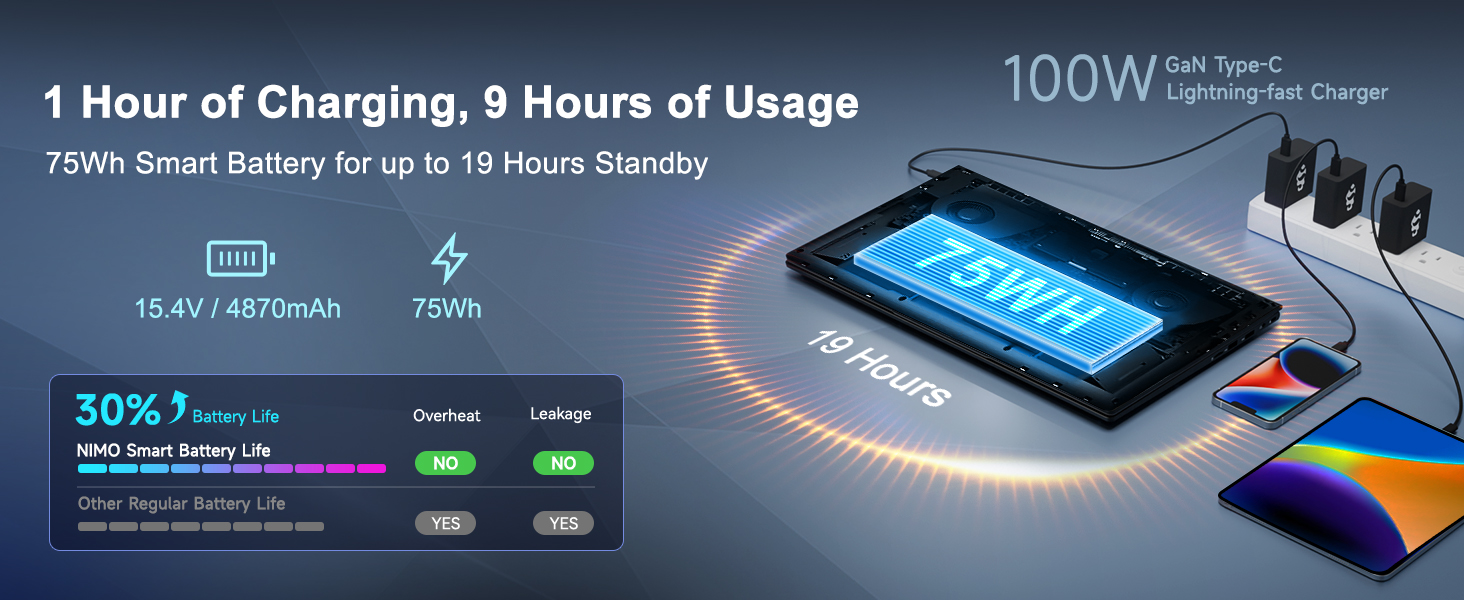
Connect the provided 100W PD Type-C fast charger to the USB-C port on your laptop and then to a power outlet. The charging indicator light will illuminate. Allow the laptop to charge fully before its first use for optimal battery calibration.

The 100W GaN Type-C charger connected to the laptop, illustrating fast charging capability.
1.3 Konfigirasyon Sistèm Operasyon an
Upon first power-on, you will be guided through the Windows 11 setup process. Follow the on-screen instructions to configure language, region, network settings, and user accounts.
1.4 Enstalasyon Lektè Anprent Dwèt
For enhanced security and quick login, set up the integrated fingerprint reader during the Windows 11 setup or later via Windows Settings > Accounts > Sign-in options. Follow the prompts to register your fingerprints.

Close-up of the backlit keyboard and integrated fingerprint reader for secure access.
1.5 Konekte periferik
Your NIMO laptop features a comprehensive multi-port design for various peripherals:
- USB-C 4.0: For ultra-fast data transfer, external displays, and eGPU support.
- USB 3.2: Transfè done gwo vitès pou aparèy konpatib.
- USB 2.0: Pou aparèy USB estanda yo.
- HDMI: Connect to external monitors or TVs.
- Plas kat SD: Pou kat memwa.
- Headphone Combo Jack: Pou pwodiksyon odyo ak antre mikwofòn.
- Fant Kensington Lock: Pou sekirite fizik.
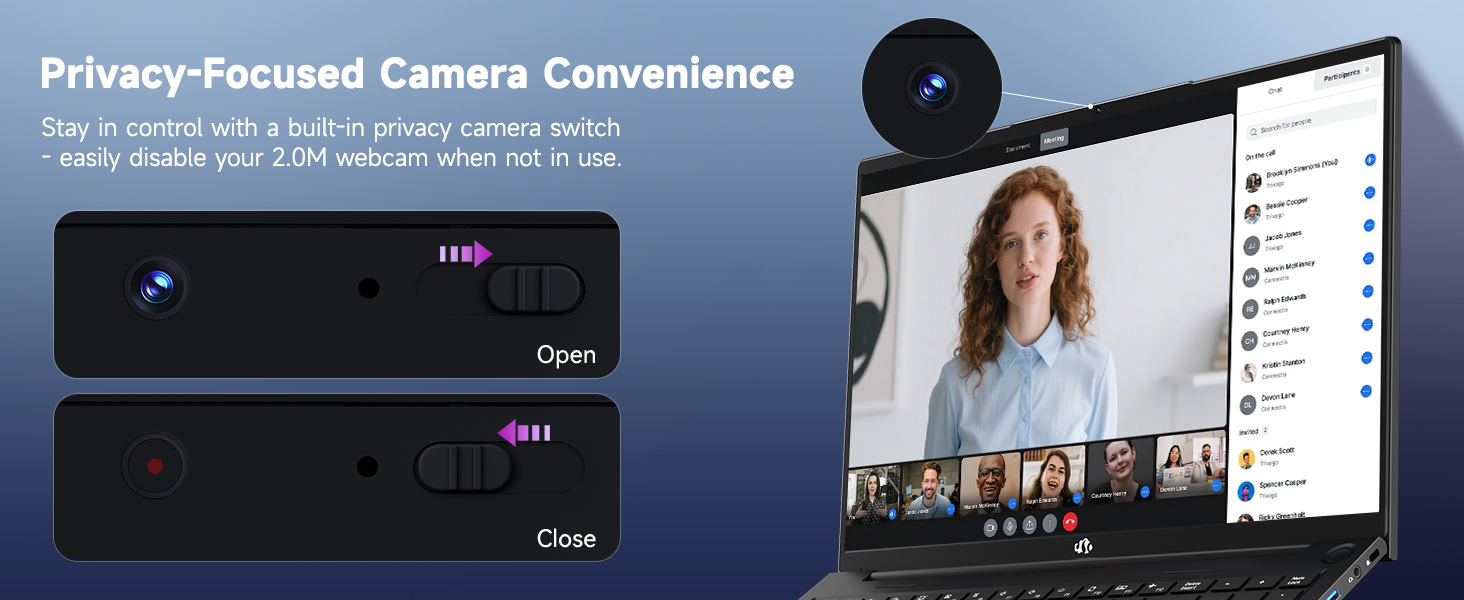
Diagram illustrating the comprehensive multi-port design of the NIMO laptop, including USB-C 4.0, HDMI, USB 3.2, USB 2.0, SD Card slot, Headphone Combo, and Kensington Lock.
2. Operasyon Enstriksyon
2.1 Mòd pou limen/etenn ak pou dòmi
- Pouvwa sou: Peze bouton pouvwa a ki sitiye sou klavye a.
- Pouvwa Off: Klike sou bouton Kòmanse a, answit sou Pouvwa > Fèmen.
- Mòd dòmi: Click the Start button, then Power > Sleep, or close the laptop lid.
2.2 Itilizasyon klavye a ak touchpad la
The NIMO laptop features a full-size keyboard with a numeric keypad and adjustable backlighting. Press Fn + F10 (or similar function key depending on model) to cycle through backlight brightness levels. The large touchpad supports multi-touch gestures for navigation.
2.3 Ekspozisyon Karakteristik
Experience clear visuals on the 17.3-inch Full HD (1920x1080) IPS display. This screen provides vibrant colors and wide viewing angles, suitable for various applications from productivity to entertainment.

The NIMO laptop displaying a vibrant image, highlighting its 17.3-inch Full HD IPS screen.
2.4 Webcam Privacy Switch
For privacy, your laptop includes a physical webcam privacy switch. Slide the switch to the left to cover the camera lens and disable the webcam, or to the right to uncover and enable it.
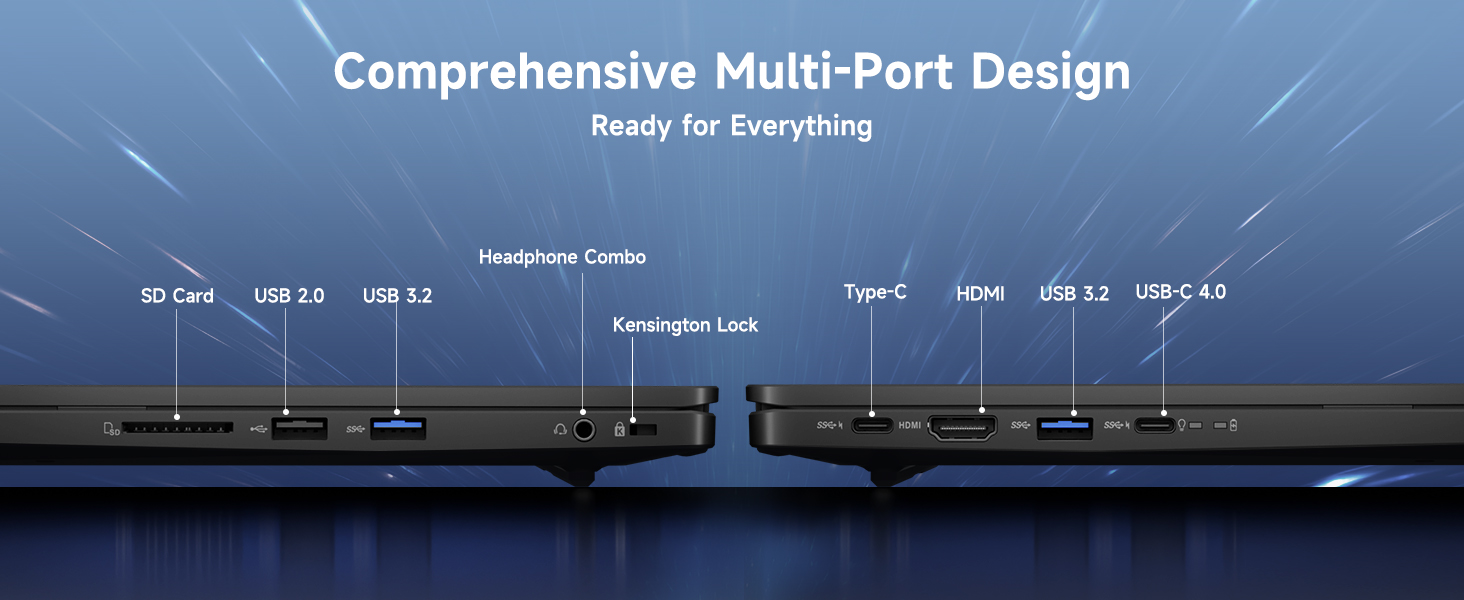
Illustration of the webcam privacy switch in both open and closed positions, demonstrating how to control camera access.
2.5 Pèfòmans Plis paseview
The NIMO laptop is powered by an AMD Ryzen 9 8945HS processor, offering 8 cores and 16 threads with a max boost clock of 5.2GHz. Integrated AMD Radeon 780M graphics provide capable performance for gaming and demanding creative applications.

Dyagram nan montreasing the AMD Ryzen 9 8945HS processor with its 8 cores/16 threads and integrated Ryzen AI NPU.

Visual representation of the AMD Radeon 780M graphics, emphasizing its capabilities for gaming and creative work.
3. Swen ak Antretyen
3.1 Netwaye òdinatè pòtab la
- Ekran: Sèvi ak yon moso twal mou, ki san pèl dampLave avèk dlo oswa yon pwodui netwayaj ekran. Pa flite likid dirèkteman sou ekran an.
- Klavye ak chasi: Sèvi ak yon twal mou epi sèk. Pou pousyè tè ki difisil pou retire, yon ti kras mouye.amp Ou ka itilize twal. Evite pwodui chimik ki agresif.
- Pò: Sèvi ak lè konprese pou retire pousyè ki nan pò yo dousman.
3.2 Jesyon batri
The laptop is equipped with a 75Wh battery. To prolong battery life:
- Evite dechaje batri a nèt souvan.
- Sere laptop la nan yon kote ki fre epi sèk si ou pa itilize li pou yon bon bout tan.
- Utilize power-saving settings in Windows 11.

Graphic illustrating smart battery optimization features, including extended battery life, smart power control, safe fast charging, and battery health protection.
3.3 Dissipation chalè
The NIMO laptop features an efficient cooling system with dual fans and double copper pipes to manage heat. Ensure that the ventilation openings are not blocked during use to maintain optimal performance and prevent overheating.
Entèn view of the laptop's efficient heat dissipation system, featuring dual fans and double copper pipes.
3.4 Mizajou lojisyèl
Regularly update your Windows 11 operating system and device drivers to ensure system stability, security, and optimal performance. You can check for updates via Windows Settings > Windows Update.
NAN. Depanaj
This section addresses common issues you might encounter with your NIMO laptop.
4.1 Pwoblèm pouvwa
- Laptop la pa limen: Ensure the charger is securely connected and the power outlet is functional. Try holding the power button for 15-20 seconds to perform a hard reset.
- Batri pa chaje: Verify the charger is correctly plugged into both the laptop and the wall. Check for any damage to the charger cable or port.
4.2 Pwoblèm ekspozisyon
- Pa gen okenn ekspozisyon sou ekran an: Connect an external monitor via HDMI to check if the issue is with the laptop's internal display. If the external monitor works, the internal display or its connection may be faulty.
- Ekran k ap flache: Update your graphics drivers. Adjust display refresh rate in Windows settings.
4.3 Pwoblèm koneksyon
- Wi-Fi a pa konekte: Ensure Wi-Fi is enabled in Windows settings. Restart your router and laptop. Update wireless drivers.
- Aparèy Bluetooth la pa konekte: Ensure Bluetooth is enabled on both devices. Remove and re-add the device in Windows Bluetooth settings.
4.4 Degradasyon Pèfòmans
- Pèfòmans ralanti: Fèmen aplikasyon ki pa nesesè yo. Tcheke Manadjè Tâch la pou wè si li itilize twòp CPU/RAM. Asire w ke gen ase espas lib sou SSD a. Fè yon eskanè viris.
- Surchof: Ensure ventilation vents are clear. Use the laptop on a hard, flat surface. Consider reducing demanding workloads.
5. Espesifikasyon teknik
| Karakteristik | Spesifikasyon |
|---|---|
| Mak | NIMO |
| Non modèl | NIMO N175L |
| Gwosè ekran | 17.3 pous |
| Rezolisyon ekran | 1920 x 1080 piksèl (Full HD) |
| Processeur | AMD Ryzen 9 8945HS (Up to 5.2 GHz) |
| RAM | 32 GB DDR5 |
| Disk Drive | SSD 1024 GB (Eta solid) |
| Koprosesè grafik | AMD Radeon 780M (Entegre) |
| Sistèm operasyon | Windows 11 |
| Kalite san fil | 802.11a/b/g/n/ac |
| Pò USB | 1x USB 2.0, 3x USB 3.0, 1x USB-C 4.0 |
| Mwayèn lavi batri | 12.8 èdtan |
| Pwa atik | 3.84 liv |
| Dimansyon pwodwi | 15.66 x 9.99 x 0.74 pous |
| Koulè | Nwa |
| Karakteristik espesyal | Klavye retroeklere, lektè anprent, odyo HD, klavye nimerik |
6. Garanti ak Sipò Kliyan
6.1 Enfòmasyon sou Garanti
Laptop NIMO ou a vini ak yon 2-ane garanti for support and service. Additionally, NIMO offers a politik retounen 90 jou from the date of purchase for any reason.
Image depicting a technician working on a laptop, symbolizing the 2-year support provided for NIMO products.
Image of a customer receiving a package, representing the 90-day return policy for NIMO products.
6.2 Kontakte Sipò
For any product-related questions, technical assistance, or warranty claims, please contact NIMO customer support:
- Imèl: service@nimopc.com
- Professional customer assistance is available to help resolve your issues.
Image of customer service representatives, indicating professional customer assistance is available.