
1. Entwodiksyon
This manual provides essential information for the safe and efficient operation of your TOPTRO Quadra Projector. Please read this manual thoroughly before using the projector and retain it for future reference. The TOPTRO Quadra Projector is designed to deliver a high-quality visual and audio experience with its advanced features and smart capabilities.
2. Enfòmasyon sou Sekirite
- Pa bloke ouvèti vantilasyon yo. Asire w ke gen ase lè k ap sikile toutotou pwojektè a pou anpeche l chofe twòp.
- Pa ekspoze pwojektè a anba lapli oswa imidite pou evite chòk elektrik oswa dife.
- Sèvi sèlman ak adaptè kouran ki vini ak pwojektè a.
- Evite gade dirèkteman nan lantiy pwojektè a lè lamp limen, paske limyè klere a ka domaje je yo.
- Mete pwojektè a sou yon sifas ki estab e plat pou anpeche l tonbe.
- Pa eseye demonte oswa repare pwojektè a tèt ou. Konfye tout antretyen bay pèsonèl kalifye.
3. Pake kontni
Verifye ke tout atik yo prezan nan pakè a:
- 1 x TOPTRO Quadra Projector
- 1 x HDMI kab
- 1 x manyèl itilizatè
- 1 x kontwòl remote
4. Pwodwi souview
Familiarize yourself with the main components and interfaces of your TOPTRO Quadra Projector.
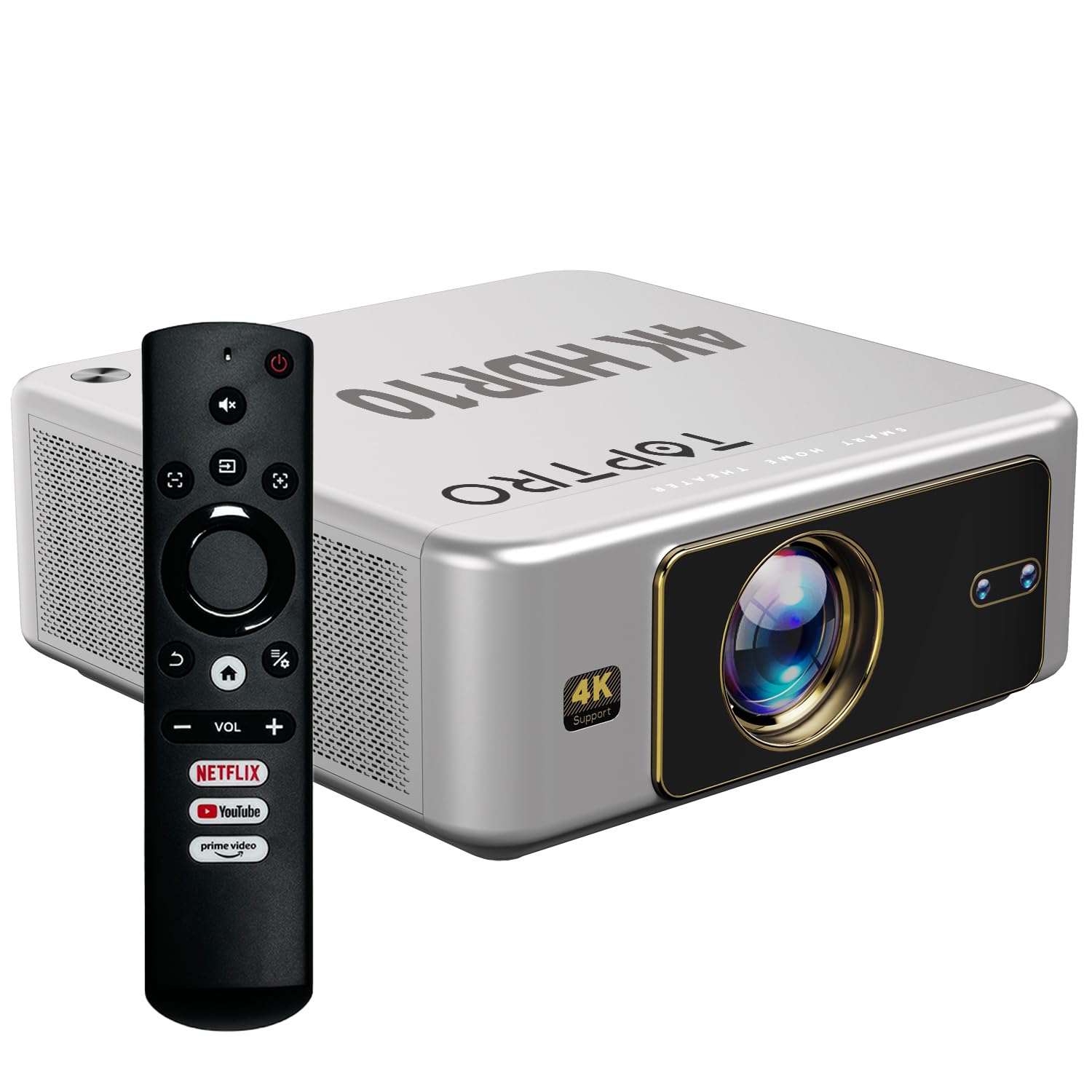
Figi 4.1: Devan view of the TOPTRO Quadra Projector with included remote control.

Figure 4.2: Rear panel of the projector displaying the power input, audio jack, HDMI ports, and USB ports.
5. Enstalasyon
5.1 Plasman ak Gwosè Pwojeksyon
Position the projector on a stable surface. The TOPTRO Quadra Projector supports a maximum screen size of 300 inches. Adjust the distance from the wall or screen to achieve your desired image size.

Figi 5.1: Distans pwojeksyon rekòmande pou diferan gwosè ekran.
5.2 Koneksyon pouvwa
- Konekte kab kouran an nan pò antre kouran pwojektè a.
- Branche lòt bout kab kouran an nan yon priz elektrik ki apwopriye.
5.3 Premye Limen ak Paramèt Debaz yo
- Peze bouton pouvwa a sou pwojektè a oswa kontwòl remote la pou limen li.
- Upon first use, the projector may guide you through initial setup steps, including language selection and network connection.
5.4 Koreksyon Fokus ak Keystone
The TOPTRO Quadra Projector features AI-powered automatic focus and keystone correction. This system automatically adjusts the image for optimal clarity and shape.
- Konsantre Auto: The projector will automatically adjust the image sharpness.
- Auto Keystone: The projector will automatically correct trapezoidal distortion to ensure a rectangular image.
- Auto Obstacle Avoidance & Screen Fit: The projector can detect obstacles and adjust the image to fit the screen area.
If automatic adjustments are not satisfactory, manual adjustments can be made through the settings menu. Navigate to the 'Display & Sound' settings to access these options.

Figure 5.2: Automatic image correction features.
6. Operasyon
6.1 Entèfas itilizatè ak navigasyon
The TOPTRO Quadra Projector runs on a Net-Flix Certified Linux OS, providing a user-friendly interface. Use the remote control to navigate through menus and select applications.

Figure 6.1: Home screen with pre-installed streaming applications.
6.2 Koneksyon
The projector offers various connectivity options for external devices.
- HDMI: Connect your laptop, MacBook, Blu-ray player, TV sticks, TV boxes, or gaming consoles (e.g., PS4) using the dual HDMI ports. The projector supports HDMI CEC and HDMI EARC for enhanced audio return channel functionality.
- USB: Two USB ports are available for connecting pendrives or hard disks to play media files dirèkteman.
- 3.5mm odyo soti: Connect external headphones or speakers for a personalized audio experience.
- Wi-Fi: Utilize the 6th Gen Dual Band Wi-Fi (2.4 GHz + 5 GHz) for internet access and streaming.
- Bluetooth 5.2: Connect Bluetooth speakers, headphones, or other compatible audio devices. The projector also supports two-way Bluetooth, allowing it to function as a Bluetooth speaker.
- Miracast: Wirelessly mirror your screen from compatible devices.

Figure 6.2: Connectivity options for external devices.
6.3 Anviwònman ekspozisyon
Adjust image quality and display features through the 'Display & Sound' menu.
- Mòd Foto: Select from various preset picture modes (e.g., Vivid) or customize settings like brightness, contrast, and color.
- 4K HDR10+ Support: The projector plays true 4K resolution HDR10+ videos, offering enhanced contrast and color depth.
- MEMC (Estimasyon Mouvman, Konpansasyon Mouvman): This technology improves video smoothness and clarity, especially for fast-moving scenes, by interpolating frames.

Figure 6.3: MEMC technology for smoother visuals.
6.4 Anviwònman odyo
Manage audio output and formats via the 'Display & Sound' menu.
- Dolby Atmos ak Dolby Digital Plus: The projector supports these advanced audio technologies for immersive sound.
- eARC mòd: Enable eARC for high-quality audio return from compatible devices.
- Fòma Sòti: Select the appropriate audio output format (e.g., Auto, PCM, Passthrough, Dolby Digital, Dolby Digital Plus) based on your connected audio system.

Figure 6.4: Immersive audio with Dolby Atmos support.
7. Antretyen
Bon antretyen asire lonjevite ak pèfòmans optimal pwojektè ou a.
- Netwayaj lantiy: Siye lantiy pwojektè a dousman avèk yon twal mou ki pa gen pousyè, espesyalman fèt pou sifas optik. Evite materyèl abrazif oswa pwodui chimik ki agresif.
- Netwayaj eksteryè: Sèvi ak yon twal mou epi sèk pou netwaye deyò pwojektè a.
- Prevansyon Pousyè: The TOPTRO Quadra Projector features a fully sealed optical engine, which helps prevent dust, dirt, and moisture from entering the light path. This design reduces the need for frequent internal cleaning and maintains consistent image quality.
NAN. Depanaj
Si ou rankontre pwoblèm ak pwojektè ou a, gade pwoblèm ak solisyon komen sa yo:
| Pwoblèm | Kòz posib | Solisyon |
|---|---|---|
| Pa gen imaj ki parèt | Incorrect input source selected; loose HDMI/USB connection; power issue. | Verify input source in settings; check cable connections; ensure projector is powered on. |
| Pa gen son | Volume too low or muted; incorrect audio output setting; external audio device not connected properly. | Adjust volume; check 'Sound output' settings; ensure external speakers are connected and powered. |
| Imaj la twoub oswa defòme | Focus or keystone correction issues; projector not placed correctly. | Allow auto-focus/keystone to complete. If issues persist, manually adjust focus and keystone in 'Display & Sound' settings. Ensure the projector is perpendicular to the screen. |
| Remote kontwòl pa travay | Batteries are low or depleted; remote not pointed at IR receiver; obstruction. | Ranplase pil yo; asire w ke liy vizyon an klè ak reseptè IR pwojektè a. |
| Fan noise is noticeable | Normal operation; projector is working hard; ventilation blocked. | Ensure adequate ventilation around the projector. Fan noise is a normal part of projector operation, especially during high-performance tasks. |
9. Espesifikasyon
Key technical specifications of the TOPTRO Quadra Projector:
| Karakteristik | Detay |
|---|---|
| Mak | TOPTRO |
| Non modèl | TOPTRO Quadra Projector 4K HDR10+ Dolby |
| Dimansyon pwodwi | 24 x 20 x 10 cm |
| Pwa atik | 2 kg |
| Entèfas Materyèl | 3.5mm Audio, Bluetooth 5.2, Dual HDMI (CEC, EARC), Dual USB |
| Aparèy konpatib | Gaming Console, Laptop, Smartphone, Speaker, Television |
| Karakteristik espesyal | Dolby Atmos - Dolby Digital Plus, 4K HDR 10+/HLG, Net-Flix Certified Linux OS, 2GB RAM, 32GB ROM, Auto Focus & Keystone, Native 1080p Full HD & True 4K Support, 32000 Lumens Brightness (2600 ANSI), 15W Big Speakers, HDMI ARC, Dual HDMI, Built-in Apps, Dual 5G & 2.4G WiFi 6, Bluetooth, WiFi Display, Electronic Focus & 6D Electronic correction, Fully Sealed Optical Engine, MEMC |
| Teknoloji ekspozisyon | LCD |
| Imaj klète | 32000 Lumèn (2600 ANSI) |
| Pwopòsyon Imaj Kontrèman | 22000:1 |
| Aspè rapò | 16:9 |
| Native Screen Resolution | 1920 x 1080 (Full HD) |
| Rezolisyon sipòte | Up to 3840 x 2160 Pixels (4K) |
| Rafrechisman pousantaj | 60 Hz |
| Lamp Lavi | 50000 èdtan |
| Faktè fòm | Pòtab |
| Kalite aliye | Mòn plafon |
| Peyi orijin | Lachin |
10. Garanti ak sipò
For warranty information, technical support, or service inquiries, please contact TOPTRO Projectors India using the details below:
- Imèl: support@toptro.in or sreeprojectors@gmail.com
- Whatsapp: 8341888860
- Websit: toptro.in
Please have your product model number (Quadra 4K HDR10+ Dolby) and purchase details ready when contacting support.