
bmani T16
bmani Wireless Earbuds User Manual
Modèl: T16
Brand: bmani
Entwodiksyon
Welcome to the bmani Wireless Earbuds user manual. These Bluetooth headphones are designed for comfort and performance, featuring a secure over-ear fit, long battery life, and intuitive controls. This manual will guide you through setting up, operating, and maintaining your new earbuds.
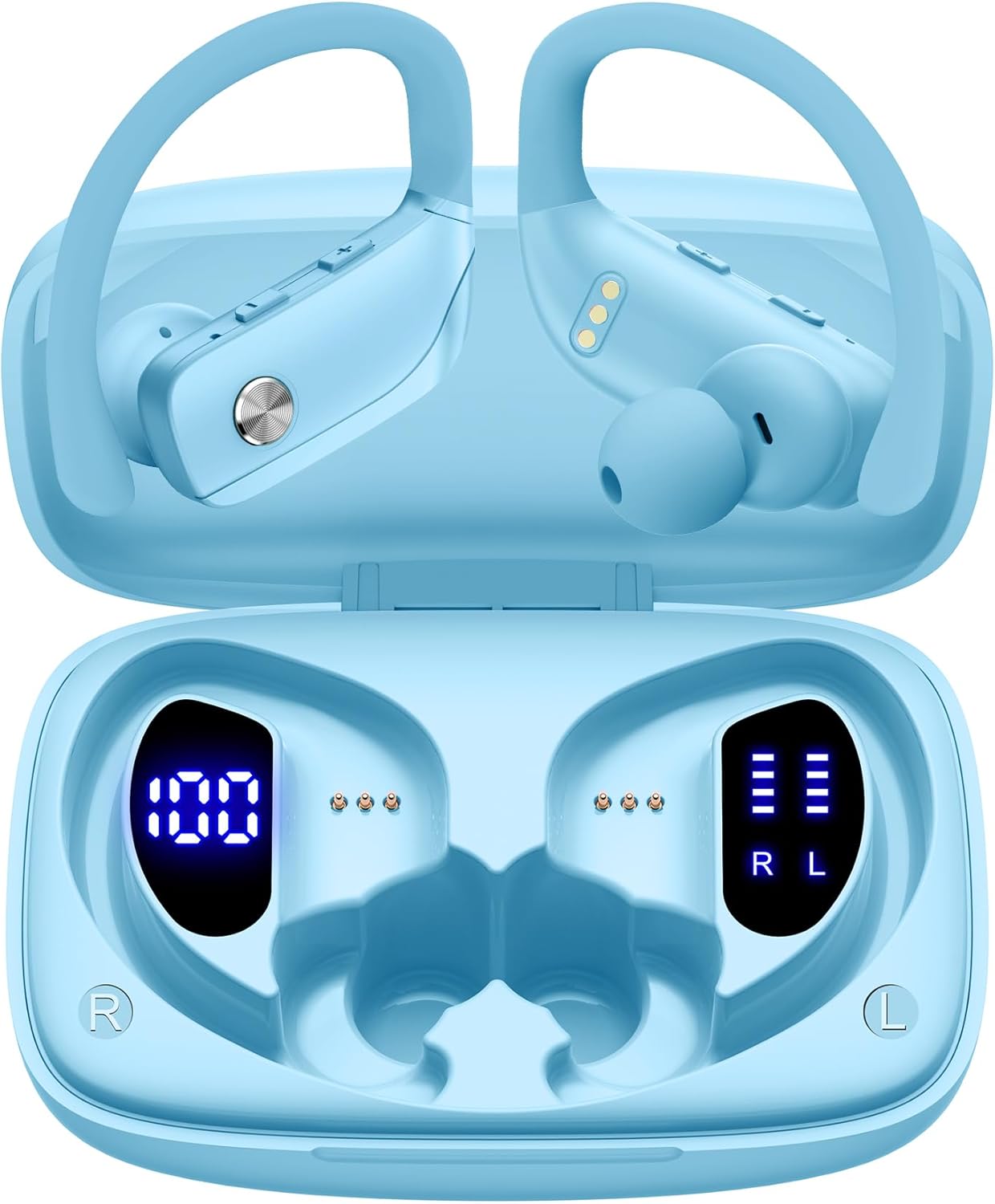
Image: The bmani Wireless Earbuds in their open sky blue charging case, showcasinekoutè yo ak enteryè bwat la.
Ki sa ki nan bwat la
- Ekoutè san fil
- Ka chaje
- Eartips (three size options: L, M, S)
- Kalite-C Kab
- Manyèl Itilizatè (dokiman sa a)

Image: This image displays all the items included in your bmani Wireless Earbuds package: the two wireless earbuds, their charging case, a set of three different sized eartips (L, M, S), a Type-C charging cable, and the user manual.
Pwodwi souview & Karakteristik
The bmani Wireless Earbuds are engineered for an exceptional audio experience with user-friendly features.
Dual LED Displays Charging Case
The charging case features dual LED displays. The left display shows the remaining battery power of the case in percentage. The right side indicates the charging process of each earbud with four grids, each representing 25% of the bud's power. The LED indicator light will flash during charging.

Image: This image highlights the dual LED digital display on the charging case. The left screen shows the charging case's battery capacity as a percentage, while the right screen displays the power status of the left (L) and right (R) earbuds using four bars each.
Long lavi batri
Enjoy extended listening sessions with up to 8 hours of music time per earbud and an additional 40 hours provided by the 600mAh charging case, totaling 48 hours of playback.

Image: This diagram illustrates the impressive battery life: 8 hours of music time per earbud (50mAh each) and an additional 40 hours of listening time provided by the 600mAh charging case, totaling 48 hours of playback.
Bluetooth 5.0 and Hi-Fi Stereo Sound Quality
Equipped with advanced Bluetooth 5.0 technology, these earbuds provide a clear and smooth connection with extended range and fewer dropouts, ensuring crystal-clear calls and uninterrupted music listening. The 10mm speakers deliver Hi-Fi stereo sound.

Image: This image visually represents the 10mm speakers within the earbuds, emphasizing their capability to deliver Hi-Fi stereo sound.

Image: This image emphasizes the Bluetooth 5.0 technology, offering extended range and fewer dropouts, and the integration with voice assistants like Siri.
Designed for Sports (IPX5 Water Resistant)
These sport headphones are designed to stay securely in place during long hours of training, preventing shifting or falling out. They come with flexible earhooks and three pairs of ear caps (S, M, L) to ensure a comfortable and suitable fit, even during intense activities like camping, running, or working out. They are also IPX5 water-resistant, protecting them from splashes and sweat.

Image: This image shows a woman wearing the earbuds during exercise, highlighting their secure fit. An inset graphic demonstrates the flexible earhooks and the three included eartip sizes (L, M, S) for personalized comfort.

Image: This infographic summarizes key features: Dual LED Battery Display, 600mAh Charging Case, Anti-skid Earhooks, IPX5 Waterproof rating, Hi-Fi Stereo sound, and Voice Assistant compatibility.
Enstalasyon
Chaje ekoutè yo ak ka
Anvan premye itilizasyon an, chaje ekoutè yo ak bwat chaje a nèt.
- Connect the provided Type-C cable to the charging port on the back of the case.
- Ploge lòt bout la nan yon sous pouvwa USB.
- Ekran LED ki sou bwat la ap montre pwogrè chaj la.
- Once fully charged, the display will show 100% for the case and full bars for both earbuds.
Pairing with Your Device (One-step Pairing)
The bmani earbuds feature automatic pairing for convenience.
- Open the charging case and take out both earbuds. They will automatically power on and attempt to pair with each other.
- Sou aparèy ou an (telefòn entelijan, tablèt, òdinatè pòtab, elatriye), aktive Bluetooth.
- Chèche pou "T16" nan lis aparèy Bluetooth ki disponib yo epi chwazi li pou konekte.
- Yon fwa konekte, w ap tande yon envit odyo, epi ekoutè yo ap pare pou itilize.
- Ekoutè yo ap konekte otomatikman ak dènye aparèy ki te konekte a lè yo retire yo nan bwat la.

Image: This image demonstrates the one-step pairing process, showing the earbuds connected to a smartphone. It also highlights their wide compatibility with various Bluetooth-enabled devices, including notebooks, TVs, desktops, smartwatches, and tablets.
Enstriksyon Operasyon
Mete ekoutè yo
Pou yon son ak yon konfò optimal, asire w ke ekoutè yo byen mete.
- Put the ear hook over the back of your ear.
- Insert the ear cap into your ear canal.
- Adjust by twisting the earbud for a comfortable and secure fit.

Image: This visual guide provides three simple steps for wearing your earbuds: 1. Place the ear hook over your ear. 2. Insert the ear cap into your ear. 3. Adjust the earbud by twisting it for a secure and comfortable fit.
Kontwòl
The bmani earbuds feature intuitive button controls.
| Aksyon | Fonksyon |
|---|---|
| Klike yon fwa | Jwe/Pòz Mizik, Reponn/Fen Apèl |
| Quick Double-click (R) | Next Track |
| Quick Double-click (L) | Previous Track |
| Press "+" Button | Volim leve |
| Press "-" Button | Volim desann |
| Quick Triple-click | Aktive Asistan Vwa |
| Kenbe | Power On/Off |

Image: This image illustrates the dual audio controls on the earbuds. It shows the physical volume buttons (+/-) and a diagram explaining single click for play/pause, double click for track navigation, and holding the button for power on/off.

Image: This infographic details the various controls: single click for call answer/end and play/pause, double click for next/previous track, pressing +/- for volume, and triple click for voice assistant.
Antretyen
To ensure the longevity and optimal performance of your bmani Wireless Earbuds, follow these maintenance guidelines:
- Netwayaj: Regularly clean the earbuds and charging case with a soft, dry, lint-free cloth. Do not use harsh chemicals or abrasive materials.
- Bout zòrèy: Remove and clean the eartips periodically. You can gently wash them with mild soap and water, then ensure they are completely dry before reattaching.
- Rezistans dlo: The earbuds are IPX5 water-resistant, meaning they can withstand splashes and sweat. Do not submerge them in water or expose them to heavy rain. Ensure they are dry before placing them back in the charging case.
- Depo: When not in use, store the earbuds in their charging case to protect them from dust and damage.
- Chaje: Use only the provided Type-C cable for charging. Avoid extreme temperatures during charging and storage.
Depanaj
If you encounter any issues with your bmani Wireless Earbuds, please refer to the following common solutions:
Earbuds not pairing with each other or with device:
- Asire w ke tou de ekoutè yo byen chaje.
- Place both earbuds back into the charging case, close the lid, wait a few seconds, then open the lid and take them out again. This often resets the pairing.
- On your device, forget or delete "T16" from your Bluetooth device list. Then, try the pairing process again from step 1.
- Asire w pa gen okenn lòt aparèy Bluetooth k ap entèfere ak koneksyon an.
Pa gen son oswa volim ki ba:
- Tcheke nivo volim nan tou de ekoutè ou yo ak aparèy ki konekte a.
- Asire w ke ekoutè yo byen chita nan zòrèy ou yo.
- Clean any debris from the eartips or earbud speakers.
- Rekonekte ekoutè yo ak aparèy ou an.
Ka chaje pa chaje:
- Asire w kab Kalite-C a byen konekte ak bwat la ak sous kouran an.
- Eseye yon diferan adaptè pouvwa USB oswa pò.
- Tcheke kab chaje a pou nenpòt domaj.
Ekoutè k ap tonbe:
- Try different sizes of eartips provided in the box to find the best fit for your ears.
- Ensure the ear hooks are correctly positioned over your ears.
Espesifikasyon
| Karakteristik | Detay |
|---|---|
| Non modèl | T16 |
| Koneksyon Teknoloji | San fil (Bluetooth 5.0) |
| Lavi batri | Jiska 8 èdtan (ekoutè), 40 èdtan (ak bwat chaje) |
| Chaje Ka Kapasite | 600mAh |
| Kapasite batri ekouteur | 50mAh (chak) |
| Rezistans dlo | IPX5 |
| Kalite kontwòl | Kontwòl bouton |
| Materyèl | Plastik |
| Pwa atik | 2 ons |
| Dimansyon pwodwi | 3.54 x 2.36 x 0.79 pous |
| Konpozan ki enkli | Charging Case, Eartip, Type-C Cable, User Manual, Wireless Earbuds |
| Aparèy konpatib | All Bluetooth-enabled mobile phones, tablets, laptops, computers, audiobooks, TV, and all devices with Bluetooth 5.0 |
Garanti ak sipò
bmani products are designed with quality and reliability in mind. For specific warranty information or technical support, please refer to the contact details provided on the product packaging or visit the official bmani websit. Kenbe resi acha ou pou reklamasyon garanti.
Ask a question about this manual
Ask about setup, troubleshooting, compatibility, parts, safety, or missing instructions. Manuals+ will review the question and use this page’s manual context to help answer it.