
MUBVIEW Klòch J7
MUBVIEW Bell J7 2K Wireless Video Doorbell Camera with Chime User Manual
Modèl: Bell J7
1. Entwodiksyon
Manyèl sa a bay enstriksyon detaye pou enstalasyon, operasyon ak antretyen MUB ou a.VIEW Bell J7 2K Wireless Video Doorbell Camera with Chime. Please read this manual thoroughly before using the product to ensure proper function and safety. This device is designed to enhance your home security with advanced features like 2K video, motion detection, and two-way audio.
2. Ki sa ki nan bwat la
Verifye ke tout konpozan yo prezan anvan ou kontinye ak enstalasyon an:
- Camera Doorbell x1
- Chime x1
- Manyèl itilizatè x1
- Chaje kab x1
- Batri x3
- Other Accessories (screws, anchors, screwdriver)

Image: Contents of the MUBVIEW Bell J7 package, including the doorbell, chime, and installation tools.
3. Pwodwi souview
Familiarize yourself with the main parts of your video doorbell and chime:
Kamera Sonèt
- 2K Camera Lens: Captures high-resolution video.
- PIR Mouvman Capteur: Detekte mouvman moun.
- Mikwofòn: Pou kominikasyon odyo de-fason.
- Oratè: For two-way audio communication and siren.
- Bouton sonèt: Aktive sonèt la epi voye notifikasyon.
- Micro USB-C Port: Pou chaje batri entèn lan.
- Bouton Reyajiste: For device reset.
- Mikwo SD kat plas: For local video storage (up to 128GB, card not included).
- Anti-Theft Button: Triggers an alarm if the doorbell is removed from its mount.
Wireless Chime
- Oratè: Li emèt son sonèt pòt.
- Kontwòl Volim: Ajiste volim sonèt la.
- Seleksyon Ton: Changes chime melody.
- Sous pouvwa: Batri ki mache ak pil pou plasman fleksib.

Imaj: Devan view nan MUB laVIEW Bell J7 doorbell and chime.
4. Enstalasyon
Follow these steps to set up your MUBVIEW Bell J7 doorbell camera:
4.1 Chaje Sonèt Pòt la
- Before first use, fully charge the doorbell camera using the provided USB charging cable.
- The charging port is located on the side of the doorbell, protected by a rubber flap.
- Yon chaj konplè ka dire jiska 180 jou, sa depann de itilizasyon.
4.2 Enstalasyon Aplikasyon an ak Koneksyon Wi-Fi
- Telechaje la CloudEdge or MUBVIEW aplikasyon an nan magazen aplikasyon telefòn entelijan ou an (Apple App Store oubyen Google Play Store).
- Kreye yon kont oubyen konekte si ou deja genyen youn.
- Asire w ke telefòn entelijan ou an konekte ak yon 2.4GHz Wi-Fi rezo. The doorbell is not compatible with 5GHz Wi-Fi.
- In the app, select "Add Device" and choose "Smart Video Doorbell".
- Follow the on-screen prompts to connect the doorbell to your Wi-Fi network. This typically involves scanning a QR code displayed on your phone with the doorbell camera.
- Once connected, you can name your device and complete the setup.
4.3 Monte Sonèt Pòt la
The doorbell can be mounted using screws or strong adhesive tape (not included for all mounting types).
- Attach the mounting bracket to your desired location on the wall or door frame. Ensure it is at an appropriate height for optimal viewing.
- Secure the bracket using the provided screws and anchors.
- Slide the doorbell camera into the mounting bracket until it clicks securely into place.
- For added security, a small screw can be inserted from the bottom of the bracket into the doorbell to prevent easy removal.

Image: Installation of the MUBVIEW Bell J7 doorbell camera onto its mounting bracket.
5. Operasyon Enstriksyon
5.1 Viv View ak Odyo De-fason
- Louvri MUB laVIEW app to access the live video feed from your doorbell camera.
- Use the microphone icon in the app to enable two-way audio and speak with visitors at your door.
- The voice changer feature can be activated for added privacy and security.

Image: Demonstrating two-way audio and voice message functionality via the app.
5.2 Deteksyon Mouvman ak Alèt
- The doorbell features advanced PIR motion and human detection to minimize false alarms.
- Lè yo detekte yon mouvman, ou pral resevwa notifikasyon imedyat sou smartphone ou.
- Adjust motion detection sensitivity and set custom motion zones within the app to suit your environment.

Image: Smartphone notification for human detection from the doorbell camera.
5.3 Vizyon lannwit
- The doorbell camera automatically switches to IR night vision in low-light conditions.
- Enhanced night vision provides clear images up to 33 feet.
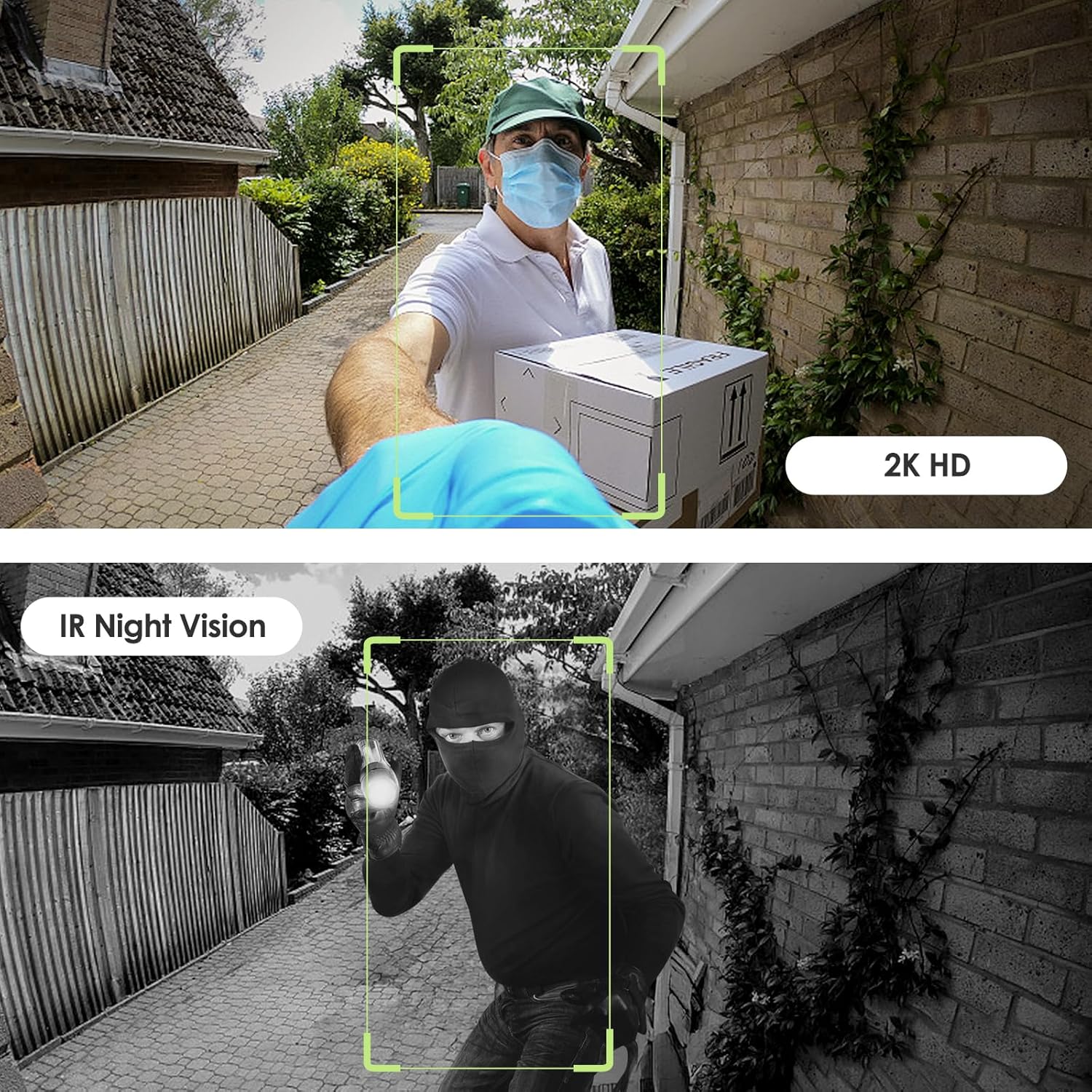
Image: Day and night vision capabilities of the MUBVIEW Bell J7 doorbell.
5.4 Depo Videyo
- Kat mikwo SD: Insert a micro SD card (up to 128GB, not included) into the designated slot for local storage of recorded footage.
- Depo nwaj: Enjoy 7-day free cloud loop storage. Optional premium cloud storage plans are available for extended storage and features.

Image: Multiple storage options: local Micro SD card and cloud service.
6. Karakteristik
- 2K Full HD Resolution: Provides clear and detailed video.
- Lantiy gran ang 145°: Ofri yon laj view nan papòt ou a.
- Ki mache ak pil: Ensures easy, wire-free installation.
- Koneksyon Wi-Fi 2.4GHz: Stable and reliable wireless connection.
- Rezistans move tan IP65: Built to withstand various outdoor conditions (rain, heat, hail, sun, dust).
- Alam anti-vòl: Siren sounds if the doorbell is tampered ak.
- Chanje vwa: Enhances privacy during two-way audio.
- Pre-Recorded Voice Messages: Respond quickly with custom messages.
- Pataje Fanmi: Supports up to 15 online users and 20 user accounts.
- Konpatibilite: Travay ak Alexa ak Google Assistant.

Imaj: Plis paseview of MUBVIEW Bell J7 features.
7. Antretyen
7.1 Batri Chaje
The doorbell is powered by rechargeable batteries. Monitor the battery level through the app and recharge as needed. The battery life can extend up to 180 days on a single charge, depending on activity and settings.
7.2 Netwayaj
Wipe the camera lens and the doorbell's exterior with a soft, damp twal pou retire pousyè ak debri. Evite itilize pwodui chimik ki agresif oswa materyèl abrazif ki ka domaje aparèy la.
7.3 Rezistans move tan
MUB laVIEW Bell J7 is IP65 weather-resistant, designed to endure various outdoor conditions. However, extreme weather conditions may still impact performance or battery life.

Image: IP65 Weather Resistance of the MUBVIEW Bell J7 doorbell.
NAN. Depanaj
| Pwoblèm | Solisyon posib |
|---|---|
| Sonèt pòt la pa konekte ak Wi-Fi a | Ensure your Wi-Fi is 2.4GHz. Move the doorbell closer to your router during setup. Reset the doorbell and try again. |
| Alam fo mouvman souvan | Adjust the motion detection sensitivity in the app. Set custom motion zones to exclude busy areas or moving foliage. |
| Move kalite videyo | Check your Wi-Fi signal strength in the app. Ensure the camera lens is clean and free from obstructions. |
| Kout lavi batri | Reduce motion detection sensitivity or frequency of live view access. Ensure the doorbell is fully charged. |
| Anti-theft alarm not working | Ensure the anti-theft feature is enabled in the app settings. Check if the doorbell is properly seated in its mounting bracket, activating the tampè bouton. |
9. Espesifikasyon
- Non modèl: Klòch J7
- Rezolisyon Capture Videyo: 2K
- Koneksyon Teknoloji: San fil (Wi-Fi 2.4GHz)
- Sous pouvwa: Mache ak pil (3 pil A enkli)
- Itilizasyon anndan/deyò: Deyò
- Nivo rezistans dlo: IP65 ki enpèmeyab
- Karakteristik espesyal: 2-Way Audio, Built-In Light, HD Resolution, Image Sensor, Motion Sensor, Voice Changer, Anti-Theft Alarm
- Aparèy konpatib: Smartphone (via CloudEdge/MUBVIEW app)
- Dimansyon pwodwi: 1.37 x 5.27 x 2.2 pous
- Pwa atik: 15.4 ons
10. Garanti ak sipò
MUBVIEW is committed to providing quality products and customer satisfaction. For any inquiries or support needs, please refer to the following:
- Sèvis Kliyan: Available via Call Service (9AM-5PM EST) and Online Email.
- Retounen: 30-day Amazon return policy applies.
- Plan Pwoteksyon: Ou ka achte plan pwoteksyon opsyonèl pou 2 ak 3 ane.
For detailed contact information, please visit the official MUBVIEW website or refer to the contact details provided in the product packaging.

Image: MUBVIEW Customer Service details.
Ask a question about this manual
Ask about setup, troubleshooting, compatibility, parts, safety, or missing instructions. Manuals+ will review the question and use this page’s manual context to help answer it.