
1. Entwodiksyon
This manual provides essential information for the safe and efficient use of your XIAOMI Redmi 15C smartphone. Please read this guide thoroughly before operating your device to ensure proper functionality and to prevent damage.
The Redmi 15C is designed to offer a reliable mobile experience with its large display, powerful battery, and capable camera system.
2. Enfòmasyon sou Sekirite
- Sekirite batri: Do not attempt to replace the battery yourself. Use only authorized service centers. Avoid exposing the device to extreme temperatures or direct sunlight.
- Chaje: Use only the original USB cable provided. A power adapter is not included; use a compatible 33W fast charger from a reputable manufacturer.
- Rezistans dlo ak pousyè: The device features IP64 dust and water resistance. This rating indicates protection against dust ingress and splashing water from any direction. It is not designed for submersion in water.
- Dispozisyon: Jete aparèy la ak batri li yon fason responsab dapre règleman lokal yo. Pa jete l nan fatra kay la.
- Sekirite Kondwi: Always prioritize driving safety. Do not use your phone while driving unless absolutely necessary and in compliance with local laws.
3. Pake kontni
Verifye ke pake ou a gen atik sa yo:
- Telefòn entelijan XIAOMI Redmi 15C
- USB kab (Tip-C)
- SIM Eject Zouti
- Gid Quick Start
- Kat Garanti
Note: A power adapter is not included in the box and must be purchased separately. For optimal charging, use a 33W fast charger.
4. Aparèy souview
Familiarize yourself with the physical components of your Redmi 15C.
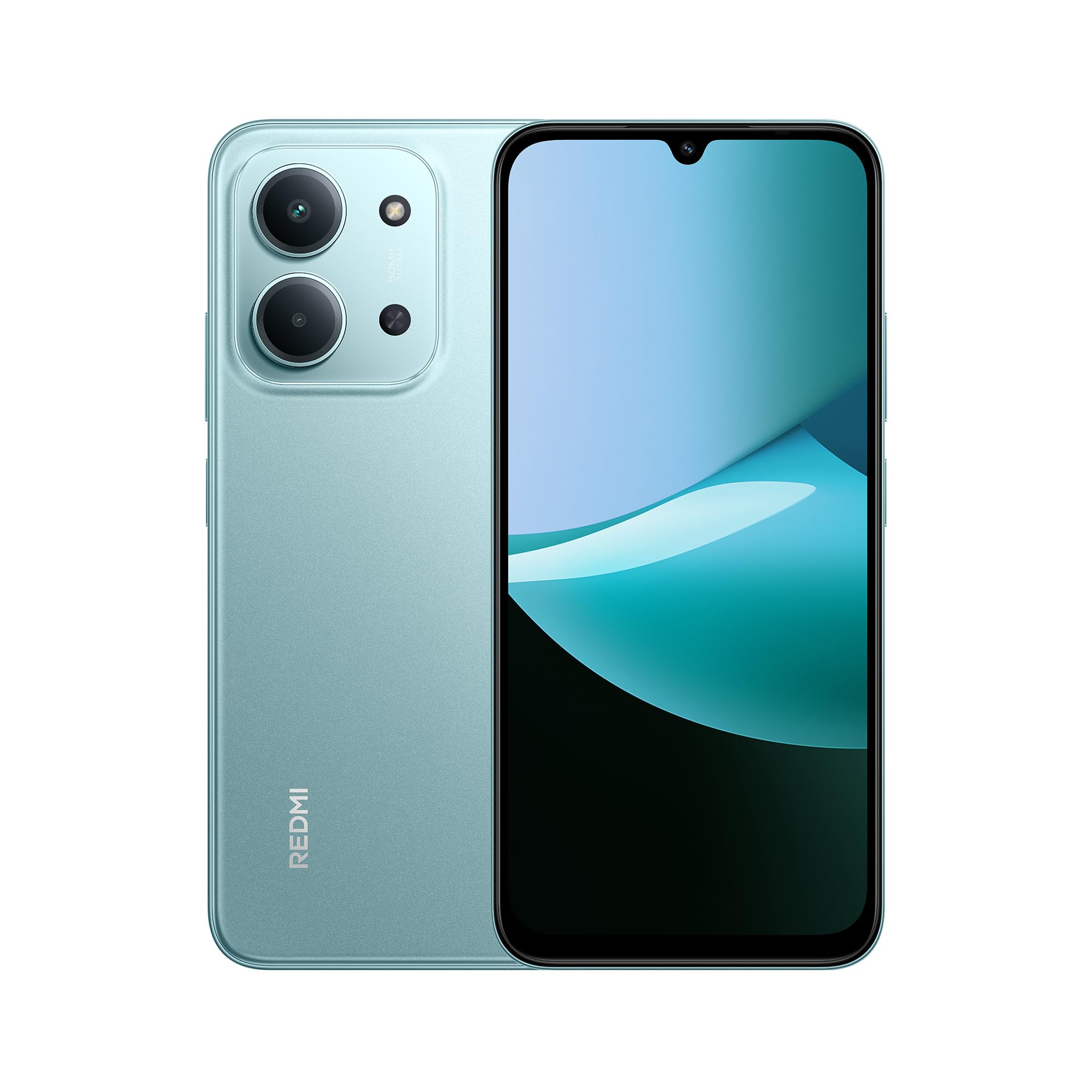
Devan ak dèyè view of the XIAOMI Redmi 15C smartphone in Mint Green.

The slim 7.99mm body of the Redmi 15C, designed for comfortable handling.
Konpozan fizik:
- Bouton pouvwa: Sitiye sou bò a, yo itilize li pou limen/etenn aparèy la oswa reveye/dòmi ekran an.
- Bouton Volim: Sitiye toupre bouton pouvwa a, yo itilize li pou ajiste volim medya ak apèl.
- USB Kalite-C Port: Sitiye anba a, yo itilize li pou chaje ak transfere done.
- Plato SIM/SD kat: Located on the side, for inserting SIM cards and a microSD card.
- Kamera devan: Sitiye anlè ekran an.
- Sistèm Kamera Dèyè: Located on the back, featuring a 50MP AI dual camera.
- Oratè: Pou pwodiksyon odyo.
- Mikwofòn: Pou antre vwa pandan apèl ak anrejistreman.
5. Pou kòmanse (Enstalasyon)
5.1. Inserting SIM/SD Card
- Jwenn plato kat SIM lan sou bò aparèy ou an.
- Mete zouti pou ejecte kat SIM lan nan ti twou ki akote plato a epi peze byen fèm jiskaske plato a soti.
- Place your Nano-SIM card(s) and/or microSD card into the designated slots on the tray. Ensure the gold contacts face downwards. The device supports Dual SIM functionality.
- Ak anpil atansyon reinserte plato a nan aparèy la.
5.2. Powering On / Off
- Pou limen: Peze epi kenbe bouton Power la jiskaske logo XIAOMI a parèt.
- Pou etenn: Peze epi kenbe bouton pouvwa a jiskaske meni pouvwa a parèt, answit chwazi "Etein".
- Pou rekòmanse: Peze epi kenbe bouton pouvwa a jiskaske meni pouvwa a parèt, answit chwazi "Rekòmanse".
5.3. Inisyal Enstalasyon Sòsye
Upon first power-on, the device will guide you through the initial setup process. Follow the on-screen instructions to:
- Chwazi lang ou ak rejyon ou.
- Konekte nan yon rezo Wi-Fi.
- Aksepte tèm ak kondisyon yo.
- Sign in to your Google account or create a new one.
- Konfigire bloke ekran an (Kòd PIN, modèl, modpas, anprent dwèt, deblokaj figi).
- Retabli done ki soti nan yon aparèy anvan (opsyonèl).
6. Operasyon debaz
6.1. Navigasyon
The Redmi 15C features a responsive touchscreen. Use gestures such as tapping, swiping, pinching, and spreading to navigate the interface.
6.2. Fè apèl epi voye mesaj
- Apèl: Open the "Phone" app, enter the number, and tap the call icon.
- Mesaj: Open the "Messages" app, tap the new message icon, enter the recipient and your message.
6.3. Konekte Wi-Fi ak Bluetooth
- Ale nan Anviwònman> Wi-Fi or Anviwònman> Bluetooth.
- Toggle the respective switch to turn it on.
- Select the desired network or device from the list and enter the password if prompted.
6.4. Sèvi ak Kamera a
The Redmi 15C is equipped with a 50MP AI dual camera system for capturing photos and videos.

Detail of the 50MP AI dual camera system on the Redmi 15C, designed to capture clear and vibrant images.
- Louvri aplikasyon "Kamera" a.
- Chwazi mòd ou vle a (Foto, Pòtrè, Videyo, elatriye).
- Tape bouton deklanchè a pou pran yon foto oswa pou kòmanse/sispann anrejistreman yon videyo.
6.5. Jesyon batri
The device features a massive 6000mAh battery for extended usage.

Illustration of the 6000mAh battery inside the Redmi 15C, providing up to 82 hours of music playback.
Pou chaje aparèy ou an:

The Redmi 15C supports 33W fast charging, allowing the battery to reach 50% in approximately 31 minutes.
- Connect the USB Type-C cable to the device and a compatible 33W fast charger.
- Avoid overcharging; disconnect the charger once the battery is full.
- To optimize battery life, adjust screen brightness, disable unnecessary features, and close background apps.
7. Karakteristik avanse
7.1. Processor Performance
The Redmi 15C is powered by a MediaTek Helio G81-Ultra octa-core processor, ensuring smooth performance for daily tasks and applications.

Visual representation of the powerful MediaTek Helio G81-Ultra octa-core processor, designed for consistent smooth performance.
7.2. Ekspozisyon Imersif
Experience content on the immersive 6.9-inch display with a 120Hz AdaptiveSync refresh rate, providing a smoother visual experience.

The 6.9-inch display of the Redmi 15C, featuring up to 120Hz AdaptiveSync for a fluid user interface.
7.3. Fonksyonalite IA ak Google Gemini
The Redmi 15C integrates with Google Gemini, an AI assistant designed to help with various tasks such as writing, brainstorming, and learning.

The Redmi 15C demonstrating interaction with Google Gemini, an AI assistant for various tasks. Setup is required for this feature.
8. Antretyen
8.1. Netwaye Aparèy la
- Sèvi ak yon twal mou, ki pa gen pèl pou netwaye ekran an ak kò aparèy la.
- Evite itilize pwodwi chimik piman bouk oswa materyèl abrazif.
- Pa flite pwodui netwayaj yo dirèkteman sou aparèy la.
8.2. Mizajou lojisyèl
Tcheke epi enstale mizajou lojisyèl regilyèman pou asire aparèy ou an gen dènye karakteristik yo, patch sekirite yo, ak amelyorasyon pèfòmans yo.
- Ale nan Anviwònman > Konsènan telefòn > Vèsyon MIUI (or similar for Hyper OS).
- Tap "Check for updates" and follow the on-screen instructions.
8.3. Jesyon Depo
To maintain optimal performance, regularly manage your device's storage.
- Efase pa nesesè files, foto, ak videyo.
- Dezenstale aplikasyon ki pa itilize yo.
- Deplase an gwo filenan yon kat microSD (si li enstale) oubyen nan depo nwaj la.
NAN. Depanaj
Si ou rankontre pwoblèm ak aparèy ou an, eseye solisyon sa yo:
| Pwoblèm | Solisyon |
|---|---|
| Aparèy pa limen | Asire w batri a chaje. Konekte l nan yon plato pou omwen 10 minit, epi eseye limen l. |
| Aplikasyon yo ap plante oswa yo bloke | Restart the device. Clear the cache of the problematic app (Anviwònman > Aplikasyon > [Non Aplikasyon an] > Depo > Efase kach la). |
| Siyal rezo pòv | Tcheke si kat SIM ou a byen antre. Eseye rekòmanse aparèy la. Asire w ou nan yon zòn ki gen rezo. |
| Batri vide byen vit | Diminye klète ekran an. Fèmen aplikasyon ki an background. Dezaktive fonksyon ki pa nesesè tankou GPS oswa Bluetooth lè w pa ap itilize yo. |
| Aparèy la ralanti oswa li pa reponn | Clear storage space. Restart the device. Check for system updates. |
If problems persist, contact customer support or visit an authorized service center.
10. Espesifikasyon
Detailed technical specifications for the XIAOMI Redmi 15C.
| Karakteristik | Spesifikasyon |
|---|---|
| Non modèl | 15C |
| Sistèm operasyon | Hyper OS 2 |
| Processeur | MediaTek Helio G81-Ultra Octa-core |
| RAM | 4 GB |
| Kapasite Depo | 128 GB |
| Gwosè ekspozisyon | 6.9 pous |
| Rezolisyon ekspozisyon | 720 x 1600 |
| Rafrechisman pousantaj | 120 Hz |
| Kamera dèyè | 50 MP AI Dual Camera |
| Kamera devan | Wi |
| Kapasite batri | 6000 mAh |
| Tan pale | Jiska 30 èdtan |
| Chaje | 33W Fast Charging Compatible |
| Koneksyon | 4G, Wi-Fi, Bluetooth, GPS |
| Sipò SIM | Doub SIM |
| Dimansyon (L x W x H) | 17.3 x 8.1 x 0.82 cm |
| Pwa | 400 g |
| Karakteristik espesyal | Wi-Fi Hotspot, Integrated GPS, IP64 Dust and Water Resistance |
11. Garanti ak sipò
Your XIAOMI Redmi 15C smartphone comes with a standard manufacturer's warranty. Please refer to the warranty card included in your package for specific terms and conditions, including warranty period and coverage details.
Pou sipò teknik, sèvis, oswa plis kesyon, tanpri vizite sipò ofisyèl XIAOMI a. websit la oubyen kontakte sèvis kliyan yo. Kenbe prèv acha ou pou reklamasyon garanti.