
1. Entwodiksyon
This manual provides detailed instructions for the installation, operation, and maintenance of your COUGAR OmnyX Mid Tower PC Case. Please read this manual thoroughly before beginning assembly to ensure correct setup and optimal performance. Keep this manual for future reference.
2. Enfòmasyon sou Sekirite
- Toujou dekonekte ekipman pou kouran an nan priz miray la anvan ou enstale oswa fè antretyen sou nenpòt konpozan andedan bwat PC a.
- Manyen tout konpozan yo avèk prekosyon pou evite domaj akòz elektrisite estatik. Konsidere itilize yon braslè ponyèt anti-estatik.
- Avoid placing the PC case in direct sunlight, near heat sources, or in areas with high humidity.
- Ensure proper ventilation around the case to prevent overheating.
- Kenbe ti pati ak zouti lwen timoun yo.
3. Pake kontni
Verifye ke tout atik yo prezan nan pakè ou a:
- COUGAR OmnyX Mid Tower PC Case
- Bwat akseswa (ki gen ladan l vis, distansè, lyen kab, elatriye)
- Manyèl Itilizatè (dokiman sa a)
- Pre-installed 160mm fans (quantity as specified in product details)
4. Pwodwi souview
The COUGAR OmnyX case is designed for high expandability and efficient cooling, suitable for various computing needs. Its symmetrical design allows for flexible placement, showcasing internal components from multiple angles. Key features include:
- Konsepsyon simetrik: Allows for versatile orientation on your desk.
- Omnidirectional Dynamic Flow System (ODF): Optimized airflow for superior cooling performance.
- Quad 160mm Fans: Equipped with four large 160mm fans for powerful cooling.
- Ambidextrous I/O Module: Features 4x USB 3.0 Type-A and 2x USB 3.2 Gen 2 Type-C ports for convenient connectivity.
- Mekanis lage rapid: Tool-less panel removal for easy access and installation.
- Streamlined Cable Management: Dedicated channels and tie-down points for a clean build.
- Bracketless Vertical GPU Mount: Supports vertical GPU installation without additional brackets.
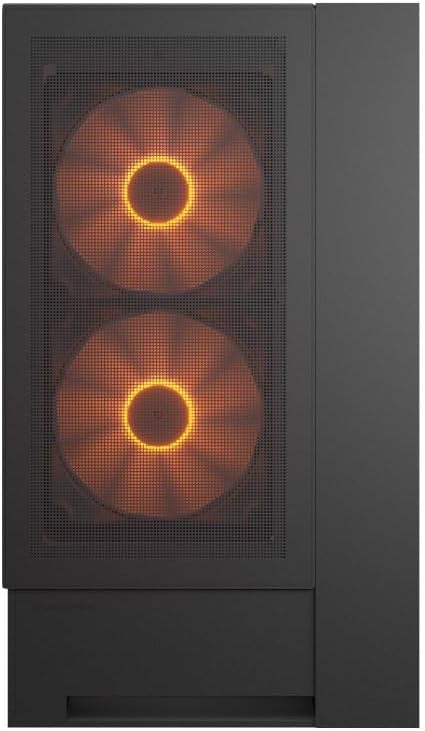
Devan view of the COUGAR OmnyX PC case, highlighting the pre-installed 160mm fans.

Illustration of the symmetrical design, allowing flexible case orientation.

Close-up of the large 160mm fans providing powerful cooling.
Prezantasyon videyo pwodwi ofisyèl laasing the COUGAR OmnyX PC case features, including its symmetrical design, quad 160mm fans, ambidextrous I/O module, cable management, and quick release mechanism for easy installation.
5. Enstalasyon ak Enstalasyon
5.1. Preparasyon
Before starting, ensure you have a clean, well-lit workspace and the necessary tools, including a Phillips head screwdriver.
5.2. Retire Panel
The OmnyX case features a quick-release mechanism for easy panel removal. Gently pull the panels to detach them from the chassis. Refer to the exploded view pou idantifikasyon eleman.

Demonte view of the COUGAR OmnyX case, showing removable panels and components.
5.3. Enstalasyon mèr
The OmnyX supports Mini ITX, Micro ATX, and ATX motherboards. Install the necessary standoffs for your motherboard size, then carefully place the motherboard and secure it with screws.

Entèn view showing the motherboard tray and mounting points.
5.4. Enstalasyon Kat Grafik (GPU)
Install your graphics card into the appropriate PCIe slot. The case supports GPUs up to 380mm in length. For vertical GPU mounting, utilize the integrated bracketless vertical GPU mount.

Illustration of the bracketless vertical GPU mounting option.
5.5. Kondwi Enstalasyon
The case provides bays for 2x 3.5-inch drives and 2x 2.5-inch drives. Secure your storage devices in the designated locations using the provided screws.
5.6. Enstalasyon Inite Alimantasyon (PSU)
Install your power supply unit in the rear-mount location. The case accommodates PSUs up to 200mm in length.
5.7. Jesyon kab
Utilize the dedicated cable management channels and tie-down points behind the motherboard tray to route and secure cables. This ensures optimal airflow and a clean internal appearance.

View illustrating the efficient cable management system within the case.
5.8. Devan I/O Koneksyon
Connect the front panel I/O cables (USB 3.0, USB 3.2 Gen 2 Type-C, audio, power, reset) to their corresponding headers on your motherboard. The ambidextrous I/O module offers flexible placement.

Close-up of the front I/O panel with USB ports and controls.
6. Operasyon Enstriksyon
6.1. Power On/Off
After all components are installed and cables connected, plug the power supply into a wall outlet. Press the power button on the front I/O panel to turn on your PC.
6.2. Kontwòl ekleraj RGB
The pre-installed fans feature RGB lighting. Control of the RGB effects and fan speed is typically managed through your motherboard's software or a dedicated controller if included. Refer to your motherboard manual for specific instructions on RGB synchronization.

Illustration depicting RGB LED and fan speed control capabilities.
7. Antretyen
Regular maintenance helps ensure the longevity and performance of your PC case:
- Netwayaj pousyè: Periodically clean dust filters and internal components using compressed air or a soft brush. Dust accumulation can impede airflow and lead to overheating.
- Netwayaj eksteryè: Siye sifas eksteryè yo ak yon mou, damp twal. Evite pwodui netwayaj abrazif.
- Tcheke kab: Ensure all internal cables remain securely connected and neatly routed.
NAN. Depanaj
Si ou rankontre pwoblèm, gade etap depanaj komen sa yo:
- Pa gen pouvwa: Check if the power supply is properly connected to the wall outlet and the motherboard. Ensure the power button cable is correctly connected to the motherboard header.
- Vantilatè yo pa vire: Verify that the fan cables are securely connected to the motherboard fan headers or a fan controller. Check BIOS settings for fan speed control.
- RGB Not Working: Confirm RGB cables are connected to the correct motherboard headers or controller. Check your motherboard's RGB software for settings.
- Surchof: Ensure all fans are functioning correctly and oriented for optimal airflow. Clean any dust buildup from filters and components. Verify CPU cooler and GPU cooler installations.
For more complex issues, consult your component manuals or contact COUGAR support.
9. Espesifikasyon
| Karakteristik | Spesifikasyon |
|---|---|
| Non modèl | OmnyX |
| Nimewo Modèl | CGR-2WA3B-RGB |
| Kalite Ka | Mid Tower |
| Sipò pou plak mèr | Mini ITX / Mikwo ATX / ATX |
| Dimansyon (D x W x H) | 300 x 470 x 520 mm |
| Bò pou kondwi 3.5" | 2 |
| Bò pou kondwi 2.5" | 2 |
| CPU Cooler Wotè Limit | 170mm |
| GPU Longè Limit | 380mm |
| Limit Longè PSU a | 200mm |
| Fanatik pre-enstale | 4 x 160mm |
| Front I / O pò | 4x USB 3.0 Type-A, 2x USB 3.2 Gen 2 Type-C |
| Pwa | 12.6 kg |
10. Garanti ak sipò
The COUGAR OmnyX PC Case comes with a 1-ane garanti from the date of purchase. This warranty covers manufacturing defects and faulty components under normal use. It does not cover damage caused by misuse, accidents, unauthorized modifications, or improper installation.
For technical support, warranty claims, or further assistance, please visit the official COUGAR websit la oubyen kontakte détayan lokal ou a.
COUGAR Official Websit: www.cougar-gaming.com