
1. Entwodiksyon
Thank you for choosing the Schneider 43A1 4K UHD LED TV. This television combines advanced display technology with smart features to provide an immersive viewing experience. Featuring a 4K Ultra High Definition display, QLED-LCD technology with Direct LED backlighting, and the VIDAA Smart TV platform, your new TV offers vibrant colors, deep blacks, and access to a wide range of entertainment.
This manual provides essential information for the safe and efficient use of your television. Please read it thoroughly before operating the device and retain it for future reference.
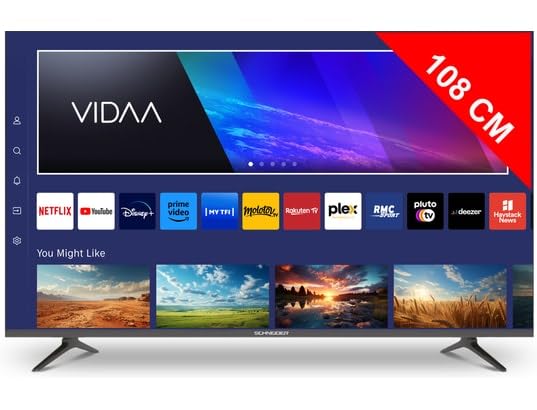
Imaj 1.1: Devan view of the Schneider 43A1 TV with VIDAA interface.
2. Enfòmasyon sou Sekirite
Pou asire yon operasyon an sekirite epi pou anpeche domaj, tanpri obsève prekosyon sekirite sa yo:
- Plasman: Position the TV on a stable, level surface. Avoid placing it in direct sunlight, near heat sources, or in environments with high humidity or dust.
- Vantilasyon: Ensure adequate ventilation around the TV. Do not block ventilation openings. Maintain a minimum distance of 10 cm from walls or other objects.
- Pwovizyon pou pouvwa: Sèvi ak sèlman ekipman pou pouvwa espesifye voltage. Ensure the power cord is not pinched or walked on. Disconnect the power plug during lightning storms or when unused for extended periods.
- Netwayaj: Debranche televizyon an anvan ou netwaye li. Sèvi ak yon twal mou epi sèk. Pa sèvi ak pwodui netwayaj likid oswa ayewosòl.
- Likid: Do not expose the TV to dripping or splashing liquids. Do not place objects filled with liquids, such as vases, on the TV.
- Timoun: Sipèvize timoun yo pou asire yo pa monte sou televizyon an oswa sou mèb yo.
- Montaj mi: If wall-mounting, use a VESA compatible bracket (200 x 200 mm) and ensure proper installation by qualified personnel to prevent injury.
3. Pake kontni
Tanpri verifye ke tout atik yo prezan epi yo an bon kondisyon:
- Schneider 43A1 4K UHD LED TV
- Kontwòl Remote
- Pouvwa kab
- Sipò pou televizyon (2 moso)
- Vis pou Sipò Televizyon
- Manyèl Itilizatè (dokiman sa a)
4. Enstalasyon
4.1 Debake
Carefully remove the TV from its packaging. It is recommended to keep the original packaging for potential future transport or service needs.
4.2 Enstalasyon kanpe
If you are not wall-mounting the TV, attach the included stand pieces to the bottom of the TV using the provided screws. Ensure the stand is securely fastened before placing the TV upright.
4.3 Montaj sou miray (opsyonèl)
The Schneider 43A1 is compatible with VESA 200 x 200 mm wall mounts. For safe installation, it is highly recommended to use a professional installer. Refer to your wall mount's instructions for specific details.
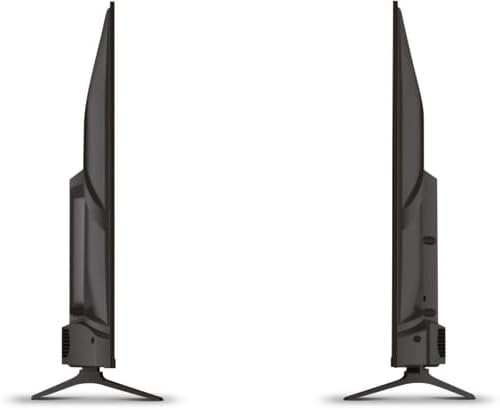
Imaj 4.1: Kote view of the Schneider 43A1 TV, illustrating its profile for placement or wall mounting.
4.4 Konekte Aparèy Ekstèn yo
Televizyon ou an ofri plizyè opsyon koneksyon:
- HDMI: Connect up to three HDMI 2.0 devices (e.g., Blu-ray player, game console, set-top box) to the HDMI ports.
- USB: Two USB ports are available for connecting USB storage devices to play media.
- AV/Audio Input: For older devices requiring composite video and stereo audio.
- Sòti kowaksyal: Pou konekte ak yon sistèm odyo ekstèn.
- Antre Antèn/Kab: Connect your antenna or cable TV signal for DVB-T/T2/C/S2 reception.
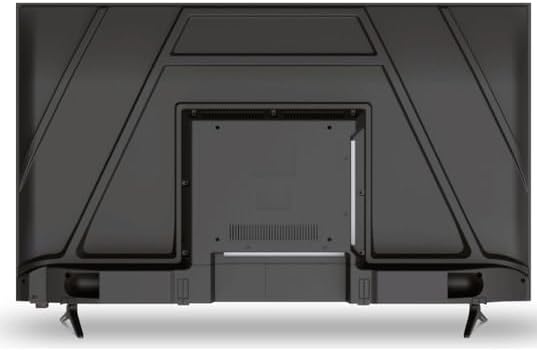
Imaj 4.2: Dèyè view of the Schneider 43A1 TV, highlighting connection ports.
4.5 Konekte pouvwa
Plug the power cable into the TV's power input, then into a suitable wall outlet.
4.6 Asistan Enstalasyon Inisyal
Upon first power-on, the TV will guide you through an initial setup process. This includes selecting your language, connecting to a Wi-Fi network, and scanning for available channels (DVB-T/T2/C/S2).
5. Opere
5.1 Fonksyon kontwòl Remote
Telekòmand lan pèmèt ou navige nan karakteristik televizyon an:
- Bouton pouvwa: Limen oswa etenn televizyon an.
- Volim monte/desann: Ajiste nivo son an.
- Chèn monte/desann: Chanje chanèl televizyon yo.
- Antre/Sous: Selects the input source (HDMI, USB, TV Tuner).
- Bouton Navigasyon: Pou navigasyon meni.
- Bouton televizyon entelijan: Direct access to popular apps like Netflix, Prime Video, YouTube.
5.2 Smart TV (VIDAA)
The integrated VIDAA Smart TV platform provides access to a variety of applications and streaming services. Connect your TV to the internet via Wi-Fi to enjoy features like Netflix, Prime Video, and YouTube. Bluetooth connectivity allows for wireless connection to compatible audio devices.

Imaj 5.1: Devan angilè view of the Schneider 43A1 TV, displaying the VIDAA Smart TV interface.
5.3 Seleksyon Antre
Press the 'Input' or 'Source' button on your remote control to switch between connected devices (HDMI 1, HDMI 2, HDMI 3, USB, AV, TV Tuner).
5.4 Anviwònman Imaj ak Son
Access the TV's menu to adjust picture and sound settings. The 4K UHD resolution, QLED-LCD technology, and Direct LED backlighting ensure a high-quality visual experience. The TV also features upscaling to enhance lower-resolution content. Audio is delivered via 2 x 8 W RMS stereo speakers with Dolby Audio support.
5.5 PC Monitor Mode
The TV can be used as a PC monitor by connecting your computer via an HDMI cable. This mode optimizes the display for computer use.
6. Antretyen
6.1 Netwaye televizyon an
Anvan ou netwaye li, asire w ou debranche televizyon an nan priz kouran an.
- Ekran: Siye ekran an dousman avèk yon twal mou ki pa gen pousyè. Pou mak ki difisil pou retire, siye l dousman.ampRense twal la avèk dlo oswa yon pwodui netwayaj ekran espesyalize (pa flite dirèkteman sou ekran an).
- Eksteryè: Sèvi ak yon twal mou epi sèk pou siye televizyon an.asing. Evite pwodui netwayaj oswa solvan abrazif.
6.2 Mizajou lojisyèl
Your TV may receive software updates to improve performance and add new features. Ensure your TV is connected to the internet to receive these updates automatically or check for them manually through the settings menu.
NAN. Depanaj
Si w rankontre pwoblèm ak televizyon w lan, gade pwoblèm ak solisyon komen sa yo:
- Pa gen pouvwa:
- Tcheke si kab kouran an byen branche nan televizyon an ak nan priz miray la.
- Asire w priz miray la ap fonksyone (teste l ak yon lòt aparèy).
- Peze bouton pouvwa a sou kontwòl remote la oswa sou televizyon an li menm.
- Pa gen imaj/son:
- Verifye ke sous antre ki kòrèk la chwazi (pa egzanp, HDMI 1, televizyon).
- Tcheke tout koneksyon kab ant televizyon an ak aparèy ekstèn yo.
- Asire w ke volim nan pa bese oswa mete sou minimòm.
- If using an antenna, check the antenna connection and perform a channel scan.
- Kontwòl Remote pa travay:
- Ranplase pil yo nan kontwòl remote la.
- Asire w pa gen okenn obstak ant telekòmand lan ak detèktè IR televizyon an.
- Smart TV/Network Issues:
- Tcheke routeur Wi-Fi ou ak koneksyon entènèt ou.
- Go to the TV's network settings to re-connect to your Wi-Fi network.
- Restart the TV and your router.
Si pwoblèm nan pèsiste apre ou fin eseye solisyon sa yo, tanpri kontakte sèvis kliyan.
8. Espesifikasyon
| Karakteristik | Spesifikasyon |
|---|---|
| Modèl | Schneider 43A1 |
| Gwosè ekspozisyon | 109 cm (43 pous) |
| Rezolisyon | 4K Ultra HD (3840 x 2160 piksèl) |
| Teknoloji ekspozisyon | QLED-LCD with Direct LED Backlight |
| Pwopòsyon kontras | 1100:1 |
| Klète | 200 cd/m² |
| Sòti odyo | 2 x 8 W RMS Stereo |
| Teknoloji Audio | Dolby Audio |
| Pò HDMI | 3 (HDMI 2.0) |
| Pò USB | 2 |
| Lòt Antre | AV/Audio Input |
| Sòti yo | Kowaksyal Sòti |
| Sentonizè | DVB-T/T2/C/S2 |
| Platfòm televizyon Smart | VIDAA (Netflix, Prime Video, YouTube) |
| Koneksyon san fil | Wi-Fi, Bluetooth |
| VESA konpatibilite | 200 x 200 mm |
| Pwa | 7.5 Kilogram |