
1. Entwodiksyon
This manual provides comprehensive instructions for the Nokia G310 5G TA-1573 smartphone. It covers essential information for setup, operation, maintenance, and troubleshooting to ensure optimal use of your device. The Nokia G310 5G TA-1573 features a 6.6-inch HD+ 90 Hz IPS LCD display, a Snapdragon 480+ octa-core processor, 4 GB of RAM, and 5G connectivity, running on Android 13.
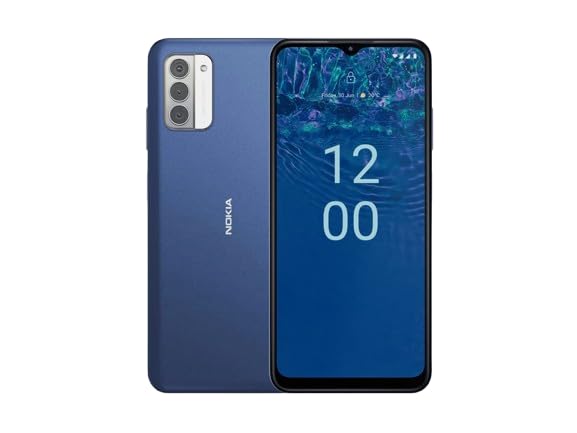
Figi 1.1: Nokia G310 5G TA-1573 Smartphone. This image displays the front view of the Nokia G310 5G smartphone, highlighting its display and general form factor.
2. Ki sa ki nan bwat la
Upon unboxing your Nokia G310 5G TA-1573, please verify that all the following items are included:
- Nokia G310 5G TA-1573 Smartphone
- USB-C kab
- Zouti èkstrè SIM
3. Enstalasyon
3.1. Chaje Aparèy la
Before initial use, fully charge your Nokia G310 5G. Connect the provided USB-C cable to the phone's USB-C port and the other end to a compatible power adapter (sold separately) or a computer's USB port. The battery indicator on the screen will show charging progress.
3.2. Mete kat SIM la
- Jwenn plato kat SIM lan sou bò telefòn ou an.
- Mete zouti pou retire kat SIM lan nan ti twou ki sou plato a pou ouvri li.
- Mete kat Nano-SIM ou a nan plato a ak kontak lò yo anba, epi asire w li byen anfòm.
- Pouse plato a tounen nan telefòn nan ak anpil atansyon jiskaske li fè yon klik.
3.3. Limen ak Premye Konfigirasyon
- Press and hold the Power button (usually on the right side) until the Nokia logo appears.
- Swiv enstriksyon yo sou ekran an pou chwazi lang ou, konekte ak yon rezo Wi-Fi, epi konfigire kont Google ou.
- Ranpli asistan konfigirasyon an pou pèsonalize paramèt aparèy ou an.
4. Opere aparèy ou an
4.1. Navigasyon debaz
- Jès ekran taktil: Tape pou chwazi, glise pou defile, pense pou agrandi.
- Ekran Kay: Jwenn aksè a aplikasyon, widjèt, ak notifikasyon.
- Ba Navigasyon: Sèvi ak bouton Retounen, Akèy, ak Aplikasyon resan yo ki nan pati anba ekran an.
4.2. Fè apèl epi voye mesaj
- Louvri a Telefòn aplikasyon pou konpoze nimewo oswa chwazi kontak.
- Louvri a Mesaj aplikasyon pou konpoze epi voye mesaj tèks.
4.3. Konekte ak rezo
- Wi-Fi: Ale nan Anviwònman > Rezo ak entènèt > Entènèt pou konekte ak rezo Wi-Fi ki disponib yo.
- Bluetooth: Ale nan Anviwònman> Aparèy Konekte> Preferans Koneksyon> Bluetooth pou konekte ak aparèy Bluetooth yo.
- Done mobil: Asire w done mobil yo aktive nan Anviwònman > Rezo ak entènèt > Kat SIM for internet access via your cellular network.
4.4. Sèvi ak Kamera a
Louvri a Kamera app to capture photos and videos. Tap the shutter button to take a picture or hold it to record a video. Explore different modes and settings within the app.
5. Antretyen
5.1. Netwaye Aparèy Ou a
Use a soft, lint-free cloth to clean the screen and body of your phone. Avoid using harsh chemicals or abrasive materials, which can damage the device's finish or screen coating.
5.2. Swen batri
- Evite ekspoze telefòn nan nan tanperati ekstrèm.
- Pa kite batri a dechaje nèt regilyèman.
- Sèvi ak sèlman chajè ak kab ki apwouve.
5.3. Mizajou lojisyèl
Tcheke epi enstale mizajou lojisyèl regilyèman pou asire aparèy ou an gen dènye karakteristik yo, patch sekirite yo, ak amelyorasyon pèfòmans yo. Ale nan Anviwònman > Sistèm > Mizajou sistèm.
5.4. Jesyon Depo
To optimize performance, regularly clear unnecessary files, dezenstale aplikasyon ou pa itilize yo, epi deplase gwo medya yo files to cloud storage or an external device. Check storage usage in Anviwònman > Depo.
NAN. Depanaj
6.1. Aparèy pa Limen
Ensure the battery is charged. Connect the phone to a charger and wait a few minutes before attempting to power it on again. If it still doesn't turn on, try holding the Power button for 10-15 seconds.
6.2. Pwoblèm koneksyon rezo
- Pa gen siyal: Check if your SIM card is properly inserted. Try restarting the phone.
- Wi-Fi pa konekte: Ensure the Wi-Fi password is correct. Restart your router and phone.
- Pwoblèm Bluetooth Pairing: Ensure both devices are in pairing mode and within range.
6.3. Aplikasyon ki bloke oswa ki bloke
Try force-closing the app (Settings > Apps > See all apps > [App Name] > Force stop). Clear the app's cache and data (Settings > Apps > See all apps > [App Name] > Storage & cache > Clear cache / Clear storage). Si pwoblèm nan pèsiste, dezenstale epi enstale aplikasyon an ankò.
6.4. Reset faktori
Kòm yon dènye rekou, si pwoblèm lojisyèl yo pèsiste, ou ka fè yon reset faktori. Warning: This will erase all data on your phone. Fè yon kopi done enpòtan yo anvan ou kontinye. Ale nan Anviwònman> Sistèm> Opsyon Reyajiste> Efase tout done (reset faktori).
7. Espesifikasyon
| Karakteristik | Detay |
|---|---|
| Non modèl | Nokia G310 5G TA-1573 |
| Sistèm operasyon | Android 13.0 |
| Gwosè ekspozisyon | 6.6 pous |
| Rezolisyon | 720 x 1560 piksèl |
| Rafrechisman pousantaj | 90 Hz |
| Modèl CPU | Qualcomm Snapdragon MSM8260A (Snapdragon 480+ equivalent) |
| CPU vitès | 2 GHz |
| Gwosè memwa RAM enstale | 4 GB |
| Kapasite Depo memwa | 128 GB (Entèn) |
| Koneksyon teknoloji | 5G |
| Evalyasyon pouvwa batri | 3600 Miliamp Èdtan (Iyon Lityòm) |
| Audio Jack | USB-C |
| Pwa atik | 6.9 ons |
| Koulè | Ble |
8. Garanti ak sipò
8.1. Enfòmasyon sou Garanti
For specific warranty details regarding your Nokia G310 5G TA-1573, please refer to the documentation provided by the seller at the time of purchase. As this is a renewed product, warranty terms may differ from new devices. It is recommended to contact the seller directly for precise warranty coverage and duration.
8.2. Sipò teknik
If you encounter issues that cannot be resolved using the troubleshooting steps in this manual, please contact:
- The seller from whom you purchased the device.
- Nokia's official support channels for general product inquiries.
Please have your device model number (TA-1573) and proof of purchase ready when contacting support.