
1. Entwodiksyon
Thank you for choosing the PEICHENG Android 15.0 10-inch Tablet. This manual provides essential information for setting up, operating, and maintaining your device. Please read it thoroughly to ensure optimal performance and longevity of your tablet.
2. Ki sa ki nan bwat la
Lè w ap debale, tanpri verifye si tout atik ki nan lis anba a yo la:
- PEICHENG Android 15.0 10-inch Tablet
- Bluetooth klavye
- Sourit san fil
- Stylus Pen
- Foldable Protective Case
- USB Chaje Kab
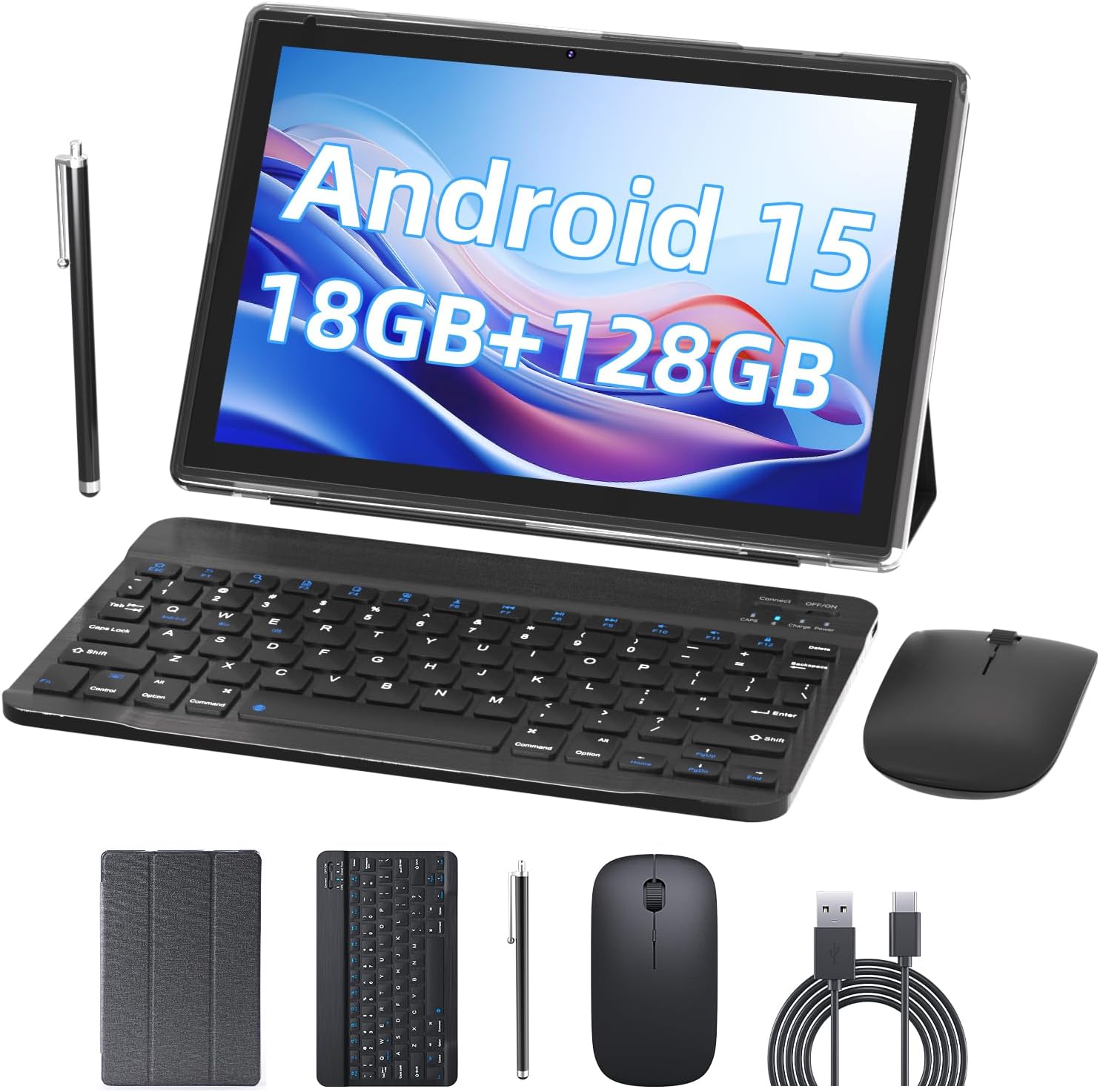
Image 2.1: Contents of the PEICHENG Tablet package, including the tablet, keyboard, mouse, stylus, case, and charging cable.
3. Pwodwi souview
The PEICHENG 10-inch Tablet is designed for versatility and performance. It features a 10.1-inch IPS display, front and rear cameras, and various ports for connectivity. Familiarize yourself with the device's layout for ease of use.
3.1 Konpozan kle
- Ekspozisyon: Ekran taktil IPS 10.1 pous (rezolisyon 1280x800).
- Kamera: Kamera dèyè 8MP, kamera devan 2MP.
- Pò: USB-C port for charging and data transfer, MicroSD card slot.
- Bouton: Power button, Volume Up/Down.
4. Enstalasyon
4.1 Premye chaj
Before first use, fully charge your tablet using the provided USB charging cable and a compatible power adapter. The charging indicator will typically show progress and turn off when fully charged.
4.2 Limen/Etenyen
- Pou limen: Peze epi kenbe bouton pouvwa a jiskaske ekran an limen.
- Pou etenn: Peze epi kenbe bouton Pouvwa a, answit chwazi 'Etenn' nan opsyon ki sou ekran an.
4.3 Inisyal Konfigirasyon
Upon first startup, follow the on-screen prompts to:
- Chwazi lang ou pi pito.
- Konekte nan yon rezo Wi-Fi.
- Konekte avèk kont Google ou a oubyen kreye yon nouvo.
- Set up security features (PIN, pattern, or password).

Image 4.1: The PEICHENG Tablet configured for use with its accessories, suitable for various tasks.
5. Operasyon Enstriksyon
5.1 Sistèm operasyon Android 15.0
Your tablet runs on the Android 15.0 operating system, offering a user-friendly interface and access to a vast ecosystem of applications via the Google Play Store.
5.2 Navigasyon debaz
- Glise: Deplase dwèt ou sou ekran an pou defile kontni an oswa pou chanje ant ekran prensipal yo.
- Tape: Touch an icon or item once to open or select it.
- Long Press: Press and hold an item for additional options or to move it.
- Zoom-pou-Zoom: Sèvi ak de dwèt pou agrandi oswa diminye imaj yo epi web paj.
5.3 Jesyon Aplikasyon
Download and install applications from the Google Play Store. To uninstall an app, long-press its icon and drag it to the 'Uninstall' option.
5.4 Ekspozisyon Karakteristik
The 10.1-inch IPS display provides clear visuals. Utilize the 'Reading Mode' feature in the display settings to reduce harmful blue light, enhancing comfort during extended reading sessions.

Image 5.1: The tablet screen showcasing multiple applications and web content, demonstrating its multitasking capabilities.
6. Pwodwi pou Telefòn
Your PEICHENG Tablet comes with a suite of accessories to enhance its functionality.
6.1 Bluetooth klavye
Peyaj: Limen klavye a epi aktive Bluetooth sou tablèt ou a. Chèche pou available devices and select the keyboard to pair. Once connected, you can use it for typing, similar to a laptop.
6.2 Sourit san fil
Peyaj: Similar to the keyboard, turn on the mouse and enable Bluetooth on your tablet. Pair the mouse through the Bluetooth settings. The mouse provides precise navigation and control.
6.3 Stylus Pen
The stylus allows for more precise input, drawing, and note-taking on the touchscreen. No pairing is required for basic functionality.
6.4 Ka Pwoteksyon
The foldable protective case safeguards your tablet from scratches and minor impacts. It also functions as a stand, allowing for comfortable viewang ak tape.

Image 6.1: The PEICHENG Tablet with its keyboard and mouse, demonstrating its capability as a portable workstation.
7. Jesyon batri
The tablet is equipped with a 6000mAh battery, providing extended usage time.
7.1 Chaje
Use the provided USB-C cable to charge the tablet. It is recommended to use a compatible charger to ensure efficient and safe charging.
7.2 Konsèy pou dire lavi batri a
- Diminye klète ekran an.
- Dezaktive Wi-Fi ak Bluetooth lè w pa ap itilize yo.
- Fèmen aplikasyon ou pa itilize k ap fonksyone nan background nan.
- Enable power-saving modes in settings.

Image 7.1: Visual representation of the tablet's 6000mAh battery, highlighting its extended endurance.
8. Koneksyon
8.1 Wi-Fi 6.0
The tablet supports 2.4GHz and 5GHz Wi-Fi 6.0, providing faster and more stable wireless connections. To connect, go to Anviwònman > Rezo ak entènèt > Wi-Fi, chwazi rezo w la, epi antre modpas la.
8.2 Bluetooth 5.0
Bluetooth 5.0 allows for efficient connection to wireless accessories like headphones, speakers, and the included keyboard and mouse. Enable Bluetooth in Anviwònman> Aparèy Konekte> Preferans Koneksyon> Bluetooth and pair your devices.
9. Ekspansyon Depo
The tablet comes with 128GB of internal storage and 18GB RAM (6GB physical + 12GB virtual). For additional storage, you can expand it up to 2TB using a MicroSD card (not included). Insert the MicroSD card into the designated slot on the tablet.

Image 9.1: The tablet's storage capabilities, highlighting its 18GB RAM, 128GB internal storage, and support for up to 2TB MicroSD expansion.
10. Itilizasyon kamera
The tablet features an 8MP rear camera and a 2MP front camera. Open the Camera app to capture photos and videos. The front camera is ideal for video calls and selfies.
11. Antretyen
11.1 Netwayaj
Use a soft, lint-free cloth to clean the screen and body of the tablet. Avoid using harsh chemicals or abrasive materials. For stubborn smudges, a screen cleaner designed for electronics can be used sparingly.
11.2 Mizajou lojisyèl
Tcheke epi enstale mizajou lojisyèl regilyèman pou asire tablèt ou a gen dènye karakteristik yo, patch sekirite yo ak amelyorasyon pèfòmans yo. Ale nan Anviwònman > Sistèm > Mizajou sistèm.
NAN. Depanaj
Si w rankontre pwoblèm ak tablèt ou a, gade solisyon komen sa yo:
- Aparèy pa soumen: Asire w batri a chaje. Konekte chajè a epi tann kèk minit anvan ou eseye limen l ankò.
- Ekran an pa reponn: Try restarting the tablet by holding the Power button for about 10-15 seconds.
- Pwoblèm koneksyon Wi-Fi: Rekòmanse routeur Wi-Fi ou a ak tablèt la. Bliye rezo a nan paramèt tablèt la epi konekte ankò.
- Aplikasyon k ap kraze: Efase kach aplikasyon ki gen pwoblèm nan (Anviwònman > Aplikasyon > [Non aplikasyon an] > Depo ak kach > Efase kach). If the issue persists, try reinstalling the app.
- Pèfòmans ralanti: Fèmen aplikasyon ou pa itilize yo, efase kach la epi asire ase espas depo. Konsidere yon reset faktori kòm dènye rekou (Anviwònman> Sistèm> Opsyon Reyajiste> Efase tout done (reset faktori) - Note: This will delete all data on your tablet. Back up important files premye.).
13. Espesifikasyon
| Karakteristik | Spesifikasyon |
|---|---|
| Mak | PEICHENG |
| Non modèl | 10.1 inch Tablet |
| Sistèm operasyon | Android 15.0 |
| Gwosè ekran | 10.1 pous |
| Rezolisyon ekran maksimòm | 1280x800 IPS |
| RAM | 18GB (6GB fizik + 12GB ekspansyon) |
| Depo Entèn | 128GB ROM |
| Depo dilatabl | Jiska 2TB atravè kat MicroSD |
| Processeur | 2.0GHz Quad-core |
| Koneksyon Wi-Fi | 2.4G/5G Wi-Fi 6.0 |
| Bluetooth | Bluetooth 5.0 |
| Kamera devan | 2MP |
| Kamera dèyè | 8MP |
| Kapasite batri | 6000mAh |
| Dimansyon (LxWxH) | 10.1 x 4.85 x 0.4 pous |
| Pwa atik | 2.66 liv |
14. Garanti ak sipò
For warranty information and technical support, please refer to the documentation provided with your purchase or contact PEICHENG customer service. Keep your proof of purchase for warranty claims.