
Nelko PM220
Manyèl Itilizatè Enprimant Etikèt Tèmik Bluetooth Nelko PM220
Modèl: PM220
1. Entwodiksyon
Thank you for choosing the Nelko PM220 Bluetooth Thermal Label Printer. This portable device is designed for efficient label printing without the need for ink cartridges, making it ideal for small businesses, address labeling, logo printing, and various organizational tasks. This manual provides detailed instructions for setup, operation, maintenance, and troubleshooting to ensure optimal performance.
2. Pwodwi souview
The Nelko PM220 is a compact thermal label printer that connects wirelessly via Bluetooth to your smartphone or PC. It supports various label sizes and offers clear, high-resolution printing for text, barcodes, and QR codes.
2.1 Kontni pake a
- Nelko PM220 Label Printer
- Label Paper Roll (starter roll)
- USB Chaje Kab
- Manyèl itilizatè

Figi 1: The Nelko PM220 Bluetooth Thermal Label Printer shown with a roll of blank labels. The printer features a sleek navy blue design with a power button and a paper feed button on the front panel.
3. Gid Enstalasyon
3.1 Chaje Tep Etikèt
- Open the printer cover by gently pushing the release button or lifting the designated area.
- Insert the label roll into the paper bin, ensuring the labels face upwards and the leading edge extends slightly out of the printer slot.
- Adjust the paper slot guide to the right to ensure the label paper is tightly attached to the far right side of the paper bin, preventing misalignment during printing.
- Fèmen kouvèti aparèy pou enprime a byen.

Figi 2: A label roll being correctly inserted into the paper compartment of the Nelko PM220 printer. The roll is placed with the labels facing upwards.
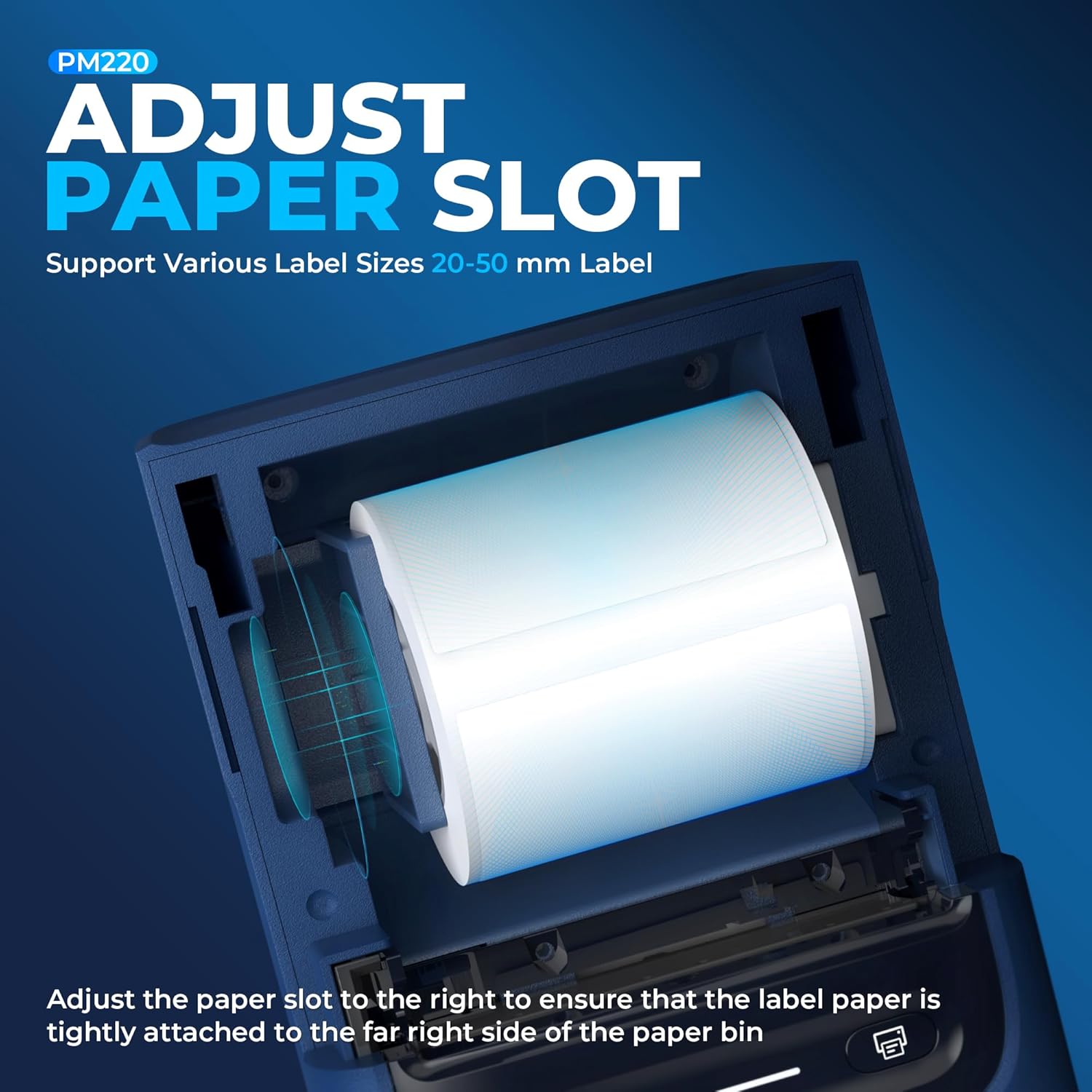
Figi 3: Yon fèmen view demonstrating how to adjust the paper slot guide within the Nelko PM220 printer. The guide is moved to the right to secure the label roll.
3.2 Konekte sou pouvwa
- Connect the provided USB charging cable to the printer's charging port.
- Branche lòt bout kab USB a nan yon adaptè kouran USB konpatib (pa enkli) oubyen nan yon pò USB òdinatè.
- Allow the printer to charge fully before first use. The indicator light will typically change color to indicate a full charge.
3.3 Enstalasyon Aplikasyon an ak Koneksyon Bluetooth
- Download the official Nelko label printing application from your device's app store (e.g., Apple App Store for iOS, Google Play Store for Android). For PC connectivity, download the appropriate driver and software from the official Nelko websit.
- Asire w ke Bluetooth aktive sou telefòn entelijan ou oswa òdinatè w la.
- Power on the Nelko PM220 printer by pressing and holding the power button until the indicator light illuminates.
- Open the Nelko app (or PC software) and navigate to the device connection section.
- Chèche pou available Bluetooth devices and select 'Nelko PM220' from the list.
- Follow any on-screen prompts to complete the pairing process. A successful connection will be indicated by a change in the printer's indicator light or a message within the app.
4. Operasyon Enstriksyon
4.1 Power On/Off
- Pou limen: Press and hold the power button for approximately 2-3 seconds until the indicator light turns on.
- Pou etenn: Press and hold the power button for approximately 2-3 seconds until the indicator light turns off.
4.2 Enprime yon etikèt
- Ensure the printer is powered on and successfully connected to your device via Bluetooth.
- Open the Nelko app or PC software.
- Select your desired label template or create a new label design.
- Enter the text, add images, barcodes, or QR codes as needed.
- Adjust label size and print settings within the app to match the loaded label tape.
- Preview etikèt la pou asire presizyon.
- Tap the 'Print' button in the app. The printer will feed and print the label.
- Chire etikèt enprime a avèk anpil atansyon sou bò ki gen dan an.

Figi 4: The Nelko PM220 printer actively printing various labels, including shipping labels, product labels, and decorative stickers, demonstrating its versatility.
5. Antretyen
5.1 Netwaye tèt enprime a
Regular cleaning of the print head ensures optimal print quality and extends the life of your printer. Use a soft, lint-free cloth lightly dampfini ak alkòl izopropilik.
- Ensure the printer is powered off and disconnected from power.
- Louvri kouvèti enprimant lan.
- Gently wipe the print head surface with the dampened cloth. Avoid touching the print head with bare hands.
- Kite tèt enprime a seche nèt anvan ou fèmen kouvèti a epi limen enprimant lan.
5.2 Depo
Store the printer in a cool, dry place away from direct sunlight and extreme temperatures. Remove any label rolls if storing for an extended period.
NAN. Depanaj
If you encounter issues with your Nelko PM220 printer, refer to the table below for common problems and solutions.
| Pwoblèm | Kòz posib | Solisyon |
|---|---|---|
| Enprimant lan pa limen | Low battery or no power connection | Charge the printer using the provided USB cable. Ensure the power adapter is working. |
| Pa ka konekte via Bluetooth | Bluetooth is off, printer is not in pairing mode, or incorrect device selected | Ensure Bluetooth is enabled on your device. Restart the printer and try pairing again. Verify you are selecting 'Nelko PM220'. |
| Poor print quality (faint, blurry) | Dirty print head, incorrect label type, or low battery | Clean the print head as described in Section 5.1. Ensure you are using thermal labels. Charge the printer. |
| Labels are not feeding correctly | Label roll improperly loaded or paper slot not adjusted | Re-load the label roll, ensuring it is seated correctly and the paper slot guide is adjusted tightly against the roll (refer to Section 3.1). |
| Printer stops printing mid-label | Out of labels or low battery | Replace the label roll. Charge the printer. |
7. Espesifikasyon teknik
| Karakteristik | Spesifikasyon |
|---|---|
| Mak | Nelko |
| Non modèl | PM220 |
| Teknoloji Enpresyon | Tèmik |
| Koneksyon Teknoloji | Bluetooth |
| Sòti enprimant | Monokrom |
| Maksimòm rezolisyon enprime nwa e blan | 203 dpi |
| Max Printspeed monokrom | 45 mm/s |
| Sipò pou Medya Gwosè | 23-54mm (width) |
| Dimansyon pwodwi | 13.3 x 8 x 10.2 pous |
| Pwa atik | 13.4 ons |
| Kalite lank enprimant | No Ink (Thermal) |
| Konpozan ki enkli | Printer, Paper |
8. Garanti ak sipò
Nelko products are designed for reliability and performance. For specific warranty information, please refer to the warranty card included with your purchase or visit the official Nelko website. If you require technical assistance or have questions not covered in this manual, please contact Nelko customer support through their official channels.
Sipò sou entènèt: Visit the official Nelko websit pou kesyon yo poze souvan, chofè, ak telechaje lojisyèl.
Sipò Imèl: Gade anbalaj pwodwi ou a oswa enfòmasyon ofisyèl la. websit pou adrès imel sèvis kliyan.
Ask a question about this manual
Ask about setup, troubleshooting, compatibility, parts, safety, or missing instructions. Manuals+ will review the question and use this page’s manual context to help answer it.