
Entwodiksyon
This manual provides essential instructions for the installation, operation, and maintenance of your Rosewill VMG 1000W 80+ Gold ATX 3.1 Full Modular Power Supply. Please read this manual thoroughly before installation and retain it for future reference. This power supply unit (PSU) is designed to deliver stable and efficient power to your personal computer system, featuring ATX 3.1 and PCIe 5.1 compatibility for modern hardware.

Image: Rosewill VMG1000 Fully Modular ATX Power Supply overview banner, highlighting low noise, premium reliability, and 80 Plus efficiency.
Prekosyon Sekirite
- Always disconnect the power cord from the wall outlet before installing, removing, or cleaning the power supply.
- Alimantasyon sa a fèt pou itilize nan òdinatè pèsonèl sèlman. Itilizasyon li pou lòt rezon ka lakòz domaj epi anile garanti a.
- Pa louvri fil kouran an casing. Gwo volimtagGen pyès ki prezan anndan, epi lè ou louvri aparèy la, garanti a ap anile epi li pral poze yon risk pou ou pran kouran.
- Ensure proper grounding of your system to prevent electrical hazards.
- Enstale ekipman pouvwa a nan yon zòn ki byen ayere, lwen sous chalè ak imidite.
Enstalasyon ak Enstalasyon
Kontni pake
- Rosewill VMG 1000W Power Supply Unit
- Modular Cable Set (including 12V-2x6 PCIe 5.1 cable)
- AC pouvwa kòd
- Montaj Vis
- Manyèl itilizatè
Enstalasyon fizik
- Ensure your computer is powered off and the AC power cord is disconnected from the wall outlet.
- Louvri ka òdinatè w lan.
- Locate the power supply mounting area, typically at the top or bottom rear of the case.
- Carefully place the Rosewill VMG 1000W PSU into the designated slot, ensuring the fan faces the correct direction for optimal airflow (usually facing downwards if there's a bottom vent, or inwards if top-mounted).
- Fikse ekipman pou pouvwa a nan bwat la avèk vis montaj yo bay yo.

Imaj: Anwo-anba view of the Rosewill VMG 1000W power supply, showcasing its fan grille and modular cable connection ports.
Koneksyon kab
The Rosewill VMG 1000W is a full modular power supply, allowing you to connect only the cables necessary for your system, which helps improve airflow and cable management.

Imaj: Detaye view of the modular cable connection panel on the Rosewill VMG 1000W power supply, showing labeled ports for MB, CPU/PCI-E, PERIF/SATA, and the orange 12V-2x6 connector.

Image: A diagram illustrating the various modular connectors included with the Rosewill VMG1000 power supply, such as 24-pin Motherboard, 4+4 pin CPU, 6+2 pin PCI-E, 12+4 pin PCI-E 5, SATA, and 4-pin Molex.
- 24-Pin Motherboard Cable: Connect the large 24-pin cable to the corresponding port on your motherboard.
- CPU Power Cable (4+4 Pin): Connect the 4+4 pin CPU cable to the CPU power connector(s) on your motherboard. Modern motherboards may require one or two such connectors.
- PCIe Power Cables (6+2 Pin): For graphics cards requiring 6-pin or 8-pin PCIe power, use the 6+2 pin PCIe cables. Connect the appropriate end to the PSU and the other to your graphics card.
- 12V-2x6 PCIe 5.1 Cable: This dedicated cable provides up to 600W of power for compatible PCIe 5.1 graphics cards. Connect the orange 12V-2x6 connector from the PSU to your graphics card's 12V-2x6 port. Ensure a firm connection.

Image: A close-up showing the vibrant orange 12V-2x6 connector on the Rosewill VMG 1000W power supply, designed for instant identification and secure engagement with compatible graphics cards.
- Kab pouvwa SATA: Konekte kab kouran SATA yo ak SSD, HDD, ak lektè optik ou yo.
- Kab periferik (Molex): Use Molex cables for any other peripherals that require this type of power connector.
- Once all necessary components are connected, organize your cables for optimal airflow and aesthetics.
- Fèmen ka òdinatè w lan.
- Connect the AC power cord to the power supply and then to a grounded wall outlet.
Enstriksyon Operasyon
Limen Sistèm Ou a
- Ensure all cables are securely connected and the power supply's main switch (located on the rear of the PSU) is in the 'ON' (I) position.
- Peze bouton pouvwa a sou bwat òdinatè w la.
- The power supply fan will activate, and your system should begin its boot sequence.
Etenn Sistèm Ou a
- Always shut down your operating system properly before turning off the main power switch on the PSU or disconnecting the AC power cord.
- For complete power removal, switch the PSU's main switch to the 'OFF' (O) position and disconnect the AC power cord from the wall outlet.
Antretyen
Antretyen regilye ede asire lonjevite ak pèfòmans optimal ekipman pouvwa ou a.
Netwayaj
- Periodically inspect the power supply's fan and ventilation grilles for dust accumulation.
- With the system powered off and unplugged, use compressed air to gently clear dust from the fan blades and vents. Hold the fan blades to prevent them from spinning rapidly during cleaning, which can damage the bearings.
- Do not use liquid cleaners or solvents on the power supply.
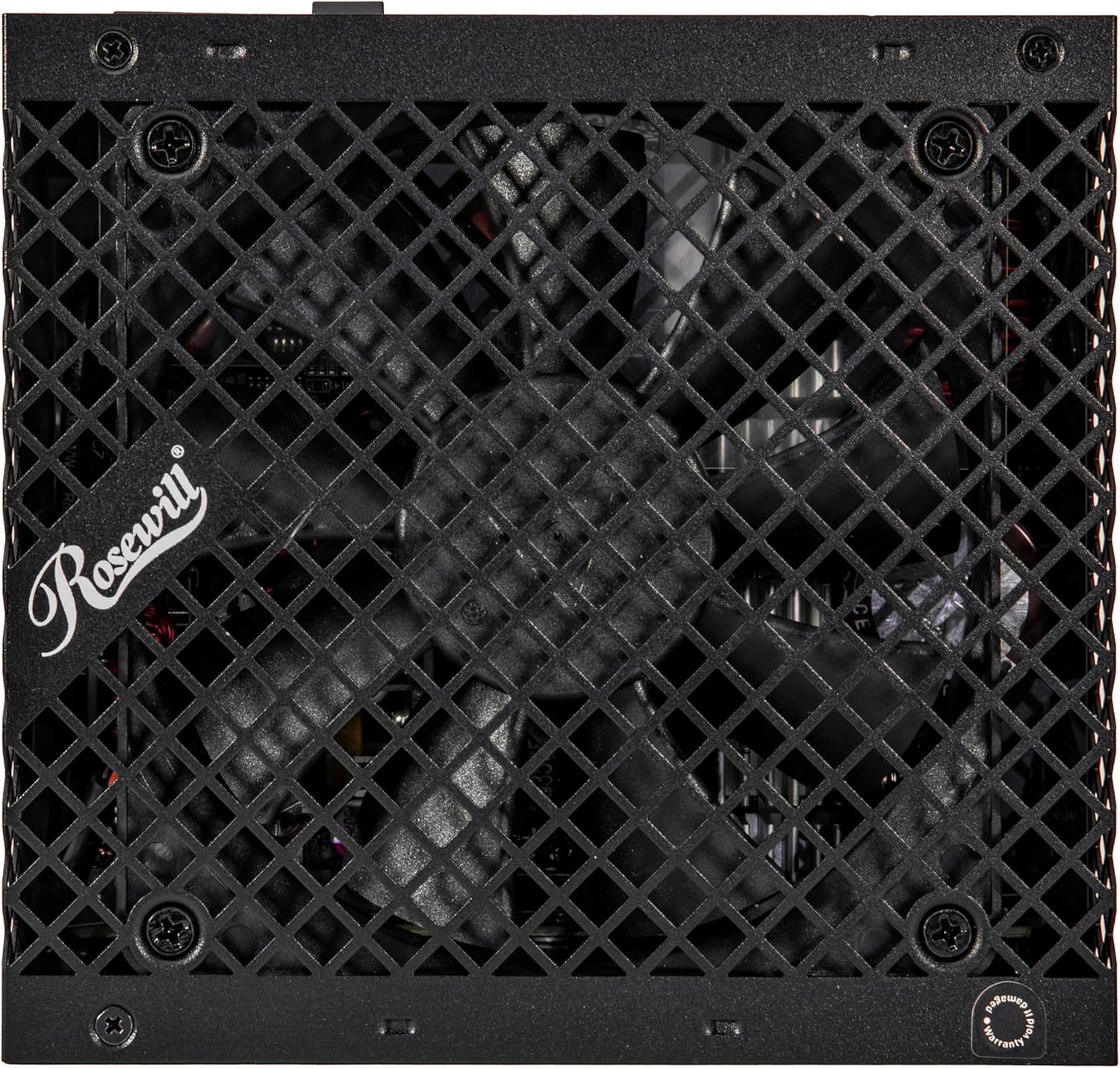
Imaj: Anlè view of the Rosewill VMG 1000W power supply, showing the 120mm FDB fan through its protective grille, which is crucial for cooling.
Depanaj
If you encounter issues with your Rosewill VMG 1000W power supply, refer to the following common problems and solutions:
Pa gen pouvwa
- Tcheke Koneksyon Pouvwa: Ensure the AC power cord is securely plugged into both the power supply and a working wall outlet. Verify the 24-pin motherboard and 4+4 pin CPU cables are firmly seated.
- PSU Switch: Confirm the power supply's main switch on the rear is in the 'ON' (I) position.
- Priz miray: Teste priz miray la ak yon lòt aparèy pou asire w ke l ap bay kouran.
- Internal Connections: Double-check all modular cables are correctly connected to both the PSU and the components.
System Instability or Random Shutdowns
- Pwoteksyon Surcharge: The power supply features multiple protection circuits (OCP, OPP, OTP, OVP, SCP, UCP) to prevent damage. If your system is drawing too much power, the PSU may shut down. Ensure your system's power requirements do not exceed the PSU's capacity.
- Component Issues: Instability can also be caused by other faulty components (e.g., RAM, CPU, GPU). Test components individually if possible.
- Vantilasyon: Ensure adequate airflow within your PC case to prevent overheating of components, including the PSU.

Image: Diagram illustrating the advanced protection suite of the Rosewill VMG1000 power supply, detailing OCP (Over Current Protection), OPP (Over Power Protection), OTP (Over Temperature Protection), OVP (Over Voltage Protection), SCP (Short Circuit Protection), and UCP (Under Current Protection).
Twòp bri fanatik
- Akimilasyon pousyè: Clean the fan and vents as described in the Maintenance section.
- Chaj: Fan speed increases with load and temperature. Ensure your system is not under excessive load or experiencing high ambient temperatures.
If problems persist after attempting these solutions, please contact Rosewill customer support.
Espesifikasyon
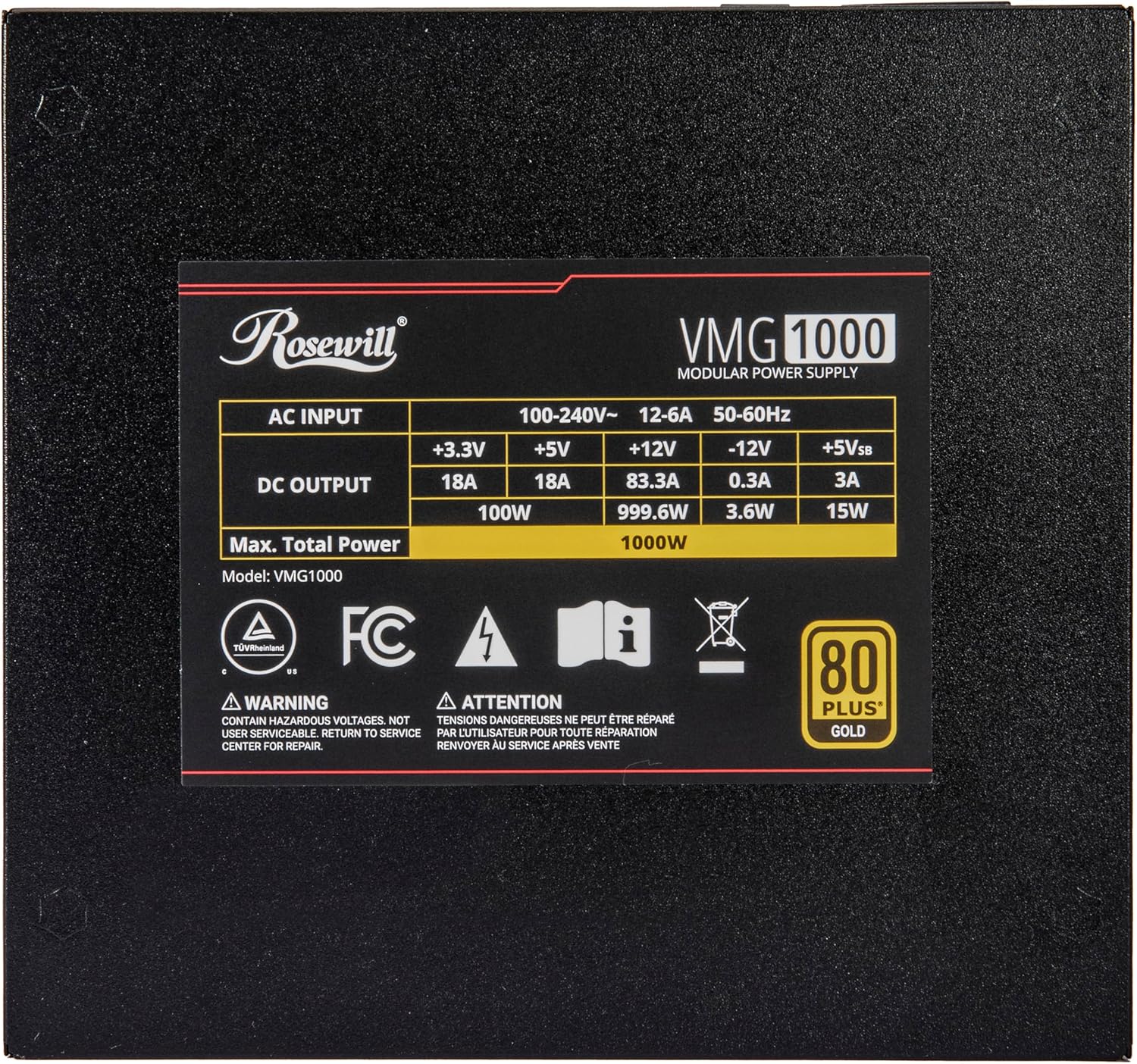
Image: The rating label on the Rosewill VMG 1000W power supply, detailing AC input, DC output for +3.3V, +5V, +12V, -12V, +5Vsb, and maximum total power of 1000W.
| Karakteristik | Detay |
|---|---|
| Non modèl | VMG1000 |
| Sòti Wattage | 1000 Watts |
| Sètifikasyon 80 PLUS | Lò |
| Faktè fòm | ATX |
| Estanda ATX | ATX 3.0 & 3.1 Compatible |
| PCIe Standard | PCIe 5.1 (with 12V-2x6 Connector) |
| Modularite | Modilè konplè |
| Kalite fanatik | Vantilatè silansye 120mm FDB (Fluid Dynamic Bearing) |
| Kondansateur | 100% Japonè kondansateur elektwolitik |
| Karakteristik pwoteksyon | OCP, OPP, OTP, OVP, SCP, UCP |
| Dimansyon pwodwi (L x W x H) | 5.51 x 5.9 x 3.38 pous (140 x 150 x 86 mm) |
| Pwa atik | 5.5 liv |
| Aparèy konpatib | Odinatè pèsonèl |
Enfòmasyon sou Garanti
The Rosewill VMG 1000W Power Supply comes with a 5-ane garanti from the date of purchase. This warranty covers defects in materials and workmanship under normal use. It does not cover damage resulting from accident, misuse, abuse, neglect, improper installation, unauthorized repair or modification, or external causes such as power surges or lightning strikes.
To claim warranty service, please retain your proof of purchase. For detailed warranty terms and conditions, or to initiate a warranty claim, please contact Rosewill customer support.
Sipò pou Kliyan
For technical assistance, troubleshooting, or warranty inquiries regarding your Rosewill VMG 1000W Power Supply, please visit the official Rosewill website or contact their customer support team. Contact information can typically be found on the Rosewill websit la oubyen sou anbalaj pwodwi a.
Rosewill Official Websit: www.rosewill.com