
Blukar K9129
Blukar K9129 Tèt Rechargeableamp Manyèl itilizatè
Modèl: K9129
Entwodiksyon
Thank you for choosing the Blukar K9129 Rechargeable HeadlampManyèl sa a bay enfòmasyon esansyèl pou itilizasyon tèt ou an sekirite epi efikas.ampTanpri li l byen anvan ou itilize l epi konsève l pou referans pita.
Pwodwi souview
Karakteristik kle
- Dual Color Temperatures: Features both white and warm light options for various environments.
- Mòd ekleraj miltip: Offers 12 modes, including standard and motion sensor modes, with XPG White, XPG Warm, COB White, XPG+COB White, COB Red, and COB Red Strobe.
- Kontwòl Capteur Mouvman: Allows hands-free operation by waving your hand within 15cm.
- USB-C Rechargeable: Built-in 1200mAh battery provides up to 30 hours of runtime on a single charge.
- Dimmable Klate: Stepless dimming from 100% to 30% with memory function.
- Adjustable & Comfortable: 45 ° reglabl lamp head and a comfortable, washable elastic headband.
- IPX5 ki enpèmeyab: Designed to resist water splashes from all angles.
Kontni pake
- Blukar K9129 Headlamp
- USB-C Chaje Kab
- Helmet Clips (4x)
- Manyèl Itilizatè (dokiman sa a)
Enstalasyon
1. Premye Chajman
Anvan premye itilizasyon an, chaje tèt la nèt.amp. Connect the provided USB-C charging cable to the headlamp's charging port and to a USB power source (e.g., AC charger, power bank, computer). The 4 battery indicators will show charging progress. A full charge typically takes 2-3 hours.
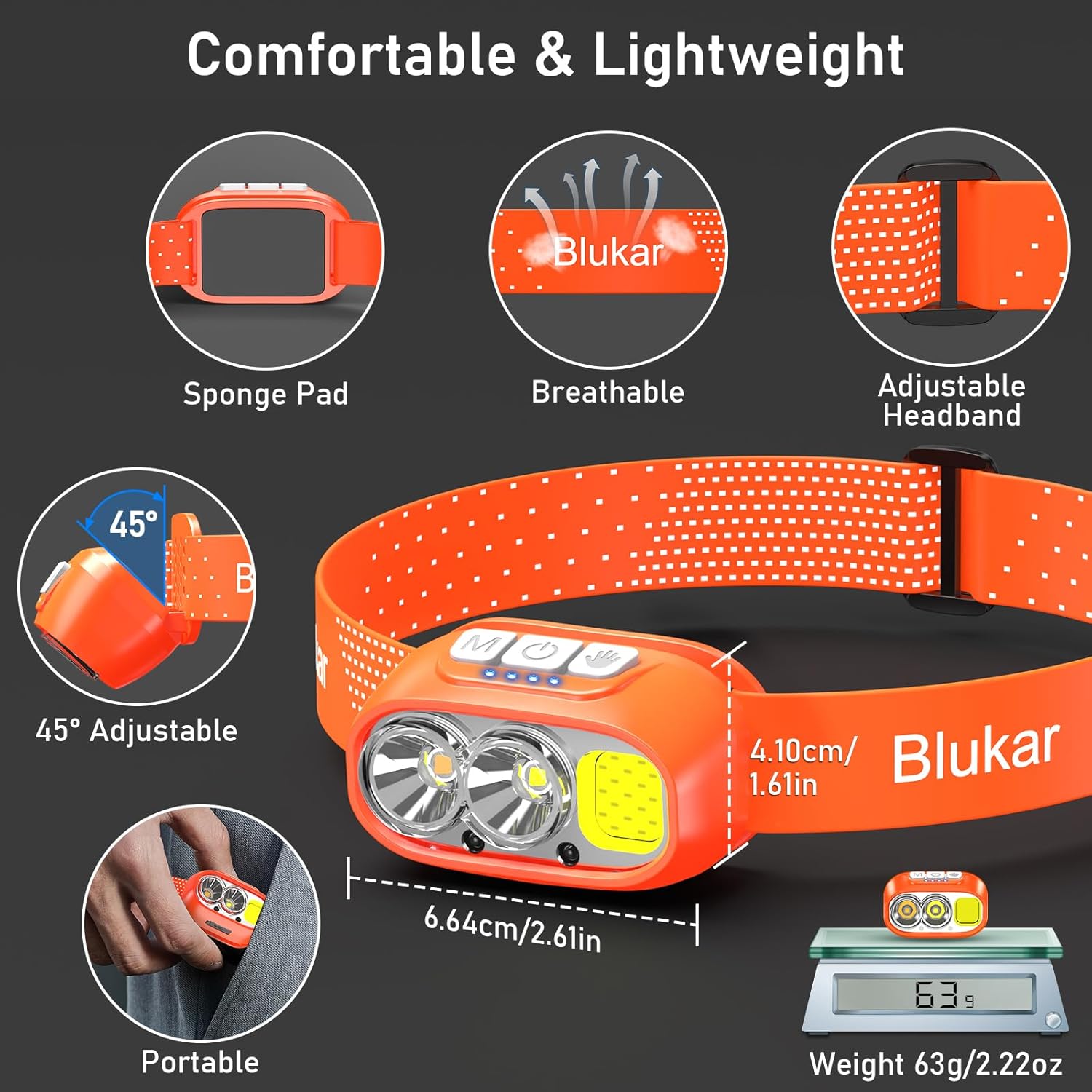
Image: The headlamp being charged via its USB-C port. It can be connected to various USB power sources like an AC adapter, power bank, or computer.
2. Ajiste bann tèt la
The elastic headband is adjustable to fit various head sizes. Adjust the length for a comfortable and secure fit. The headband is also removable and washable for hygiene.

Image: Details of the headlamp's comfortable and lightweight design, showing the adjustable headband, sponge pad, and 45-degree tilt capability.
3. Attaching to a Helmet (Optional)
Use the included 4 helmet clips to securely attach the headlamp to a helmet for a stable fit during activities.
Enstriksyon Operasyon
Fonksyon bouton

Image: Close-up of the headlamp's top panel, highlighting the three independent control buttons: 'M' for Normal Mode, a hand icon for Sensor Mode, and a power icon for Power & Dimmer.
- Normal Mode Button (M): Short press to cycle through standard lighting modes.
- Sensor Mode Button (Hand Icon): Short press to activate motion sensor mode (green light indicates activation). Once active, wave your hand within 15cm to turn the light on/off.
- Power & Dimmer Button (Power Icon):
- Short press to turn the light on/off.
- Long press to adjust brightness steplessly (100%-30%).
- Features a memory function for the last used brightness and mode.
Mod ekleraj
Headl laamp offers 12 lighting modes, accessible via the Normal Mode button and Sensor Mode button.

Image: Visual representation of the 12 lighting modes available, including various white light combinations, red light, and sensor modes. It also illustrates the stepless dimming function.
- Standard Modes (6): XPG White Light, XPG Warm Light, COB White Light, XPG+COB White Light, COB Red Light, COB Red Light Strobe.
- Sensor Modes (6): The same 6 modes as above, activated by the Sensor Mode button.
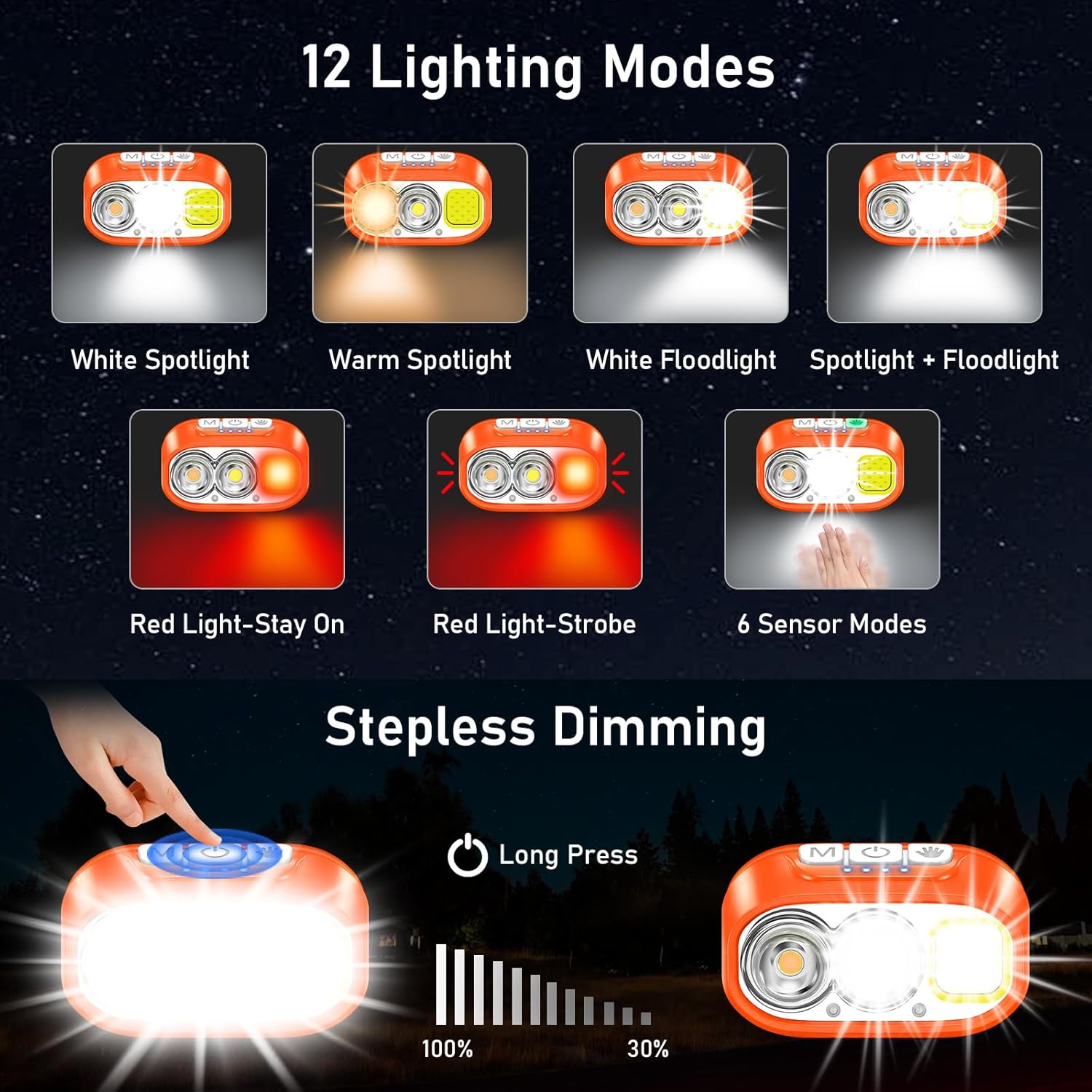
Image: Illustration of the three main light sources: White Light for general use, Warm Light for challenging weather conditions like fog or snow, and Red Light for specialized uses like night fishing or emergency signaling.
Operasyon Capteur Mouvman
To use the motion sensor, press the Sensor Mode button. A green indicator light will illuminate. Once active, simply wave your hand within 15cm (approximately 6 inches) in front of the headlamp to toggle the light on or off without touching the buttons.
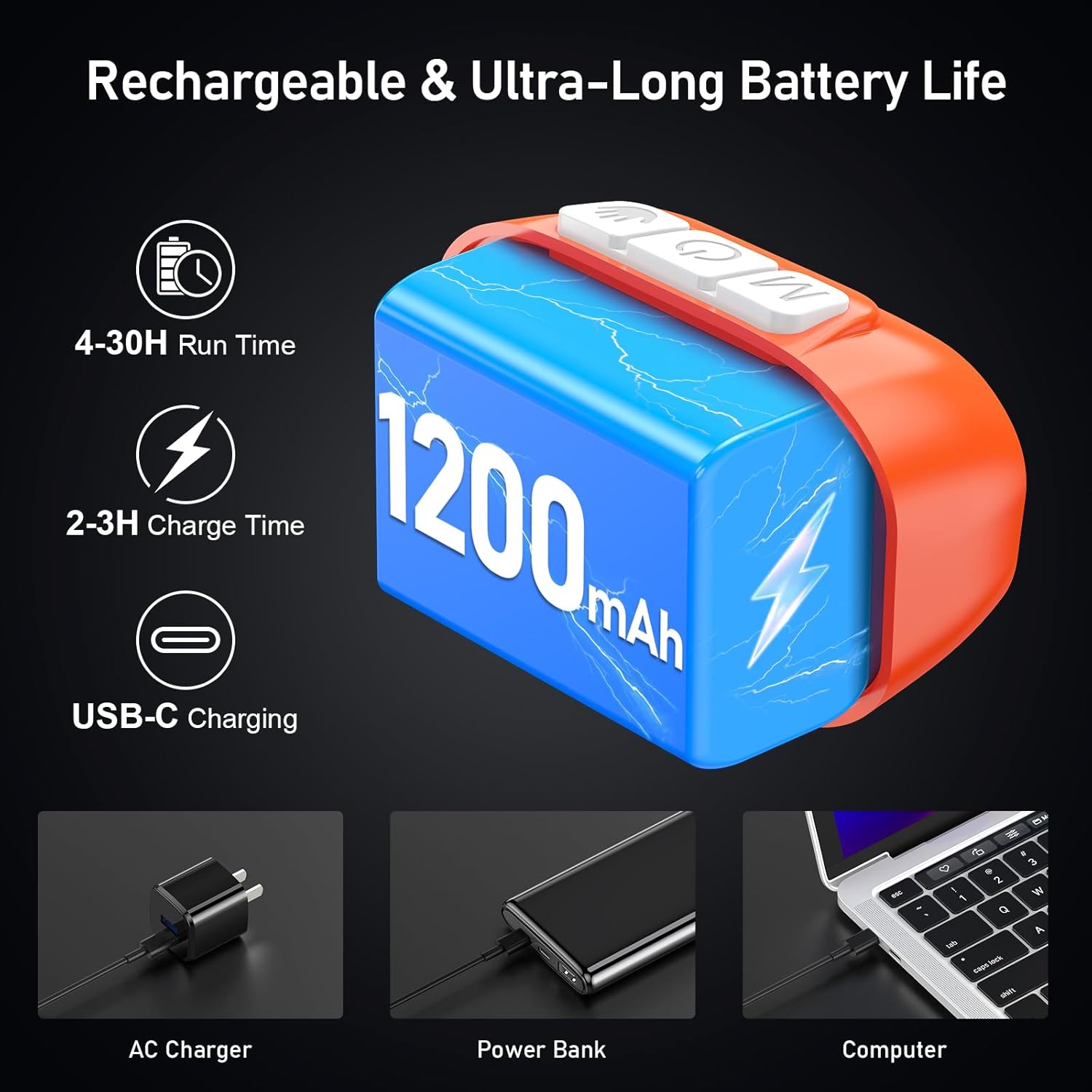
Image: A person demonstrating the motion sensor mode, turning the headlamp on and off with a hand wave while working on a car engine, highlighting the 15cm sensing distance.
Ajiste Angle Travès
Headl laamp unit can be tilted up or down by 45° to direct the light precisely where needed.
Image: The headlamp unit is shown with an arrow indicating its 45-degree adjustable tilt capability.
Antretyen
- Netwayaj: The elastic headband is removable and washable. Clean the headlamp body with a soft, damp twal. Pa sèvi ak pwodui netwayaj abrazif oswa solvang.
- Swen batri: To prolong battery life, charge the headlamp regularly, even if not in frequent use. Avoid fully discharging the battery for extended periods.
- Depo: Sere tèt laamp nan yon kote ki fre, sèk lwen limyè solèy la dirèk ak tanperati ekstrèm.
- Rezistans dlo: Headl laamp is IPX5 waterproof, meaning it can resist water splashes. Do not submerge the headlamp nan dlo.
Image: The headlamp is shown with water splashing over it, illustrating its IPX5 waterproof capability, which protects against water jets from any direction.
Depanaj
| Pwoblèm | Kòz posib | Solisyon |
|---|---|---|
| Headlamp turns off unexpectedly in sensor mode. | Sensor reacting to unintended movement or objects. | Switch off the sensor mode if not needed, or ensure no objects are passing within 15cm of the sensor. |
| Headlamp pa limen. | Batri ap vide. | Chaje headl laamp fully using the provided USB-C cable. |
| Pwodiksyon limyè se dim. | Low battery or dimming function activated. | Recharge the battery. Long press the Power & Dimmer button to increase brightness. |
| Headlamp pa chaje. | Kab oswa sous kouran ki defektye. | Try a different USB-C cable or a different USB power source. Ensure the cable is securely connected. |
Espesifikasyon
| Nimewo Modèl | K9129 |
| Mak | Blukar |
| Materyèl | ABS |
| Koulè | Orange |
| Dimansyon pwodwi | 2.61"D x 1.61"W x 1.38"H |
| Pwa atik | 84 gram (2.96 ons) |
| Kapasite batri | 1200mAh |
| Kalite batri | Lityòm Polymère |
| Tan pou chaje | 2-3 èdtan |
| Runtime | Up to 4 hours (ultra-bright mode), up to 30 hours (soft light mode) |
| Evalyasyon ki enpèmeyab | IPX5 |
| Konpozan ki enkli | USB kab |
Garanti ak sipò
Blukar products are designed for reliability and performance. For any questions, technical support, or warranty inquiries, please contact Blukar customer service through the retailer where the product was purchased or visit the official Blukar websit.
Tanpri kenbe prèv ou achte pou reklamasyon garanti.
Ask a question about this manual
Ask about setup, troubleshooting, compatibility, parts, safety, or missing instructions. Manuals+ will review the question and use this page’s manual context to help answer it.