
1. Entwodiksyon
Thank you for choosing the PUTORSEN Triple Monitor Mount EMPT09-C036P-35B. This heavy-duty monitor mount is designed to provide a stable and adjustable solution for multi-screen workstations, supporting up to three monitors, each up to 35 inches in size and weighing up to 12 kg (26.4 lbs). It features fully articulating gas spring arms for precise positioning and includes options for both desk clamp ak aliyeman gromèt.
2. Enfòmasyon sou Sekirite
- Li tout enstriksyon yo ak anpil atansyon: Ensure you understand all assembly and installation steps before proceeding.
- Kapasite pwa: Do not exceed the maximum weight capacity of 12 kg (26.4 lbs) per arm. Exceeding this limit may result in instability and potential damage.
- Gwosè monitè: Sipò sa a fèt pou monitè ant 17 ak 35 pous.
- Epesè biwo: Ensure your desk meets the required thickness for the chosen mounting method (Clamp: 10-45mm; Grommet: 10-40mm).
- VESA konpatibilite: Verify your monitors have VESA mounting patterns of 75x75mm or 100x100mm.
- Asanble: Rasanble pwodwi a sou yon sifas mou epi pwòp pou evite reyur.
- Ajisteman prentan gaz: Adjust the gas spring tension only after the monitor is mounted to prevent the arm from springing up or down unexpectedly.
- Timoun: Kenbe ti pati yo lwen timoun yo.
3. Pake kontni
Please verify that all components are present before beginning assembly. Refer to the parts list in your physical manual for detailed identification.

Figi 3.1: All components included in the package. This diagram illustrates the various parts such as the main pole, gas spring arms, VESA plates, desk clamp, grommet base, and hardware.
4. Espesifikasyon
| Mak | PUTÈ |
| Nimewo Modèl | EMPT09-C036P-35B |
| Kalite aliye | Mòn tab (Cl)amp oswa Grommet) |
| Kalite Mouvman | Articulating, Swivel, Tilt, Rotation |
| Materyèl | Akrilonitril Butadien Styrene (ABS), Asye alyaj |
| Koulè | Nwa |
| Minimum Supported Screen Size | 17 pous |
| Maximum Supported Screen Size | 35 pous (chak) |
| Kapasite pwa | 12 kg (26.4 lbs) per arm |
| VESA konpatibilite | 75x75mm, 100x100mm |
| Biwo Clamp Epesè | 0.39"-1.77" (10mm-45mm) |
| Epesè Grommet Mount | 0.39"-1.57" (10mm-40mm) |
| Dyamèt twou Grommet la | 0.39"-2.36" (10mm-60mm) |
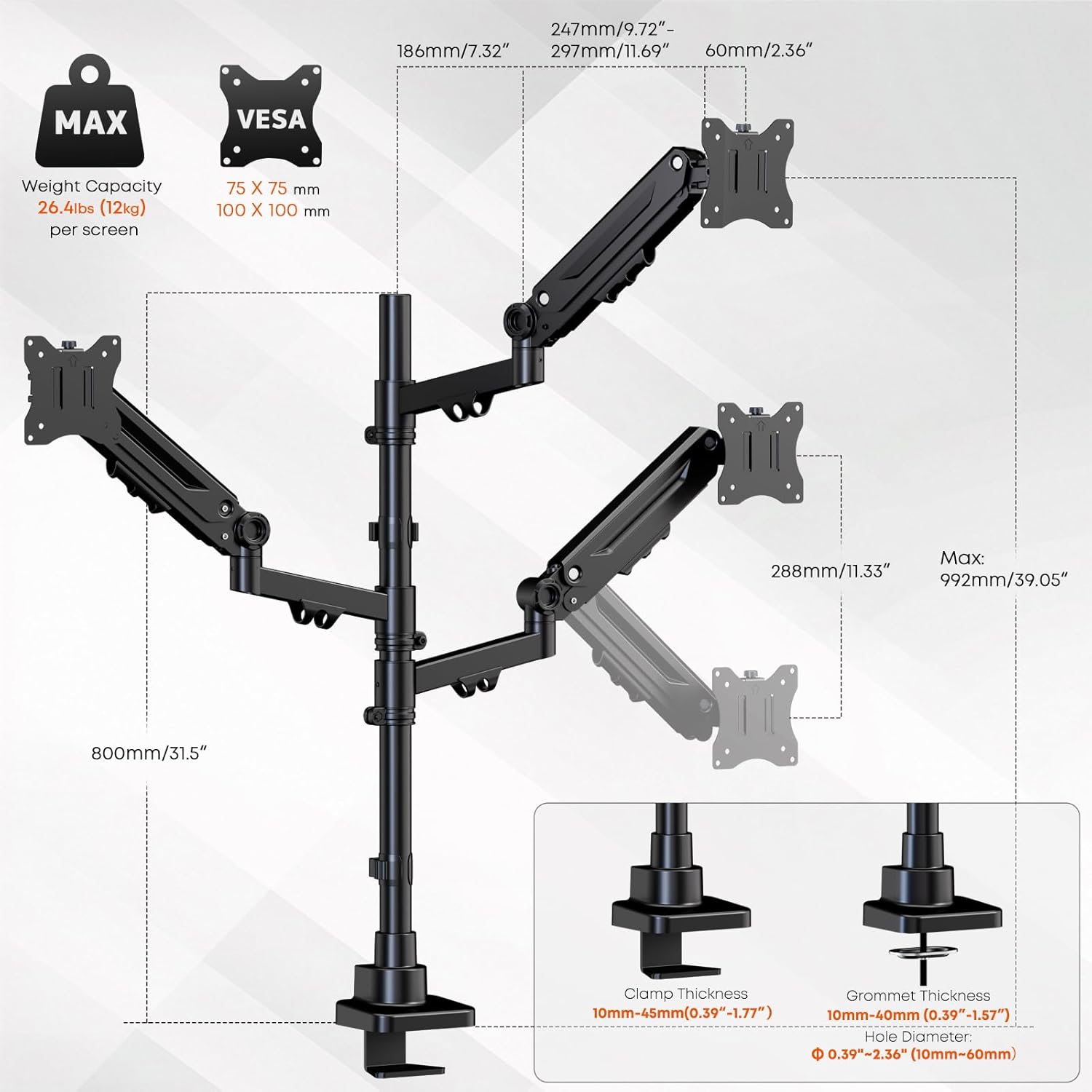
Figi 4.1: Detailed specifications and dimensions of the monitor mount, including VESA patterns, weight capacity, and desk compatibility for clamp ak aliyeman gromèt.
5. Enstalasyon ak Enstalasyon
Follow these steps to properly install your PUTORSEN Triple Monitor Mount.
5.1 Chwazi metòd montaj ou a
The mount supports two installation methods: C-clamp or grommet mount. Select the method suitable for your desk.
- C-Clamp Enstalasyon: Tache C-cl laamp to the edge of your desk. Ensure the desk thickness is between 10mm and 45mm. Tighten the clamp byen fèm pou anpeche mouvman.
- Enstalasyon Grommet: If your desk has a grommet hole (10mm-60mm diameter) and a thickness between 10mm and 40mm, use the grommet base. Secure the base through the hole using the provided hardware.
5.2 Assemble the Pole and Arms
- Attach the main pole to your chosen desk base (C-clamp oswa grommet).
- Slide the gas spring arms onto the main pole. The arms can be positioned at desired heights. Secure them using the provided collars and screws.
5.3 Attach Monitors
- Attach the VESA plates to the back of each monitor using the appropriate screws (M4x12, M4x30, M5x12, M5x30). Ensure the screws are tightened securely but do not overtighten.
- Carefully slide the monitors (with VESA plates attached) onto the gas spring arms. Ensure they click into place or are secured with the locking mechanism.

Figi 5.1: The triple monitor mount with monitors installed, demonstrating the gas spring arms and support for up to 35-inch screens.
6. Operasyon ak Ajisteman
The PUTORSEN Triple Monitor Mount offers extensive adjustability for optimal viewing konfò.
6.1 Ajisteman tansyon sous gaz la
After mounting your monitors, you may need to adjust the gas spring tension to ensure the arms hold the monitors in place without sagging or floating. Use the included Allen key to turn the adjustment screw on each arm:
- Vire nan sans zegwi mont lan (-) to decrease tension for lighter monitors.
- Vire sans kontrè zegwi mont lan (+) to increase tension for heavier monitors.
Adjust gradually until the monitor stays at the desired height when released.
6.2 Monitor Positioning
Each arm allows for independent adjustment:
- Ajisteman wotè: Move the arms up or down along the main pole, or use the gas spring mechanism for vertical movement.
- Enklinezon: Adjust the monitor screen vertically by tilting it up or down (±35°).
- Swivel: Rotate the monitor horizontally left or right (±90°).
- Wotasyon: Vire monitè a 360° pou oryantasyon pòtrè oswa peyizaj.

Figi 6.1: Demonstrating the full range of motion including tilt, swivel, and 360-degree rotation for optimal monitor positioning.
6.3 Jesyon kab
Utilize the integrated cable management clips along the arms and pole to route and organize your monitor cables. This helps maintain a clean and clutter-free workspace.

Figi 6.2: Integrated cable management system for a tidy setup.
7. Antretyen
Antretyen regilye asire lonjevite ak fonksyònman an sekirite nan sipò monitè ou a.
- Netwayaj: Siye montaj la ak yon twal mou.amp twal. Evite pwodui netwayaj abrazif oswa solvan.
- Enspeksyon peryodik: Tcheke tout vis ak koneksyon yo detanzantan pou asire yo rete sere. Sere yo ankò si sa nesesè.
- Gas Spring Check: If monitors begin to sag or drift over time, re-adjust the gas spring tension as described in Section 6.1.
NAN. Depanaj
If you encounter issues with your monitor mount, refer to the following common problems and solutions:
| Pwoblèm | Kòz posib | Solisyon |
|---|---|---|
| Monitor sags or drifts down | Gas spring tension is too low for the monitor's weight. | Increase gas spring tension by turning the adjustment screw counter-clockwise (+). |
| Monitor floats up or is difficult to push down | Gas spring tension is too high for the monitor's weight. | Decrease gas spring tension by turning the adjustment screw clockwise (-). |
| Mount feels unstable or wobbles | Desk clamp or grommet base is not securely tightened. | Asire biwo clamp or grommet base is fully tightened to the desk. Check all arm connections. |
| Monitors are not level | Minor variations in arm height or VESA plate alignment. | Adjust individual monitor tilt and rotation. Ensure arms are at the same height on the pole. |
| Cables do not fit into management clips | Too many cables or cables are too thick. | Reduce the number of cables or use thinner cables if possible. Use external cable ties if clips are insufficient. |
9. Garanti ak sipò
9.1 Enfòmasyon sou Garanti
This PUTORSEN Triple Monitor Mount is covered by a 10-ane garanti from the date of purchase. This warranty covers manufacturing defects and material flaws under normal use. It does not cover damage caused by improper installation, misuse, accidents, or unauthorized modifications.
9.2 Sipò pou Kliyan
For technical assistance, warranty claims, or any questions regarding your PUTORSEN product, please contact our customer support team. Refer to the contact information provided in your product packaging or visit the official PUTORSEN websit pou detay sipò.
Resous sou entènèt: For additional information, FAQs, and video tutorials, please visit the PUTORSEN Store on Amazon.