
1. Entwodiksyon
Thank you for choosing the Ekrist HX100A5 Magnetic Portable Charger. This device is designed to provide convenient and versatile charging for your mobile devices, including iPhones with MagSafe, Apple Watches, and other USB-C and Lightning compatible devices. Please read this manual thoroughly before use to ensure proper operation and to maximize the product's lifespan.

Imaj 1: Plis paseview of the Ekrist HX100A5 Magnetic Portable Charger's charging capacity for various devices.
2. Pake kontni
Asire w tout atik yo prezan nan pakè w la:
- Ekrist HX100A5 Magnetic Portable Charger
- USB-C Chaje Kab
- Manyèl Itilizatè (dokiman sa a)
3. Karakteristik
- Dual Magnetic Wireless Charging: Compatible with MagSafe for iPhone 12-17 series and dedicated charging for Apple Watch (Series 1-10/Ultra).
- Câbles entegre: Integrated Lightning and USB-C cables for direct wired charging.
- Plizyè pò Sòti: Additional USB-A and USB-C ports for versatile wired charging.
- Kapasite segondè: 10800mAh battery provides extended power for multiple charges.
- 25W PD+QC4.0 Fast Charging: Supports rapid charging for compatible devices, reaching 50% iPhone charge in approximately 30 minutes.
- LCD Digital Display: Clear screen shows real-time battery percentage.
- Konsepsyon kontra enfòmèl ant ak pòtab: Ideal for travel and daily use.
- Plizyè pwoteksyon sekirite: Built-in safeguards against overheating, overcharging, overdischarge, short circuit, overvoltage, overcurrent, and overload.

Image 2: Diagram illustrating the multiple security protections integrated into the power bank.
4. Enstalasyon
4.1 Premye Chajman Bank Ekstèn lan
- Connect the provided USB-C charging cable to the USB-C input port on the power bank.
- Branche lòt bout kab USB-C a nan yon adaptè miray USB konpatib (pa enkli).
- The LCD digital display will show the charging status and battery percentage. Allow the power bank to fully charge before first use. Full recharge typically takes 3-5 hours.
4.2 Konprann Ekran LCD a
The LCD display shows the current battery percentage of the power bank. When charging devices or being recharged, the display will illuminate to show the status. Press the power button briefly to check the battery level.
5. Operasyon Enstriksyon
5.1 Charging iPhone via MagSafe (Wireless)
- Asire w iPhone ou a konpatib ak MagSafe (iPhone seri 12 oswa pi resan).
- Align the back of your iPhone with the magnetic charging pad on the power bank. The magnets will snap into place, and charging will begin automatically.
- For optimal magnetic connection and charging efficiency, use an iPhone without a case or with a MagSafe-compatible case.
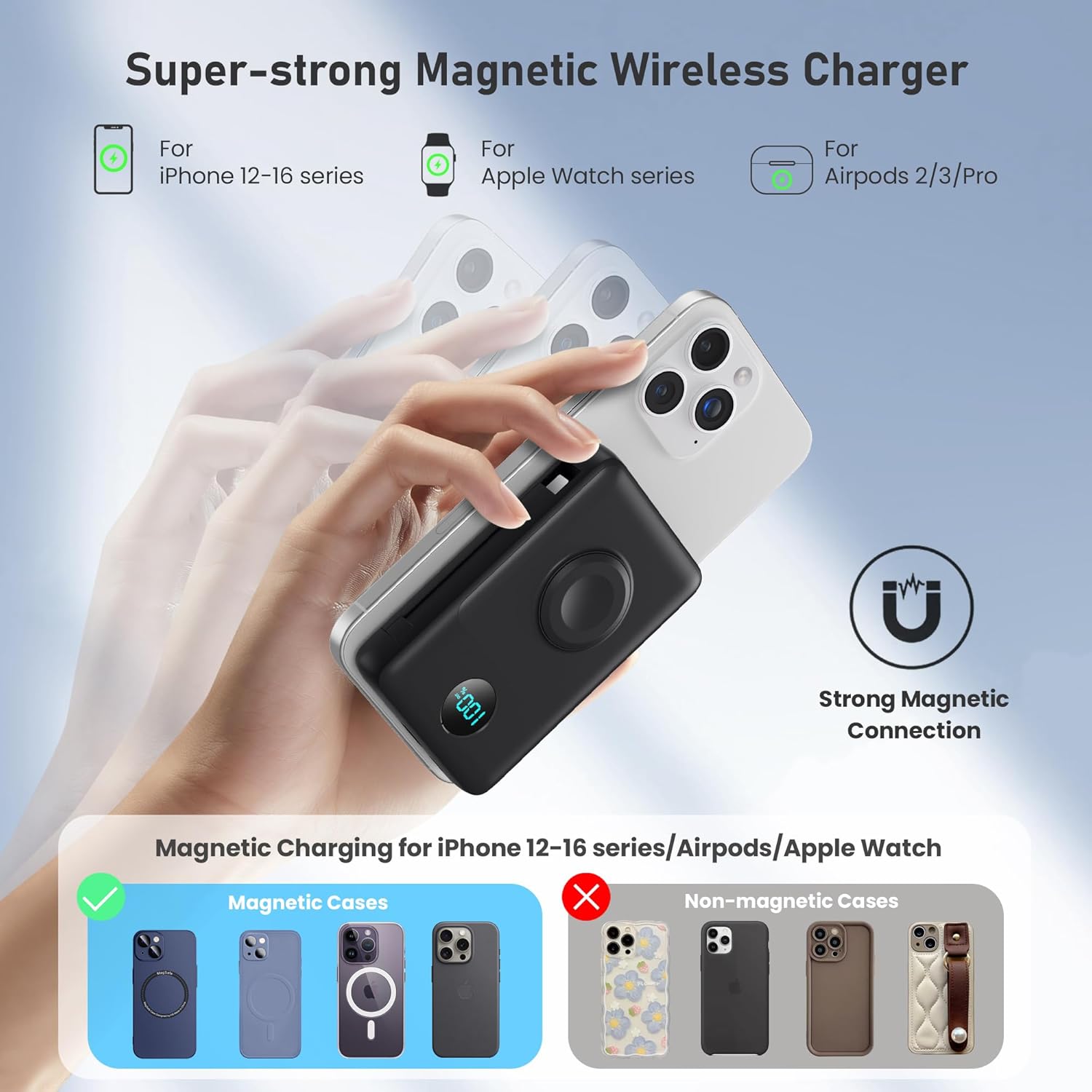
Image 3: Illustration of the strong magnetic connection for wireless charging with an iPhone, showing compatibility with MagSafe cases.
5.2 Charging Apple Watch (Wireless)
- Place your Apple Watch onto the dedicated Apple Watch charging module on the power bank.
- Ensure the watch is properly aligned for charging to begin.
5.3 Charging via Built-in Cables
- Pull out the integrated Lightning cable or USB-C cable from its storage slot.
- Connect the appropriate cable to your device's charging port. Charging will start automatically.

Image 4: The power bank demonstrating simultaneous charging of multiple devices using its built-in cables and wireless pads.
5.4 Charging via USB-A/USB-C Ports
- Use your own USB-A or USB-C charging cable.
- Plug one end into the USB-A or USB-C output port on the power bank.
- Konekte lòt bout la ak aparèy ou an.

Image 5: The power bank illustrating 25W PD + QC4.0 fast charging capabilities for wired connections.
6. Antretyen
- Kenbe bank pouvwa a lwen dlo, dife, ak tanperati ekstrèm.
- Evite jete oswa sibi aparèy la nan gwo enpak.
- Netwaye sifas la avèk yon twal mou epi sèk. Pa sèvi ak pwodui chimik ki agresif oswa materyèl abrazif.
- Sere nan yon kote ki fre, sèk lè yo pa itilize.
NAN. Depanaj
7.1 Aparèy la pa ap chaje
- Ensure the power bank is sufficiently charged. Check the LCD display.
- Verify that the charging cable (built-in or external) is securely connected to both the power bank and your device.
- For wireless charging, ensure proper alignment of your device on the charging pad. Remove any non-MagSafe cases that may interfere.
- Try using a different cable or port to rule out a faulty connection.
7.2 Chaje dousman
- Ensure your device supports fast charging and that you are using a compatible cable and port (e.g., USB-C PD).
- Wireless charging is generally slower than wired fast charging.
- High ambient temperatures can affect charging speed.
7.3 LCD Display Not Working
- Peze bouton pouvwa a yon ti tan pou aktive ekran an.
- If the issue persists, try fully recharging the power bank.
8. Espesifikasyon
| Nimewo Modèl | HX100A5 |
| Kapasite batri | 10800 mAh |
| Dimansyon pwodwi | 4.37 x 2.8 x 1.02 pous |
| Pwa atik | 10.5 ons |
| Kalite Connector | 2*Wireless Charging + Built-in 2 Cables (Lightning, USB-C) + USB-C Port |
| Karakteristik espesyal | Dual magnetic portable charger, Built-in Cables, iWatch charger, 25W Power Delivery Fast Charging for iPhone/Apple Watch, LCD Digital Display, Wireless Charger |
| Manifakti | Dongguan Yuanhaoxun Technology Co., Ltd. |
| Dat Premye Disponib | 20 jen 2025 |
9. Garanti ak sipò
The Ekrist HX100A5 Magnetic Portable Charger comes with a standard manufacturer's warranty. For detailed warranty information, product support, or technical assistance, please refer to the contact information provided on the product packaging or visit the official Ekrist websit la. Tanpri konsève prèv acha ou a pou reklamasyon garanti.