
1. Pwodwi souview
The SVITOO P108 is a 12-inch Android tablet designed for versatile use, from entertainment to productivity. It features a 2K Full HD display, an Octa-Core processor, ample RAM and storage, and a long-lasting battery.

Image 1.1: The SVITOO P108 tablet showcasing its 2K display, dual-band Wi-Fi, Bluetooth 5.0, GPS, 30GB RAM (6+24), 128GB ROM, 8800mAh battery, T7250 processor, Android 16, and 13MP rear / 8MP front cameras.
Kontni pake:
- SVITOO P108 Tablet x 1
Dispozisyon aparèy:

Image 1.2: A detailed diagram illustrating the location of the volume buttons, power button, front camera, flashlight, rear camera, 3.5mm headphone jack, TF card slot, Type-C port, and microphone on the SVITOO P108 tablet.
- Bouton Volim: Ajiste nivo pwodiksyon odyo a.
- Bouton pouvwa: Turn the device on/off, or put it to sleep/wake it up.
- Kamera devan: Pou apèl videyo ak selfie.
- Kamera dèyè: Pou pran foto ak videyo.
- Flach: Bay limyè pou kamera dèyè a.
- Jack ekoutè 3.5mm: Konekte kas ekoutè filaire yo.
- TF Kat plas: Mete yon kat microSD pou plis espas depo.
- Kalite-C Port: Pou chaje ak transfè done.
- Mikwofòn: Pou antre odyo pandan apèl oswa anrejistreman.
- Oratè: Pou pwodiksyon odyo.
2. Inisyal Enstalasyon
2.1 Chaje tablèt la
Before first use, fully charge your tablet. Connect the provided USB Type-C cable to the tablet's Type-C port and the other end to a compatible power adapter. The battery indicator on the screen will show charging status.
2.2 Limen/Etenyen
- Pou limen: Press and hold the Power button until the SVITOO logo appears.
- Pou etenn: Press and hold the Power button until the power options appear on the screen, then select "Power Off".
- Pou rekòmanse: Peze epi kenbe bouton pouvwa a jiskaske opsyon pouvwa yo parèt, answit chwazi "Rekòmanse".
2.3 Inisyal Konfigirasyon
Upon first power-on, follow the on-screen prompts to set up your tablet. This includes selecting your language, connecting to a Wi-Fi network, setting up your Google account, and configuring basic security settings.
2.4 Mete yon Kat MicroSD
To expand storage, insert a microSD card into the TF Card Slot. Ensure the tablet is powered off before inserting or removing the card. Gently push the card until it clicks into place.
3. Itilizasyon Tablèt la
3.1 Navigating the Android Interface
The tablet runs on Android 15, offering a user-friendly interface. Swipe up from the bottom to access the app drawer, swipe down from the top for notifications and quick settings, and use the navigation buttons (back, home, recent apps) at the bottom of the screen.
3.2 Ekspozisyon Karakteristik
The 12-inch 2K Full HD display (2000x1200 resolution) provides a clear and vibrant viewing experience. The screen has a 5:3 aspect ratio and 380 nits brightness.
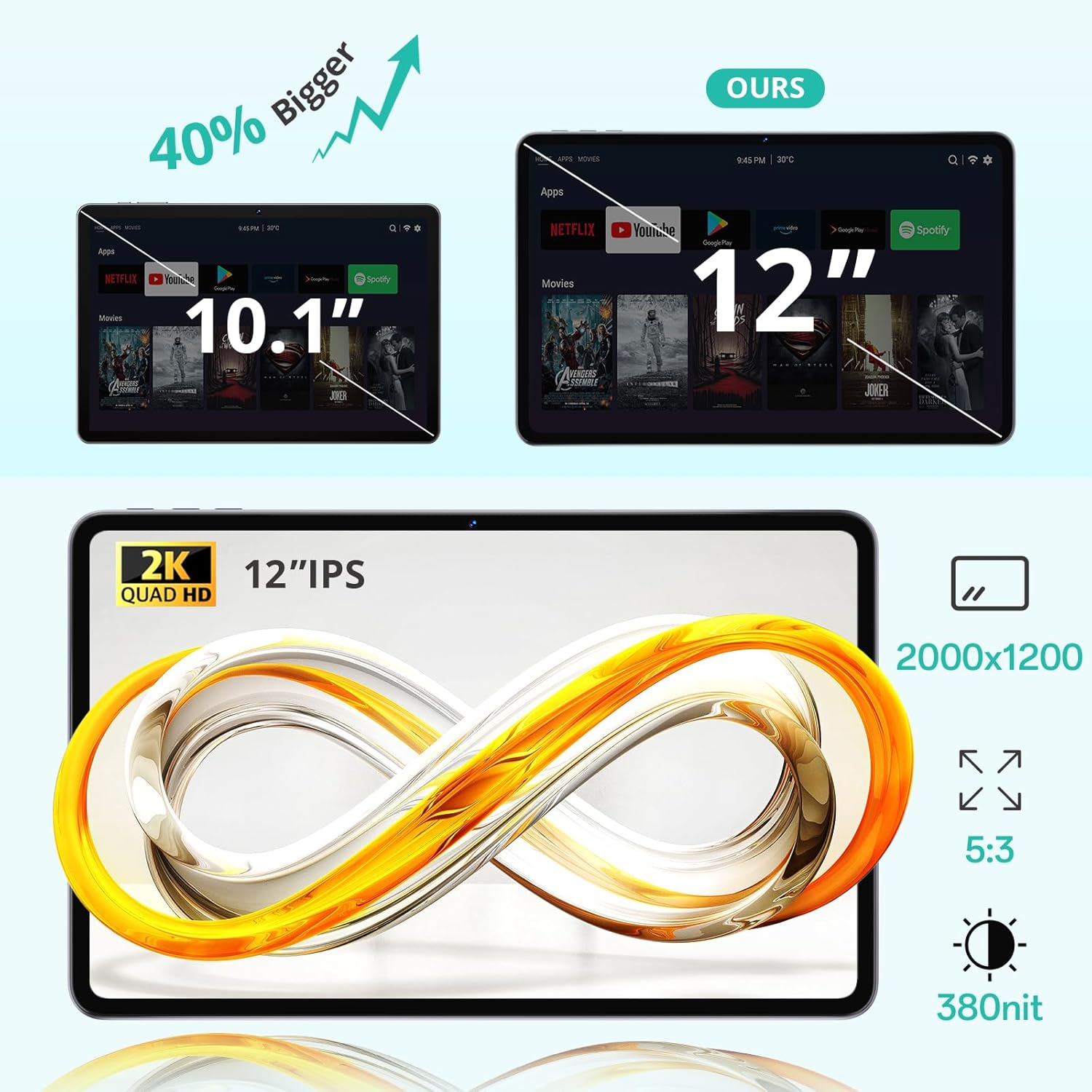
Image 3.1: The 12-inch display of the SVITOO P108 tablet, highlighting its 2K Quad HD resolution of 2000x1200, 5:3 aspect ratio, and 380 nit brightness, shown alongside a size comparison to a 10.1-inch tablet.
3.3 Widevine L1 Support
The tablet supports Widevine L1, enabling high-definition streaming from popular services like Netflix, YouTube, and Prime Video. This ensures a premium viewing experience with crisp visuals.

Image 3.2: The SVITOO P108 tablet displaying a high-definition image, indicating Widevine L1 support for streaming content from platforms such as Disney+, Netflix, YouTube, and Prime Video.
3.4 Miltitasking ak Split-Screen
Utilize the split-screen feature to run two applications simultaneously. This enhances productivity, allowing you to watch videos while chatting or browse the web while taking notes.

Image 3.3: Step-by-step guide on how to activate split-screen mode on the tablet, showing how to tap the recent apps button, select an app, and choose 'Split screen' to open a second app alongside it.
3.5 Reading Mode
The tablet offers a dedicated reading mode that reduces blue light and optimizes brightness for a more comfortable and eye-friendly reading experience.

Image 3.4: The tablet displaying text in reading mode, emphasizing features like reduced blue light, optimized brightness, and overall eye-friendliness.
3.6 Parental Controls and Child-Friendly Interface
The tablet includes features for parental controls, allowing parents to manage content, screen time, and ensure a safe browsing environment for children. A child-friendly interface is also available for educational content.

Image 3.5: The tablet displaying a child-friendly interface with educational content and parental control options, indicating features like child-safe browsing and screen time management.
4. Antretyen ak Swen
4.1 Netwaye Tablèt la
Sèvi ak yon twal mou ki pa gen pousyè pou netwaye ekran an ak kò tablèt la. Pou tach ki difisil pou retire, siye yon ti kras.ampRense twal la avèk dlo oswa yon solisyon pou netwaye ekran. Evite itilize pwodui chimik ki agresif oswa materyèl abrazif.
4.2 Swen Batri
The tablet is equipped with an 8000 mAh lithium-ion battery. To prolong battery life:
- Evite tanperati ekstrèm.
- Pa kite batri a dechaje nèt souvan.
- Sèvi ak plato orijinal la oubyen yon plato konpatib ki sètifye.

Image 4.1: The tablet highlighting its 8800mAh battery, with icons indicating usage times for video, music, web navigasyon, ak mòd sibstiti.
4.3 Mizajou lojisyèl
Regularly check for and install software updates to ensure optimal performance, security, and access to the latest features. Go to Anviwònman > Sistèm > Mizajou sistèm pou tcheke pou mizajou.
NAN. Depanaj
Tablèt 5.1 la pa limen
- Asire w batri a chaje. Konekte chajè a epi tann kèk minit anvan ou eseye limen l ankò.
- Peze epi kenbe bouton Pouvwa a pandan 10-15 segonn pou fòse rekòmanse.
5.2 Pèfòmans Ralanti
- Fèmen aplikasyon background ki pa nesesè yo.
- Clear cache for frequently used apps (Settings > Apps > [App Name] > Storage > Clear Cache).
- Asire w ke gen ase espas depo ki disponib.
- Rekòmanse tablèt la.
5.3 Pwoblèm koneksyon Wi-Fi
- Aktive epi dezaktive Wi-Fi a nan Anviwònman rapid yo.
- Rekòmanse routeur Wi-Fi ou a.
- Forget the network and reconnect (Settings > Network & internet > Wi-Fi > [Network Name] > Forget).
5.4 Ekran an pa reponn
- Fè yon rekòmanse fòse lè w kenbe bouton Pouvwa a pandan 10-15 segonn.
- Asire w ekran an pwòp epi li pa gen imidite.
6. Espesifikasyon
| Karakteristik | Detay |
|---|---|
| Non modèl | P108 |
| Gwosè ekspozisyon | 12 pous |
| Rezolisyon ekran maksimòm | 2000 x 1200 piksèl |
| Sistèm operasyon | Android 15 |
| Processeur | Unisoc T606 Okta-nwayo (1.8 GHz) |
| RAM | 6 GB (dilatabl a 24 GB) |
| Depo | 128 GB (expandable via microSD up to 1TB) |
| Kapasite batri | 8000 mAh |
| Lavi batri | Up to 8 hours (general use) |
| Kamera dèyè | 13 MP |
| Kamera devan | 5 MP |
| Koneksyon | Wi-Fi (2.4G/5G, 802.11ac/b/g/n), Bluetooth 5.0, GPS |
| Pò | 1x USB Type-C, 1x 3.5mm Audio Jack, 1x TF Card Slot |
| Dimansyon | 28.23 x 17.84 x 0.98 cm |
| Pwa | 940 g |
| Karakteristik espesyal | Widevine L1, GPS |
7. Garanti ak sipò
7.1 Enfòmasyon sou Garanti
Tablèt SVITOO P108 la vini ak yon garanti manifakti yon aneGaranti sa a kouvri domaj nan materyèl ak nan fabrikasyon anba itilizasyon nòmal. Tanpri konsève prèv acha ou pou reklamasyon garanti.
7.2 Sipò pou Kliyan
For technical assistance, troubleshooting, or warranty inquiries, please contact SVITOO customer service. Support is available 24 hours a day, 7 days a week. Please refer to the contact information provided with your purchase or on the official SVITOO websit.